
Workpiece zero point and program zero point: where the error is
Workpiece zero and program zero often get mixed up after a fixture change. We explain the difference, how failures occur, and checks to do before starting.
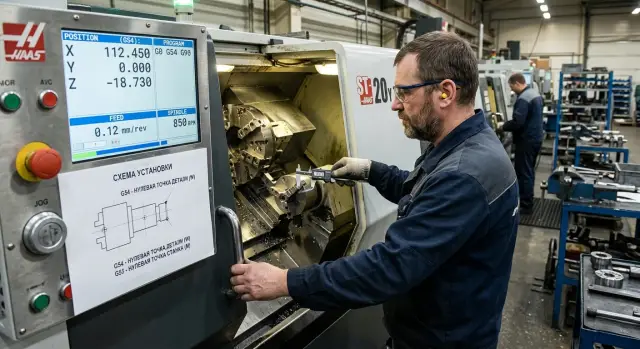
Why the error appears after a routine retooling
After changing a chuck, jaws or another fixture, an operator easily assumes that only the workholding changed. In reality, the reference base from which the machine counts coordinates changes. If that shift isn’t checked, the program will run without errors but in the wrong place.
This is why the mistake so often appears after a routine retooling. The machine is fine, the tool is set correctly, the program ran on the previous batch. That creates a false sense that you can quickly transfer the old settings and start the first blank right away.
The failure usually doesn’t start in the CNC system but in the setup logic. The operator remembers the old zero, the previous face or the previous overhang and transfers those values into the new setup. This happens especially when the new fixture looks very similar to the old one but holds the blank 1–2 mm differently.
At that moment the workpiece zero and the program zero get confused. The program follows the correct path relative to its coordinates, but the part itself is located on a different base. From the outside everything looks calm: the axes move smoothly, there are no alarms, tool offsets are entered. Scrap appears immediately on the first part.
Usually the cause is one of four things: different jaws were installed and changed the blank’s overhang; the chuck or tooling was replaced and shifted the actual zero; a stop was moved and the fixturing changed; or the old work offset was left in place after the new setup.
A simple example. Yesterday a shaft was clamped with one set of jaws, today a different set was used. The face of the part ended up 1.5 mm closer to the tool, but the offset still had yesterday’s value. The machine honestly cuts to the programmed dimensions, but the starting point is already different. As a result the first part is short in length, even though the drive, tool and program are not at fault.
On lathes this shows up very quickly. After a fixture change the error most often affects the face, step length or seating diameter. That’s why after any—even minor—retooling you mustn’t rely on memory. Re-establish the part’s reference to the new base.
What is the workpiece zero point
The workpiece zero point is the reference point on the blank itself. Dimensions on the drawing are taken from it, and finished parts are later checked relative to it. Put simply, it’s the origin for a specific part.
If the drawing shows 20 mm in X and 15 mm in Z, those measurements aren’t taken “from wherever is convenient” but from the chosen part base. So the workpiece zero is always linked to how the part should be held and how you will measure it after machining.
On a lathe the zero is often tied to the spindle axis and the face. On a milling part it might be the blank corner, the center of a hole, or the top surface. The point is the same: the workpiece zero relies on the real bases used to clamp and inspect the part.
This zero depends not only on the drawing but also on the actual setup. The stop, jaw type, shim height, position in the vise—even whether the blank is fully seated in the base—affect fixturing. If the fixture changes, the workpiece zero can shift even though the program remains the same.
A clear example: the blank used to rest against the left jaw face, but after retooling it’s placed on a spacer. The drawing hasn’t changed, but the actual base position is different. That means the part zero moved. If you don’t notice that, the dimension will be wrong on the first part.
There are smaller, but equally unpleasant, cases. The operator is sure the part is clamped the same way it was yesterday and doesn’t check whether the blank is fully seated against the stop. If the blank hasn’t reached the stop by just 0.3 mm or is slightly rotated, the part zero is already different. For the machine that’s not a small detail but a new setup geometry.
So the workpiece zero is always tied to fixturing. If the part shifts in the clamp, its zero shifts too. That’s where length, face and hole-position misses begin.
What is the program zero point
The program zero point is the reference from which the program calculates all tool movements. If the block says X20 Z-5, the machine interprets those coordinates only relative to the program zero.
Put simply, the program lives by its own logic. To it, the part already looks like it’s in the correct place. The program doesn’t know where that point is on the real machine.
The operator links the code to the real setup via a work offset, for example G54 or G55. While that offset is set correctly, the tool will go where it was intended.
Imagine a turning operation. The program was written as if the zero is on the spindle axis and at the blank face. All dimensions, passes and plunges are calculated from that point. If, after changing the chuck, jaws or another fixture, the blank shifts by 2 mm, the program won’t know. It will still run to the old coordinates.
That’s the source of confusion. The workpiece zero is the base on the part. The program zero is the point from which the G-code path was written. In practice they must coincide through a properly set offset, but that coincidence doesn’t happen automatically.
Typically an operator does three steps: selects the work offset, measures the actual position of the part after clamping, and enters that into the offset table. A mistake at any of those steps immediately sends the tool to the wrong place. Sometimes that’s only 0.3 mm at the face. Sometimes the cutter plunges deeper than intended and the first part is immediately scrap.
On any machine the logic is the same: the program won’t correct a setup error. It simply executes the trajectory. So check the program zero not in the file but together with the real fixturing and the active offset.
Where confusion starts after changing fixtures
Confusion starts the moment the fixture is changed but the setup is mentally left unchanged. Yesterday the part was fixtured by one face and one stop. Today a different fixture is used, and the blank sits differently: deeper, higher, or with a different overhang.
On the screen everything looks familiar. The same file is open, the same work offset is active, coordinates aren’t alarming. So the operator often corrects only what’s immediately visible and misses the second shift.
The drawing zero stayed the same, the program didn’t change, but the real part is now in a different place relative to the machine. If that isn’t accounted for, the machine will dutifully repeat the old logic on the new setup.
After a fixture change several parameters usually change at once: blank overhang from the clamp, face position relative to the stop, seating height and tool access to the first machining point. Because of that, a quick single-axis check often doesn’t save you.
A typical case is simple. The old fixture held the blank against a rigid face stop. The new one sets it slightly deeper and at the same time changes the clamp height by 1–2 mm. The operator quickly adjusts Z because the face is easy to check with a probe or touch, but doesn’t recheck the other axis. The approach looks normal, but the first operation already misses the base.
This happens on lathes and machining centers alike. On the shop floor you’ll often hear: “The program is old, we just changed the fixture.” But that’s the problem—the program is old, while the part position is new.
The worst part is that the system usually gives no obvious signal. The offset is saved, tool corrections are in place, the path is familiar. The error is not in the file but in the difference between the new part base and the offset that went unchecked.
How the first part becomes scrap
The most frustrating scrap often appears not on the tenth part but on the first. Yesterday the operator turned a batch with fixturing by jaw face. Everything went well, dimensions held and the Z offset was checked.
The next day softer jaws with a different bore were fitted. The blank seated deeper than yesterday. The program stayed the same, the tool too, and here many relax: if the code didn’t change, the offset must be fine. In practice that’s how scrap happens.
The program zero in the code didn’t move. But the workpiece zero in the physical setup moved with the new fixturing.
Take a simple case. Yesterday the blank face after clamping was in one position, and the operator set Z so the first pass removed 0.5 mm. Today the new jaws seated the blank 2 mm deeper. The old Z offset remained unchanged and the cycle was started immediately.
The machine did exactly what it was told. For it the zero was still yesterday’s. As a result the cutter approached the face not by 0.5 mm but by 2.5 mm. The first pass removed extra material, the length was lost immediately, and if the stock allowance was small the dimension can’t be saved.
The error chain is usually short: jaws or fixture are changed, the blank takes a different Z position, the operator leaves the old work zero, and the first pass ruins the face or loses length.
The problem is not the program per se. The problem is that the new setup changed fixturing while the offset data remained old. That’s why the first part after retooling often ends in scrap.
How to check zeros before the first run
After changing a fixture, don’t immediately open the offset table and tweak numbers at random. First look at the drawing and determine which base the dimensions come from. One dimension is taken from the face, another from the axis, another from a datum plane. If you confuse that base with the machine’s setup zero, the problem is already built in.
Then check how the blank actually sits in the clamp. Where is the real stop, how far does it protrude, is there a spacer, new jaws, a flipped part, a shim. After a fixture change even a 0.5–1 mm shift already changes the result on the first part.
Check sequence
- Compare the datum on the drawing with how the part is placed in the fixture.
- Find the actual stop and check real surfaces by touch.
- Set the work offset again for the axes that changed after retooling.
- Do a dry run and stop the machine before the first cut.
- Measure a trial dimension immediately from the first part.
When entering offsets don’t change all coordinates at once. If the fixture shifted only in Z, don’t touch X without reason. Rushing here often creates a second error on top of the first, and then it’s hard to understand where the zero went.
A dry run is best done with a safe tool retraction. Check where the tool tip or the tool reference point comes relative to the face and OD. If the approach looks odd, don’t try to “catch” the dimension with manual feed. Stop and recheck the base, the stop and the active offset.
On the first part don’t rely only on a visual check. Measure the size from the base indicated on the drawing. After a stop change the OD may be fine while the length is already out of tolerance. This happens often: the operator sees the tool cutting “roughly where it should” but measures the wrong dimension and notices the mistake too late.
On the turning shop the simple rule is: one check before cutting saves more time than unpacking a box of scrap later.
Errors that cause immediate scrap
Most often scrap doesn’t come from a complex failure but from one old setting that wasn’t removed after retooling. The machine runs as usual, the program gives no warnings, but the first part already goes to waste.
The most common case is replacing jaws or other tooling without updating the offset. New jaws change the part seating, its overhang and the actual datum position. If you keep the old work offset the tool will go somewhere unexpected.
Terminology confusion also causes errors. Machine zero is set by the machine. The workpiece zero is chosen from the drawing datum. The program zero is taken from the trajectory logic. If only one of these points remains in the operator’s head, error is almost inevitable.
Another trap is checking only one axis. On a lathe the operator quickly checks X, sees the diameter matches and starts the cycle. But the error is in Z: the face shifted after a jaw change by 3–5 mm, and grooves, chamfers or cutoffs miss.
Measuring from the most convenient place is also a problem. For example, the setup person measures from the face because it’s easy to reach with a probe, even though the drawing uses an internal stop as datum. As a result the actual fixturing and the program logic differ.
Skipping the dry run lets this happen. People rush, especially when the run is short or the machine was idle. But one run without cutting takes less time than troubleshooting why the first part has the wrong length, is caught in the jaws or lost its finishing allowance.
After retooling only a full check helps: the drawing datum, the part’s position in the fixture and the active machine offset must match. If one of these elements falls out, the machine will produce scrap without any warning.
Short checklist before starting
After a fixture change don’t trust yesterday’s values. That’s when the workpiece zero and the program zero most often diverge, even though everything on the screen looks normal.
- Compare the drawing datum with how the part sits in the clamp.
- Recheck the work offset for the axes that could have changed.
- Make sure the tool will be called by the same command it was referenced to.
- Do a dry run or a safe approach to the first point.
- After the first part, immediately measure dimensions from the correct datum.
This sequence seems too simple, so it’s often skipped. The operator changes a fixture, loads a new batch, sees a familiar program and starts the cycle. The machine runs without alarms, but the first part goes out of size because of a wrong zero or an old offset.
If tooling changes frequently on the shop floor, keep this checklist right at the machine. One sheet near the control is usually more useful than trying to remember everything.
What to do on the shop floor afterward
The same mistake rarely happens by accident. Usually there’s no shared procedure: one setup person sets the work zero, another assumes everything is already considered in the program, a third changes a fixture without recording it. Then the first part goes to scrap and the argument starts—not about the cause but about who’s to blame.
It’s easier to introduce a single rule for everyone. After any tooling change the team should answer three questions the same way: where is the part datum, where is the program zero and which offset is active in the machine now. If two people on the same shift answer differently, you already have a problem.
In practice simple discipline helps. After a fixture change the setup person records what changed: jaws, stop, clamp height, offset number, tool correction. Keep a short fixturing diagram near the program that clearly shows where X and Z are taken from. The first setup is checked against the recording, not memory. If the program is old but the tooling is new, don’t start the part without rechecking the zero.
That routine actually saves time. A note of a few minutes often saves a blank, a tool and half an hour of rework. This is especially visible on series parts where people quickly get used to one scheme and stop checking the obvious.
The fixturing diagram should be simple. You don’t need a thick folder. One sheet is enough: which surface is the datum, what the part bears against, which face is taken as zero, and which offset the program uses. If that sheet is stored separately it’s rarely used. If it’s right next to the CNC program and setup card, the chance of error drops noticeably.
When a shop changes equipment or wants to tidy up start-up after retooling, an outside perspective is useful. EAST CNC supplies CNC lathes and machining centers and helps with selection, commissioning and service. For shops where the problem isn’t the machine but confusion over datums and offsets, that kind of review is often as important as the equipment itself.
A good result on the shop floor usually looks boring: the setup person opened the notes, checked the diagram, verified the offset, ran the first part and immediately got the right size. That kind of boredom is exactly what you want on the floor.