
Working from customer drawings without a 3D model: what to ask
Working from a customer's drawings without a 3D model requires a checklist of questions before starting CAM. We cover what to clarify so you avoid disputes over dimensions on the shop floor.
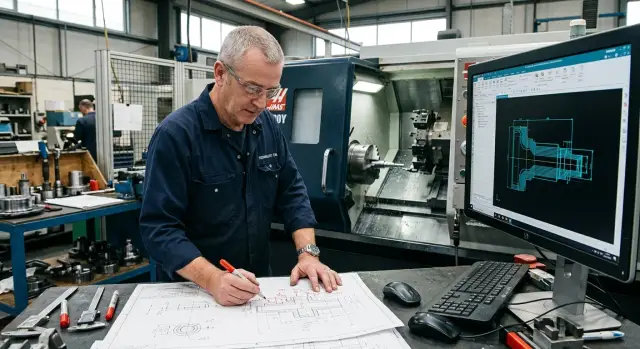
Why a single drawing is often not enough
When a customer sends only a 2D drawing, even a tidy file often leaves too many interpretation options. On the sheet the part looks clear, but in CAM and on the shop floor it suddenly becomes apparent that people read the same geometry differently.
Usually it's not one big mistake but several small gaps. Individually they seem tolerable. Together they cause delays in programming, extra approvals and arguments after the first part.
Most problems start in four areas: dimensions without tolerances, missing surface finish or datum, inconsistent dimension chains, and unclear units, scale or revision in the file. This happens constantly on turned parts. For example, an outer diameter is shown as 40, a neck length as 32, but the overall chain gives 31.5. If the technologist picks one option, the part can be made "by the drawing," but the customer may reject it.
A separate trap is dimensions with no tolerances. For CAM this is not a small thing. If it's unclear whether to hold a diameter to ±0.01 or use a general tolerance, cutting passes, tools, cycle time and even inspection methods change.
Scale also confuses people. They look at the picture and mentally fill in missing geometry, especially when sections are lacking. But scale doesn't replace a dimension, and a nice outline on the sheet doesn't tell you what radius is actually required on the part.
Another common source of confusion is the revision number. The customer may have corrected a hole, chamfer or material, while an old sheet went into production. Then the argument is not about machining quality but about which file was considered current.
One drawing can be a good starting point. For a calm launch it is not enough if it contains even one ambiguity.
What the technologist checks before the first call
When only a 2D drawing arrives, the technologist looks first at the part logic, not individual dimensions. If there are gaps at this stage, guesses will follow, and guesses on the shop floor almost always cost time and money.
First they check material and stock. The drawing should make it clear what the part is made of and what the starting blank is: bar, forging, casting, tube or a pre-machined blank. Without that you can't properly estimate stock allowance, fixturing or operation sequence.
Next the technologist looks for datums. They need to know which surfaces will be used for the first setup and what will be the datum for the second setup. If this is not obvious, some dimensions can only be determined "on paper," not on the machine.
Then comes the geometry check. The technologist walks the drawing outline and marks places that are easy to misread: diameters and lengths that should match between views, missing radii and chamfers, incomplete thread and groove callouts, fits without a clear datum, areas with separate surface-finish requirements.
On a turned part disputes often don't start with a complex shape but with small details. One unspecified radius, a chamfer without a size or a thread without a runout length — and CAM can't be assembled without assumptions.
Surface finish is also checked immediately. It's not a formality. If one journal needs a fine finish and an adjacent area allows ordinary machining, you must choose different tools, parameters and sometimes even the pass order.
Hidden contradictions are checked separately. For example, there may be an overall length and step dimensions, but the sum doesn't add up. Or one view shows a 1x45 chamfer while another makes the edge look sharp. Mark these places on a copy of the drawing so the conversation with the customer is short and focused.
A good first review doesn't take long. After it you can tell whether to go straight into CAM or if you must resolve datums, blank and ambiguous dimensions first.
Questions to ask in advance
The first question is simple: which dimension does the customer consider primary. A drawing may contain many dimensions, but a part almost always has one or two that determine acceptance or rejection. If you don't clarify this, the technologist will route the process by their logic while the customer's inspection looks at something else.
This is especially important when you don't have a 3D model. In 2D you can't always see which dimension relates to an assembly fit or the next operation. So ask directly: "If we have to choose, which dimension do we hold first?" One question like that often prevents a future dispute.
Next agree on the machining and inspection datums. The technologist needs to know which surface to use for setup, and the inspector needs to know from which datum to measure. If the shop chooses one datum and inspection another, you'll see differences even if the part is otherwise fine.
Discuss stock allowance separately. Not every surface needs to be finished to final size in one run. Sometimes the customer leaves stock for grinding, heat treatment or a later setup. If you don't talk this through, the shop may remove metal that should have been left.
Another useful question is whether all surfaces really need machining. The drawing doesn't always make that clear. Sometimes some planes or diameters are reference geometry, not machining requirements. Machining everything increases cycle time with no benefit.
It's worth asking about inspection: which dimensions are checked first, what the customer considers critical, and which datums are used for measurement. That helps the technologist know where no interpretation is allowed, and it helps the CAM programmer set priorities for toolpaths and references.
Typically you can reduce the discussion to five topics: primary dimension, datums, stock allowance, list of surfaces to be machined and inspection sequence. After that the drawing reads much more calmly and there are far fewer ambiguities.
If a company both machines parts and selects equipment, this logic is familiar. In EAST CNC practice problems usually arise not from the machine but between the drawing, CAM and inspection. One short checklist before start-up is almost always cheaper than one machine stoppage.
How to review a drawing without confusion
It's better to do this review in one document, not from memory or in scattered messages. Otherwise the technologist sees one thing, the CAM programmer another, and the shift foreman gets a third version at the machine.
A convenient order is simple. Start with a copy of the drawing and go through it entirely with a pencil or in a marked-up PDF. Mark not only obvious errors but places where dimensions can be interpreted differently: which datum to use, which tolerance to treat as operative, what to do with a chamfer, radius or surface finish.
Then gather all unclear points into one list. Don't scatter questions across messenger, email and phone calls. If someone later has to search for an answer for ten minutes, on the shop floor that easily becomes an hour of downtime.
Divide the list into simple blocks: dimensions and tolerances, datums and references, material and blank, heat treatment and coating, inspection and acceptance. This makes it easier for the customer to answer and for the technologist to avoid losing any item.
On the drawing copy put a number next to each questionable area that matches the list. Then the conversation isn't "I'm talking about that top-right dimension" but a clear reference. Everyone looks at the same point and discusses the same issue.
Record every answer immediately into a single working version of the document. Not in a notebook, chat or a separate sheet. If the customer clarifies that dimension 32 relates to datum A, that note should be in the same file where the question was. For CAM this greatly reduces the risk of error, especially on turned parts and on parts with complex setups.
A simple example: the drawing shows a groove but it's unclear from which end its location is measured. If you don't close that question, the toolpath can only be correct formally. One reading makes the part acceptable; the customer's reading may not. When the list is closed, pass the final version to the CAM programmer and the shift foreman. Everyone must have the same annotated version so the dispute doesn't restart at the machine.
How not to get stuck at the CAM stage
CAM usually stalls not because of the program itself but because of blanks in the drawing. If the technologist didn't lock down the datum and part zero before starting, any toolpath becomes a matter of dispute: where to measure from, how to fixture, where to leave stock.
Start by tying the part to specific datums. From a 2D drawing you must immediately understand which face, end or diameter will be the origin for dimensions, where the zero axes are and whether that matches actual shop setups. When the drawing datum and the shop datum differ, the program can be correct and the part still out of tolerance.
Then check if there is enough data for the toolpath. CAM doesn't work from guesses. If the drawing doesn't show depth of cut, angle, radius in a transition or where a chamfer ends, you'll hit a dead-end question. The same happens with internal grooves, thread exits and chained dimensions that don't add up.
Mark zones requiring machining stock separately. The customer usually shows the final shape, while the technologist needs to know what remains for finishing, grinding or a second setup. If you don't decide this early, the toolpath will be neat only on screen.
One of the most common CAM mistakes from a 2D drawing is inventing hidden geometry. If a radius isn't specified, a transition isn't explained, and a line looks schematic, don't decide for the customer. A couple of millimeters in such a place can turn into a new program, a scrapped blank and a dispute at the machine.
Before the first program, a short check is usually enough: mark datums and part zero, list dimensions without which you cannot build the toolpath, separately note stock allowances and ambiguous transitions, then send the customer one consolidated list of questions. This process is much cheaper than emergency edits after a stoppage.
A simple shop-floor example
A drawing arrives for a shaft with a groove and a thread. The part looks simple: diameter, thread and groove are noted. But the problem is not the shape — it's how to read lengths.
The drawing shows the distance to the groove, but the datum for that dimension is unclear. The designer didn't specify from which end to measure. The dimension chain doesn't help because both ends look like valid references: thread on one side and a plain end on the other.
The technologist prepares CAM and chooses zero in the way that's most convenient for machining. They measure from the left end, build the transitions, set the groove position and release the program. For them this logic is sensible: the blank is easier to fixture that way.
Then the part goes to inspection. The inspector uses the same drawing but measures from the other end, from the thread side. That also makes sense: that end participates in assembly, so it's logical to check the groove location from there.
In the end the diameter is fine, the thread is fine and the groove is machined correctly. But its position shifted a couple of millimeters relative to the datum the inspector used. The shop insists the program is correct. The inspector says the dimension isn't met. A dispute starts before shipping.
This case shows the issue of working only from a 2D drawing. The error isn't in CAM or the machine. People simply chose different datums.
One short question would have prevented the dispute: "From which end should we measure the distance to the groove, and from which end will you measure it at inspection?"
If the customer answers, "Measure and inspect from the thread end," the technologist immediately changes the datum in the program or adds a note in the routing sheet. After that the shop, CAM and inspection all read the same dimension the same way.
That question takes five minutes. Reworking the part can take half a day, and a dispute with the customer even longer.
Where mistakes happen most often
Errors rarely start in CAM. They usually appear earlier, when different people read the same sheet differently. One unclear datum or one missed note quickly becomes a machine downtime and an argument over the part.
A common story: the technologist picks the datum out of habit. They see similar geometry, recall a previous part and build the machining logic from a familiar surface. If the drawing doesn't clearly state datums for machining and inspection, the operator sets the part in the jig in the most convenient way, while inspection measures according to a different scheme. Everyone does their job honestly but ends up with different numbers.
Old drawing revisions cause no fewer problems. The operator may keep a printout by the machine or open a file from an old folder. Sometimes the difference is one chamfer, tolerance or radius, but that's enough to spoil the first part or an entire batch.
Inspection also easily goes wrong if it measures from the wrong datum. On 2D drawings this happens often: the dimension chain exists, but the measurement logic is unclear. The shop is convinced the part is OK while inspection sees an out-of-tolerance value. The argument is about a number even though the root cause is the reference point.
Another trap is fine-print notes. They often hide stock allowances, surface finish requirements, processing order or phrases like "dimension after heat treatment." If the team misses these, CAM can be made correctly but according to the wrong scenario.
A frequent slip is taking a reference dimension as an operative one. On paper it looks almost the same, especially on dense drawings with small notes. The technologist includes it in the program, the operator adjusts the setup, and inspection focuses on other dimensions that were intended to be decisive.
A short checklist before launch
It's better to spend 15 minutes verifying than to argue at the machine about what the designer meant.
- There must be a single version of the drawing with a clear revision and date.
- Every questionable dimension should have an answer before start, not after the first part.
- Datums for machining and inspection must match.
- The CAM programmer should verify in advance whether there is enough geometry for all toolpaths.
- The shift foreman must know what counts as scrap immediately and what is acceptable by agreement.
A simple test: give the drawing to the technologist, CAM programmer and inspector separately. If they describe the same part in different words, the launch is still raw.
In supply, commissioning and service practice this is especially visible. Even the right machine won't save you if people start from different source data. That's why EAST CNC materials often emphasize not only equipment but also preparing drawings, datums and inspection before start-up.
What to do next
If orders without 3D models come regularly, don't reinvent the same set of clarifications each time. Make a short template for new requests. Four blocks are usually enough: datums and references, tolerances and surface finish, material and blank, inspection and acceptance.
Such a template has a measurable effect. The technologist spends less time on repeated questions, the manager doesn't dig through long email chains, and the operator immediately sees which version of data launches the part into the shop.
Store answers not only in chat or email. Keep them with the drawing, CAM file and CNC program in the same order folder. It's convenient when that folder also contains the document version, the list of agreed questions, the setup sheet and who approved changes. Then dimension disputes are resolved by records, not memory.
Review the first run together. At startup bring the technologist, operator and inspector. The technologist checks processing logic, the operator sees weak points in fixturing and tooling, and inspection evaluates whether the dimension can be measured consistently on the finished part.
After the first run immediately record what went wrong: which questions were clarified at the last minute, where CAM stopped because geometry was unclear, which dimension caused a dispute and what to add to the template for future orders. After a few runs you'll build your own working standard. It's usually more useful than any general checklist because it relies on your parts, your tolerances and your inspection methods.
Sometimes the issue isn't the drawing but the equipment. The part can be made only with extra re-setups, long cycles or unstable dimensions. In that case discuss not only questions for the customer but also selecting a CNC lathe for the real task. EAST CNC, as the official representative of Taizhou Eastern CNC Technology in Kazakhstan, works with such requests: from machine selection to commissioning and service, when you need to consider part, material, batch and required accuracy together, not separately.