
Work-in-progress between operations: how to measure and reduce it
WIP between operations often grows unnoticed. Learn how to count stuck parts, spot losses and reduce inventory without missing delivery dates.
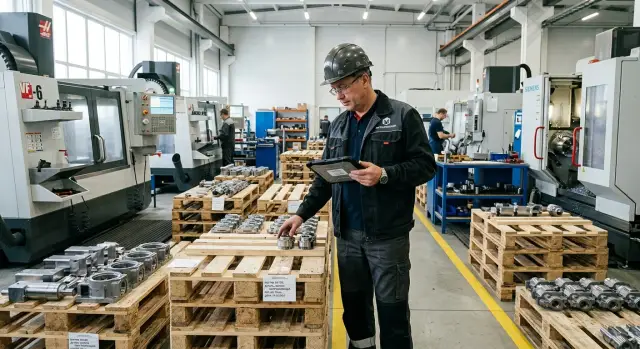
Why WIP accumulates
Work-in-progress between operations grows not only when a shop stops. More often it happens during normal working days when each operation individually runs fine but the flow between them is broken. Parts leave one station faster than they arrive at the next.
The most common reason is simple: a batch waits for a free machine or operator. On a lathe line this is especially visible. One machine finishes work, a tray of parts is ready, but everything stalls because the downstream station is occupied, an urgent batch arrived, or the person hasn’t become available yet.
There’s also a quieter cause. After setup it seems things move quickly, so teams launch a batch with a buffer. But then parts sit at the machine, at inspection, or on a trolley longer than anyone notices. Half an hour here, an hour there, then the shift ends. A week of such pauses becomes several days of waiting.
Priorities also change the picture. In the morning the area takes one batch, after lunch the foreman asks to insert an urgent job, and by evening another urgent order appears. The first batch ends up partially done but not finished. Formally it hasn’t been lost — it’s just sitting in the shop. In reality it’s frozen money and occupied space.
Another trap is how load is seen. The area usually sees pieces: 20 parts, 100 parts, three pallets. But shops rarely see days of waiting between operations. For that reason a large inventory looks normal. When parts lie neat and tidy they even create a false sense of order.
In metalworking this happens constantly: after turning a batch waits for milling, then inspection, then the next setup. Each transition looks minor by itself. But these pauses inflate WIP more than one noticeable stoppage.
Inventory piles up where nobody measures flow by time. As long as the shop only sees part counts, stuck batches will grow almost unnoticed.
Where it hides on the shop floor
Most inventory isn’t in the warehouse but in aisles, at machines and on trolleys. People get used to it and stop noticing. That’s how WIP between operations starts to look like "normal order," while in reality it’s extra money tied up in semi-finished parts and extra days in a part’s route.
Start by looking between the first and second operations. That’s where inventory usually grows fastest. The first operation often runs steadily while the next pulls parts more slowly due to changeovers, measurements or a longer cycle. If the first machine produces 80 pieces per shift and the second manages 55, the difference begins to accumulate by lunchtime.
Then check spots that aren’t normally counted as inventory. Parts settle on trolleys at inspection, by the wash and drying station, at marking and packing posts, next to where they wait for a crane, containers or a free operator. They are kept "briefly" and then forgotten for a day or two.
In metalworking this is very clear. After turning a batch can quickly come off a CNC lathe but then get stuck before washing or dimensional check. On paper the operation is closed, but in the real flow the part hasn’t progressed.
Count separately what lies in front of the bottleneck. It may be a single machine, one inspection post or one operator through whom most work passes. Inventory before such a point is often treated as insurance, but it is usually just a queue. If a bottleneck processes 40 parts per shift, anything above that becomes waiting.
There’s another quiet loss zone — parts that wait for rework. These are put into a separate container, marked with a marker and set aside until a "free window." A week later there’s not one defective batch but several, and each delays schedules.
A useful practice is simple: walk the route of a single part on foot and mark every point where it waits longer than 30 minutes. That walkthrough quickly reveals the real picture. Most often WIP hides not where people first look, but in small pauses between otherwise normal operations.
How to measure stuck parts
Start with one route, not the whole shop. Choose a part that goes through 3–5 operations in one area, for example CNC turning, drilling, inspection and washing. If you try to cover the entire flow at once, numbers will mix and the measurement will turn into an argument about where inventory "really" sits.
Then walk that route and note all waiting points. Look beyond zones between machines. Parts often stand at inspection, near trolleys, by a changeover area or on the supervisor’s desk waiting for paperwork. These quiet points create extra WIP.
In a simple table record a few things for each point: how many pieces lie there now, how many batches that is, how long they’ve been waiting and what the next operation will be.
Counting pieces only is a mistake. Sixty parts in one batch is one situation. The same 60 parts split into six batches of 10 looks different: more transfers, more starts and a higher chance some of a batch stays until the next shift.
One walkthrough proves little. Repeat the measurement at least three times during the week: at the start, middle and end. On Monday you see what remained from the previous week. Midweek typical delays show up. On Friday it’s clear whether the shop can push work before the weekend.
Better to measure each time at the same hour. Then you’ll see a recurring pattern rather than random noise. If two to three batches consistently pile up after inspection, the problem is obvious without complex reports.
This measurement takes less than an hour for one route and quickly shows where stuck parts live permanently versus where they were caused by a one-off failure.
How to convert parts to money and days
WIP looks harmless until you convert it to money. Parts on the floor aren’t just material — they already include metal, labor, tooling and machine time. If a batch stands for a week, that money stands too.
It’s better to calculate, not estimate. For each batch take the number of parts, percent complete and the current cost. If a batch has 100 parts, each passed 70% of operations, and the accumulated cost per part at this stage is 18,000 тг, then 1,260,000 тг sits idle. That’s a usable figure.
It’s convenient to view inventory in four ways at once: how many parts are actually waiting for the next operation, at what stage they stopped, how much money is already invested in that batch and how many days it’s been idle.
Days are counted simply: use the date of last movement, not the order start date — when it was processed, handed over, accepted or placed in queue. If a batch stood 9 days but the previous operation took 6 hours, the problem isn’t cutting speed. The problem is waiting.
On a CNC turning area this shows immediately. A blank is worked for 25 minutes, then waits for inspection and the next operation. The actual processing time for the whole part may be under an hour, while calendar time in the shop is 4–5 days. The money is hidden in that difference.
Compare two indicators for each queue: processing time and waiting time. If processing is 40 minutes and waiting is 2 days, speeding up the machine is almost pointless. First you must remove the queue cause: infrequent batch removal, oversized runs, a bottleneck at inspection or an uncoordinated schedule between areas.
Mark these points directly in the table. Usually three columns suffice: "money invested", "days without movement" and "waiting-to-processing ratio." The most expensive queues surface quickly. Start there, not where many boxes simply sit.
Example of a simple situation on a line
On a turning area everything looks fine until you check part flow by operation. The first machine produces housing parts fast: say 100 pieces per shift. The operator isn’t idle, the program is tuned, tooling is set and scrap is rare. The area even looks productive on the report.
The problem begins downstream. The second operation runs on another machine and takes longer. Cutting itself takes more time, and frequent changeovers make it worse. In the morning they start one SKU, an hour later switch to another, then switch back. Each tool, chuck and program change takes 20–30 minutes. As a result the machine spends much of the day preparing rather than cutting.
After two days a queue of three batches forms before the second machine: 80 parts in the first, 120 in the second and 90 in the third. All passed the first operation, are on trolleys and pallets, but far from finished. Formally the shop has many parts. In reality there’s almost nothing ready to ship.
The usual picture: the first machine keeps producing because "you can’t stop it"; the second chokes on small changeovers; the foreman sees a large WIP volume yet the delivery date tightens.
On Friday the customer expects 150 finished parts. The shop holds nearly 300 semi-finished pieces after the first operation, but only 70 are completed. The rest are stuck between machines. From the outside production looks busy and everything seems to run. In fact WIP between operations grows and delivery dates slip where the flow stopped being smooth.
This example is sobering. A fast first machine alone won’t save the area. If the next operation is slower and often retooled, each new batch only lengthens the queue. So you must look not at how many parts were made at the start of the route but at how many passed the bottleneck and moved closer to shipping.
In practice this is common on CNC turning areas where the first operation is stable while the second depends on frequent tooling and SKU changes. That’s where inventory grows quietly: no breakdowns, no obvious downtime, but a noticeable loss of time.
What most inflates inventory
Inventory is inflated not by one big mistake but by several shop habits. They seem convenient in the moment but then turn WIP between operations into a constant loss of money, space and foreman attention.
The first habit is launching large batches to reduce changeovers. On paper this looks sensible: the setup person spends less time, the operator is less interrupted, and the first operation yields a good volume. But later parts hit the next operation and sit waiting. The shop then prides itself on first-machine output while finished parts do not increase.
On a turning area this is clear: after roughing a batch of 200 moves forward, while finishing and inspection can only take 60–80 per shift. The rest sits on trolleys, blocks aisles and mixes with new orders.
The second reason is mixing urgent and regular orders in one queue. When an urgent job cuts into the flow, people pull parts from the middle of a batch, change priorities on the fly, and then return to older tasks. The queue is broken, parts lose order and WIP grows even where it used to be acceptable.
The third reason is simpler: no one sets a limit on WIP between operations. If you can keep 20 parts or 200 between milling and inspection, it will usually grow to 200. People act for local convenience: one area pushes forward, the next can’t accept it.
A simple guideline helps. If an area can’t quickly say how many parts are safe between two operations without harming lead times, it effectively has no limit even if nothing is written down.
Another frequent error is counting output by the first operation rather than by finished parts. Then the shop sees a nice start figure but misses that half the batch stalled before the next stage. The picture is distorted: the plan looks on track but shipments slip by a day or two.
Usually inventory grows with the same signs: the first operation consistently outputs more than the next; urgent orders regularly leapfrog the queue; parts wait longer than they are processed; reports show lots of starts but few finished items.
Removing at least these causes usually lowers shop inventory without drastic measures. Often smaller batches, separate urgent-order rules and a simple limit between operations are enough.
How to reduce volume without risking due dates
The safest way to cut WIP between operations is not by ordering the shop to "remove parts" but by setting clear launch rules. When more parts lie between two operations than the area can realistically pass on in 1–2 days, inventory starts living its own life. That doesn’t add reliability.
Begin by setting a limit between operations. It’s easiest to measure in pieces or batches rather than money. For example, keep no more than two batches between turning and inspection. Once the limit is reached, don’t start a new batch until the previous one has moved on.
This works better than trying to load every machine to the max. A machine might be busy all day, but if a queue already waits downstream you’re only shifting money from raw inventory into stuck parts.
What to change first
If a queue grows at the same place, reduce launch size there. Large batches feel convenient but often create the bottleneck. Smaller runs pass the area faster, reveal defects earlier and don’t hold the whole order waiting.
Handle urgent and scheduled orders with separate rules. If every order is declared urgent the flow collapses in a day. Give urgent work its own limit and start window while scheduled jobs follow the normal rhythm.
Another common source of extra WIP is long changeovers. When changeover eats half a shift, supervisors try to launch more to avoid touching the machine again. The queue swells. Better to simplify changeovers: prepare tooling in advance, keep programs handy and move some setup tasks off the machine downtime.
Before starting a new batch, look at the bottleneck’s load, not just whether the first machine is free. If the next area is already full for two days, early launch won’t help delivery dates.
In practice four simple rules often suffice: set a limit between operations, reduce batch sizes where queues form, separate urgent orders from regular ones and shorten changeovers so big starts can’t be justified.
If these rules are followed for at least two weeks, shop inventory usually falls without frantic measures and without missing committed dates.
Quick daily checklist
WIP between operations rarely grows in jumps. It accumulates bit by bit: one trolley left at a machine, two batches waiting inspection, then an operator starts a new order because it’s convenient. Checking the area weekly misses the moment. A daily check of 10–15 minutes quickly shows where money has stalled.
In the morning or at shift end walk the same route and record four numbers:
- how many batches haven’t moved for more than 24 hours;
- where the queue grew since yesterday;
- which order is stuck before the busiest spot on the area;
- how many parts have completed their operation but haven’t moved on.
These numbers are useful only in comparison. One day says little. A five-day series reveals the area’s habit. If a queue before one machine grows three days in a row, don’t wait until month-end. Check the cause immediately: long changeovers, no containers, an inspector who collects parts once per shift or an operator launching overly large batches.
A simple rule: count deviations, not everything. The foreman doesn’t need a long report. He needs a short list of places where inventory grew since yesterday. That makes it easier to decide what to do today: finish a stuck batch, prioritize an order or hold off on a new start.
This checklist often breaks common assumptions. You may find that before the bottleneck there are not ten orders but two, with processed parts nobody passed on. Formally machines ran. In reality due dates didn’t move.
If you keep this list daily for two weeks you’ll quickly see the difference between a one-off failure and a permanent accumulation point. After that you can reduce shop inventory calmly without excessive risk to schedules.
Where to start next week
Take one route, not the whole shop. Prefer a part that runs daily and goes through 2–4 operations. One week of such checks will be more useful than trying to count all stuck parts across the area at once.
A good starter is a route where after turning the batch goes to drilling and then inspection. If trays constantly accumulate between the first and second steps, that’s where WIP already holds your money and stretches lead times.
You don’t need a complex tracking system. A simple table or even a sheet of paper is enough if the foreman really fills it at shift end. Don’t record everything: note only what helps make decisions — how many parts arrived at an operation, how many left, how many remained at shift end and why they didn’t move (queue, changeover, rework, missing tooling or operator).
After five working days it will be clear where inventory grows on its own and where it serves as a short buffer. Then production and planning can agree on a simple limit between operations — for example no more than one shift’s need or no more than two standard trays between adjacent steps.
Write the limit down and test it on the actual schedule. If the area meets delivery dates without an extra pile of parts, the limit is likely correct. If delivery slips immediately, don’t force inventory down by decree. First find the root cause.
Often the issue isn’t discipline but the route itself. A part may wait because tooling is inconvenient, changeovers are long or one machine is weak. Then try a different route, change tooling, split the batch into smaller starts or move some volume to another machine.
If the question comes to selecting metalworking equipment, you can compare options with EAST CNC. This is the official representative of Taizhou Eastern CNC Technology Co., Ltd. in Kazakhstan: the company offers CNC lathes, machining centers, commissioning and service. That conversation is useful when you need to understand not just machine price but whether it will remove the queue between operations on your area.
FAQ
How to tell that WIP is already too large?
Look at waiting time, not just piece counts. If a batch waits for the next operation more than a day, or waiting time far exceeds processing time, WIP has become a problem.
Where should I look for stuck parts first?
Start with the area between the first and second operations. Then check inspection, wash/dry stations, packaging, carts by machines and the spot before any bottleneck — parts often sit there the longest.
How to quickly measure WIP without a complex tracking system?
Pick one route of 3–5 operations and walk it. At each point note how many pieces lie there, how many batches that is, how long they’ve been waiting and what the next operation is.
What is more important to measure: pieces or waiting days?
Waiting days show the problem more clearly. One batch of 60 parts and six batches of 10 parts create different loads: the second case has more transfers, more starts and a higher chance some of the batch will be left until the next shift.
How to convert stuck parts into money?
Keep it simple: quantity × percent complete × current cost at this stage. That immediately shows how much money sits idle, not just how many boxes are in the shop.
Why do large batches often just inflate WIP?
A large batch saves time on the initial setup but then creates a queue down the route. The first machine shows high output, but finished parts for shipping don’t increase.
How should urgent orders be handled so they don’t break the whole flow?
Don’t put urgent and regular jobs in the same queue. Give urgent work a separate start window or limit; otherwise operators will tear the flow apart all day and WIP will grow faster.
How to reduce WIP without risking delivery dates?
Set a limit between neighboring operations and don’t start a new batch until the previous one has moved on. Start with one or two batches and monitor for two weeks to see if the area keeps its due dates under that rule.
What daily check actually helps?
Each day at the same time check which batches haven’t moved for over 24 hours and where queues grew since yesterday. This quick walk gives the supervisor an actionable view faster than long production reports.
When should you start thinking about new equipment?
If you’ve already reduced batch sizes, separated urgent orders and removed long changeover pauses, but the queue still sits at one operation, the problem may be the machine or tooling. That’s when it’s worth discussing equipment options with EAST CNC to see if a new machine will clear the bottleneck rather than shift it.