
Winter Equipment Delivery to Kazakhstan: Startup Without Mistakes
Winter equipment delivery to Kazakhstan requires a pause before startup. Learn about warm-up, electronics inspection, lubrication checks, and the first startup after transport.
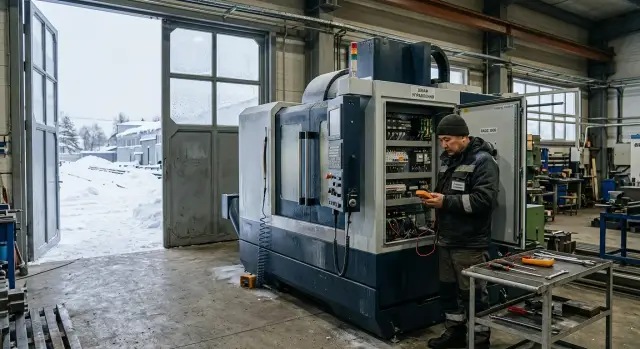
Why problems only show up at startup
After winter transport, a machine often looks fine: the body is intact, the packaging is removed, and there is no obvious damage. But many problems are hidden inside and only become visible at the moment of the first power-up.
The main reason is the temperature difference. If a machine is brought in from freezing weather into a warm shop, condensation quickly forms on cold metal. You may not notice it outside, but inside the control cabinet, on terminals, boards, and connectors, moisture settles as a thin film. While no power is applied, nothing seems wrong. As soon as voltage appears, sensor errors, false signals, and sometimes a short circuit can occur.
The second common reason is thickened lubrication. In the cold, oil and lubricants lose fluidity. The components may still look fine, but they no longer move as freely. You may not feel this during a manual check. The problem becomes clear when the drive tries to move the carriage, spindle, or another mechanism in normal mode. Then you get jerks, extra noise, overcurrent, and an emergency stop.
There is also the transport factor. During a long winter haul, the equipment is exposed to constant small vibrations. Because of that, connectors, terminals, fasteners, transport locks, and position sensors can loosen. Such shifts are rarely visible right away. They show up later, when the system self-check does not receive the needed signal or a component moves off its intended path.
Usually, four things show up at startup:
- sensor and drive errors;
- unstable power supply to cabinets and modules;
- stiff axis movement because of cold grease;
- loose connections after transport.
That is why the first startup is not a formality. It is the moment when the machine works for the first time in real conditions after cold, moisture, and vibration. If you skip warm-up and inspection, a small issue can easily turn into a full day of downtime or a part replacement that could have been avoided.
What to do in the first hours after unloading
Most problems are usually caused not by the road itself, but by the rush after unloading. The machine has not yet reached workshop temperature, the packaging hides some defects, and it is easy to miss something missing from the shipment. In the first hours, it is better not to hurry with startup and to carry out acceptance calmly.
First, check the shipment against the documents and packing units. Look not only at the machine itself, but also at everything delivered separately: cabinets, cables, tooling, supports, documentation, and boxes with accessories. If something is missing, record it immediately in the acceptance report. A day later, it will be much harder to prove the shortage.
Then inspect everything visible from the outside. Check the body, doors, glass, handles, cables, connectors, and transport fasteners. In the cold, plastic and seals become stiff, so even a small impact can sometimes cause a crack that is hard to see from a distance. If a door closes crookedly or the glass has play, that is already a reason to stop and inspect the machine more carefully.
It is best to take photos right away, while the load is still in place after unloading. Photograph the overall view, the package number, the serial plate, and close-ups of problem areas. Also record dents, torn film, wet cardboard, signs of condensation, and ice. These images will help both in talks with the carrier and when contacting service.
Next, place the equipment in a dry, heated room with a stable temperature. Do not leave it by the gate where a constant cold draft comes through, and do not heat the body with a heat gun at close range. Sudden heating is often worse than the frost itself: moisture quickly forms on the metal and inside the cabinets.
In practice, a simple sequence is enough:
- check the documents, shipment units, and комплект;
- inspect the body and external components;
- take photos of all signs of damage and moisture;
- place the machine in a dry warm room and let it stand.
If the machine arrived at night in severe frost, the pause before the next step almost always saves more time than trying to do everything within one hour.
How to plan warm-up
The most common temptation after winter delivery is simple: power it up quickly and see whether the machine is "alive." That is usually the first mistake. After transport, the metal, cables, sensors, and control cabinet are often colder than the shop air, which makes condensation easy to form inside.
First, compare the temperature of the machine itself and the room. If the equipment was brought in from outside in severe frost, the difference may remain for a long time. The body may seem normal on the outside, while the cold stays longer inside cabinets, guides, and closed cavities.
Usually, a machine needs 12 to 24 hours to equalize with the workshop temperature. After a hard frost, it is better to allow more time. For a heavy machine with a massive bed and closed cavities, rushing almost always costs more than waiting one extra shift.
During this period, the room must stay dry. If the shop is damp, temperature alone will not solve the problem. Moisture settles on boards, terminals, and connectors and then causes faults at the first power-up. First bring the room conditions under control, then count the wait time.
A practical approach is simple:
- note the workshop temperature and the approximate temperature of the machine after unloading;
- leave the equipment alone for at least 12 hours;
- after severe frost, extend the pause to a full day or longer if the machine is large;
- keep the room dry and avoid sharp temperature changes.
Do not try to speed things up with a heat gun aimed directly at the electrical cabinet. That can overheat one area while nearby parts remain cold. The moisture does not disappear; it simply moves elsewhere. It is much safer to warm the whole room evenly.
Do not rely only on the clock; look at the condition of the equipment too. When the temperature of the body, cabinet, and workshop air has nearly equalized, you can move on to checking the electronics and only then apply power.
How to check the electronics before powering up
After winter delivery, the electronics are most affected by condensation. A cold cabinet is brought into a warm shop, moisture appears inside, and problems begin at the first power-up. Sometimes it looks like a random sensor or drive error, even though the cause is very simple.
Right after unloading, it is better not to open the cabinet. First let the machine warm up to room temperature. If the metal still feels cold to the touch and there is fogging on the surfaces, it is too early to inspect it.
Once the cabinet has warmed up, open it and inspect the inside carefully in good light. Look for more than obvious drops of water. Small ice, white residue on boards, connectors, or terminals are also dangerous. Such traces often remain after moisture and transport dust. If you see this, do not switch on the machine. Dry the cabinet first and remove the cause; if you are unsure, call a service engineer.
Then check the basic control points. Terminals must sit firmly. Connectors must not be crooked or partially inserted. The grounding wire should be checked separately: it must be intact and securely fastened. Inspect the cables along their visible length, especially where they bend or enter the cabinet. Cracked insulation, scuffing, and kinks are better discovered before startup than after it.
Do not forget the fans and filters. During transport, packaging dust, fine dirt, and fibers often get inside. The fan should rotate freely, and the filter should not be clogged. Otherwise, the cabinet can overheat within the first minutes of operation, even if the startup itself goes without errors.
If a service team is starting the machine, this inspection is usually part of commissioning. But it is also useful for the operator to understand what is being checked and why it is done in this order.
What to check in the mechanics and lubrication
After cold transport, the weak points are often hidden in the mechanics. Frost, moisture, and long fixation during transport change the behavior of oil, thick grease, and pneumatics. If load is applied too early, a small issue quickly becomes a repair.
Start with the oil. Look not only at the level, but also at the condition. If the oil is cloudy, foamy, or shows traces of water on the dipstick, it is better to delay startup. After a winter trip, that happens more often than it seems. The grease on the guides should lie in an even layer, without clumps or dry streaks.
Then inspect the exposed components. Guides, chuck, covers, and hoses suffer not only from transport itself, but also from constant vibration and temperature changes. Look for leaks, cracks, pinched sections, loose clamps, and torn plugs. If there are signs of moisture or a light film on metal surfaces, remove it right away.
Check the transport stops, bars, locks, and straps separately. They are often removed only partially: one bolt is taken out, the other is left in place. As a result, an axis moves with effort, and the cause looks unclear. Do not remove anything at random. Refer to the shipment list and the unloading diagram, if there is one.
Do not rush with pneumatics either. If the machine needs air for the chuck, tool change, or protective systems, check the hoses and actual pressure. When pressure is insufficient, clamping works weakly, covers move in jerks, and automation throws errors even though the source of the problem is mechanical.
Before startup, the picture should be like this:
- oil level within spec, with no water or foam;
- grease on the guides is present, not dried out, and not in clumps;
- covers, chuck, and hoses are free of distortion and damage;
- all transport locks have been removed;
- air supply is stable, if the machine needs it.
If you have any doubt about even one point, it is better to stop and call service. For heavy CNC equipment, that is normal working discipline, not unnecessary caution.
First startup step by step
After the temperature equalization pause, do not give the machine full load right away. The first startup after transport should be calm: first power, then basic checks, and only after that a dry run.
First, turn on the main power and simply watch the machine for a few minutes. Look at the CNC screen, cabinet indicators, and error messages. If the system reports drives, sensors, lubrication, or an emergency chain, do not clear the signal several times in a row. First find the cause.
Then let the system run for 10–15 minutes without sudden actions. After winter transport, drives, power supplies, and the display sometimes need a little time to settle into normal operation. During this time, do not start rapid movements, do not bring the spindle up to high speed, and do not open the electronics cabinet unnecessarily.
After that, turn on lubrication and check that it is actually reaching the feed points. One signal on the panel is not enough. Check the oil level, pump operation, hose condition, and whether delivery is visible where an indicator or sight glass allows it. If lubrication is not flowing, startup must stop.
Next, move on to manual movements at low speed. Move the axes one by one, without rushing, with short travel in both directions. Listen to the sound, watch for jerks, delayed response, unusual vibration, and rising load on the drives. Then check the return to zero, if the manufacturer’s instructions allow it.
Only after that should you run a dry cycle without a part and without load. Keep the tool in a safe position to avoid accidental contact. If the machine has a spindle, increase speed in stages. During the cycle, watch pressure, lubrication, component temperature, and any new messages on the screen.
If at any stage you notice strange noise, a heating smell, condensation in the cabinet, or a recurring error, stop the startup. One extra hour of checking in winter is almost always cheaper than repairing guides, a drive, or a control board.
Where mistakes happen most often
The most common mistake is simple: the machine is brought in from the frost and almost immediately switched on. From the outside, the body may already seem dry, but inside the control cabinet, connectors, and sensors, the metal is still cold. At that moment, condensation forms on terminals and boards, and the first startup produces false alarms, communication failures, or protection trips.
The second mistake is a superficial inspection. The operator opens the cabinet quickly, looks inside, and decides everything is fine. That is how you can easily miss moisture drops, loose terminals after transport, shifted connectors, and small cracks in the fasteners. For a CNC machine, such a miss often costs more than an extra 20 minutes of checking.
Transport locks are another separate problem. People forget to remove them more often than it seems, especially after a night unloading or in a hurry. Then an axis receives a move command, hits the limit, and goes into alarm. Sometimes the mechanics are not damaged immediately, but they do take an unnecessary load, and that is already a bad start.
The first test run is another place where mistakes happen. Do not run the axes at full speed right away. First check short movements, return to zero, limit switches, pressure, and lubrication delivery. After winter transport, a gentle start is almost always wiser than a sudden jump to normal operation.
Another common mistake seems minor, but later it makes service support much harder: nobody records the error code and the moment it appeared. As a result, the cause is lost. Instead of guessing, it is better to note right away:
- the alarm code or the message on the screen;
- when the fault appeared — at power-up, after clearing an alarm, or during axis movement;
- the workshop temperature;
- what actions the operator has already taken;
- a photo of the screen and control cabinet.
Such a log makes diagnosis much easier and saves time if a service engineer joins the startup.
Example: the machine arrived at night in freezing weather
The truck arrived at the site late in the evening, when it was about -20 outside and around +18 in the workshop. With such a temperature difference, the main danger is not the road itself, but condensation, thick grease, and small misalignments that only become noticeable in the morning when someone is in a hurry to power up the machine.
The crew unloaded the machine, carefully placed it in position, and stopped there. That was the right decision. At night, no one switched on the cabinet, started hydraulics, or tried to check the axes "for a minute." Over several hours, the metal, cables, connectors, and components inside the cabinet slowly reached workshop temperature.
In the morning, the technician did not rush the startup. First, he opened the electrical cabinet and checked whether there was any moisture on the drive housings, terminals, and cable entries. Then he checked the condition of the lubrication at visible points and went over the fasteners that could have loosened during transport.
The sequence was simple:
- inspect the cabinet and connectors without applying power;
- check lubrication, guides, and visible hoses;
- check transport stops and fasteners;
- only then apply power and watch the indicators.
This sequence does not save five minutes; sometimes it saves a whole day. If the machine is switched on immediately after a cold delivery, moisture inside the cabinet causes false errors, and thick grease makes smooth axis movement difficult. From the outside, everything may still look normal.
After power-up, the technician did not start working under load right away. He let the machine sit powered on, then ran a dry cycle: checked the axes at low speed, listened to the spindle, watched the system messages, and made sure lubrication was being delivered normally. Only after that was the machine put into real operation.
This scenario only looks slow at first glance. In reality, it is the shortest path to a proper startup after winter transport.
Short checklist and next steps
Before the first startup, it is worth going through the simple points once more. This short list covers the most common causes of failures:
- the room is warm, the air is dry, and there is no condensation on the body or inside the cabinets;
- the control cabinet is dry, terminals have not loosened, and cables and connectors are in place;
- oil and lubrication are within normal level and condition;
- pneumatics hold the required pressure, if the machine needs them;
- warm-up took enough time and was not ended "by feel";
- transport locks have been fully removed;
- the first startup is done without load and without rushing.
If even one point is not met, it is better to stop the startup and remove the cause first. That is cheaper than searching for an unstable fault after a breakdown.
When you need commissioning or service after winter delivery, it is useful to work with specialists who guide the machine from delivery to putting it into operation. EAST CNC at east-cnc.kz works with selection, delivery, commissioning, and service for CNC machines, so this startup can be done without unnecessary rush or guesswork.
FAQ
Why can’t you switch on the machine right after it arrives from the cold?
Because after cold transport, condensation often forms inside the cabinet and on the metal parts. The machine may look dry on the outside, but there can already be a thin film of moisture on terminals, boards, and connectors. If power is applied too early, false errors, sensor faults, and even short circuits can appear. Let the machine slowly reach the workshop temperature first.
How long should you wait before the first power-up?
Usually 12–24 hours in a dry, heated room is enough. If the frost was severe, and the machine is large and heavy, it is better to allow a full day or more. Don’t look only at the clock. The body, cabinet, and workshop air should be at nearly the same temperature.
Can I speed up warming with a heat gun?
No, direct heating only makes things worse. If you aim a heat gun at one area, the metal warms unevenly and moisture moves to other places. It is safer to heat the whole room evenly and avoid sharp temperature swings.
What should be checked in the first hours after unloading?
First check the shipment against the documents, packing units, and the machine’s external condition. Inspect the body, doors, glass, cables, connectors, and any signs of impact or moisture. It is best to take photos before doing anything else. Capture the overall view, the serial plate, dents, wet cardboard, and torn packaging.
How can I tell there is moisture in the electrical cabinet?
Look for more than just water drops. Fogging, frost, white residue on terminals and boards, damp cable entries, and cold metal inside the cabinet are all warning signs. If you notice even one of these signs, do not apply power. Dry the cabinet first and check where the moisture came from.
What should be checked in the mechanics and lubrication before startup?
Check the oil level and condition. If it is cloudy, foamy, or contains water, it is better to delay startup. On the guides, grease should be spread evenly, without clumps or dry streaks. Also check the hoses, chuck, covers, and make sure all transport locks have been removed.
What is the correct order for the first startup?
Start by powering up the machine and watching the screen and indicators for a few minutes. Then let the system run calmly without sudden commands, check that lubrication is being delivered, and only after that move the axes one at a time at low speed. If the manual allows it, perform a return to zero and then run a dry cycle without a part. Increase spindle speed in stages, not all at once to a high value.
What are the most common startup mistakes?
The most common mistake is rushing. The machine is powered on right after frost, the cabinet is only glanced at, transport locks are forgotten, and fast movements are started right away. Another common mistake is not recording the alarm code and the moment it appeared. After that, finding the cause becomes much harder.
When should startup be stopped and service called?
Stop immediately if you see repeated errors, strange noise, a burning smell, condensation in the cabinet, stiff axis movement, or no lubrication. The same applies to weak air pressure if the machine uses pneumatics. Do not keep resetting the same alarm over and over. That can turn a small issue into a repair.
Do I need photos and notes during acceptance and startup?
Yes, it saves time and money. During unloading and the first startup, record photos of damage, signs of moisture, the error on the screen, the workshop temperature, and your actions before the fault. These notes help identify the cause faster and make disputes with the carrier or service team easier to resolve.