
Why the Micrometer Lies: Temperature, Dirt, and Storage
We explain why a micrometer seems to lie at the machine: how hand heat, oil, chips and poor storage add extra microns and skew measurements.
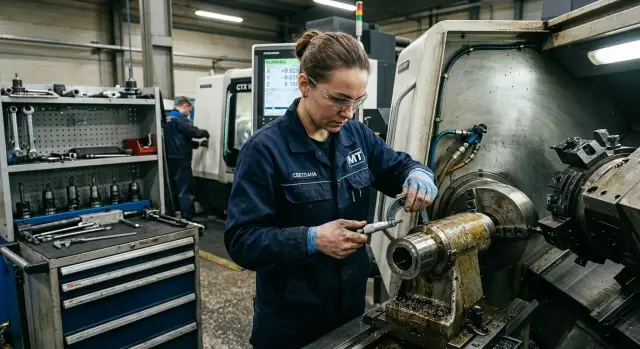
Why the size drifts right at the machine
The same dimension on a part can differ within two or three minutes, even if the operator didn’t change the cutting conditions. This often happens immediately after machining: the part is still warm, a thin film of oil remains on the surface, and the micrometer sits not in its case but next to the machine.
When numbers don’t match people blame the micrometer first. But more often the cause is nearby: in the hands, on the part surface, or at the actual measurement point. A micrometer doesn’t show an abstract truth. It shows whatever was between its anvil and spindle at that exact second.
Several things at the machine immediately affect the result: the part temperature after machining, hand heat, oil and dust on the surface, different force when bringing the spindle in, storage near heat, vibration and coolant aerosol. Each of these alone changes the reading a little. Together they easily add extra microns.
On a single part you might not notice it. On a series the error quickly becomes a problem: the operator starts adjusting the machine to a wrong reading even though the cutter is cutting correctly.
A typical shift situation looks like this. A shaft is taken off, measured immediately and gives a size at the upper limit. A few minutes later the part cools down, oil spreads or gets wiped off, and the same feature measures smaller. After that the operator adjusts compensation without a real reason.
The measuring location also makes a big difference. If you measure next to the spindle where it’s warm, coolant aerosol flies and vibration exists, there won’t be stability. Even a good micrometer prefers calm conditions, a clean surface and a short pause without hurry.
An error rarely comes from a single big cause. Usually it’s a chain of small things that accumulate right by the machine. The longer the series and the higher the tempo, the stronger the effect. So the dimension drifts not because the metal suddenly changed, but because measurement conditions change faster than the shift notices.
Where extra microns come from
Extra microns appear not only from tool wear or reading mistakes. Much more often the part, the micrometer and the measuring spot live at different temperatures and cleanliness.
After machining the metal still holds heat. A part may sit by the machine for only a couple of minutes, and that’s enough for the size to shift by a few microns. You can’t see it with the eye. The operator takes the workpiece, measures and gets one number, and ten minutes later at the same spot sees a different one.
The micrometer itself also changes while in use. If you hold it in your palm for a long time, the frame and anvils heat up from the hands. Metal accepts that heat quickly. As a result both the tool and the part change right at the moment of measurement.
Dirt is another story. A thin oil film, dust from grinding or fine metallic mist create an extra layer between the micrometer anvil and the part surface. The layer is almost invisible, but for a precise measurement it’s enough.
Chips make it worse. They not only prevent full contact but also scratch the measuring faces. After several such measurements the anvil and screw no longer seat as they should, and the error starts repeating even on a clean part.
Another frequent source of scatter is storage. If the micrometer lay in a cold cabinet and is then used on a hot surface, the tool and the part have different thermal backgrounds. The opposite also happens: the tool sits by the machine all day while the control part comes from a cooler room. With such combinations stable results are hard to expect.
In short: the problem is often not the scale but the environment around it. Until the shop maintains consistent cleanliness, temperature and proper storage, a precise instrument will give floating results.
How hands change the reading
On the shop floor this often looks trivial. Someone picks up the micrometer, holds it comfortably for a minute, does a repeat measurement and sees a different number. It seems the tool is unstable. In reality one of the most frequent causes is simple: the hands heat both the instrument and the part.
The micrometer frame is small but it warms up quickly. If you hold it with your palm for long, the body’s temperature changes and so does the internal dimensional chain of the tool. The difference is small, but on tight tolerances it becomes visible.
With the part the effect appears even faster. A small bushing, a pin or a thin ring is warmed by fingers in seconds. The part looks the same from the outside, but the metal has already expanded slightly. The operator measures once, then handles the part, turns it, puts it in the micrometer again and gets a new number.
This is especially noticeable in simple cases: when the part is small and light, when the tolerance is narrow, when the measurement is made immediately after machining, and when the operator repeatedly re-grips both the micrometer and the part.
A repeat measurement often confuses exactly because of re-gripping. First the micrometer sat in the stand and was colder. Then someone held it in hand, checked the size, adjusted the grip, clamped the part again and got a different result. Nothing broke in a minute. The conditions just changed.
On a lathe floor this shows on a typical small part. The first measurement gives 20.000 mm. Half a minute later, after the operator twiddled the part with fingers and clamped it again, the instrument shows 20.003 mm. For rough work this is negligible. For a precision fit it’s already a reason to waste time checking the machine and setup.
To reduce hand influence the grip should be short and consistent. Hold the micrometer by the thimbles or pads if they exist, handle the part quickly and avoid warming it with your fingers before checking. If the numbers wander, first remove hand heat from the process.
What oil, dust and chips do
Even a part that looks clean can give a false size. A thin oil film between the part and the micrometer anvil adds extra microns. On a tight tolerance that’s enough to move the reading out of limits.
With fine chips it’s worse. They act like a shim: the micrometer rests on a random particle rather than the actual metal. One measurement looks fine, the next immediately shows an oversize, although the part didn’t change.
The problem can be on the tool too. If an oil layer, dust or a chip fragment remains on the anvil or spindle, contact won’t be even. The micrometer clamps the debris together with the part and the operator sees a size that isn’t there.
A common wiping cloth can also spoil things. If it leaves lint, you simply swap one contaminant for another. After a quick wipe the surface seems clean, but soft fibers lie between the measuring faces.
Coarse rags are dangerous in another way. When an operator rubs the anvil or spindle with a dirty rag, they can scratch the measuring surfaces. After that the error becomes not random but permanent.
A simple routine helps here. Before measuring, remove oil and dirt from the part with a clean lint-free wipe, check the anvil and spindle against the light, remove chips with a brush or air—not by hand—and don’t rub the measuring faces with harsh rags.
A simple example: a turner measured a shaft immediately after machining, quickly wiped the part with a cloth and got +0.01 mm. After properly cleaning the anvils, spindle and the part itself, the size returned into tolerance. The error was not in the part but in the dirt layer between the metal and the micrometer.
Where storage spoils accuracy
A micrometer often errs not because it’s worn but because of where it was left between measurements. A shelf next to the machine heats from motors, lamps and the machining area. Add small vibration and the tool lives in different conditions than the part.
An open drawer is also a bad option. Dust, chip debris and oil aerosol collect there and later remain on the anvils and screw.
Often a micrometer is placed next to a hot part for just a minute. That’s enough for the tool metal to take a different thermal background. After such a wait a measurement seems odd even though the instrument is serviceable.
A fall from a small height rarely goes without trace. If a micrometer slipped into chips or onto concrete, the screw travel may change. It will close as usual, but force and repeatability will be gone.
A case doesn’t always help. If it hasn’t been cleaned for a long time, it transfers dirt onto a clean instrument. Someone put the micrometer away with an oily film and in the morning took it out and measured the new batch. Dirt from the case moved onto the anvils and the first measurement already produced an error.
Simple habits here are very basic:
- store the micrometer in a clean closed case, not on a shelf by the machine;
- don’t place it next to hot parts and surfaces;
- wipe anvils and body before putting the tool away;
- after any drop check readings against a gauge or standard.
This gives more benefit than it seems. If the tool lies in a clean place without heat, oil and shocks, it lies less often and doesn’t force you to look for problems where there aren’t any.
How to measure at the machine without arguments
If you measure a part immediately after machining, the micrometer often shows not the real size but the state of the area at that minute. A hot blank, oil on the surface and warm hands easily add those extra microns that later cause disputes between operator and quality.
The routine here is simple and takes less than a minute.
First, don’t grab the part right after the cut. Put it near the measurement spot and let the temperature equalize a bit. Even a short pause often changes the result more than you’d expect.
Then wipe the part, the anvil and the spindle with a clean lint-free cloth. A thin oil film, dust or fine chips easily add unwanted hundredths.
Take the micrometer calmly and briefly. Don’t wrap your whole palm around the frame, otherwise the tool metal will warm and the reading will shift.
Bring the spindle in only with the ratchet. If you use finger force, the closing pressure will vary and the reading will start to float.
After that make two or three measurements in the same area. If the numbers are close, the result can be considered normal. If scatter is noticeable, look for the cause immediately instead of recording an average at random.
On the lathe floor this looks familiar. The operator removes a shaft, touches the oily surface with fingers, measures once with extra finger pressure and gets a size at the edge of tolerance. A minute later the inspector repeats the measurement on a clean part and sees a different number. In such moments it seems the instrument is wrong, although usually conditions are to blame.
If the figures don’t match, first inspect the measurement point. The surface should be clean, without burrs or stuck chips. Then check whether you held the micrometer too long or pushed the spindle by hand instead of using the ratchet. If the discrepancy remains, repeat the measurement on a neighboring spot of the same surface. That way it’s easier to understand whether the size changes across the part or the measurement process itself is unstable.
Errors considered normal on the shop floor
Most extra microns come not from rare instrument failures but from habits that have long become normal at the bench.
The first mistake is measuring a part immediately after machining near the machine. After cutting the metal hasn’t equalized in temperature, so a temporary value is taken for the real one.
The second is turning the ratchet like an ordinary screw and tightening to the stop by hand. Then the micrometer doesn’t measure but squeezes the surface. On soft materials this shows faster, but on hard parts extra force also changes the reading.
Third is placing the anvils on a dirty spot. A thin oil film, grinding dust or fine chips are enough to make the dimension larger or smaller than needed. It’s especially painful when the part is good but rejected because of debris at the measurement point.
There’s a less visible cause too. The micrometer lay on a cold shelf and was then taken straight into a warm zone and put to work. The tool hasn’t adopted the area temperature yet and hands heat the frame further. The error immediately accumulates from several small factors.
Another mix-up appears when two operators compare numbers without a common routine. One waits a minute after machining, another measures immediately. One wipes the part, the other doesn’t. One uses the ratchet, the other tightens by hand. Then everyone looks at different numbers and searches for a machine problem.
Only a single shared procedure works. It should be short and clear so everyone follows it, not just the most careful setup technician. It’s worth writing it down for the shop and posting it where measurements are taken.
Even a simple memo will do:
- let the part rest a little after machining;
- remove oil, dust and fine chips from the part and micrometer anvils;
- handle the micrometer with dry hands and don’t warm it in your palm;
- measure at the same spot with the same force;
- if size is disputed, repeat the measurement at the same spot by a second person.
There’s one more frequent issue—the measurement location itself. If you work by open doors, next to a hot machine or on a dirty cabinet, errors will repeat shift after shift. It’s better to allocate a separate clean area: a table, lint-free wipes, good lighting and a place where the part can rest a few minutes before measurement.
After work check storage too. If micrometers are tossed near chips, left on the machine or taken anywhere, accuracy won’t last. Ask two simple questions: who cleans the tool at the end of the shift and who is responsible for its storage place.
When launching a new cell or changing equipment, it’s useful to discuss not only the machine but also where the operator will control parts and how the first measurement after start-up will be organized. For such tasks EAST CNC usually finds it practical to talk about the machine, commissioning and service at once. When launching, small things like a convenient inspection area often save more headaches than expected.
A micrometer rarely lies on its own. More often something just prevents it from working normally. If the shop brings order to temperature, cleanliness, storage and a consistent measurement method, most disputed sizes will disappear without needless corrections or stops.
Quick check before a series
Before the first part of a series spend a minute on a short check. That minute often saves half an hour when the size starts to drift and the shift looks for the cause in the wrong place.
Look not only at the scale. Errors often come from the shop: oil remains on the part, dust collects on the anvil and the tool is colder or hotter than the part.
Before starting work do a few things:
- wipe the measurement spot on the part;
- check the anvil and spindle;
- compare the temperature of the part and the tool;
- don’t hold the frame in your palm too long;
- make two repeat measurements at the same point.
The problem often appears right after machining. The part is still warm, the operator rushes, grabs the micrometer with the whole palm and gets a size that won’t repeat a few minutes later.
A good sign is two close results in a row. If the first measurement shows one value and the second moves 3–5 µm, start with the simple fixes: clean contact surfaces, remove hand heat, let tool and part stand side by side.
A common shift situation: an operator measures a shaft and sees 20.006 mm. Then he wipes the anvil, dries the measurement point and checks again. The second result is 20.002 mm. The part didn’t change. Dirt between the part and micrometer disappeared.
Such a short check quickly shows why issues appear on the floor and not at calibration. If you make it a habit, disputed sizes noticeably decrease.
Example from a typical shift
On a turning floor they removed a shaft after a pass and immediately brought it to measurement. The part left the machining zone warm, a thin oil film remained on the surface. The turner quickly set the micrometer and saw a size 4 µm above the limit.
The first thought was predictable: the machine drifted, stop the series and check compensation.
But the foreman didn’t touch the machine right away. He asked for a short pause, wiped the shaft with a clean cloth and checked the part again with the same micrometer, but calmly. The second measurement showed a different number: the size returned to tolerance.
The cause wasn’t feed, tool wear or program. Two small things affected the reading, the kind the shop often calls trivial: the shaft was warm after machining and oil on the surface added an extra layer between the micrometer anvil and the part.
That’s how the feeling that the micrometer lies usually appears. In fact it shows what was given to it to measure: a heated part, a dirty surface or a hurried check. Add warm hands and a tool that lay by the machine and the error easily grows another few microns.
In that shift everything ended calmly. The team leader didn’t stop the batch but checked a few more parts after a short wait and normal wiping. The numbers repeated and it became clear the process was steady.
If nobody had done a second measurement under normal conditions, the cell might have unnecessarily disassembled a tool, opened the machine and spoiled the series by their own actions.
What to change on the shop floor
If everyone measures their own way, the size dispute won’t end. One grabs the part immediately after machining, another wipes it as they please, a third takes the micrometer from a cold cabinet and expects micron accuracy. That’s how discrepancies appear that later get blamed on the instrument.
Only one shared routine works. It should be short and clear so everyone follows it, not just the tidiest setup tech. Better write it down for the shop and hang it where parts are measured.
A short checklist will do:
- let the part rest briefly in one place after machining;
- remove oil, dust and fine chips from the part and micrometer anvils;
- handle the micrometer with dry hands and don’t warm it in your palm;
- measure at the same place with consistent force;
- if the size is doubtful, repeat the measurement at the same spot by a second person.
There’s another frequent problem—the measurement area itself. If you work by open doors, next to a hot machine or on a dirty cabinet, errors will repeat shift after shift. It’s better to allocate a separate clean zone: a table, lint-free wipes, good lighting and a place where the part can sit a few minutes before measurement.
After work check the tool storage. If micrometers are thrown among chips, left on the machine or put anywhere, accuracy won’t last. Decide two things: who cleans the tool at the end of the shift and who is responsible for its storage.
When launching a new cell or changing equipment, it’s useful to discuss not only the machine but also where the operator will perform checks and how the first measurement after start-up will be organized. For such tasks EAST CNC usually recommends addressing machine selection, commissioning and service together. At start-up, small details like a convenient inspection area often save more nerves than expected.
A micrometer rarely lies by itself. More often it’s prevented from doing its job. If the shop gets order in temperature, cleanliness, storage and a consistent measurement method, most disputed dimensions will disappear without unnecessary corrections or stops.
FAQ
Why does the micrometer show different sizes on the same part?
Most often the size changes not because of the instrument itself but because of measurement conditions. The part cools down after machining, oil or dust sits on the surface, and hands warm both the part and the micrometer. Remove these small factors and repeatability usually returns.
How long should I wait after machining before measuring?
Do not measure immediately after the cut. Give the part a short pause so the temperature evens out, then wipe the measurement area and only then check the dimension. Even a couple of minutes often removes extra microns.
Should I wipe the part before measuring?
Yes—always wipe. A thin oil film acts like an extra layer between the part and the micrometer anvil and shifts the measurement up. Use a clean, lint-free cloth, not a regular towel that sheds fibers.
Why shouldn’t I hold the micrometer in my hand for a long time?
Because the palm quickly heats the frame. That changes the instrument temperature and on tight tolerances you’ll already see a different result. Hold the micrometer briefly and, if possible, by the grips or insulation pads.
Why use the ratchet if I can just tighten it by hand?
The ratchet provides consistent closing force. If you tighten the spindle by hand, each grip is different and the reading will float. On soft materials the error becomes even more pronounced.
Where is it better to measure: right at the machine or aside?
Better away from the hot zone. Near the spindle there’s more heat, coolant aerosol and vibration, all of which spoil a stable measurement. If there’s no separate bench, at least pick a clean calm spot and don’t rush.
How to tell if the micrometer is lying or the shop conditions are at fault?
Do a simple test. Clean the part and the micrometer anvils, let the part cool slightly, then repeat the measurement two or three times at the same spot using the ratchet. If the numbers come close, the problem was the environment, not the instrument.
What to do if the micrometer was dropped?
Check it immediately against a gauge or reference. Even a small shock can change the screw travel and repeatability, although the micrometer may look normal externally. Don’t use a dropped tool in production without verification.
How should a micrometer be stored in the shop?
Keep it in a clean closed case, not on a shelf by the machine. Don’t place it near hot parts, oil or chips. Wipe the anvils and body before storing, otherwise dirt will stay with the tool until the next shift.
How to reduce measurement disputes between operator and inspector?
Agree on one procedure for everyone. Let everyone wait a short time after machining, clean the part and micrometer, measure with the ratchet and check the same zone. When the team measures the same way, disputes and needless corrections drop significantly.