
Why CNC Simulation Doesn't Prevent Stops on the Shop Floor
We explain why a CNC simulation can pass while the machine still experiences pauses, alarms and cycle interruptions due to the postprocessor, tooling and part zeros.
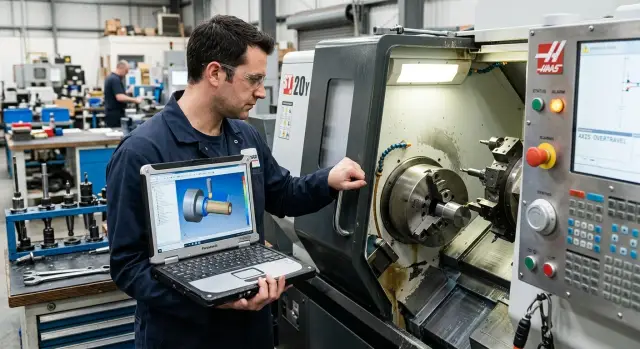
Where the mismatch begins
The difference rarely starts with a big mistake. Usually a small detail causes trouble: the simulator uses one assembly, but the shop has another. In the model the chuck, jaws, toolholder and tool overhang look correct, but the operator fitted tooling with a slightly different height or length. On screen everything is clean, but in the actual cutting zone a few millimeters are missing.
That's why CNC simulation often gives a false sense of security. It calculates the trajectory from the data loaded into it. If CAM received one set of dimensions, and the machine has another, the problem isn't in the program. The issue is that the digital model no longer matches the real machine.
Most often the mismatch starts in three places. The machine tooling changes: a different holder, different jaws, spacers, extensions, or a different overhang. Then the part zero shifts: in CAM it was set to the end face and centered, while on the machine the datum was referenced from another surface. And finally, someone assumes a small tweak doesn’t need to be recorded because "it's obvious." At that point the program and the machine live in different versions of the same part.
What the simulation actually checks
Simulation doesn't check the whole shop. It compares the toolpath only to the assembly the process engineer loaded: the part, the raw stock, the tool, the chuck, fixtures and any other elements that were included in the file.
In essence, CNC simulation answers a simple question: will the tool follow the planned path inside this digital scene. If the trajectory plunges too deep into the part, cuts the wrong area, or hits an object from the assembly, the software usually shows it right away.
It reliably catches trajectory errors, wrong operation order, tool changes and collisions with items added to the model. But this check has strict limits. If the project doesn't include the actual jaws, an extended toolholder, a nonstandard holder or the real clamp height, the simulation won't see them. For the simulator those items simply don't exist.
The same happens between operations. On the screen everything looks calm: approach, machining, retract, tool change. But in the shop the setup technician may change the sequence, tweak the overhang, make a manual approach, shift the zero or install other tooling. The simulation cannot guess actions like that.
It doesn't know how the operator set the part in the morning after a changeover. It doesn't know the shop grabbed a similar but different holder. It doesn't know the tool was reground and its length changed slightly. On the screen it's still "clean," while on the machine stops begin.
Put simply, the simulation checks your digital version of reality, not reality itself. If the model is assembled accurately, it helps a lot. If it misses even one important detail, the image reassures more than it should.
Where the postprocessor changes the picture
The postprocessor takes the path from CAM and turns it into lines the specific machine understands. On screen the toolpath may look correct, but the CNC doesn't see a picture — it reads NC code lines.
This is often where the difference appears between what the simulation showed and what happens at the machine. The same path can be output differently: using another coordinate call, a different tool compensation logic or another cycle format.
On a lathe this is especially noticeable. CAM builds the pass over the part, and the post decides how the approach looks, when compensation activates, when the spindle gets a start command and when the program moves to a safe point. If the post contains an extra line or an old setting, the tool may approach from the wrong side or retract too late.
The issue often hides in details. For example, the post may call the wrong work offset, apply compensation before the approach instead of after, or output a cycle the control interprets differently. In the model this is almost invisible. In the shop it causes a stop, an axis limit alarm or strange behavior on the first frame.
After any post change it's not enough to just view the 3D model again. Open the NC and read it the way an operator reads a program at the control. Usually it's enough to check a few places: which work offset the program calls, where tool compensation turns on, how the approach and first cut are written, what cycle the post outputs and where the tool goes after the operation ends.
If a company uses different machine types, the risk grows. The same CAM logic won't produce identical NC code for an inclined lathe, a vertical center, and a 5-axis machine.
A good habit is simple: after changing the post, compare not only the simulation but also two versions of the program line by line. If offsets, compensations, safe planes or cycle commands changed, that's not a minor edit. It's a new program and must be checked again.
Why tooling breaks the tidy model
CNC simulation checks only the assembly loaded into it. If the model has one chuck, one set of jaws and one holder, but the machine uses others, the picture quickly loses meaning.
In the shop this happens all the time. During setup someone uses a different set of jaws because the right ones are occupied. A different chuck is installed after the last batch. The program stays the same, the simulation looks clean, but the turret approaches the part differently than on screen.
A common problem is toolholder length. A library may contain the short variant while the setup person mounted a holder 10–20 mm longer. For the simulation this is a minor detail. For the machine it's a different clearance radius, different Z allowance and a higher risk of hitting the chuck or jaws.
The same occurs with stock overhang. On screen the bar or forging protrudes a certain length, but in the shop it's clamped slightly differently. Even an extra 15 mm can eat up travel margin. This is especially critical on lathes, where chuck, jaws, turret, tool and part are close together.
There are worse cases. Virtual assemblies often simplify fixture geometry. They show the general volume but not real protrusions, bolts, stepped jaws or nonstandard bores. Because of that, the turret in the model passes safely, but on the machine it gets close and triggers a collision or travel-limit stop.
A simple example: the program looks clean for a 120 mm part. On the machine jaws were set higher and the stock protruded 18 mm farther so it was easier to trim the end face. As a result the cutoff tool reached a point that was air in the simulation but, in reality, already part of the chuck.
Before running a series it's useful to check not the whole program but the tooling: which chuck and jaws are installed, whether holder length matches the library, the actual stock protrusion and whether the turret enters zones the model simplified.
A good model helps. But it can't guess what the setup tech mounted this morning. If shop tooling doesn't match the file, stoppages are almost inevitable.
How part zeros break the program
Part zeros seem trivial until the machine moves into air or into the clamp. A CNC simulation may show a clean process if the model uses one zero and the operator set another on the machine. The program is formally correct, but shifted for the real machine.
The most common mistake is simple: CAM, setup and inspection use different reference points. The process engineer sets the zero per the drawing, the setup tech picks a convenient face, and the inspector measures from a fixture datum. Each action makes sense locally, but the overall picture falls apart.
Confusion often appears on the Z axis. In CAM the tool may reference the top face of the part, while on the machine the Z zero is taken from the chuck face, the jaws or another surface. If the Z sign was also checked hastily, the machine moves somewhere completely unexpected. Those errors rarely look large on screen, but in the shop they produce immediate stops.
Before the first run four quick checks usually suffice. Choose one reference point for CAM, setup and inspection, verify which work offset is active, check the Z sign and the tool start position, and don't confuse the drawing zero with a zero chosen only for convenience.
The last point is often underestimated. The drawing zero is needed so dimensions match documentation. A setup zero may be more convenient, but then it must be recorded explicitly as an offset, not kept in someone's head. Otherwise the first part might come out acceptable by chance, and the next one will shift.
A simple scenario: in a turning operation the engineer set the zero at the stock end face, but after facing the setup tech moved it to the new face and didn't record the offset. The first part passed because everyone checked the actual size. After a tool change and rerun the stock allowance vanished and the cycle stopped on compensation.
After the first good part any zero shift should be recorded immediately: in the setup card, in the program comments or in the shift log. Then the next run won't be a guessing game and the program stays clear for both the engineer and the operator.
How to check the program before the first run
CNC simulation is useful, but before the first run the program must be checked against the real machine. Otherwise the screen looks clean and in the shop the tool approaches jaws, chuck or clamps too closely.
First open the assembly in CAM and put photos of the actual tooling next to it. Look not only at the part but at everything around it: chuck, jaws, arbor, holder, tool overhang, spacers. Often the issue isn't the toolpath but a small detail missing from the model. For example, CAM may use a short toolholder while the machine has a longer block, and the safe retract immediately becomes insufficient.
Then verify the program start. These errors are the most boring and the most expensive. Make sure the program calls the correct coordinate system, that part zeros match the setup, and that tool compensations are tied to the positions actually in the turret or magazine.
Next, walk through a short checklist: does the part zero in CAM match the machine, are the correct tool and compensation numbers called at the start, are there enough safe retracts on the axes, are there unnecessary plane changes or missing modes, and does the post output code in the format the control expects?
After that do a dry run at reduced feed. Spindle, clamps and coolant can be used as appropriate, but the first check is better done calmly with your hand on the pause. Watch not only dangerous approaches. Note where the machine wastes motions, where the tool retracts too far, and where the operator can't predict the next move.
Run the first part operation by operation rather than one long continuous cycle. After each risky point insert a stop and check the tool's actual position. It's easier to catch a mistake before impact. This is especially important on CNC lathes where a wrong zero or an extra overhang quickly becomes a stoppage.
All discrepancies found should be fed back into the system, not kept in the setup tech's head. Update the tooling model, the tool library and the post settings. Then the next program will be closer to the real machine and the verification will take less time.
An example from a typical shop
On paper everything looked fine. The process engineer prepared turning for a flange in CAM and assembled the operation for a short holder. The CNC simulation showed normal approach, retract and end facing with no extra motions.
At the machine the picture changed quickly. The setup tech couldn't find the same short holder and installed an extended one. For the shop this is a routine substitution: same part, same insert, it just seemed easier to fit. But for the trajectory the difference was noticeable.
Then the chain of events followed. In the virtual assembly the tool retracted safely. On the real machine the long holder produced a different overhang. During retract the machine hit a travel limit and the operator stopped the cycle to avoid damaging the tooling and chuck.
The issue wasn't a single error but two at once. CAM checked the short tool, while the shop used a long one. At the same time the post output a retract that assumed more axis clearance. On screen it all matched. On the machine it didn't.
After the first stop the team decided to shift the part zero in Z to get the cycle back quickly. That helped clear the limit but created a new error. The program performed an extra facing pass because the start of the operation no longer matched the calculation in the model. The part wasn't ruined, but extra material was removed and time was lost to inspection.
This case shows why you can't rely only on a pretty animation. If machine tooling, the CNC post and the part zero live in different reality versions, shop stoppages are almost inevitable.
The fix was ordinary. The engineer updated the assembly for the actual extended holder. Then they adjusted the postprocessor so it outputs a safe retract considering the real overhang and machine limits. After that they rechecked the Z zero, ran a noncutting test and only then released the part to cycle.
Usually that's how the cause is found: not by hunting for a single guilty button but by aligning the model, the tool, the code and the datum in one place.
Errors that repeat most often
Many stoppages start not with a major error but with the habit of "it'll do." CNC simulation may show a clean path, but the shop follows other rules. There the important things are not only the lines on screen but also the CNC post, the actual machine tooling, the startup commands and the part zeros.
A common story is using a post for a "almost the same" machine. Models may look similar, but the control, M-codes, tool change logic and safe retracts can differ. In CAM everything seems fine, but on the machine the program stops at the start of the cycle or pulls the tool where the setup tech didn't expect.
An outdated tool library causes no fewer problems. The holder was changed, the overhang altered, a different chuck installed, but the model stayed the same. On screen the pass exists; in the shop the holder body hits tooling or there's insufficient jaw clearance.
Another frequent mistake is to look only at the pretty toolpath and not read the start block. That's where the cause often hides: the wrong zero is selected, a compensation wasn't reset, the required feed mode wasn't set, or a command the control expects wasn't enabled. The first seconds of the program are more dangerous than the middle because that's where all initial conditions converge.
Zero issues are even simpler and therefore more unpleasant. A setup tech shifts the machine zero by 1–2 mm to hit a size faster, but CAM didn't get updated. The next batch runs under a different G54 and a program that worked yesterday cuts extra material today or approaches the part too closely.
The most expensive habit is skipping a dry run after a "small" tweak. Changing a tool number, modifying the approach, tweaking feed or one line at the start can completely change machine behavior. Five minutes of checking is almost always cheaper than an hour of downtime and ruined stock.
If stoppages repeat, the cause is usually not a single factor. It's a chain of small mismatches that nobody checked together.
A short checklist before a series
Even a good CNC simulation won't save you if no one verifies basic things with the actual machine before starting a series. On screen everything looks clean. In the shop the program meets the chuck, jaws, actual stock overhang and manual offsets the operator entered.
A short pre-series check takes a few minutes but often saves hours of downtime.
Compare the CAM machine model with the physical machine in the shop. If the kinematics match but the post is set for another control, the simulation will show a safe path while the machine follows a different trajectory. Check tool lengths against the setup card and the machine's compensation table. If CAM assumes one overhang while the magazine has another, the very first approach may be too deep or, conversely, not reach the size.
Add all actual tooling to the assembly: chuck, jaws, arbor, clamps, tool overhang — all of it should be in the model, not only in the setup tech's head. Make sure the part zero in CAM and on the machine are the same. A common mistake is the programmer using the end face zero while the operator references jaws or another datum.
Run the first part without temporary workarounds. If you had to disable compensation, change feed on the fly, or manually skip frames to make the pass, the program isn't ready for a series.
There's a simple sign: after the first part you shouldn't have to edit the program on the fly or explain every step to the operator. If verbal instructions are needed, the mismatch remains.
In practice it's not complex geometry that trips you up but small details: a different chuck, an extra 8 mm of tool overhang or a shifted zero — and the series starts stopping for no clear reason. Catch that before the first ten blanks, not after scrap and machine downtime.
What to do next
If the CNC simulation passed but the machine still stopped, don't try to fix it with a single local tweak. Instead assemble a reference kit for each part or family. It should align four things: the exact machine, the specific postprocessor, the real machine tooling and the part zero map.
Often the problem isn't the program itself. One setup tech slightly raised the part in the vise, another changed the chuck, a third edited the post in their own folder. On screen everything still "matches," while the shop already works in a different reality.
The workflow is straightforward: store the post, the setup card, the tool list and zeros in one place, record who and when made changes, after a stoppage document not only the fault but its cause, and then update the reference kit before the next batch launch.
Personal notes and verbal agreements almost always lead to repeated stops. Today the operator remembers the shift, in a week no one will. If a tweak didn't enter the shared data package, it will most likely be lost.
It's useful to treat every stoppage as a short technical case. What diverged: the model, the post, the tooling or the zero? How was that confirmed? What needs to change so the same error won't return on the next part? A temporary workaround can save the shift, but later it costs the series.
If the cause repeats, look broader: does the machine have sufficient rigidity for that operation, is the clamping scheme appropriate, is the postprocessor outdated, and is the service team comfortable maintaining this setup? An external review helps in such questions. EAST CNC, the exclusive official representative of Taizhou Eastern CNC Technology Co., Ltd. in Kazakhstan, works with supply, commissioning and service of CNC machines, so such an analysis can be carried out not only by the model but also on the real equipment in the shop.
The most sensible next step is simple: assign one person responsible for the reference kit and update it after the next stoppage. That alone removes a noticeable share of repeat failures.
FAQ
Why did the simulation pass, but the machine still stopped?
Because the simulation compared the toolpath to the model in CAM, not to the real machine. If the file assumes one holder, one tool offset and one part zero, but the shop has different fixtures, the screen looks clean while the machine no longer has the necessary travel or clearance.
What does the CNC simulation actually check?
It checks the tool path inside the digital assembly the programmer loaded into the project. If the model doesn't include the real jaws, tool extension, actual stock overhang or the correct zero, the simulation won't account for them.
Where does the divergence between CAM and the shop usually begin?
Most often the mismatch starts with tooling, the part zero, or the NC code after post. CAM may assume a certain holder and overhang, the shop may have different hardware, and the NC program can call a different work offset or use a different approach.
Can the postprocessor really ruin an otherwise good toolpath?
Yes — this happens often. CAM draws the path, but the postprocessor turns it into commands for a specific control. If the post outputs corrections, cycles, safe retracts or work offsets differently, the machine will behave differently than the animation suggested.
Why does changing the holder or jaws affect the outcome so much?
Because even an extra 10–20 mm of holder length changes approach and retract clearances. On a lathe that can be enough to hit a travel limit, get too close to the jaws, or trigger a collision stop.
How do I correctly check the part zero before the first run?
First pick one reference point to use in CAM, setup and inspection. Then check which work offset is active on the machine, verify the Z-axis sign and the tool start position. If a setup operator moves the zero for convenience, record that offset right away instead of keeping it in someone's head.
What should I check in the NC code first?
Look at the program start block the way an operator reads it at the control. Verify the invoked coordinate system, tool and offset numbers, spindle start, the initial approach and the first cutting move. Problems are most often hidden in the beginning of the program.
Do I need a dry run after a minor edit?
Yes. A small change at the start of the program, a different tool number or a new approach can change machine behavior more than expected. Five minutes of a dry run usually costs far less than a ruined blank and an hour of downtime.
What to do if the operator changed tooling or shifted the zero?
Don't treat it verbally. Update the tooling model, the tool library, the setup card and the program. If an operator changed the holder or moved the zero, the team must see that in the shared data before the next run.
How can we reduce repeated stoppages in a production run?
Assemble a single reference kit for the part: one machine, one post, the actual tooling, the tool list and the zero settings stored together. After each stoppage record not only the failure but the root cause, then update the reference kit so the same mistake won't repeat.