
Where Turning and Milling Operations Lose the Datum
The handoff between turning and milling operations often causes datum shift. Let's look at zero points, check dimensions, and the part transfer order between departments.
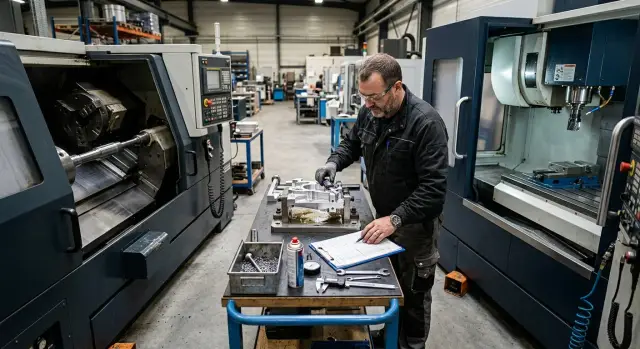
Where the datum shifts between departments
The datum is usually lost not because a part has a complex shape, but because the reference point quietly changes. On the turning operation, zero is set from one end face because that makes it easy to face the part and hold the length. Then the part goes to milling, and there the operator uses the other end face because it is easier to clamp the part or touch off faster with the probe.
From the outside, everything looks fine: the diameter is within tolerance, the faces are clean, the holes are in place. But the dimensions are already living in two different systems. At the junction of turning and milling operations, that creates a shift that first looks minor and later turns into scrap in center-to-center distance, slot depth, or hole position.
The second common cause is part re-clamping. After turning, the part ends up in jaws, a vise, or a V-block in a different position. Even if the operator uses the same surface, the seating is rarely repeated perfectly. Chips under the part, a burr on the face, a different stick-out from the jaws, worn vise jaws — and the axis shifts by several hundredths or more. For rough machining, that may sometimes be acceptable. For a finishing handoff between operations, it is already enough to lose the dimension.
The problem gets worse when the drawing sets dimensions from one datum, but the process route sends the part from another. For example, the designer sets the hole length from base face A. On the shop floor, the turner works from face A, while the milling operator out of habit picks face B because it is open and easier to see. Formally, both operations are done neatly. For the part, that is already two different logics.
The worst part is that inspection often catches this too late. While the part is still on the lathe, the shift is invisible. After milling, it is not always obvious either, if only local dimensions are measured. The deviation shows up at the end, when the part is almost finished and time, tooling, and material have already been spent on it.
Usually the cause falls into one of four groups: turning and milling use different end faces, the part sits differently after re-clamping, the route does not match the datums on the drawing, or inspection checks the final result too late. If these points are not aligned in advance, even a precise machine and careful work will not remove the repeat error.
What to choose as the common datum
The common datum should be one and clear for everyone. If the turning department measures from the left face and the milling department clamps the part by random contact, variation will appear even with a precise setup. For each part, decide in advance what both operations will use: an end face, an outer diameter, or an axis.
For rotating parts, it is usually best to use the part axis and one end face. The axis helps maintain coaxiality after re-clamping, and the face sets the length. If milling needs to locate a slot or holes relative to the diameter and the face, this pair of datums usually creates fewer arguments and fewer recalculations.
When the drawing datum and the clamping datum do not match
This is a normal situation. On the drawing, a dimension may be taken from the finished face, while the part is easier to clamp on rough stock or on another diameter. There is nothing wrong with that as long as you separate two things right away: the design datum and the clamping datum. The first is needed for dimensions. The second is needed to hold the part without runout or excessive force.
If the datums are different, show both on the sketch and in the route card. Next to them, note how the operator moves from one to the other. For example: "Z zero from face A after facing, X and Y zero on the part axis." Then the next department will not have to guess where to take the coordinates from.
The names must match everywhere. If the route card says "face A", the sketch should not say "datum 1", and the shop-floor conversation should not use "left face". The same zero should have the same name. That clears up confusion better than long explanations.
Usually a simple set is enough: face A as the Z datum, the part axis as the X and Y datum, and diameter D1 as the check dimension after the turning operation. It is also useful to mark the surface that must not be touched until the end of the route. Often this is the finished face, a bearing diameter, or a machined neck. One extra handling on that surface, and the datum between operations starts to drift.
In practice, it is better to choose not the most convenient surface for the current machine, but the one that both operations can repeat consistently. At the start, that is not always the fastest path, but the series will run more smoothly later.
Which dimensions to pass on
At the junction of turning and milling operations, you do not need to pass the entire drawing along. Only the dimensions that preserve the geometry of the part after re-clamping should move to the next department. Otherwise the milling operator starts guessing the zero, and the inspector sees the problem only on the finished part.
First, lock down the Z-zero position. Pass it not with words like "same as the previous operation," but from a clear feature: a finished face, a stop, or a shoulder. If the turning operation creates two faces, state right away which one sets Z0 for the next step. Otherwise one operator will use the left face and another the right face, and the dimensional chain will drift.
For milling, you almost always need one more dimension: from the part axis to a slot, hole, or plane. The axis after turning is usually the most reliable datum. That is why a dimension like "24 mm from axis to hole center" is more useful than referencing the outside diameter, which may still have stock allowance or tolerance.
Also record the stock allowance the turning operation leaves for milling. Do not hide it in a general note. If a face needs to be removed by 1 mm on each side or a slot needs to be finished after rough turning, that should be obvious right away. Otherwise the next department can easily mistake a semi-finished piece for a finished dimension.
There is another useful trick: call out the dimension that will show datum shift first. It does not have to be the final part dimension. Often a short check dimension works better — from face A to the center of the first hole, from a shoulder to the start of a slot, from the axis to a machined plane. It is faster to check, and the error shows up earlier.
After each re-clamp, the inspector should measure the same check dimension. That disciplines zero-point transfer and makes it easier to find the cause of scrap. In the route card and on the sketch, five items are usually enough: the Z datum with the specific face or shoulder named, the dimension from the axis to the milling feature, the stock allowance for the next operation, the early check dimension for datum shift, and the dimension that must be verified after every re-clamp.
If you define these dimensions, the datum between operations becomes clear without verbal explanations. For production runs, that is especially useful: a new operator reads the card and sets the part the same way as the previous shift.
How to transfer zero step by step
At the junction of turning and milling operations, people usually get confused not in the program, but in the starting point. If the turner thinks from one face and the milling operator uses another, the local dimensions may line up, but the part moves away from the drawing.
You need a single order that everyone reads the same way. For this, take the drawing, choose one starting datum for the whole part, and do not change the logic as work continues.
Working sequence
- Mark the common datum on the drawing. Usually this is the face and diameter that make it easy to measure lengths and coordinates after re-clamping. The datum must be real: it should be possible to rest the part against it, measure it, and find it again in the next operation.
- On the turning operation, tie the machine zero to that datum and write it down in the card. Do not just write "part zero." It is better to state directly: "Z0 on the left face after facing, X0 on the axis of rotation."
- After turning, measure two dimensions that let the milling operator know the part is positioned correctly. One is usually the length from the reference face, the other is a diameter, shoulder, or groove that is easy to check. Record not only the nominal value, but also the actual value on the first part.
- On milling, set zero from the same surfaces. If the fixture does not allow direct use, use a transfer dimension already measured after turning. Then zero is passed not by eye, but through measurement.
- Check the first part against the transfer sketch right away. If the hole, slot, or plane is off, do not hope the series will "settle in" on its own. Fix the card, note where to take zero from, and only then start the batch.
In practice, this is often enough to remove unnecessary fitting. If after turning the flange already has a reference face and an outside diameter, the milling operator can set up from them and verify with one transfer dimension before the first cut.
This way, the junction of turning and milling operations no longer depends on the memory of the supervisor or the habit of a specific operator. Zero is transferred through documentation and two measurable dimensions.
What to write in the card and on the sketch
If the route card says nothing about zero, each department will fill it in differently. At the junction of turning and milling operations, that quickly creates a shift: the turner treats one face as the datum, the milling operator uses another, and the dimension has already moved on the second re-clamp.
The sketch should show two things right away: where to take zero from on the axis and which face to use for length. Do not hide this in notes. Put simple callouts directly on the surface so the operator sees the datum in a couple of seconds instead of searching the whole sheet.
What should be visible immediately
Use ordinary words in the labels. If it is the left face, write it that way: "left face, axial zero." If it is the outside diameter used for support or clamping, label it as the support diameter. Internal abbreviations that only one shift supervisor understands are better left out.
Also separate out the inspection block. That keeps the required dimensions from getting lost among the machining dimensions. Usually four lines are enough: the dimension from the reference face to the first milled feature, the dimension from the axis of rotation to the plane or slot, the diameter or surface used to check re-clamping, and the tolerance actually used for acceptance.
This kind of block saves time. The inspector does not have to search the drawing, the operator does not argue about where to measure from, and the setup person does not have to check everything again.
Another useful thing on the sketch is a small picture of the clamping setup for the second operation. It is enough to show which face rests against the stop, which diameter is held, and which surface must not go under the jaws. One simple sketch is often more useful than a long explanation.
What should not be left as spoken agreement
A verbal agreement lasts until the end of the shift. Then another operator comes in and sets the part "the usual way." That is why the card should record which datum moves on, what checks the seating after clamping, and which dimension confirms that the zero was transferred correctly. If the datum matters, it should be drawn and labeled. Otherwise everyone will understand it differently.
A simple example with one part
Let us take a shaft with a flange on one end. Later, a slot and a group of holes need to be made on the flange, and there is a groove on the cylindrical section. This example shows well where the datum most often shifts at the junction of turning and milling operations.
On the lathe, the outer diameters, the flange face, and the groove are machined first. The common zero is best taken right away from the flange face in Z and from the axis of rotation in X and Y. Then the part gets a simple logic: everything tied to length is measured from one face, and everything tied to symmetry is held from the axis.
After turning, do not send the part to milling with a vague phrase like "slot in the center, holes per drawing." That approach almost always creates extra questions and sometimes scrap. The milling operator needs not guesses, but two or three verified dimensions that have already been confirmed on the lathe.
Before the next operation, it is better to record the flange thickness, the distance from the flange face to the groove, the outside diameter that makes the part easy to clamp or locate, and the flange diameter if it is used for layout or inspection.
Suppose after turning you got a flange thickness of 12 mm, and the distance from the flange face to the start of the groove is 48 mm. On milling, those are the dimensions used as the starting point. The slot is not placed roughly in the middle of the flange, but from the flange face. The holes are also tied to the part axis and the same face. If the operator starts recalculating from the overall shaft length or from memory of the sketch, an error of 0.2-0.5 mm can appear very easily.
The example is simple, but in series production it saves a lot of time. When both operations hold on to one face and one axis, the check dimensions line up without extra fitting. If the turning dimensions are written in the card and called out on the sketch, milling runs much more calmly.
Common mistakes at the operation handoff
At the junction of turning and milling operations, the datum is usually lost not because the part is complicated, but because of small shifts that nobody recorded. One operator adjusted the stock allowance, another moved the clamp, and a third received only the program with no clear sketch. In the end, the zero was supposedly transferred, but in practice each operation was already living from its own reference point.
The mistake starts with the reference face
The most common failure appears after a stock allowance correction. The turner faced the reference face to remove runout or bring the dimension in, but the card was not updated. For the turner, it was a quick correction of a few tenths; for the next department, it was already a new datum.
After such a correction, zero-point transfer quietly breaks down. On milling, the operator sets the part according to the old record and gets a shift in every dimension that was measured from that face. The scrap may not be obvious right away: the fit still passes, but the holes or slot are already off.
The second typical mistake is tied to re-clamping the part. It is moved to another chuck, collet, or V-block and the stick-out is not checked. Even a 10-15 mm difference changes the behavior of a long blank, especially if the size was previously taken from the face after a light facing cut. If the new clamp gives the part a different position, that needs to be checked with a dial indicator, not just hoped away.
Another weak point is when only the program is passed to the next department. Without an inspection sketch, the operator sees the coordinates but not which dimensions must confirm that the datum has seated correctly. Then people start measuring what is easiest to reach with calipers, not the dimension that actually catches the error. For difficult spots, an indicator, depth gauge, or even a simple go/no-go template may be needed for one check.
The first part can be misleading
With the first part, people often work manually: shift zero a little, tweak the offset, adjust the cutting conditions, and get a good result. Then the batch starts, but none of those actions made it into the record. The next part repeats the old mistake because the machine remembers one thing and the people remember another.
A common example: after turning, the flange came out 0.2 mm shorter, and the milling operator compensated by shifting the setup. The first part assembled normally. If that shift was not entered into the card and marked on the sketch, the next batch will drift again. If the card does not show the new reference face, the actual stick-out, and two check dimensions, the datum between operations has not been locked down by anyone.
A short check before series production
Before starting a batch, the supervisor, setup person, and inspector need to verify one simple thing: where the part starts its reference after turning and where it continues it on milling. At the junction of turning and milling operations, the datum usually shifts not because of complex geometry, but because of different notes in the drawing, the route card, and the machine memory.
If the drawing sets zero from face A, the card says face B, and the operator on the second operation looks for zero based on the previous part, the batch will show variation almost immediately. The first part may still pass. By the fifth, a shift in a hole, slot, or length will appear.
Before the batch, it is useful to check five points:
- is the same zero used in the drawing, route card, and setup;
- are the reference surfaces named the same on the turning and milling sides;
- have two check dimensions been chosen that will immediately show datum shift;
- does the operator of the second operation know how to set the part without "test fitting" and guesswork;
- does the inspector know what to measure on the first part and which tolerance to check first.
People often get mixed up in the names of datums. One department writes "face after facing," another writes "left face," and a third person sees the part only after re-clamping and does not understand whether it is the same face or not. It is better to write in a way that makes mistakes hard: "face A after turning operation 010" and "diameter B after finishing pass."
The two check dimensions should be chosen from different directions. One catches axial shift, the other catches rotation or incorrect seating in the fixture. For example, for a housing this could be the distance from face A to the hole center and the dimension from outside diameter B to the plane of the milled slot. If one dimension moved, look for zero shift. If both moved, check the datum transfer between operations and the part re-clamping.
This check takes about 10 minutes. But it saves a shift, blanks, and arguments between departments about where the error started.
What to do next
Do not try to rebuild the whole route at once. Take one part where the datum most often shifts after re-clamping. It is better to choose a part where a slot, holes, or a plane follows the turning operation, and where the disputed dimension is usually corrected on the milling side.
Put the drawing, the route, and a photo or sketch of the real clamping setup on both departments side by side. The mismatch usually shows up quickly: the drawing uses one face and one diameter as the datum, but in reality the turner and the milling operator work from different surfaces.
For one test part, make a short datum transfer sheet. It is enough to record the common datum after the first operation, the zero point on the lathe, the dimension that must be held until re-clamping, the first check dimensions on milling, and the setup direction so the part is not rotated by 180 degrees.
Then run one part with this method. Do not change everything at once — the fixture, tooling, and program. If you change several things at once, you will not know whether the zero-point transfer itself worked.
After the trial, compare not only the final dimension, but also the workflow itself. How long did it take to set zero, how many times did the operator recheck the datum, where did the disagreement about the sketch arise. This kind of review is often more useful than one good measurement at the end.
If the new setup works, move it into the card and onto the working sketch in simple language. Datum setup between operations should not live in one setup person's head. Otherwise the problem will come back on the next shift.
If you are choosing a CNC lathe or a machining center for these handoffs, do not discuss only the part size and power. It is more important to show the re-clamping scheme, the zeros, and the check dimensions right away. EAST CNC supplies CNC lathes and machining centers, and also helps with selection, commissioning, and service, so that conversation is easier to have in the language of the real process route, not just general specifications.