
Voltage dips on the shop floor: how to protect a machine
Voltage dips on the shop floor disrupt program starts, cause drive faults and heat electronics. We cover how to measure the supply, thresholds and how to choose a stabilizer.
Why the machine suffers from a weak supply
A CNC machine depends not only on mechanics but also on stable power. A typical electric motor can sometimes tolerate a short voltage dip with little consequence, while the machine’s electronics react much more severely. Inside you have the control cabinet, drives, sensors, relays, contactors and power supplies. If the voltage drops for a fraction of a second, the logic can already fail, even if the operator didn’t notice anything.
Such dips often look deceptive. The shop lighting doesn’t flicker, the machine doesn’t shut off completely, outwardly everything seems calm. But that is enough to disrupt program start, trigger a drive error or put the system into an emergency state. Sometimes the failure doesn’t appear immediately but during a tool change, spindle acceleration or homing. That’s why the problem is often mistaken for a faulty sensor, program or servo drive for a long time.
A voltage dip is dangerous not only because of stoppage. If it repeats, the electronics and power components wear out faster. Contactors burn, power supplies heat more, relays work worse, and errors become more random. After a while the machine seems “temperamental,” while the real cause has been the supply all along.
What happens at the moment of a dip
Drives don’t draw current equally in all modes. During acceleration and braking the load increases in jerks. If the line itself is weak, with a long cable, small cross-section or shared load among multiple machines, the voltage falls even more at that moment. The machine needs current to operate normally, and the supply cannot provide it.
In a small shop this looks familiar: a lathe sits on the same line as a compressor or welding. While loads are low everything runs smoothly. As soon as the spindle accelerates, a hydraulic unit starts or neighboring equipment kicks in, the voltage sags. The CNC sees unstable power and the drives operate at the edge of their tolerance.
There’s a second problem too. With fluctuating voltage drives struggle to keep their mode. They go into protection more often, heat up more and tolerate peaks worse. In metalworking this is especially unpleasant: a short fault disrupts a cycle, ruins a part and can stop a shift for half an hour.
So power should not be considered mere background. It’s part of the machine’s normal operation. If the line is weak, even a well-maintained machine will run with extra wear and unexpected stops.
Symptoms visible during operation
The supply seldom “drops” in a nice, obvious way. Usually the machine starts acting oddly: one day it runs smoothly, the next it produces errors with no obvious cause. Because of this the problem is easily taken for a program, sensor or drive fault.
A common sign is that the program doesn’t start on the first try. The operator presses start, the machine thinks longer than usual, then reports an error or simply doesn’t begin the cycle. On the second attempt everything runs normally. Such intermittent faults often point to the power supply.
Another typical case is spindle or axis emergencies during acceleration. At low speeds everything is fine, but when a drive needs more current an error appears. From the outside it seems like a servo problem, although the cause may be the supply line.
Another worrying signal is the machine rebooting when the coolant pump, hydraulic unit or another heavy consumer is switched on. The machine itself may be perfectly fine. But when a load nearby starts, the controller or display can reboot, and after that you need to bring the machine back to the working state.
The most telling situation is when errors are very different. Today the system complains about the X axis, tomorrow the spindle, then a module loses communication or initialization fails after power-on. If the faults vary but occur in bursts and without a clear pattern, check the supply among the first things.
Usually be alert if you see several signs together:
- the cycle starts only on the second attempt;
- errors appear during axis or spindle acceleration;
- the machine reboots after a pump or neighboring load is switched on;
- different alarms pop up on the screen without a single obvious cause;
- failures increase during peak hours when more equipment runs on the site.
These symptoms alone don’t prove anything, but you shouldn’t ignore them. If you delay checking, faults will repeat and the lifetime of electronics and power modules will shorten faster than normal.
How to measure the supply on the site
Looking at the distribution board display tells little. You need to check the supply in two modes: before load and during the machine’s real work. It’s the difference between these values that often reveals the source of the problem.
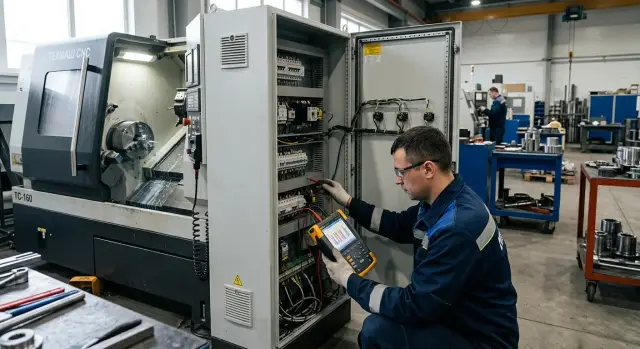
Start by measuring at the machine input. Take a reading before startup, then repeat during operation. If the supply is three-phase, check each phase separately. A single sagging phase is enough to cause drive errors even if the other two look normal.
It’s best to use an instrument that records the minimum and maximum over a shift. A common multimeter is useful, but it often misses short dips. Those short dips are exactly what prevents program start, spindle, pump or compressor startup.
Don’t measure only during quiet times. Put the machine under normal load and take values when the heaviest consumers start. Most often a dip appears when the hydraulic unit, pump, compressor starts, during spindle acceleration or when the machine runs alongside neighboring equipment.
One measurement is almost useless. Take several series in the morning, midday and toward the end of the shift. In small shops the picture changes depending on who turns on welding, a furnace or a second machine and when.
What to record
Without records it’s easy to confuse a random spike with a persistent problem. Log not only the number on the instrument but the conditions under which it occurred. Note the time, the load running on the site, the measured phase, the minimum voltage value and the duration of the dip if the device shows it.
Then compare these data with the machine’s documentation. Voltage tolerance is not judged “by eye” or memory but by the model’s datasheet. If values go beyond tolerance even during short starts, the issue is the site supply, not a “temperamental” machine.
Such a log greatly simplifies conversations with the electrician and service team. From it it becomes much clearer whether a separate line, stabilization or finding a bad contact in the network is needed.
What to check besides voltage
Normal readings on a multimeter don’t guarantee the supply is fine. Dips often originate not in the public network but in the line to the machine: too long a cable, poor connections or someone else’s load on the same input.
Line and connections
Trace the entire chain from the board to the machine. Look at the input cable type, how many meters it runs and whether there are old joints, transitions or temporary extensions along the way. The longer the line and the smaller the cross-section, the greater the drop under load. At idle everything may seem fine, but during spindle acceleration or pump startup the voltage already sags.
Then check where current passes through clamps. Terminals, the breaker and contactors should not heat noticeably. If plastic is discolored, there is a smell of overheating or screws are loose, the cause is nearby. A poor connection creates extra resistance, then follow start failures, spontaneous stops and drive errors.
Line load
Compare cable cross-section not with what "used to work" but with the actual shop load. If the same line feeds a compressor, welding, furnace or another machine, the margin quickly disappears. A frequent scenario: in the morning the CNC runs smoothly, but after neighboring equipment starts, faults begin.
Also check for phase imbalance. It causes different currents per phase and extra heating even if average voltage looks normal. Another bad sign is frequent circuit breaker trips. After them the machine may reboot, lose home or fail to start a program.
For a quick check measure four things: voltage not only at the board but at the machine input under load; compare current across phases; check heating of terminals, breaker and contactors; record what equipment is switched on the same line when faults occur.
If the line is weak, first remove its bottlenecks. A stabilizer does not always help when the issue is in the cable, terminals or an overloaded phase.
When to install a stabilizer
A stabilizer is needed not after one random failure but when measurements show a recurrent problem. If voltage sags happen at the same hours, when neighboring equipment starts or under shop load, that’s a pattern rather than a one-off.
The most common mistake is simple: after one failure buying the largest unit right away. First understand how often dips repeat and how deep they are. If the dip was caused by a one-time grid accident, watch the supply for several days. If dips occur regularly, a stabilizer makes sense.
Selection begins with load, not price. Don’t choose a model that matches the machine’s rated power exactly. During starts of spindle, hydraulic unit, coolant pump or compressor current spikes and a weak stabilizer will trip. You need a power margin, otherwise the stabilizer’s protection becomes another failure point.
Before buying check several things: whether dips repeat from measurement results, whether there’s enough power margin for starting currents, whether the machine is isolated from welding and compressors, how the device works across three phases and what happens if one phase disappears.
A separate supply line often gives a greater effect than expected. When a single input feeds the machine, extraction, compressor and heating, the supply becomes unstable even without a public network fault. It’s better to protect the CNC and drives separately; sometimes it makes sense to provide a separate supply for the controller and measuring electronics.
One important point is often missed. A stabilizer does not fix a bad cable, loose terminals, an overheated breaker or a bad neutral. If the line is long, undersized and contacts heat, first correct the wiring. Otherwise you waste money and faults will remain.
Faults that affect startup and drives
When the supply is unstable, the machine usually fails not during cutting but at startup. The CNC enables modules step by step: control cabinet, drives, sensors, pump, hydraulics. If the supply dips during this sequence, the controller may not finish initialization, hang on boot or report an axis error.
The most unpleasant faults at startup are very short dips of fractions of a second. From the outside it looks like a random error: the operator restarts the machine and it sometimes reaches ready state and sometimes stops again. Often the cause is not the CNC system but a voltage drop at the moment the pump, compressor or neighboring equipment starts—exactly when axes go to home.
In this situation servo drives don’t have time to reach normal mode, and sensors and encoders may report errors. An axis begins homing and stops with an error. The program does not start, although the mechanics are fine.
Common behavior: the cabinet powers up but can’t see one axis; the axis runs to home and fails with an error; when the pump starts the screen flickers; after reboot the error disappears and then returns later.
Drives are harmed not only by dips but also by phase imbalance. When voltages differ across phases, motors and power units heat more. The machine may keep working, but the cabinet overheats and drives more often report current or temperature faults.
Regular spikes also wear electronics. Drivers, power supplies and sensors tolerate repeated hits to their inputs poorly. Hence the intermittent faults: a sensor goes missing, an axis jerks on start, or a program runs only on the second try.
If such dips repeat constantly, drive lifetime shortens. Capacitors in power supplies age, contactors wear out, and servo amplifiers work at the edge of their tolerance. Shops then spend a long time searching for faults inside the machine, while the root cause is the supply.
Frequent mistakes when protecting power
Many begin with the CNC panel, sensors or drives while the problem lies earlier at the shop input. If the supply sags, the machine may drop a program, take long to reach ready state or report errors without obvious failure. In this case replacing electronics does not remove the cause and only wastes time and money.
Another common mistake is selecting a stabilizer strictly by nameplate power. On paper numbers match, but in real work there’s no margin for starting currents, axis acceleration, hydraulic units, pumps and peripherals. As a result the stabilizer trips or runs at its limit.
Problems also come from incorrect phase wiring. For a three-phase machine don’t try a single-phase solution “as a test” or power only some units through a separate block. That creates imbalance, random trips and errors that look like CNC faults but are simply incorrect power arrangement.
Measurements are often done wrong too. They take readings when the shop is quiet, while the compressor is off and welding is idle. Then the usual shift starts, neighbors turn on loads, and the supply sags during real operation. So check the network at different times, preferably during peak hours and when all equipment on the same input is started.
Another typical story: the machine and welding station were put on the same line. While welding is rare it seems tolerable. Later power jerks appear, drive errors and unstable program starts.
If you have doubts in at least two areas—supply type, power margin, actual measurements or line loading—don’t rush to change modules in the cabinet. First fix the power. For a lathe this is often more effective than replacing electronic parts one by one.
Example from a small shop
A small shop had a CNC lathe. In the morning it started without problems: the cabinet booted, axes homed and the first part ran fine. Because of this they initially thought the supply was fine and faults were due to settings or the program.
The problem appeared later when the shop reached full mode. The operator switched on the compressor, another machine started nearby, and the lathe suddenly lost home on one axis. Sometimes the program didn’t start on the first try. Sometimes the drive reported an error, though the day before everything was fine.
They first searched for faults in sensors and the servo system. End switches, connectors and cable fastening were checked. No clear failure was found. Then they measured the supply during the shop’s full startup. It showed a brief dip exactly when several heavy consumers were switched on simultaneously.
On paper the network looked acceptable. In quiet minutes the readings were stable. But a short dip during the compressor start was enough for the machine electronics and drives to misbehave. This is a common trap: a one-off morning measurement shows nothing, while the real issue lives in short dips under load.
After the check the shop put the machine on a separate line, selected stabilization according to the machine parameters and staggered the compressor and processing start times. Random faults almost disappeared. The machine stopped losing home and program starts became predictable.
This example shows a simple point. If the machine behaves unstably only during overall load hours, the cause is often not in the program or drives but in the site supply.
Quick check before startup
If the site has had voltage dips, don’t power the machine immediately. A short pre-shift check often reveals the problem before a program start fails, a drive error appears or the cabinet unexpectedly reboots.
First review the error log for the last few days. It quickly shows whether there were supply faults, lost communication with drives, or errors during spindle or axis start. If the same code repeats in the morning or when neighboring equipment starts, that’s a pattern.
Then measure the input voltage while major consumers haven’t yet loaded the line, and repeat the measurement when the site runs in its usual mode. Compare not by memory but with a simple table: nominal for your machine, value in the morning, under load and in peak time.
Before the shift keep a few simple rules in mind:
- don’t switch compressor, machine, extractor and other heavy equipment on simultaneously;
- let loads come up in sequence with short pauses between them;
- check terminals and connections for cleanliness, dryness and signs of heating;
- record any deviation immediately, not at the end of the shift.
Often the problem is visible in small details. A terminal is slightly loose, a contact heats, and in the morning “everything seems to work.” After an hour a drive throws an error and people look for the cause in the program, while the supply is to blame.
What to do next
If the machine fails to start, goes into error or drives behave oddly, don’t try to solve everything with a single measurement. Voltage dips often come in waves: morning supply is one thing, afternoon another, and during a neighbor’s compressor start yet another.
First build a normal picture over several shifts. You need measurements at different times, notes about site load and the machine’s fault log. After that it’s easier to decide what to do: fix the line, change the connection scheme, install stabilization or stagger equipment starts.
If you’re selecting a new machine, factor in power beforehand, not after delivery. A weak site can run one model fine and repeatedly stop another.
In such cases discuss supply with the supplier early. EAST CNC supplies CNC lathes, helps with selection, commissioning and service, so measurement logs and wiring diagrams allow a more concrete discussion. The earlier you check the site, the lower the chance that the first start will begin with diagnosing network errors instead of production.
FAQ
How to tell if the problem is the supply and not the machine?
Watch the machine’s behavior under load. If errors occur when the spindle accelerates, or when a pump, compressor or nearby equipment starts, check the power first before sensors and drives. Another common sign is varied faults that occur in bursts: sometimes the program won’t start, sometimes an axis goes into error, sometimes the screen reboots.
When is the best time to measure the site voltage?
Measure the supply not only when things are quiet, but also during normal operation. The most informative readings are taken during spindle acceleration, when the hydraulic unit starts, the coolant pump runs, the compressor starts, and at times when many machines operate simultaneously. One check is not enough. Take several readings in the morning, midday and toward the end of the shift.
Is a standard multimeter enough for checks?
A regular multimeter is fine for an initial check, but it often misses short voltage dips. If faults are intermittent, use a device that records the minimum and maximum over a shift. This way you’ll see the short drops that disrupt program start, spindle or pump startup.
What should I record during measurements so we don’t have to guess later?
Record the time, phase, voltage before load and under load, and what was running at that moment. Note whether the spindle, pump, compressor or a neighboring machine was starting. Such a log quickly shows where dips repeat and at what moments the machine goes into error.
Which wiring points should I check first?
Trace the line from the distribution board to the machine. Check cable length and cross-section, old joints, terminals, the circuit breaker and contactors. If a terminal is hot, the plastic is discolored, or you smell overheating, investigate there first. A bad contact often produces the same symptoms as a faulty drive.
Should I install a stabilizer after one failure?
No. Don’t buy a stabilizer after a single incident. First collect measurements over several shifts and see whether dips repeat or if it was a one-off event. A stabilizer makes sense when the supply regularly sags. If the issue is a weak cable or bad terminals, a stabilizer won’t fix it.
Why does the machine reboot when the compressor or pump starts?
Because at that moment the line experiences a sudden load surge. If the machine and a heavy consumer share the same input, voltage briefly drops and the controller can reboot. It may look like CNC failure from the outside, but often the shared line is to blame.
Are voltage dips dangerous if the machine still seems to work?
Yes. Repeated drops heat power supplies, contactors and power modules more, and drives go into protection more often. At first the machine is just capricious; later errors become more frequent and electronic components age faster.
Will a dedicated supply line help even without a stabilizer?
Often yes. Removing the machine from a common line shared with welding, compressors and heaters usually reduces faults even without a stabilizer. First eliminate common overloads and weak wiring points. Then decide whether a dedicated stabilizer is needed.
What should I do before starting the shift if there were prior dips?
Before the shift check the error log, measure the input voltage and don’t start all heavy devices at once. Allow the compressor, extractor and machine to start in sequence. If failures have already occurred, note the time and what was running nearby. Those notes make it easier to find the cause and explain the situation to an electrician or service team.
What to do next?
Don’t try to decide based on a single measurement. Voltage dips usually come in waves: morning supply may be one thing, afternoon another, and during a neighbor’s compressor start yet another. Collect measurements over several shifts, record the load in the area and keep the machine’s fault log. After that it’s easier to choose: fix the line, change the connection scheme, install stabilization or stagger equipment start times. If you’re choosing a new machine, consider site power in advance—one shop can run one model fine and regularly stop another. EAST CNC supplies lathes with CNC, helps with selection, commissioning and service, so measurement logs and wiring diagrams let you have a more specific discussion. The earlier you check the site, the less likely the first start will begin with chasing power issues instead of production.