
Vibration when boring deep holes: what to check
Vibration when boring deep holes is often caused by bar overhang, tooling and clamping. Step-by-step checklist to find and fix the issue.
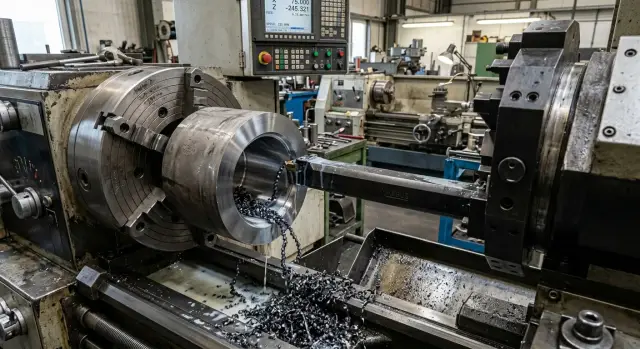
Why a deep hole starts to chatter
When boring a deep hole the tool behaves like a long lever. The cutting edge pushes against the metal, the bar deflects slightly, returns and cuts again. That creates a repeating oscillation heard as a howl, a ringing or a sharp chatter.
Simply reducing the feed rate does not always help. Cutting force goes down, but system stiffness does not increase. Sometimes the opposite happens: the edge starts to rub more than cut, and vibration gets worse.
You usually recognize the problem by three signs: sound, the bore wall pattern and the measurement results. A steady whisper turns into a hum or intermittent ringing. The surface shows waves, rings or torn patterns. After inspection you see taper, ovality and rough finish.
Taper often appears when the bar deflects more under load as the hole gets deeper. Ovality arises when the tool vibrates on a stable path rather than randomly. Roughness increases because the edge removes a different chip thickness every revolution.
Excessive overhang accelerates the issue. Adding a little length can reduce stiffness much more than expected. A bar that behaved on a 60 mm depth may go into resonance at 90–100 mm with the same speed and feed.
A practical sign: if the entry surface still looks acceptable but the sound and trace worsen further in, the cause is almost always the combination of large overhang, low stiffness and an unsuitable cutting regime. In that situation only changing feed is pointless. You need to check the whole system.
Where to start checking
When vibration appears while boring a deep hole, first collect a few simple facts. Otherwise you can end up fixing symptoms, not the cause. Most often the problem comes from a combination of overhang, a thin bar, weak part clamping and a worn insert.
Measure the actual overhang of the boring bar. Look not at the catalog length but at the distance from the clamping point to the cutting edge. Even an extra 10–15 mm can matter more than a noticeable feed reduction. If the length increased because of an extension, adapter or extra protrusion, record it.
Then compare the bar diameter to the hole diameter. A too-thin bar loses stiffness; a too-large bar can worsen chip evacuation. The sound may be similar in both cases, but the root cause differs, so check both sizes rather than a single parameter.
Next, check part clamping. In the chuck or fixture the workpiece must sit straight and clean on its support. If the clamp is far from the cutting zone or the part sticks out too much, the workpiece itself starts to play. It may seem like the tool is at fault, while part setup is part of the problem.
Inspect the insert, screw and seat. A small chip under the insert, a stripped screw or a worn pocket often produce the repeating ringing and waves on the bore wall. On a short overhang that may pass unnoticed; on a long overhang it shows immediately.
Finally, note the actual spindle speed, feed rate and depth of cut. Not from memory, but from the program and what the machine actually does. If constant cutting speed is enabled, check the spindle speed limit too. After these checks it’s usually clear whether to start with clamping, tooling or cutting parameters.
How overhang reduces stiffness
When boring a long hole the boring bar acts like a ruler pulled out too far from the bench. On a short overhang it holds steady. On a long overhang it bends and vibrates even under small forces. The same happens with a boring bar.
That is why chatter often starts with excess length rather than feed or speed. Sometimes adding 10–20 mm is enough for a smooth cut to turn into a hum, for a ripple to appear on the wall and for the insert to wear noticeably faster.
Bar diameter also directly affects behavior. With the same overhang, a thicker bar usually runs quieter than a thin one. If the hole allows, use the largest possible diameter. Trying to save a thin tool only by lowering feed is a bad idea.
A quick rule of thumb is the ratio of overhang to bar diameter:
- up to 3D the risk is usually low;
- around 4D–5D the tool needs careful selection of insert and parameters;
- from 6D and above chatter becomes much more common.
This is not a strict rule. Material, insert geometry and clamping method also matter. But this check quickly shows where to look for the source.
In practice shortening the overhang almost always brings a quick improvement. If you can remove an extension, use a shorter bar or bring the tool closer, start there. Reducing length by 15 mm often helps more than a noticeable feed reduction.
If you cannot shorten the overhang, then select a stiffer bar, change the insert geometry and revise the pass plan. But first ask: does the tool really need that length, or is part of the overhang left from habit?
How the bar and insert affect the result
If vibration persists after changing the feed, often the culprit is the "bar–insert" pair. Even a good machine won’t save the situation if one part of the pair cuts with too much force and the other cannot hold it.
Steel and carbide bars behave differently. Steel is cheaper and absorbs accidental shocks better, but at long overhangs it springs more. Carbide bars are stiffer, so on deep holes they often run quieter and give a smoother wall. When overhang is near the limit, switching to a carbide bar can help more than another 10–15% feed cut.
Insert geometry also changes tool behavior. A sharp, "light" geometry cuts more gently and loads the system less. A "heavy" insert pushes harder on the bar and brings on chatter earlier.
A smaller nose radius often helps. A 0.4 mm radius is usually calmer than 0.8 mm when the hole is long, stock is small and the setup dislikes extra load. A large radius fits where the system is stiff and feed is sure; in a deep hole it can swing the tool itself.
Choose the chipbreaker with the real material and feed in mind. If it’s unsuitable, the insert will rub instead of cut. Chips will tear, the sound will be harsh and rings will appear on the surface. For a finishing pass in a deep hole a more open chipbreaker often works better than one designed for large removal.
A worn edge itself triggers vibration. First you hear a light ringing, then stripes grow on the surface and size starts to vary. On deep holes it pays to change the insert a bit earlier than usual. It’s cheaper than scrapping parts in the last millimeters of a pass.
One practical step often makes a difference: replace a steel bar with a carbide bar and switch from a 0.8 mm radius insert to a 0.4 mm radius insert with a suitable chipbreaker. In many cases that removes the ringing without a big loss in productivity.
How to change parameters step by step
When a deep hole starts to chatter, don’t change everything at once. That way you may get a random result and not understand what helped. Better follow a sequence and check sound, wall pattern and chip form after each change.
A typical workflow is:
- First reduce spindle speed by 10–15%. With chatter this often helps more than sharply cutting feed. The vibration frequency changes and the system may leave an unlucky zone.
- Then check the bar overhang. If the part and setup allow, remove at least 10–20 mm.
- After that retune the feed for the new speed. Don’t lower it randomly. Sometimes after lowering speed you can even slightly increase feed so the edge doesn’t rub.
- Then review the depth of cut for the finishing pass. Too small a stock can sometimes make the problem worse.
- Change one parameter at a time and record the result.
This sequence feels slow but saves time. If you reduce speed, feed and depth at once you won’t know what helped and will have to guess next batch.
Example: a hole 140 mm deep with bar overhang 165 mm. The operator first drops speed from 900 to 780 RPM and the ringing quiets. Then he removes 15 mm of overhang and the wall evens out. Only after that he raises feed from 0.08 to 0.10 mm/rev and gets a calm cut without extra noise.
Mistakes that keep chatter
The most common mistake is treating everything with feed alone. The noise may quiet down, but the cause remains. If speed lies in an unlucky zone the system still goes into resonance.
Another typical error is leaving overhang "just in case" after the initial setup. It is convenient for access, but extra 10–20 mm quickly eats stiffness, especially on small diameters. So check overhang early, not after long experiments with parameters.
Trying to continue with a worn insert because it "still cuts" is also common. That may pass in roughing, but not in deep boring. A blunted edge rubs more, heats the tool and makes the bar bounce.
Clamping errors occur too. For access the workpiece may be pulled out of the chuck or clamped too loosely. Then not only the tool but the part starts to move. Changing parameters in that situation helps little.
After replacing a bar or holder some operators immediately run a full cycle. That’s risky. Even a small runout after installation changes load on the cutting edge and the machine can start to "sing" already at the start of the pass.
Usually the pattern is: feed reduced, original overhang left, insert unchanged, runout unchecked. Each item alone seems acceptable; together they give persistent vibration and poor hole geometry.
If you need to find the cause quickly, follow this order: check part clamping first, then overhang, then insert condition, and only after that adjust speed and feed.
A simple example on a part with a long hole
On a steel part with a 42 mm hole 180 mm deep the problem often doesn’t appear immediately. The first millimeters are fine; then in the middle you hear ringing and the wall shows a wavy trace. The operator reduces feed, but the noise doesn’t go away. Sometimes the surface even gets worse because the tool stays longer in the zone where the system already vibrates.
In that case look immediately at three things: bar overhang, insert condition and spindle speed. If you keep a long overhang "just in case," stiffness falls too much. For this depth even a few extra millimeters are noticeable, so first bring the bar closer.
Next put in a fresh insert. It seems minor, but a tired edge often causes that mid-pass ringing. At the entry it still cuts acceptably, further in it rubs and excites the bar. After changing the insert the sound often calms on the trial pass.
If vibration remains, shift speed up or down by 10–15%. Make small steps and listen. When the frequency moves into a safer range the ringing disappears fairly quickly and the wall evens out.
The practical sequence here is simple: shorten the overhang to what’s really needed, fit a new insert, make a trial pass and only then tweak speed in small steps. After that the finishing pass usually doesn’t "sing," and dimensional stability holds along the hole.
Quick checks before a new batch
If the previous part had chatter when boring deep holes, don’t start a new batch with the same settings blindly. Five minutes of checks often saves an hour of scrap, insert replacement and readjustment.
Before starting, quickly go through these points:
- remove unnecessary overhang and leave only the length needed for the actual depth;
- inspect the insert under good light and check its seat;
- ensure the part is clamped squarely and not overextended;
- compare speeds with your working notes;
- make a short trial pass, not a full cycle.
Most mistakes are about overhang. People leave extra length "just in case" and end up with a flexible connection instead of a stiff one. A 20–30 mm difference can change things more than reducing feed.
Don’t skimp on the insert either. If the edge looks doubtful, it’s cheaper to fit a new one immediately. On deep holes you usually hear a defective cutting edge before you clearly see the defect.
The first pass before a run should be short and attentive. Listen to the spindle, watch chips and check the bore trace right away. If the sound is steady, chips evacuate well and the surface is free of stripes, continue. If the part hums at the start, don’t automatically push feed down. First check overhang and insert seating, then adjust speed.
What to do next on your shop floor
If you find a combination that bores the hole smoothly, don’t keep it in one operator’s memory. Record the setup on the setup sheet. For the next batch this saves time and prevents repeatedly treating a stiffness or tooling issue with feed changes.
Usually record diameter and depth, bar type and diameter, actual overhang, cutting parameters and insert grade. This short set already shows why one setup runs quietly and another starts to ring on identical parts.
Before a series, do a short test on one part or on part of the hole depth. Look at sound, chips and load behavior. If chatter appears immediately, stop and fix the setup. It’s cheaper than sorting a whole batch later.
If vibration won’t go away even after proper parameter selection, look for the weak link in stiffness. Check part clamping, bar seating, holder condition, chuck runout, wear in machine components and cleanliness of support surfaces. On deep holes the issue often lies not in one setting but in the whole chain of machine, tooling and part.
If you process such parts regularly, look beyond a single bar or insert. EAST CNC works with CNC lathes for metalworking and publishes practical materials on equipment and shop work. When the limit is the machine, layout or process stability, that experience becomes useful.
A simple guideline: record a successful setup, verify it with a short test at the batch start, and if chatter repeats investigate machine and tooling. Then the problem usually does not come back next week under a different part number.