
Vacuum clamping for aluminum plates: where it makes sense
We look at when vacuum clamping for aluminum plates holds a part steadily, and when mechanical clamps provide greater rigidity and less vibration.
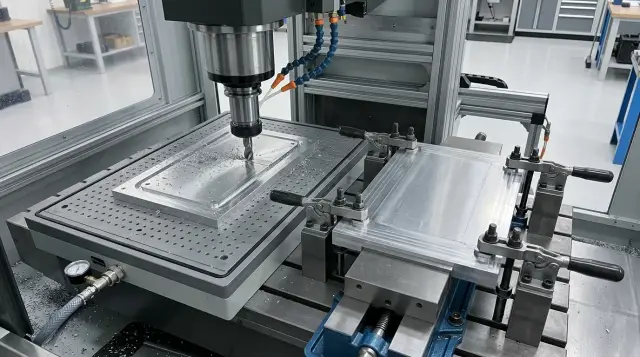
Why this is easy to get wrong
Vacuum clamping for aluminum plates often seems like the most convenient option. Nothing gets in the way from above, the tool can reach almost anywhere, and the part is easy to load and unload. But the mistake usually starts before the first pass.
A thin plate can bend the moment it is clamped. Sometimes it already has a slight internal warp, sometimes the table support is not perfect, and sometimes the sealing layout pulls the sheet unevenly. In the end, the workpiece is held, but the flatness has already shifted by several hundredths or more.
Many people look only at holding force and forget about clamping rigidity. These are different things. A part may not move on the table, yet still flex a little under the cutter. For aluminum, that is enough to leave chatter marks, move the dimension, or ruin the finish surface.
The situation gets more complicated because cutting force changes during machining. In roughing, the cutter pulls and pushes the plate harder, especially at entry, in corners, and with a long tool overhang. In finishing, the load is lower, and the same clamping method suddenly seems fine. That makes it easy to draw the wrong conclusion after a short test.
Mechanical clamps have a different trap. They often provide a more rigid support at specific points and handle side load better. But clamps block part of the tool path from above and around the edges. The programmer has to work around them, split the job into stages, or move the part. Each workaround adds the risk of error.
Vacuum has the opposite problem. It holds across the surface and gives good tool access, but it does not prevent every kind of deflection. If there are long spans between support zones, if a pocket leaves a thin floor, or if aggressive roughing is involved, the plate starts to spring. It may not lift off. The worse issue is that it shifts only slightly, and that is already visible on the part.
A simple example: a 10 mm plate, a large center pocket, and a clean contour around the edge. Vacuum looks convenient until the roughing cutter removes the bulk of the stock. After that, the middle sags a little, the edge starts to ring, and the depth dimension begins to wander. It still looks stable by eye, but in practice the part is already behaving differently from what you expected.
How vacuum holds a plate
Vacuum clamping for aluminum plates does not hold the part by "suction force" but by pressure difference. The pump removes air from the area under the plate, and outside air presses the workpiece down onto the table. The larger the real contact area, the stronger the hold. That is why a large flat plate holds much more reliably than a narrow strip or a part with many windows and cutouts.
There is a simple rule: vacuum likes a continuous surface. If the plate sits on the table with almost no gaps, the system behaves predictably. If there are scratches, chips, oil, grooves, or even small dents, air begins to leak in. On paper the area is the same, but on the shop floor the holding power is already weaker.
The problem often shows up on aluminum after rough cutting. The blank looks flat, but burrs or saw marks remain underneath. Because of that, the plate does not touch the table across its full surface. The vacuum is there, but the reserve holding force is small. Sometimes that is enough for a light pass, but with a heavier cut the part begins to vibrate.
A thin plate is usually held well by vacuum. It pulls the plate down onto the table and can partly remove a slight "propeller" twist or bow. But that does not mean the plate itself has become rigid. If the cutter pushes from the side, a thin sheet can still deflect and respond with vibration. In other words, vacuum improves contact with the table, but it does not turn a flexible blank into a rigid one.
Another point is through cuts. As long as the part contour remains intact, vacuum holds the full area. Once the cutter opens a through window or cuts the contour, part of the sealed zone disappears. Pressure drops, and holding can fall right in the middle of machining. On small parts, that happens quickly.
For that reason, vacuum is better judged not by the overall sheet size, but by how much airtight area remains at each stage. Good holding at the start does not mean it will stay that way after the first through pocket. In practice, that moment often decides whether the job runs smoothly or the part shifts on the last passes.
What mechanical clamps do
Compared with vacuum clamping for aluminum plates, mechanical clamps handle side load better. You notice that right away when the cutter pushes the part sideways: the clamp does more than hold downward; it also helps keep the plate from shifting.
That is especially useful in roughing, contour work, and heavy stock removal near the edge. Where vibration when milling aluminum appears, clamping rigidity often depends not so much on tightening force itself as on where the support sits and where the clamp pushes.
Mechanical clamps have another advantage: you choose a clear contact point yourself. If the plate is thin or has a locally weak area, you can support it closer to the cutting zone and reduce extra deflection. With vacuum, that is harder to do because it pulls the part more evenly, but not always where you need it at that moment.
The problem starts when the operator tightens the clamp "for safety". For aluminum, that is a common mistake. The edge of the part can lift, especially if the clamp is near the edge or presses on an already slightly bent area. The plate looks firmly seated, but once the clamp is released, the geometry shifts.
There is a simple sign: if the part stops resting calmly on the base after tightening and starts rocking under light hand pressure, the clamp is no longer helping; it is bending the blank.
The downside of this setup is direct as well: mechanical clamps reduce tool access. The cutter cannot move freely around the full perimeter, and when machining pockets and edges, the fastening often has to be repositioned. That slows the job down and raises the risk of error when resetting the part.
Mechanical clamps are usually chosen in these cases:
- there is a strong side load from cutting
- the edge or corner of the plate must be held very rigidly
- the part is small and the fastening does not interfere with the tool path
- the operator can place supports accurately under the machining zone
If the part is large, thin, and needs open tool access across almost the whole surface, clamps alone quickly become an obstacle. But when you need predictable support at a specific point, they often give calmer machining than vacuum.
Where vacuum really works
Vacuum gives the best result not on every aluminum part, but on simple, clear geometry. It needs a large contact area, a flat support surface, and a cutting regime with moderate forces.
The best case is a large flat plate with no deep underside pockets. When the blank lies almost across its entire face on the table, vacuum holds it evenly and does not pull the edge the way mechanical clamps sometimes do.
This is especially noticeable on thin plates. If you clamp such a part with jaws at the edges, the metal can bend slightly even before machining starts. Vacuum clamping for aluminum plates often wins here: the part sits across its full surface rather than at a few points.
It also works well when the depth of cut per pass is small. Face finishing, light pocketing, surfacing, and finishing the outer contour are typical operations where vacuum performs well. If the tool is not trying to shove the part hard, the risk of chatter is lower.
Vacuum has another strength: free access from above. When the part needs many passes on the face and clamps would block the path, vacuum saves time. The operator does not need to work around clamp arms, move them, or split the program into extra steps.
On production runs, the advantage is even greater. If the shop is running the same plate with the same contour over and over, a vacuum table gives a steady and repeatable cycle. Load the blank, align it to the stop, turn on the vacuum, and start the program. For a batch, that is often faster than setting mechanical clamps each time.
Vacuum is worth considering in these cases:
- the plate is large, flat, and has no complex relief on the underside
- the work is mostly finishing or light stock removal
- open tool access is needed across almost the entire surface
- the part repeats in batches and does not change contour from one batch to the next
Put simply, vacuum likes calm machining and a clear part shape. For face finishing of an aluminum plate, it is often a very convenient option, especially where you need a flat surface, quick access to the part, and short changeover time.
When clamps are the better choice
Mechanical clamps are the better choice when cutting forces can shift the blank on the table or lift part of it off the support. For aluminum, that happens more often than people think. The material cuts easily, so the operator often increases feed and depth. At that point, side load rises quickly, and vacuum no longer gives enough reserve.
The first clear case is heavy roughing. If the cutter removes a lot of metal in one pass and pulls the part sideways, clamping rigidity becomes the main issue. Clamps hold not only downward but also help limit movement in the plane of the table. For roughing, that is usually safer than vacuum clamping for aluminum plates.
The second case is a narrow or short blank. Such a part has little contact area, which means vacuum simply does not have enough surface to grip with the needed force. On a large plate, vacuum may work quietly, but on a strip or short offcut the holding reserve is often too small.
The same thing happens after nesting or cutting when the support area shrinks during the job. At the start the part sits firmly, but after a few passes all that remains is a narrow bridge or a small island of support. If the tool then applies a side load, the part can shift, start vibrating, or lift at the edge.
Clamps usually win in these operations:
- rough milling with noticeable side load
- machining narrow and short blanks
- working with parts that have a small support area
- passes with a high risk of movement in the plane
- through cuts after which the part loses part of its support
There is also a practical sign. If you already expect vibration when milling aluminum, it is better to look at clamps or a combined setup right away. Vibration rarely starts "out of nowhere." Usually the part first flexes a little, then the noise rises, and after that the edge quality suffers.
A good example is a 300 x 80 mm plate that needs a large pocket almost along the full length and then a through contour. On vacuum, such a part may hold well only at the beginning. After pocketing, the contact area drops, and after the through cut, part of the blank is barely supported at all. In that case, clamps give a more predictable result and handle tool access to complex zones more calmly, if they are placed before the path starts.
How to test the option on your own part
Doubts are better settled with a short test on your own plate, not with an argument. For the same part, vacuum and mechanical clamps can give different results even on the same machine with the same tool. The reason is simple: thickness, support area, and where the cutter pushes the metal during cutting all matter.
Start with the part itself. A thin aluminum plate with a large contact area often sits well on a vacuum table. But if the support area is small, there are pockets or cutouts, or the plate is already slightly warped, holding quickly weakens. In that case, mechanical clamps often give calmer machining, even though they get in the way of the tool.
The easiest way to check is with a short sequence:
- Measure the plate thickness and estimate the real contact area, not just the overall part size.
- Mark the areas where the cutter creates strong side load: a long slot, deep contour, heavy rough pocketing.
- Split the work into roughing and finishing. It is often useful to run roughing on the more rigid setup, while finishing can sometimes be easier on vacuum.
- Run a test pass at working parameters, not at "safe" reduced settings.
- Compare not only holding, but also deflection, chatter marks on the edge, and changeover time.
Look at the result honestly. If vacuum clamping for aluminum plates holds the part but leaves waves after roughing, you hear chatter, or the flatness goes out, that setup is not a good one. If clamps give a flat surface but the operator spends an extra 15-20 minutes on setup and repositioning, that also needs to be counted.
It helps to run two short tests on one part: first remove a small allowance with a roughing cutter, then do a finishing pass. After that, compare three things: cutting sound stability, surface marks, and dimensional repeatability. If one method wins only on one point but loses on the other two, the choice is already almost clear.
That test takes little time and quickly shows where vacuum is suitable and where ordinary clamps are the better answer.
Common mistakes
The most common mistake is simple: vacuum clamping for aluminum plates is used where the part quickly loses rigidity. While the plate is still intact, everything looks fine. But after a large pocket, windows, or deep cavities, the thin sections start to spring, and vacuum no longer protects against deflection and chatter.
That happens, for example, with a 12 mm plate when only a 2-3 mm floor is left. Before pocketing, it sits quietly. After a few passes, the cutter is no longer cutting a plate, but a thin membrane, and edge quality drops right away.
Another common problem is a dirty table. One chip, a spot of oil, or an old piece of sealing material is enough for the plate to sit unevenly. The vacuum may still build, but the support is already poor: in one place the part hangs, in another it is pressed into the table, and the dimension drifts.
With mechanical clamps, people make the opposite mistake: they tighten them too hard, and right at the edge. For aluminum, that is especially unpleasant. The plate bends before machining, and after the clamps are released it partly springs back. The machine looked fine, but inspection reveals a surprise.
Many people choose a setup just because it gives easy tool access and forget about clamping rigidity. An open top surface and free cutter access look attractive, but vibration when milling aluminum quickly shows the cost of that choice. If the cutting zone is poorly supported, good tool access no longer helps.
Another mistake is using the same setup for every operation. Roughing and finishing need different approaches. For roughing, it is better to add support, stops, or clamps, even if they interfere with the path. For finishing, you can simplify the setup once cutting forces are lower.
Usually these five habits are enough:
- clean the table, the plate, and the sealing surface before every setup
- check where the part will lose rigidity after pocketing
- do not overtighten clamps on a thin edge
- look not only at cutter access, but also at support under the cutting zone
- change the clamping method between roughing and finishing
If a ringing sound, a dull wave on the surface, or drifting dimensions appear after the first passes, the problem is usually not the cutting parameters, but the clamping.
A simple shop-floor example
In the shop, they took a 12 mm aluminum plate and planned two operations: face the top, then cut several pockets. On paper, the vacuum table looked convenient for the entire cycle. The part is flat, the support area is large, there are no clamps on top, so nothing gets in the way of the tool.
On the first side, that choice worked well. The plate was quickly placed on vacuum, the base came out flat, the end mill ran without workarounds, and the probe measured the dimensions calmly. For this kind of operation, vacuum often gives exactly what is needed: clean tool access and even support across the full face.
While taking a light skim on the face, there were no problems. Cutting force was mostly downward, and the part sat quietly. If mechanical clamps had been on top, the operator would have needed extra repositioning or would have had to leave unmachined areas under them.
The situation changed at the pockets. As the tool went deeper and the walls around the pocket got thinner, the load became less calm. The risk of chatter appeared, and with it came marks on the surface. Vacuum was still holding the plate, but the clamping rigidity no longer looked sufficient for steady work at the same settings.
So the part was moved to mechanical clamps and stops. Yes, that took more time: the blank had to be repositioned, stops set, and it had to be checked that the cutter would not hit a clamp. But the part gained a much more rigid hold against side movement, and the pockets ran more smoothly. The cutting sound became steadier, and the risk of shift dropped noticeably.
This example shows a simple rule. Vacuum is convenient where you need a flat base and open access from above. Clamps work better where the tool goes deep into the material and starts pulling the part sideways more strongly.
In practice, the winner is often not one method, but a combination of two:
- the first side and the finishing face are done on vacuum;
- deep pockets and heavier stock removal are moved to clamps and stops;
- cycle time goes up, but scrap and emergency stops happen less often.
If the part is thin, it is better to spend an extra 10-15 minutes on repositioning than to chase vibration, dimensional drift, and a ruined plate later.
A quick check before starting
Before you start, it is better to spend two minutes inspecting than to chase vibration, cutter marks, or a shifting part. For an aluminum plate, that is especially clear: a clamping mistake quickly creates surface ripple and an unpleasant squeal during cutting.
If you are using vacuum clamping for aluminum plates, start with the base, not the program. The plate should sit across its full surface, without rocking and without chips under the part. Even a tiny speck changes the support, and then the vacuum is no longer holding the plate, but its tilt.
Then check the sealing line. The rubber or cord should be clean, intact, and dry. Oil, fine chips, and a torn corner often do not cause a full loss of vacuum, but a slow drop in holding force. That is worse: the machine is already cutting, and the part is gradually losing rigidity.
Before starting, it is helpful to go through a short list:
- run your hand over the base and the underside of the plate to remove chips and burrs;
- make sure the plate sits flat and does not rock when you press on the corners by hand;
- check that clamps, stops, and fittings do not enter the tool path;
- make a short test pass at a safe depth and listen to the cutting sound;
- decide in advance what the operator will do after a through cut or contour cut.
The sound on a test pass tells you a lot. A steady cutting noise is a good sign. Whistling, chatter, and a fine ripple on the wall usually mean the part lacks support, the vacuum has dropped, or the cutting mode is too aggressive for that setup.
You should not improvise at the machine during a through cut. When the cutter opens the contour, the part or the cutout can open a leak path and holding can drop sharply. The operator should know in advance where to leave tabs, when to reduce feed, and when to stop the cycle if the piece starts moving.
A simple rule of thumb: if the plate lies flat, the seal is clean, the tool does not catch on the fixture anywhere, and the test pass is quiet and free of ripple, the start is usually smooth. If even one point is in doubt, it is better to stop and correct the clamping. Those two minutes often save a whole plate.
What to do next
If the part is already in production, start not with the fixture but with the job itself. Write down the material, exact plate thickness, dimensions, flatness, and the list of operations: roughing, finishing, pockets, through windows, chamfers, drilling. Even at this stage, it is often clear where vacuum clamping for aluminum plates makes sense and where the holding reserve is too small.
Then calculate the cost without fooling yourself. The price of a vacuum plate, a pump, or a clamp set is only part of the picture. Time often matters more: how many minutes go into setup, whether clamps block the cutter path, how many times the operator has to reposition the clamping, and how many parts need to be made per shift.
If vacuum saves 10-15 minutes on each setup, the difference becomes visible quickly. But if weak support increases vibration when milling aluminum, that saving disappears after the first bad part or extra pass.
For tricky parts, it is better to keep two clamping scenarios instead of one. The first is a fast one, when the stock removal is small and open tool access is important. The second is a more rigid one, when there are deep pockets, long tool reach, narrow bridges, or heavy roughing.
It is useful to check four things:
- what matters more for the part: tool access or clamping rigidity
- whether mechanical clamps will block the needed machining zones
- how much stock is removed per pass and how long the tool overhang is
- whether you can switch from vacuum to clamps quickly without new tooling
If the answer is not obvious, do not argue in theory. Run a short test on a similar blank and compare setup time, cutting sound, vibration marks, and final geometry. Half an hour of that check usually tells you more than a long discussion at the machine.
If you are choosing a machine and fixture for this kind of work, EAST CNC can help you discuss the setup for your material and operations, as well as commissioning and service for your machining process. That is useful when you want the machine, clamping method, and real cutting parameters to work together from the start, instead of piecing the solution together step by step.