
Universal machining center or two machines: choosing for your workshop
Universal machining center or two machines: compare machine loading, seasonal peaks, downtime risk, redundancy and floor space to choose the right setup without extra cost.
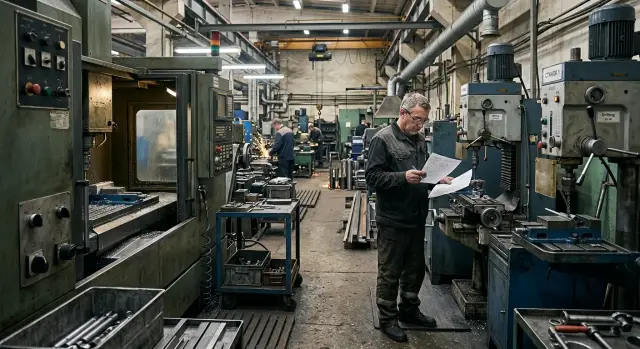
Why this choice raises questions
With the same budget, two workshops often reach different decisions. One buys a universal machining center to cover more operations on one machine. Another installs two separate machines and gets parallel work, even if each machine can do fewer operations.
At first glance a single center seems simpler: one purchase, one footprint, one station. But the real decision starts not from the invoice price, but from day-to-day workshop work. It’s important to understand how many parts pass through each week, how often the parts list changes, and how costly even short downtime is.
Versatility alone doesn’t guarantee savings. Such a machine often needs more fixtures, more careful setup and a stable load to justify its cost. If it’s busy almost all the time, that’s convenient. If half-shifts are spent waiting for the next batch or on changeovers, the advantage quickly disappears.
Concerns usually come down to three things: load fluctuates, orders arrive in waves, and space is limited. On top of that is another risk: if all work depends on a single machine, any breakdown or extended service stops the whole station.
With two machines the logic is reversed. One can be set up or serviced while the second keeps working. For small production this is often calmer. But this layout also has costs: more space, more connections and more daily attention.
If the shop makes short runs of different parts for repair work, a universal machining center often removes many problems. If, however, two repetitive operations run month after month, two separate machines are usually more practical.
So the question is not simply “one versus two.” It comes down to actual load, available space and the cost of downtime in your shop.
What changes with variable loading
With uneven loading the shop typically operates in two modes. During quiet weeks the priority is not peak speed but how many hours equipment doesn’t sit idle between batches. If orders are few but varied in size and series, a single universal machining center often has a steadier load.
The reason is simple: the whole flow runs through one machine, and you don’t have a second machine idle just because there’s no suitable part for it. For a small shop this is often cheaper and more convenient on regular weeks. Today you need bushings, tomorrow a single repair part, the day after a prototype. A flexible machine handles that mix more easily.
When orders increase, the picture changes. Two machines split the flow more easily: one handles repeat items, the other deals with urgent batches or a different group of parts. Work queues don’t pile up in one place.
The difference is most visible on urgent jobs. If there’s only one machine, an urgent part almost always breaks the day’s plan. You must remove the current fixture, change tools, load a different program, make a trial piece and then return to the original batch. On paper it looks like a quick task switch. In reality it takes a significant part of a shift.
With two machines accepting an urgent order is easier. One keeps the current job, the other takes the new task if the fixture and part size allow. Losses still occur, but production rhythm holds up better.
Most time is often lost not to cutting but to preparation. Chucking, fitting tools, adjustments, the first size check and restarting—each pause seems small, but over a week they amount to hours. So when choosing you should look not only at maximum parts per hour but at how often batches change.
If the flow is unpredictable and orders vary a lot, one flexible machine often runs more evenly. If the shop regularly has parallel series and urgent interruptions, two machines give more scheduling freedom.
How seasonal orders affect the choice
Seasonality quickly breaks calculations that use only the average month. One month the shop is quiet, and before the season demand spikes and the schedule compresses into a few weeks. In this situation you must calculate by the busiest period, not by the yearly average.
This is clear with parts for agricultural or construction equipment. Before the season clients want their batches immediately; after it the flow can drop by half. If everything goes through a single universal machine during the peak, any delay immediately creates a queue.
On one machine the risk of downtime in a quiet period may look lower, but the risk of missed deadlines in season is higher. One urgent order, an unplanned changeover or a small defect shifts all other batches. Two separate machines are usually less flexible in operations variety, but they allow parallel work and prevent the whole flow from stalling because of one part.
Reserve capacity matters where the season is short and the sales window small. If most margin is earned in 2–3 months, extra hours in that period cost more than the convenience of a universal option in the low season.
Payback looks different too. Average annual loading may be moderate, and a second machine can seem unnecessary. But if the shop turns away customers every season, pays overtime and misses deadlines because of insufficient capacity, losses add up quickly.
Check a few simple items: how many weeks per year the shop operates with almost no gap between orders; how much money is lost to refusals and rescheduling; which operations most often create queues; and whether you can separate batches between two machines without confusion.
Small urgent batches should be counted separately. They rarely give large volume but often break the day’s plan. On one machine these jobs are inserted between large batches and trigger more changeovers. With two machines it’s easier to keep one for the main flow and use the other as a buffer for urgent and short runs.
So for seasonal demand the deciding factor is not rated versatility but how the shop survives the tightest weeks without queues and crises.
What to do when floor space is limited
When space is tight, a machine’s specification dimensions aren’t enough. Equipment occupies more than a rectangle on the floor. You need a working area: open a door, feed a blank, remove a part, bring a trolley, change tooling, attend service points.
Therefore the choice often depends not on the machine’s length but on how the equipment fits into the real flow. One large center may seem more compact than two machines, but soon pallets, bar stock, boxes of tooling and finished parts appear around it. In a cramped shop this becomes obvious quickly.
A useful check is simple: draw a plan not only for the machines but for people and material movement. If an operator must walk around a stack of blanks to open the tool cabinet, the layout is already poor. If a service engineer can’t reach assemblies without moving stock, every maintenance will take extra time.
On the plan note the area in front of doors, blank loading points, operator and trolley paths, raw material and finished parts zones, swarf removal routes and tool supply. These small things often decide more than a few decimeters in a datasheet.
One large machine often interferes with flow where parts run in short batches. While the operator loads one item group, other orders already wait and pile up near the same machine. Two machines are sometimes easier to place along a wall or in different zones. Then raw and finished parts don’t mix, and people don’t cross in a single tight point.
But the opposite can also be true. If the parts list is stable and loading is mostly large series, one center may occupy less useful space than two machines with two sets of walkways, cabinets and service zones.
For a small shop count not only square meters but free meters around equipment. Those influence daily working tempo. If on the plan everything fits only “snugly,” in real operation the space will almost certainly be insufficient.
When choosing a CNC machine for a small shop, discuss layout with the supplier, not just the model. In practice the winner isn’t the smallest machine but the one that doesn’t break the flow of parts in the area.
Step-by-step decision process
Arguments are best settled not by a catalog or someone else’s experience, but by your own numbers on parts, shifts, changeovers and downtime. Then the choice becomes much clearer.
Start with a simple table. First analyze current work, then look at specific models.
- Gather a list of parts for 6–12 months. For each item record size, material, tolerances, repeatability and batch size. Often a few typical parts account for most loading.
- Note shift loading separately for a normal month and for the peak month. If you run one shift in March and two in September, the calculation changes significantly.
- Count not only pure machine time but changeover time. Fixture changes, tool setting, a trial part and first-piece inspection often consume more time than expected.
- Estimate the cost of downtime. If one machine’s spindle or feed stops, how many hours or days does the shop lose?
- Compare both options by output, occupied area and headroom for growth. If one option gives slightly more output but blocks aisles and leaves no room for tool storage, that advantage may be illusory.
Then run a short calculation for two scenarios: a normal month and a peak month. For each, sum cutting hours, setup hours and potential downtime. This shows which layout handles the load more evenly.
For a small shop rated power is less important than what you can actually produce per shift without rushes, crises and constant changeovers. If numbers are close, usually choose the option that leaves area for growth and doesn’t make production overly dependent on a single node.
Example for a small shop
Imagine a workshop of 140–160 m² making repair and small series parts: bushings, flanges, shafts and housings. The schedule is uneven: one week brings single orders of 5–20 pieces, the next a repeat batch of 300 pieces.
One universal machining center can cover more tasks in the same area. It’s simpler for an operator to run one machine than to move work between two stations. For small, varied orders this is often more convenient: fewer unnecessary moves, easier program changes, less waiting between operations.
This option is especially suitable when the customer today orders one geometry, tomorrow another, and the day after asks for a trial batch. For a small shop that’s normal. One machine often pays off through flexibility rather than peak speed.
But the picture changes when many repeat batches dominate. Suppose the shop machines the same bushing and the same shaft each month for service companies. Two dedicated machines often give a better pace. While one runs bushings, the other continuously machines shafts. Changeovers minimally interrupt the schedule and queues grow slower.
In seasonal peaks the difference grows. If volumes rise sharply in autumn or spring, one universal center can become a bottleneck. It can do many things, but all parts still wait for the same working area. Two machines are easier to split by operation and can get through the peak without night shifts if the parts mix is stable enough.
The downside is space. Two machines need more surrounding area, separate logistics for parts, and two maintenance schedules. If orders return to a ragged mix, one of the machines may sit idle for long periods.
There is no perfect answer. One universal machining center often fits shops with many small varied orders and strict space limits. Two machines usually win where repeats are common and seasonal peaks are predictable. With uneven loading always count setup time, waiting and downtime as well as parts per hour.
If your shop runs a mixed flow, a universal center is usually the safer first step. Add a second machine later when repeat batches occupy a large share of the month.
Common mistakes
The most frequent mistake is simple: people don’t look at their actual parts list, they look at the catalog maximum. Many buy a flexible machine “with room to grow” as if the shop will start making everything tomorrow. In practice revenue usually comes from 10–15 recurring parts, not rare complex orders.
Because of this some buy an overly capable machine with features they rarely use. Or the opposite: they buy two narrow machines while one well-chosen machine would cover most work. Start by listing parts for the last year and focus on ordinary weeks, not rare peaks.
Another common error is ignoring setup time. On paper a universal center looks convenient: one machine, many operations. But if the operator changes fixtures, chucks, tools and programs several times a day, much of the shift goes to preparation. Two simpler machines may deliver higher output even if each is weaker on paper.
Purchase price also misleads. A manager sees one machine is cheaper than two and stops there. But the invoice is only the beginning. If the only machine is down for service, the whole flow stops. Downtime in season can cost more than the price difference between the options.
The reverse mistake is placing two machines where space is tight. People count only the machine footprint and forget aisles, bar feed access, swarf removal, storage, cabinets and service access. The second machine exists, but working with it is inconvenient and slow.
Another oversight is not leaving any backup. A single universal center is great while it works. Two machines provide redundancy, but only if the shop can move parts between them without chaos. If a single machine breaks, both groups of orders shift. With two machines at least some work can continue.
A good solution rarely looks like the most powerful or the cheapest option. It’s usually the layout that handles standard loading, tight space and a bad week when something breaks or an order changes.
Quick checklist before buying
Before you pay, count not the machine’s datasheet but your usual week and the worst month. The same mistake repeats: people look at catalog maximums, not actual shop work.
Check five things before purchase. How many hours must a machine work in peak season? If load hits 85–90% or more, there’s almost no reserve. Any urgent job, changeover or small fault immediately delays delivery.
Next, check whether two machines can reliably handle your most common part. It’s not enough that dimensions fit; consider cycle time, fixture convenience and changeover speed. Sometimes two simpler machines produce a steady output without a single-operation queue.
Measure not just the installation footprint but the working zone around the machine. You need aisles, space for blank loading, access to cabinets, swarf and coolant, and service access. On paper the equipment may fit, in the live shop it may not.
Assess the cost of stopping. If one machine failure halts all output, the risk is high. Two machines are usually weaker individually, but one can temporarily pick up part of the work and save the schedule.
Finally, be honest about who will run, changeover and service the equipment. A universal machining center often requires a more experienced setup technician. Two machines add routine: more checkpoints, more tool changes and more daily tasks.
Run the last 20–30 orders through both schemes on paper. This test quickly shows where queues form, where people wait and how many hours are lost to preparation rather than cutting.
If the result is still unclear, base the decision on the worst month, not the average. That month shows which layout will withstand your real shop without emergencies.
What to do next
Combine three items in a single table: parts list, shift patterns and shop area. While these data live in separate files or in people’s memories, decisions are almost always emotional. When everything is visible on one sheet the answer becomes much clearer.
Add how parts load production by week and month. Mark seasonal peaks separately. Often those peaks reveal where one machine will slow the whole flow and where a second machine will provide necessary headroom.
Then check four things: which items bring main revenue, how many hours they take in a normal month and in a peak, how much space the machine and aisles need, and how much the shop loses if one station stops even for a day.
After that ask for two calculations: one for a universal machining center and one for two separate machines. Compare not only purchase price but future loading, setup time, downtime risk and seasonal output.
The difference usually appears not on the invoice but in a bad month. If orders spike and one machine becomes a bottleneck, its downtime can cost more than a higher initial budget. If space is strictly limited, a compact center can win on internal logistics.
Discuss commissioning and service separately. Who will start the equipment, how long will commissioning take, how quick is service response, and which spare parts you should keep—these matter as much as technical specs.
If you need a calm step-by-step analysis of parts, shifts, space and real load, do it with the supplier before purchase rather than after. EAST CNC offers clear services for this: consultation, selection, delivery, commissioning and service. The most useful next step is simple: send your parts list and shop plan and ask for two comparable calculations in one format.
FAQ
When is a single universal machining center really more cost-effective?
Choose a universal machining center when you have many small, varied batches, frequent changes in items and limited floor space. It’s convenient when today is a repair part, tomorrow is a prototype, and the next day a different geometry.
When is it better to install two separate machines?
Two separate machines are better when the same operations repeat month to month and the flow can be split. One machine runs the main batch while the other handles urgent jobs or the neighboring part, so queues grow slower.
Which is more important: purchase price or downtime cost?
Look beyond the purchase price and include the cost of downtime. If one machine failing stops all orders, that risk can cost more than buying a second machine.
How do you know one machine is already too little with uneven load?
A clear sign is that an urgent part upends your whole day. If the operator often removes tooling, changes tools, runs a trial piece and then returns to the previous job, the single machine is losing time to setup rather than cutting.
How do seasonal orders change the decision?
Count the busiest weeks, not the average month. If during the peak all orders go through one machine and load is near capacity, any small delay immediately creates a queue and shifts delivery dates.
How to properly assess space in a small workshop?
Measure the whole working area, not just the machine footprint. You need operator walkways, space for blanks and finished parts, access to service points, swarf removal, coolant and cabinets. On paper the machine may fit, but in real operation it can become cramped.
Why does setup time so often break the calculations?
Small pauses between batches are often underestimated. Changing the chuck, aligning a tool, adjustments and the first-size check each seem short, but over a week they add up to many hours.
How to calculate the choice using my own data instead of a catalog?
Use your own orders for 6–12 months and run them through both layouts on paper. Compare cutting hours, setup time, peak load, occupied area and losses if one machine stops — this usually makes the choice much clearer.
What is usually the wiser first step for a small shop?
As a first step, a single universal machining center is often safer for a small shop with mixed flow and limited space. It gives more flexibility across varied orders. Add a second machine later when repeat batches occupy a significant portion of the month.
What to prepare before talking to a supplier?
Before asking a supplier, prepare a parts list, batch sizes, shift patterns, shop layout and your peak months. With those data the supplier can compare one center and two machines based on your real load. EAST CNC offers selection, delivery, commissioning and service to help with this.