
Turning on an Interrupted Profile: How to Eliminate Tool Impact
Turning on an interrupted profile often causes tool impact on exit. We show how trajectory start and nose radius reduce chipping, noise, and marks on the part.
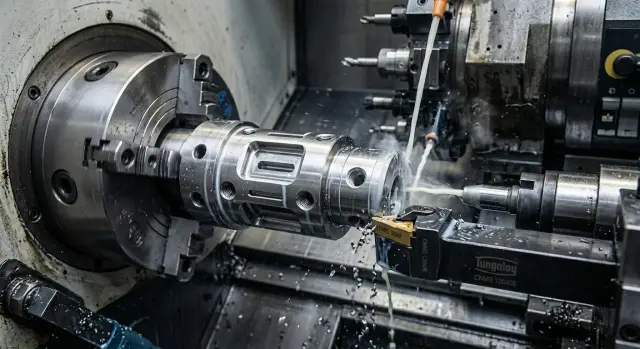
Why the impact appears on exit
When machining a profile with windows and grooves, the tool is not cutting continuous metal, but a section with interruptions. While the cutting edge moves along the body of the part, the load stays more or less even. But at the edge of a window or groove, the tool suddenly loses support, and the cutting force drops almost instantly.
The problem often shows up not at the exact moment of exit, but a little later, when the edge meets the metal again. The tool has already unloaded, sometimes flexed back slightly, and then takes the hit again. This repeated re-entry is what usually ruins the surface.
The usual picture is easy to recognize: first the sound gets sharper, then you can see marks on the part near the interrupted zone, and after that small chips appear on the insert. If the cutting conditions were already near the limit, the chip grows quickly and brings vibration along the whole path.
It is most noticeable on thin parts and blanks with weak clamping. The chuck holds the part, but there is not enough stiffness, and at the moment of re-entry into the metal, the blank itself springs slightly. Then the impact hits not only the cutting edge, but the whole system: the part, the tool holder, and the carriage.
The signs are usually visible right away: the noise becomes sharper near the window or groove, a local scratch or matte spot appears on the surface, and the insert gets a micro-chip on the nose or the front edge.
A simple example is a shaft with a longitudinal groove. The tool moves smoothly along the cylinder, then goes into the empty section and cuts back into the metal at the next edge. The higher the feed and the poorer the clamping, the harsher this contact becomes. If you add a bad trajectory start to that, the impact will repeat at the same point on every pass.
That is why the cause should not be looked for only in speed or feed. Very often the source of the impact is the geometry of the interruption, the place where the pass starts, and how rigidly the part is held.
Where to look first
The most common source of impact is not in the cutting data table, but on the part itself. Look at exactly where the surface is getting damaged: right after the edge of the window, before the groove, or at the tool exit from the cut. The mark almost always points to the place where the tool path and tool geometry did not match the interrupted profile.
First, check the trajectory start point in relation to the window or groove. If the tool starts too close to the interruption, it does not have time to stabilize. The edge alternates between cutting and empty space, then hits the metal again. This kind of entry is often heard as a short dry knock, and a shiny strip or waviness is left on the surface.
Then quickly check four things: where the path starts, what nose radius is on the insert, what feed per revolution is set in the program, and how long the tool overhang is with the part clamped in real conditions.
The pair "nose radius - feed" often gives the answer faster than a long search in the program. If the radius is noticeably larger than the feed, the edge enters the metal with a broad arc. On an interrupted section, that often increases the hit. If the radius is too small, the insert chips more easily at the edge of the window. Do not look at the numbers separately; look at the combination.
Then assess the stiffness of the whole system. An extra 10–15 mm of tool overhang sometimes causes more trouble than a wrong cutting mode. The same applies to workholding: if a thin-walled blank sits loosely in the chuck, the impact on exit seems like a trajectory mistake, although in fact the part itself moves away from the tool.
A good reference point is the location of the first defect. If the surface tears right after leaving the window, the problem is usually the trajectory start and the length of the free section. If the mark continues in an arc after the interruption, the usual culprits are overhang, clamping, or too aggressive feed. This check takes a few minutes and often saves you from changing the insert unnecessarily.
How to choose the trajectory start
If the tool enters work right on the edge of a hole, window, or groove, it takes the hit immediately. Metal is there, then suddenly it is gone, and the insert cannot settle into a steady cut. That is why it is better to shift the start to a solid section where the tool can build load smoothly.
In practice, the effect is simple: the first contact is softer, and the next exit into the interruption does not shake the tool as much. In many cases, this helps more than trying to change the feed or speed right away.
Imagine a shaft with a side window. If you start the pass exactly at the edge of the window, the tool will hit almost immediately. If you move the start 10–20 mm to the left, onto solid metal, the tool first stabilizes and only then approaches the interruption.
A short lead-in is also useful. Do not keep a long approach at working feed all the way to the cutting zone. It is better to move the tool in quickly, then make a short entry section, and only after that switch to the working feed on the main pass.
There is another common mistake: finishing the move right before the next window or groove. At that point, the tool again enters an unstable mode, and the operator later looks for the cause in the insert or holder. It is much calmer to pull the tool out on a solid section and approach the next interruption with a separate move.
Before starting, it helps to do a dry run. Watch the tool path without removing metal: where it starts cutting, where it exits, and whether the start point falls into a dangerous edge. On CNC lathes, it is better to do this check every time you shift the zero point, change the allowance, or adjust the contour.
If the impact becomes quieter after moving the start, but does not disappear, that is already a good sign. It means the direction is right, and the next step is to fine-tune the insert nose radius and the entry into the material.
How the nose radius changes the impact
The insert nose radius affects not only surface quality, but also how the tool survives the exit from the metal at a window or groove. The larger the radius, the longer the contact area. The load is spread more softly, but at the moment of interruption the tool pushes the part harder and gets a more noticeable hit itself if the setup is not rigid enough.
A small radius often behaves more calmly on an interrupted profile. It touches the metal over a smaller area, passes narrow grooves more easily, and catches the edge of the window less on exit. That is why on parts with tight grooves, a small-nose insert often gives a more predictable pass, even if the resulting surface is slightly rougher.
A large radius works differently. It smooths the trace on a solid section better and usually leaves a more even surface. But for that, you need a rigid machine, short overhang, and secure workholding. If the system is soft, a large radius does not absorb the impact; it turns it into vibration and deflection.
You can see this fairly quickly. If you are turning a shaft with a window and a narrow groove, an R0.2 or R0.4 insert often passes that section more calmly than R0.8. On a short, firmly clamped part, R0.8 may cut cleaner if the feed and depth are chosen without overloading.
Feed should always be viewed together with the radius. The same cutting data for different inserts almost never gives the same result. A small radius with a high feed starts biting too sharply and chips the edge on exit. A large radius with a feed that is too low often does not cut, but rubs the surface before contact breaks. If you hear a bang after the window and vibration grows, this pair is the first thing to check.
A simple clue is the wear pattern on the insert. Small chips on the nose mean the impact is already breaking the edge. A bright shine on the nose without proper chips usually points to rubbing, not cutting. In both cases, do not rush to change the whole setup. First try the next radius and adjust the feed.
For these tasks, the winner is usually not the most "finishing" insert, but the one that passes profile interruptions calmly. If the tool hits on exit from the window, a smaller radius often helps faster than simply reducing spindle speed.
How to set up the process step by step
First, mark on the drawing all the places where the tool loses continuous contact with the metal. This includes not only large windows, but also narrow grooves, cross holes, pockets, and sharp transitions. If you miss even one such place, the impact almost always appears unexpectedly, even though the cutting data looks fine on paper.
Then choose the entry and exit points so the tool does not meet the interruption at the most heavily loaded moment. It is usually safer to start the path on a smoother section and remove the tool where there is no window or groove immediately after the cutting line. If the profile allows it, shifting the start by just a few millimeters often removes the sharp hit on exit.
The first trial pass is best done cautiously. Reduce the feed and do not try to reach the calculated cycle time right away. A slow start gives a clear picture: where the impact sound appears, at which point the tool vibrates, and whether the surface mark changes after leaving the window or hole.
After that, do not change everything at once. If you adjust the feed, trajectory start, nose radius, and depth of cut simultaneously, the reason for the improvement will remain unclear. It is much more useful to go step by step: first shift the start, then check the exit, then try a different nose radius if needed.
A good working setup is easy to forget if you do not write it down. After a successful pass, save the simple data: where the trajectory starts, where the tool exits, what feed worked on the trial, and what nose radius was on the insert. For the next part with a similar window or groove, this will save time and remove unnecessary experiments at the machine.
In practice, it looks simple. Suppose a shaft has a cross hole and a narrow groove near the exit zone. The operator marks both interruptions on a sketch, moves the start to a solid section before the hole, makes the first pass with a reduced feed, and listens for where the impact appears. If the impact remains, only one parameter is changed, not the whole set of settings.
In the service practice of machine suppliers such as EAST CNC, it is usually not the complex tricks that help, but a careful sequence of actions. When the interruption map is at hand, the entry point is chosen calmly, and the successful settings are recorded, repeat setup goes much more smoothly.
Example of a part with a window and a groove
The problem is easy to see on a simple bushing. On the outside, it has an annular groove, and in the wall, a cross hole. While the tool moves along solid metal, the pass is quiet. But as soon as the path brings it to the edge of the hole, the tool loses support for a fraction of a second and then cuts back into the material. That is when the impact appears.
On such a part, the old route only looked logical on the screen. The tool ended the pass right at the edge of the window. Because of that, a sharp click was heard on exit, and after several parts a small chip appeared on the edge. The surface near the hole also got worse: a wave remained that is hard to remove with a finishing pass.
What helped was not one big change, but two simple ones. First, the trajectory start was moved to a solid section of the outer diameter. Then the tool entered the cut where the metal carries the load more evenly and approached the hole zone already stabilized. After that, the insert nose radius was reduced by one step. If a more "blunt" nose had been used before, which pushed the material harder, the smaller radius reduced the impact force at exit.
The difference is visible right away. The old path gave a hit at the window edge and noticeable noise. The new start on a solid zone made entry and exit calmer. The smaller nose radius reduced the push and lowered the risk of chipping, and the edge near the hole came out cleaner, without a torn mark.
After the adjustment, the sound became softer almost immediately. The operator can hear that without instruments. On the part, the edge near the window became smoother, and the trace after the pass near the outer groove stopped "shaking." That does not mean a smaller radius is always better. If the part is thin or the feed is too aggressive, another defect can appear. But on an interrupted profile with windows and grooves, this step often works better than simply lowering the speed.
The main takeaway from this example is simple: do not run the tool into the edge of the interruption if you can start and finish the pass on a solid section.
Common mistakes
The most common mistake is simple: the operator places the trajectory start exactly on the boundary of the interruption, where the tool immediately meets empty space and then suddenly returns to metal. That is when the hard impact appears, especially if the part has a window or a narrow groove.
Another mistake is increasing the insert nose radius and not changing the feed. A larger radius sometimes makes the edge calmer, but it also raises the load on entry and exit. If the feed stays the same, the tool starts pushing the metal instead of cutting it, and the impact mark becomes even more noticeable.
Many try to solve everything with one method and simply reduce the spindle speed. That sometimes softens the sound and vibration a little, but it does not remove the cause. If the trajectory start is wrong and the nose radius does not suit the contact width, the impact will remain even at a lower speed.
There is one more costly mistake: after the first pass, impact marks are already visible on the part, but they are written off as random and production continues without checking the trajectory. As a result, the operator loses the insert, produces scrap, and spends more time on re-setup than on a short diagnosis at the beginning.
Quick check before starting
Five minutes of dry checking often saves the insert, the part edge, and the operator’s time. On parts with windows and grooves, the impact usually appears not in the middle of the pass, but at the moment of entry or exit.
Before the first working pass, look not only at the cutting data, but also at the tool path itself. It is important to understand where it cuts in, where it exits, and what lies under the edge at those points.
A short check looks like this:
- set the start and exit where there is solid metal under the tool;
- check the approach and withdrawal so they do not pass through the window or cross the groove tangentially;
- match the insert nose radius to the profile width;
- make a trial pass with a low feed and listen to the sound;
- after the pass, inspect the edge specifically in the exit zone.
That is already enough to quickly rule out gross mistakes. For example, on a part with one window and a narrow groove, the tool may run quietly for almost the whole rotation and then suddenly hit only in one zone. In such a case, the cause is often not the machine or the insert, but the fact that the exit landed on the edge of the cutout.
If after the trial pass the sound became softer and the exit edge stayed clean without tearing, the setup is close to normal. Only after that does it make sense to adjust feed, speed, and depth of cut.
What to do next
If the impact on exit is still there, do not try to remove it with a single feed or speed adjustment. A simpler move often helps: split the pass into two sections. On the first section, the tool removes the main allowance up to the window or groove, and on the second it finishes the problem area calmly with a different entry point or a softer exit.
This approach slightly increases the cycle time, but it removes the most unpleasant contact. For a one-off part, that is almost always a sensible trade-off. For a series, too, if the impact is costing you inserts or creating scrap.
If the part bends noticeably, look for the cause not only in the trajectory. Check the part overhang, the rigidity of the clamping, and the condition of the jaws. Even a correctly chosen start will not save you if a thin part moves away from the tool at the moment it leaves the solid section.
In such cases, a short check helps: reduce the part overhang as much as the operation allows, make sure the clamping is not pulling the blank sideways, remove unnecessary tool overhang, and see exactly where the impact mark appears - right after the window, on the groove, or on both sections.
If you turn the same part regularly, do not leave the setup as "roughly workable." For an interrupted profile, it is better to choose a stable scheme once: a specific tool, nose radius, start point, and pass order. After that, keep it as the standard and change only what truly affects the result. This saves inserts, setup time, and the operator’s nerves.
When the problem is not only in the cutting data, but also in selecting the machine and tooling, it helps to involve people who see the task as a whole. EAST CNC, the official representative of Taizhou Eastern CNC Technology Co., Ltd. in Kazakhstan, works with exactly these tasks: from selecting CNC lathes to commissioning and service maintenance. And on the east-cnc.kz blog, you can find equipment reviews and practical metalworking materials.
FAQ
Why does the impact often appear right after a window or groove?
Because the tool first loses support and then meets the metal again. The harshest contact often happens not in the empty section, but at the moment of re-entry. If the part is clamped loosely or the tool overhang is too long, the impact becomes even stronger.
Where should I start checking if an impact appears on the part?
First, look at the first mark on the part. Then check the trajectory start, tool overhang, workholding, insert nose radius, and feed per revolution. In most cases, the cause is in this combination, not just in spindle speed.
Where is it better to start a pass on an interrupted profile?
Set the start on a solid section, not on the edge of a window or groove. That way the tool has time to enter a stable cut and reaches the interruption more calmly. Often a shift of 10–20 mm is enough to reduce noise and surface marks.
Which insert nose radius is better for profiles with windows and grooves?
A smaller nose radius usually behaves more calmly around windows, grooves, and holes. It pushes the material less and passes interruptions more easily. A larger nose radius leaves a smoother mark on a solid section, but it requires a rigid machine, short overhang, and secure clamping.
Will simply lowering the spindle speed help?
Not always. Lowering spindle speed may soften the sound a little, but it does not remove the root cause if the start is in a bad spot or the insert choice is wrong. First correct the trajectory and check the pair of nose radius and feed, then adjust speed.
How are feed and nose radius connected?
Look at them together. If the radius is large and the feed is too low, the tool may rub the surface before contact breaks. If the radius is small and the feed is too high, the edge is more likely to chip on re-entry. Start with a moderate feed and change one parameter at a time.
What should I do if the part is thin and the impact affects the whole system?
In that case, first remove any extra overhang of the part and the tool. Then check how the chuck holds the blank and whether it pulls it to one side. If the part springs back at the moment it leaves the solid section, even a good trajectory will not give a clean cut.
Is a dry run worth doing before starting?
Yes, it is one of the most useful checks. On a dry run, it is easy to see where the tool starts cutting, where it exits, and whether the path runs into the edge of a window. Such a check is especially important after shifting the zero point, editing the contour, or changing the stock allowance.
When is it better to split the pass into two sections?
Split the pass when one route still gives a harsh contact in the problem area. On the first section, remove the main allowance, and on the second, finish the tricky zone separately with a different entry point or a softer exit. The cycle will be slightly longer, but you will save the insert and the surface.
How do I know the setup is working properly?
A normal setup is heard and seen right away. The sound near the window or groove becomes softer, there is no local scratch or matte patch on the surface, and there are no fresh micro-chips on the insert nose. After that, you can carefully return to the working feed and check the result again.