
Transferring programs to machines over the network without unnecessary risks
Transferring programs to machines over the network needs simple rules: who gets access, where backups are stored, and how edits are recorded without confusion.
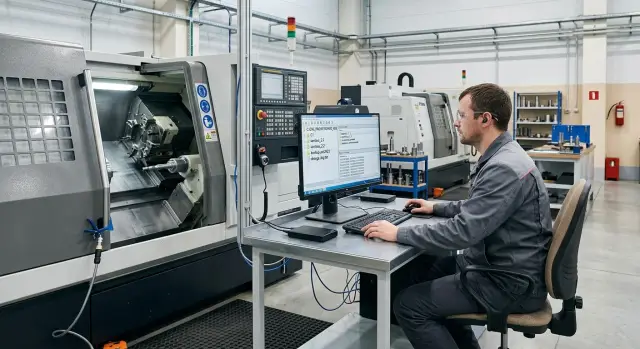
Why confusion often starts here
The problem usually begins even before the program is sent to the machine. In the shop, the same file often lives in several places at once: on the technologist’s computer, in a shared folder, in the machine memory, and in someone’s personal copy with a name like "final_definitely".
Because of that, the program on the computer and the program on the machine quickly stop matching. The technologist changes the feed or the operation order in the office, the operator edits the file at the control after the first part, and the setter takes a version from an old folder because it "worked yesterday." The name stays the same, but the content is already different.
Transferring programs to machines over the network does not create chaos by itself. It simply exposes an old problem very quickly: the company does not have one clear process. If you do not agree on where the master version is kept, who has the right to change it, and who releases the file for production, a dispute at the machine will appear almost immediately.
Usually, the confusion starts for several reasons. The program is edited directly on the machine and the changed file is not returned to the shared folder. New versions are saved under random names. A "similar" file is used for the run without checking the date and author. No one records the reason for the change.
The cost of such a small mistake grows fast. A machine may sit idle for half an hour while the team looks for the right version. Worse, the wrong file may be launched: the part becomes scrap, the tool follows the wrong path, and the shift spends time not on production but on finding the error.
This is especially common in a small shop where one team runs several CNC machines. While everything depends on people remembering things, the setup seems convenient. But once one employee goes on vacation or changes shifts, it is no longer clear which version was the latest and why it was changed at all.
The way people work matters more than the connection scheme itself. If the shop has already agreed on where the source file is stored, who may change it, and how edits are recorded, the network becomes just a convenient transfer tool, not a source of conflict.
Where the extra risks appear
When programs are transferred to machines over the network, the problems usually do not start in the cable or on the server. They appear in day-to-day shift work, when a file is copied, renamed, and edited several times without clear rules.
The most common mistake is simple: the operator runs the wrong version. Files look almost the same, especially when names like val-12.tap, val-12_new.tap, and val-12_final.tap have already become normal. One file is on the machine, another in the shared folder, and a third on the technologist’s computer. The difference may be just one feed or one offset, but the resulting scrap batch is very real.
Editing without recording the reason causes no fewer problems. The technologist changes the program, the setter adjusts it at the machine, and the operator later copies that version back into the folder. A week later nobody remembers which version was approved and which one appeared during the work.
Another risk is the lack of backups, which is often the case. In many shops, CNC program backups are kept on one USB drive or one office computer. A flash drive can be lost easily. A computer may fail or be unavailable at the wrong time. Then people start looking for "that exact file" in the machine memory, old folders, or personal messages.
Confusion also grows quickly in a shared network folder if drafts, working programs, and the archive are not separated. A person opens the directory and sees ten similar names with no hint about what can be launched and what should only be kept for history. In such an environment, even a careful employee can make a mistake.
A simple sign that the process is already starting to fall apart is this: nobody knows for sure which version is current, who last changed the file, and where the copy is that can be restored in five minutes.
Who should get access and what they may do
A common mistake looks like this: everyone gets almost the same rights. As a result, the operator, setter, and technologist work with the same files, and later nobody can say which program is considered current.
A simple rule works well here: there should be fewer write rights than view rights. The fewer people can change the file, the lower the risk that an old or accidentally edited version will go to the machine.
The operator usually only needs to load the approved program to the machine. The setter can view the file, check it for the specific fixture, and report if it needs to be reviewed. The technologist or CNC programmer edits the source file and saves the new version in the working folder. One responsible person should release the final file into production. Even in a small shop, this greatly reduces the number of disputes.
That responsible person does not slow the work down. They simply make the final check before the run. If anyone can release the final version, arguments about who changed what will start very quickly.
It is better to separate view and edit rights by using different folders or accounts. Operators usually only need read access to the archive and upload rights to the machine from the approved-files folder. Source programs and drafts can be shown to them, but they should not be allowed to change them.
It is better not to make on-machine edits a normal practice. It is easy to make a "small temporary fix" at the machine, and a week later nobody understands where the real file is. If such an edit cannot be avoided, the employee should immediately record exactly what was changed, who did it, and why. After that, the same change should be applied to the master copy.
A working setup looks simple: the technologist changes the feed, the responsible person releases version V3, the operator loads only V3, and V2 remains in the archive without overwrite rights. That is already enough to remove unnecessary disputes and keep access to CNC machines under control.
How to organize files without a complex system
Most mistakes are caused not by the network, but by a mess in the folders. The operator takes the wrong file, the technologist edits a copy on their computer, and an old version goes to the machine. If the structure is simple and the same for everyone, these failures become noticeably less common.
A shop does not need a complicated IT setup. Usually, one shared directory on a server or work computer is enough, where the programs ready to run are stored. That is the working point: the operator knows the file must be taken only from there, not from a messenger, a USB drive, or a personal archive.
In practice, it is convenient to divide storage into four parts: a working folder for current programs, an archive for previous versions, a folder for templates, and a folder for already verified programs. The main thing is that the archive should not sit inside the working folder. Otherwise, someone will open an old version and send it to the machine simply because it appeared first.
A file name should answer three questions at once: what part it is, which machine it is for, and what version it is. Good examples look like this:
Val_205_Lathe1_v03_2026-04-12Flanec_A2_VMC850_v05_2026-04-12
Random abbreviations only get in the way. If one employee writes "kr", another writes "korp", and a third writes "korpus_new_final", the order quickly falls apart. It is better to adopt a simple naming rule once and use it for every new file.
Templates and finished programs should also not be mixed together. A template is used to start the job, but it cannot be run on the machine until the technologist adapts it for the specific part. When templates are stored separately, the operator will not confuse a draft with a finished program.
If the folders are named clearly and the file names can be read without decoding them, people make fewer mistakes even when they are in a hurry. For a small shop, that is often enough to remove half the unnecessary risks without expensive systems.
How to set up the transfer step by step
For a small shop, the best approach is a simple one: one network directory on a shared computer or server and one clear path for everyone. Then transferring programs to machines over the network does not turn into a hunt for the latest version across flash drives, desktops, and messages.
First, choose one folder that will become the only exchange point. Do not keep two or three more temporary copies on different computers. When there are several sources, people quickly get confused and launch an old program.
Setup order
- Create three folders: "In Work", "Ready to Run", and "Archive". In the first one, the technologist edits the file; in the second one, only what can be sent to the machine is stored; in the third one, version history is kept.
- Give the technologist the right to create, change, and move files. Leave the supervisor with access to view all folders and the right to move a file into "Ready to Run" after checking it.
- Give the operator read-only access to the "Ready to Run" folder. They do not need to delete, rename, or return files to the working area.
- In the machine or controller settings, specify one download source: the "Ready to Run" folder.
- Set up daily backup of the entire directory, for example after the shift ends.
After setup, test the scheme with one sample file. The technologist places the program in "In Work", the supervisor moves it to "Ready to Run", and the operator opens it on the machine. If at any step the person can take the file from the wrong folder, the rule is not working yet.
A simple guideline is this: during a shift, the operator should only see finished programs, not drafts. If the system ensures that, you have already removed most of the unnecessary risks.
How to keep a change log without extra work
If the operator changes the program right before the run and a week later nobody remembers why, the shop takes on an unnecessary risk. The mistake often appears not in the edit itself, but in the fact that nobody recorded it.
A change log does not need a complicated IT setup. One file next to the CNC program folder is enough, where the team records each edit immediately after it is made. When programs are transferred to machines over the network, this approach pays off quickly: it becomes easier to understand which version was sent to the machine and why it differs from the previous one.
What to record
The record should be minimal, but without vague wording:
- date and time;
- who made the change;
- reason for the change;
- what exactly was changed.
For the last item, it is better to be specific. Not "adjusted the program," but "reduced feed on the finishing pass," "replaced tool T04 with T06," or "changed the offset on the X axis by 0.15 mm." Then the supervisor or setter can see the point right away without extra calls.
The reason should also be short and to the point: "vibration on the part," "tool wear," "new material batch," "size drift." Usually one phrase is enough.
There is no need to delete old records. Even if a new program version is released, the previous line stays in the log. Otherwise, the history disappears, and with it the answer to when the fault first appeared.
It is best to keep the log in the same place as the program files themselves: in the shared network folder, next to the working versions and the archive. Personal notes in a phone, messenger, or paper notebook are almost always lost.
If the shop has five to ten machines, one shared spreadsheet for the area is usually enough, with each entry showing the program number. If there are many programs, it is better to keep a separate log for each part group or machine.
A sample entry might look like this: "12.04, A. Ibraev, program 0417, reduced feed from F0.22 to F0.18, reason - vibration marks on the finished surface." One line, but a lot of value. It immediately shows who changed what and why.
If you make such a log a mandatory part of releasing a new version, the team spends half a minute on the note and greatly reduces confusion.
Example for a small shop
In a small shop with two lathes, you do not need a complex network or a separate IT department. One clear process is enough so that transferring programs to machines over the network does not create extra risk.
Imagine a work area with two machines, one technologist, and a shift supervisor. The technologist prepares a new program, checks it, and saves the file in the "In Work" folder. Until the program is approved, the operator does not see it. That immediately removes most of the confusion.
When the technologist releases version V03, they do not edit the old file in place. They move V03 into the "Ready to Run" folder and give the file a clear name, for example Stanok1_Detal25_V03. Next to it is a short note with the date, the surname, and what exactly was changed. It takes a minute, but later you do not have to remember why the part ran fine yesterday and not today.
Before the shift, the supervisor opens the "Ready to Run" folder and checks the version number against the job. There is no need to search for the program on different computers or flash drives. If the job says V03, the machine should have only V03. If V02 is there, the error is visible before startup.
The operator takes the file from the run folder, machines the first part, and leaves a short note if something seems off: the size drifted, the feed is too aggressive, or the tool change is not going as expected. The operator does not rewrite the program themselves. They record the remark, and the technologist decides whether version V04 is needed.
The backup here is simple too. At the end of the day, the program folder is copied to the archive and also to a separate drive or a second computer. For a small area, that is usually enough. Process matters more than complexity here.
Mistakes that create new problems
Most failures are caused not by the network or the machine, but by small habits in file handling. They seem convenient right up until the first time the operator launches the wrong version and nobody can understand where it came from.
A common mistake is to keep the working program and the archive in the same folder. Then copies like "part_final", "part_final2", and "old" quickly appear. A week later it becomes hard to tell what is used for production and what is kept only for history.
Renaming a file right before launch also creates confusion. The technologist corrected the program, the operator changed the name to match the order number, and then the setter can no longer connect the new file to the source version. If the name changes at the last moment, the change log almost loses its meaning.
Another bad habit is sending a program through a messenger or personal email. A file can easily be sent to the wrong person, the wrong copy can be downloaded, or the conversation can simply be lost. This method offers no proper access control and almost never gives a clear answer to which version is latest.
Problems also appear when different parts are given names that are too similar. Two programs may both be called "housing_01," even though one was made for a different blank or a different machine. Visually the files look alike, and the difference is noticed too late.
There is also a silent problem: after edits, nobody checks whether the backup was saved. While everything is working normally, you do not notice it. But if the new version fails, there is nowhere to roll back, and the old file has to be searched for in flash drives, message threads, and local folders.
Usually, a few rules are enough: the working folder and archive are kept separately, the file name is not changed before launch without a log entry, programs are not sent through personal email or messengers, clear names are used for different parts, and after an edit one person confirms that the backup was created.
In a small shop, this can be managed without a complex IT system. One shared network folder, a separate archive, and a short table log already remove most of the extra risks.
A quick check before starting
Before sending a program to the machine, it is worth spending two minutes on a short check. Problems usually start not because of the network, but because of confusion: who edited the file, which version is current, and where the machine is supposed to take it from.
Check five things:
- the working program has one responsible owner;
- the machine receives the file from only one folder;
- the backup is created on schedule;
- the change log shows the latest edit and its reason;
- the file version matches the launch order.
If even one item does not match, it is better to delay the start by a few minutes. A network mistake disappears just as quickly as the correct file.
In a small shop, this check often solves almost everything. No complex IT system is needed. You need one source of files, clear versions, automatic backups, and a log that the team actually keeps.
What to do next
There is no need to reorganize the whole shop all at once. It is much smarter to take one machine, one part, and one responsible person. That way, it becomes easier to see where the process is convenient and where it breaks down on small details.
First, write the process down on one sheet. You do not need a ten-page procedure. A short instruction is enough: where the master program is kept, who may change the file, how the file reaches the machine, where the backup copy goes, and where edits are recorded.
After that, do a trial transfer on one real example. It is better to choose a part without rare settings and without a hard deadline. Even at this stage, it will become clear whether the access rights are sufficient, whether employees are getting lost in the folders, and whether it is easy to find the right file version.
For the first seven days, it is useful to watch not theory, but real failures. Someone opened the wrong folder, someone saved the file under the old name, someone did not understand which version was approved. That is normal. It is usually after the first week that folder names, naming rules, and access rights should be adjusted.
If people are still getting confused, the scheme is named poorly. Folders should be understandable without explanations. Access rights are also better kept simple: one group of employees changes files, and the rest only take approved versions for work.
It is also helpful to review changes briefly once a week. It takes 10-15 minutes, but it quickly shows where the process is starting to drift again.
If you are updating your equipment fleet at the same time, it is better to think through these rules in advance. EAST CNC, the official representative of Taizhou Eastern CNC Technology Co., Ltd. in Kazakhstan, helps with consultation, selection, delivery, commissioning, and service maintenance of machines. For shops building file transfer and work routines from scratch, it is more convenient to discuss this before launch. The EAST CNC blog on east-cnc.kz is also useful for practical advice on metalworking and organizing work with CNC machines.