
Tool Presetter: Where to Place It and How to Cut Losses
A tool presetter can be placed in the tool room or near the machine. We break down tool routes, the setter’s role, and how to choose a layout without losing extra minutes.
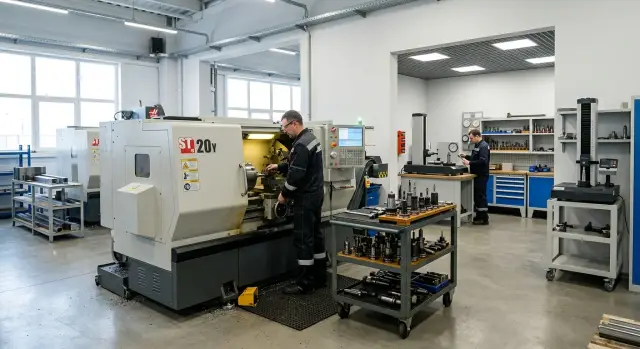
Where minutes are lost during tool preparation
The losses do not start at the spindle, but earlier. One person takes the tool from storage, another looks for the right holder, a third carries the set to the machine, and each spends 3–5 minutes. Individually, that seems minor. Before the first part, these small delays can easily eat up half an hour.
Often the route itself is too long. The tool is taken from the cabinet, moved to measurement, then the person goes back for a missing collet and returns to the machine again. If the presetter is far from the setup area, the setter or assistant spends more time walking than working with their hands.
Extra carrying almost always creates downtime, even when the setup itself goes quickly. The machine is ready, the program is loaded, the workpiece is waiting, but the tool has not arrived yet or has not been checked fully. In the end, the shop loses time in the place where it is rarely counted.
The problem is that these minutes almost never show up in the shift report. The paperwork shows 20 minutes for setup or 15 minutes of downtime. But it does not show that 6 minutes were spent looking for the holder, 4 minutes on the way to the presetter, and another 5 minutes on rechecking after the transfer. On paper, the process looks smooth. In the shop, it jerks.
Before the first part, four things usually take time: the tool was not assembled into a kit in advance, the setter is waiting for a free presetter, the tooling is brought to the machine one item at a time instead of as a set, and after the transfer the overhang or position number is checked again.
Even a very fast setter cannot compensate for a poor tool route. If they do 10 precise actions but cross the shop twice between them, the speed is lost not in the setup itself, but in internal logistics. This is especially obvious at the start of the shift, when several machines are waiting to be started at once.
A simple, clear process looks like this: at any moment, one person understands who is taking the tool, where it is measured, and when the kit reaches the machine fully ready. If at any stage you hear "we’ll find it now," "we’ll bring it over now," or "let’s check it again," the minutes are already gone.
How the tool route depends on shop size
Shop size changes not so much the measurement itself as the path the tool takes between people and workstations. On two machines, an extra 20–30 meters is hardly noticeable. On eight or ten, the same movement quickly turns into queues, waiting, and confusion.
Small shop floor
In a small area, one person often does almost everything: assembles the tool, carries it to the presetter, enters the data, and installs the assembly in the machine. From an organizational point of view, that is not always ideal, but the route is short and easy to understand.
If one or two machines stand nearby, the setter notices an error quickly. They measured the overhang, walked to the machine, saw a mismatch in the offset, and corrected it on the spot. Time losses here are more often caused by switching attention than by the route itself. While one tool is being measured, another machine may be waiting for a different one.
For such an area, a simple rule usually works: the less the tool is handed from person to person, the better. Extra formality only slows things down.
Shop floor with 5–10 machines
On a group of several machines, the picture is different. The setter is already tracking launch order, checking the first part, keeping corrections under control, and helping operators. If they also measure all the tooling themselves, the day is spent not on setup, but on constant movement between machines, the presetter, and the tool storage area.
On such a shop floor, downtime grows quickly. While the setter carries one holder to measurement, another machine is waiting for a tool change, and a third needs the first part checked. The person is busy all day, but the machines still sit longer than they should.
Here, not only the device matters, but also the division of roles. The more machines there are in the group, the more expensive every extra trip with a tool in hand becomes.
When the presetter is placed in the tool room
A presetter is often placed in the tool room when the shop needs all tooling to stay in one place. Holders, inserts, screws, adapters, and tool cards are kept together and do not spread around the shop floor. That noticeably reduces the small chaos that later eats up time in pieces.
This setup has a clear advantage: tools are prepared calmly at a bench, without noise and rush near the machine. The setter or toolroom technician can assemble the kit, check the overhang, enter the dimensions into the card, and send fully prepared tooling to the shop floor. If several machines are in use, it is easier to maintain overall order.
This option is especially convenient when tools are assembled in batches in advance. For example, sets for three or four machines are prepared for a shift for recurring parts. In this kind of work, a central station is often more convenient than a separate presetter for each machine.
But time does not disappear. It just moves into the tool route. The setter goes to the tool room, waits for a free station, returns to the machine, and then goes back again if a replacement is urgently needed or if a deviation in length is found after the first part. One such round seems trivial. Over a shift, it becomes a noticeable pause.
It is especially inconvenient when work does not go according to plan. An insert breaks, the material changes, the size shifts after the first part, and the tool makes the same round through the tool room again. The machine is standing still, while the setter is occupied not with setup, but with walking.
A tool room setup usually works well if the range repeats, urgent replacements are rare, tooling is assembled in advance, and the distance to the machines is short. If the job changes often during the shift, a central station starts to slow the process down. There is more order in the tool room, but less flexibility at the machine.
When the presetter is placed next to the machine
This option is chosen where work changes frequently during the shift. The setter does not go to the tool room and immediately checks what is needed for the current operation: overhang, correction, insert condition, runout after a quick change. If a tool breaks or the size shifts after the first part, the issue is solved in a few minutes, without an extra trip across the shop.
A presetter near the machine is especially convenient for small batches. One part is running today, another is up an hour later, and then an urgent insert comes in for a few pieces. In this setup, there is no point in building a queue in a shared tool room. The setter takes the holder, checks it on the spot, installs it in the turret, and sees the result immediately on the test part.
There is another advantage: it is easier to confirm the overhang for the actual job. On the setup sheet, one value may look fine, but at the machine you can quickly see whether the rigidity is enough, whether a neighboring tool interferes, and whether the machining zone is easy to reach. For frequent changeovers, this is often faster than any centralized scheme.
But speed has a cost. Near the machine, it is harder to keep the area clean and the storage organized. Chips, coolant, dust, and haste quickly turn a local station into a place where holders are not in the right spots and the measuring probe needs extra wiping. If you do not set up a simple order, the setter will start losing the same minutes they just saved.
There is another problem: a local station works only for one machine or a small group. While that machine runs without stopping, the presetter nearby may sit idle. At the same time, a neighboring machine is waiting for checked tooling. In a balanced shop, that is manageable. In a shop with different urgent orders, the imbalance is obvious right away.
This option is usually best where there are many changeovers, short runs, and the setter is assigned to a specific machine or a small group. For a small shop floor, it is often the fastest choice. But without discipline, it quickly turns into a mess.
What changes in the setter's work
On a small shop floor, the setter's work is usually direct and fast. If there are one or two machines in operation, they take the tool themselves, check it on the presetter, install it in the turret or magazine, and immediately see the result at the machine. The route is short, there is almost no need to hand the tool to another person, and small mistakes like the wrong overhang, a mixed-up offset, or a worn insert are caught right away.
On a shop floor with 5–10 machines, the setter has a different job. They need to keep the setup sequence under control, check the first part, watch the corrections, and help operators. If they also handle all the pre-assembly and measurement themselves, their workday breaks into dozens of small trips.
That is why, on a larger shop floor, it makes sense to separate what affects the current start-up from what can be prepared in advance. Tool pre-assembly, labeling, measurement of standard positions, and order-specific kitting are often better handled by a toolroom technician or kit preparer. Then the setter receives a ready set, quickly checks the critical dimensions, and installs the tool in the machine.
A simple handoff rule helps a lot here. On the tag, in the card, or in a shared table, it should be clear which machine or order the tool was assembled for, what the kit includes, the offset number, who measured it, and when. Without this, people start checking the same thing twice. One person does not trust someone else's measurement, the other does not understand why the tooling was returned, and time is wasted.
In short, on a small shop floor the setter benefits from a short route. On a medium or large one, they benefit from a clear division of roles.
How to choose the right setup for your shop
The presetter location should be chosen based on lost minutes, not habit. In one shop, it is more convenient to keep it in the tool room; in another, near the machine. The difference is usually visible not by feeling, but by how many times during a shift people walk, wait, and measure the tool again.
First, count the normal load per shift. How many times do you change tools, how often do you adjust offsets, how many changes are planned, and how many are urgent because of wear, chipping, or a part change? If urgent changes are frequent, one remote station often starts to slow things down.
Then draw the actual tool route. Not in words, but on paper: cabinet, storage, presetter, cart, machine, spindle. Mark not only the meters, but also the minutes. Sometimes a 25-meter route takes 6–8 minutes because the setter is waiting for a cart, the operator is clearing space, and the presetter is busy.
Next, divide all work into two groups. Planned preparation usually works better on a stable route, where tools are assembled and measured in advance. Urgent replacements need a shorter path. For them, a presetter near the machine, or at least inside the shop floor, often creates fewer losses.
There are a few questions that quickly clarify the situation. How many times per shift does a tool go the full route from storage to installation? Where do people wait most often: at the presetter, at the machine, or at storage? Which operations can be prepared in advance, and which ones always end up in emergency mode? Who performs the measurement and enters the offset: the setter, the operator, or one shared specialist? And how many minutes of downtime does each urgent replacement create?
After this review, the decision is usually easier. If the numbers do not improve in a 1–2 week test, the setup is not a fit, even if it looks neat on paper.
Example for a shop floor with six machines
Imagine a shop floor: six machines, two shifts, small and medium batches. The range changes often, so tools move almost nonstop. In this setup, losses are easier to see not in the monthly report, but in the first two hours of the shift.
If the presetter is in the tool room, the morning often starts the same way. Setters and operators wait in line, someone drives a cart with holders, and someone returns because one position is missing from the card. The measurement itself takes a few minutes, but the travel, waiting, and repeated trips can easily add another 15–25 minutes before the first part on each start-up.
The option with a presetter by one machine is not ideal either. The tool is nearby, the setter does not run across the whole shop, but on a six-machine floor an imbalance appears quickly: people gather around "their" machine, neighboring ones wait, and the aisle between machines turns into a constant route for carts and cassettes.
A shared station near this machine group usually works more smoothly. Especially if part of the tooling is assembled in advance into cassettes for standard batches. Then the setter does not spend the morning assembling everything from scratch, but takes a ready kit, quickly checks the overhangs, and passes it to the right machine. The flow becomes calmer: less rush, fewer random stops, and fewer arguments about who goes to measurement first.
For such a shop floor, it is useful to watch four numbers: how many minutes pass from the start of the shift to the first good part, how many urgent tool trips happen per shift, how many times the setter interrupts one setup for another machine, and how many machines are waiting for the same station at once.
If the shared station is placed near the machine group, these indicators usually even out. The first part comes out sooner, and there are fewer urgent trips. For a six-machine shop floor, this is often more practical than the extremes: one remote tool room for everyone or one presetter tied to a single machine.
Mistakes that add downtime
Most often, downtime grows not because of one big failure, but because of small decisions that first seem convenient. Sometimes the presetter is placed wherever there happened to be free space. On the plan, everything looks fine. In practice, the setter and operator start walking extra meters, waiting for each other, and moving tools across the entire shop.
If the shop runs at a tight pace and changes continue all day, that small detail quickly turns into lost hours. Suppose one unplanned change takes 4–5 extra minutes because of the longer route. If there are eight such changes in a shift, the losses are no longer small.
The same mistakes usually add time. The tool is measured without a shared record of the holder, overhang, and purpose, so the same assembly gets different labels. Ready kits are stored far from the machine that needs the replacement, and although the tooling is technically ready, it arrives too late. Urgent changes and planned preparation are done at the same station, so one unexpected task breaks the preparation of the next batch. And finally, people count only the cost of the presetter and the furniture around it, while the losses from spindle downtime and waiting people are not counted at all.
There is also a mistake that goes unnoticed for a long time. If there is no single record for assemblies, every experienced setter keeps the scheme in their head. While the same shift is working, the system seems to hold together. As soon as someone different comes in, the searching, questions, and repeated measurements begin.
For a small shop, that is already annoying. For a large shop floor, it is a systemic loss.
Quick check before deciding
If the argument about where to place the presetter has been going on for weeks, look at one ordinary workday. The answer is visible in how the tool moves through the shop and how many times people wait for one another. A good setup removes extra steps instead of just moving the measuring point.
Check five simple things. Does the assembled tool reach the machine on the first try, or is it often carried back because of missing data or a wrong assembly? Does the setter have to wait in line for measurement when the machine is already ready to start? Can the operator find the right kit immediately thanks to clear labeling? Can you do an urgent replacement in a few minutes from a single record, or do you check the paper, the control, and the machine memory every time? And do you see the actual time from tool request to installation in the spindle, not just the overall downtime figure?
If the answer is no to three of these questions, the problem is usually not the device itself. More often, the tool route is broken and the roles are mixed up.
There is a simple test. Take one standard setup and time four points: request, assembly, measurement, and installation. If you see returns, waiting at the presetter, or searching for a ready holder between these steps, you already know where the minutes are being lost. Sometimes moving the presetter really solves the issue. Sometimes clear labeling, a shared data table, and one pick-up point for kits is enough.
A good sign is simple: the operator quickly takes the ready tool, the setter does not stand in line before start-up, and during an urgent change nobody argues about the numbers.
What to do next
Do not start with buying a presetter. First, check how your tools move through the shop. On paper, this can be seen in half an hour, but the extra loops later take hours every month.
Take one standard order, preferably a repeating one. Draw the route of the tool from the cabinet or tool room to the machine and back. Note who goes and how many times, where they wait, where they look for the holder, and where they check the overhang and correction again.
After that, four steps are enough: separately measure planned preparation and urgent replacements, time not only the presetter itself but also the travel and waiting, compare the same order in two modes - when tools are prepared in advance and when the issue is solved during machine operation - and record the result across several shifts, not just one good day.
Usually it then becomes clear what slows the shop down most. Sometimes the issue is not the presetter itself, but the long tool route. Sometimes the problem is that the setter runs between machines and keeps the whole scheme in their head. On a small shop floor, that is still tolerable. On a group of several machines, that organization quickly creates downtime.
Do not move the machines, cabinets, and storage units in advance. First agree on the presetter location, the aisles, holder storage, and the point where the setter receives the prepared kit. Otherwise, everything will have to be moved again later.
If you are choosing a machine, workshop layout, or service scheme right now, it is better to check these questions already at the selection stage. EAST CNC and the east-cnc.kz blog pay attention to this not only at the equipment level, but also at the level of the entire tool route: from selection and delivery to commissioning and ongoing service. In practice, that is more useful than arguing only about where to place one device.
FAQ
Where is it better to place a presetter — in the tool room or near the machine?
Look at lost minutes, not habit. If you have many urgent replacements, short runs, and frequent changeovers, place the presetter near the machine or inside the production area. If you prepare standard kits in advance and rarely need unscheduled tool changes, it is more convenient to keep the station in the tool room.
When is a presetter in the tool room really convenient?
This option works well when the job follows a clear plan. The toolroom technician assembles the kit calmly, measures the overhang, labels the assembly, and sends finished tooling to the shop floor. It is easier to keep things organized this way if the distance to the machines is short and urgent replacements are rare.
When does a presetter by the machine bring the most benefit?
A presetter next to the machine saves time when parts change during the shift. The setter quickly checks the overhang, changes the tool, and immediately sees the result on the first part. This setup is especially useful for small batches and frequent unplanned changes.
What usually eats up time before the first part?
Most of the time is lost not in the measurement itself, but in searching and moving. People look for the holder, wait for the presetter to become free, carry items one by one, and then recheck the overhang or offset number after the move. Before the first part, these small delays easily add up to a noticeable pause.
Do you need a separate person to prepare tools on a multi-machine shop floor?
On one or two machines, the setter often handles everything alone because the route is short. On a group of 5–10 machines, it is better to divide the roles: one person prepares and measures the standard positions in advance, while the setter takes a ready kit and focuses on startup. Otherwise, the setter spends the whole day walking between machines instead of setting them up.
How can you quickly tell that the tool route is poorly organized?
Take one typical setup and time four points: request, assembly, measurement, and installation in the machine. If you see returns, waiting at the presetter, or searches for a ready holder between these steps, the route is poor. A paper report often hides this, but a stopwatch shows it right away.
What should you do first if it is too early to move the presetter?
Start with order in the data, not with moving furniture. Create clear labeling, keep one record for each assembly, and issue the kit from one place. Often that is enough to remove unnecessary returns and double checks without major expense.
Which setup is best for a workshop with six machines?
For six machines, a shared station near that group usually works better than the extreme options. A remote tool room creates extra walking, while a station next to one machine pulls people to a single spot. A shared presetter inside the area smooths the flow and reduces the morning queue.
What should definitely be listed on a tool tag or card?
Keep the minimum information people need to avoid checking everything again. On the tag or in the card, include the machine or job, the assembly composition, the offset number, who measured the tool, and when. Then the operator and the setter immediately understand what they have in hand.
How can you test a new setup and avoid making a mistake?
Run the test for at least a week and compare numbers, not impressions. Look at how many minutes pass until the first good part, how many urgent trips for tools happen per shift, and how many machines wait for the same station at once. If the numbers do not go down, the setup is not right for you.