
Tool-prep post: when your shop already needs it
Open a tool-prep post not by habit but by numbers. We cover signs in utilization, downtime and setup errors so you know when to start.
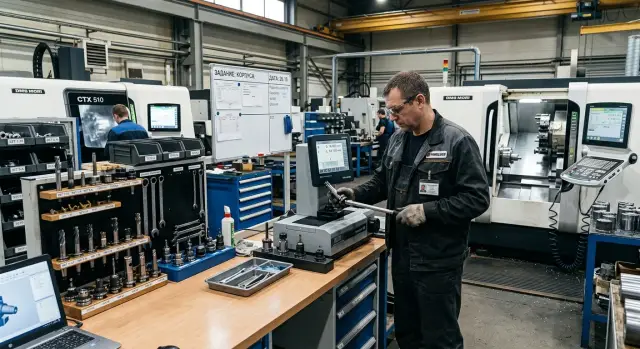
Why machines wait longer than it seems
Time losses rarely look like one big stoppage. More often they are small pauses stretched across the day. A machine may appear to run almost continuously, but the spindle is silent for 5–15 minutes too often.
One common reason is simple: the setup person assembles the tool right at the machine. They search for the right holder, select the insert, check the collet, verify the arbor. All that time the equipment sits waiting.
The operator also falls out of rhythm. They need the next tool assembly but lack a holder, insert, adapter or collet. Short trips to the cabinet, the area stockroom or the neighboring machine begin. Each seems trivial alone. Over a shift these add up to a noticeable chunk of time.
On CNC lathes this is especially visible with frequent changeovers. Measuring stickout, checking tool length and small adjustments happen while the spindle is not cutting metal. Formally this is part of setup. In financial terms it is machine downtime.
The problem worsens when the job changes several times a day. Batch changes fragment time into short stops that are barely visible in reports. Nobody writes: "the machine was idle for 7 minutes because they were looking for the insert." But lost hours are built from such pauses.
Shops usually notice only big failures: a breakdown, missing material, emergency stops. Small waits quickly become normal. That is why equipment utilization looks better on paper than in practice.
Simple example. If a machine loses 10 minutes for four changeovers per shift, that’s 40 minutes without cutting. If there are five such machines, the shop loses over three hours of machine time per day.
So a tool-prep post is not needed when the shop is already chaotic. It’s needed earlier—when preparation increasingly happens at the machine, not away from it. Then waiting ceases to be accidental and becomes a constant loss.
What load signals reveal
The first sign is not in the report but in the pauses between batches. If a machine sits 20–30 minutes after the last part while the actual tool change takes 8–10 minutes, time is lost to waiting for preparation. That means some operations should be moved to a separate tool-prep post.
A second sign is easy to spot where one setup person runs several CNC machines. They constantly walk between machines, assemble arbors on the go, look for missing tools, recheck stickout and offsets. While they are busy at one machine, the others wait. On a utilization chart the load may look acceptable, but in reality the spindle is too often silent.
A third sign appears with rush orders. As soon as an urgent batch cuts into the plan, the normal flow breaks: tools are pulled from prepared kits, order is changed, setups are moved, and half the shift is spent restoring everything. If this repeats weekly, the current scheme can’t handle real load.
There is another quiet but costly sign. The evening shift doesn’t finish setups and leaves part of the work for the morning. Formally the machine is ready to start, but the operator waits for assembly, a measurement or a turret position change. The first part of the shift is spent catching up, not producing.
If the shop recognizes itself in at least two of these situations, the issue is not the number of machines. It is how preparation is organized. In that mode a separate post no longer seems redundant; it clears the bottlenecks where the shop loses hours every day.
Where the shop loses time every day
Most time is lost not to cutting itself but to small actions around it. They are nearly invisible individually, but between a ready machine and the first part there is often a long chain of extra minutes.
A typical picture: tools are not stored in one place but across cabinets, drawers and carts. The setup person looks for a holder, then an insert, then remembers a collet was left at the neighboring machine. The CNC could already be running, but it waits.
A lot of time is spent on repeat measurements. A kit was assembled earlier, but nobody trusts the data. So tools are measured again, stickout is verified, numbers are rewritten and only then the kit is carried to the machine. If this happens several times a day, the lost time becomes a noticeable part of the shift.
The same happens with offsets. When offsets are entered on the fly, people almost always come back to recheck. One check, then a doubt, then a paper lookup, then calling another person. The error may never occur, but time is gone.
Clutter quickly accumulates near the machine: old holders, previous assemblies, notes, empty insert boxes. Because of this the right kit is harder to find, positions are confused more often and clearing up after setup takes longer. Disorder rarely looks like a serious problem, but it steals minutes each day.
On one start it’s easy to lose 5–10 minutes searching for tools and fixtures, another 5–8 minutes on repeat measuring, 3–7 minutes on double-checking offsets and a few more minutes at the machine due to extra holders and papers. With 4–5 changeovers per shift that’s already 40 minutes or more. With several machines the sum grows fast.
At that point the tool-prep post stops being a nice-to-have. It becomes the normal way to remove daily losses.
Which setup mistakes repeat
Repeated mistakes rarely look catastrophic alone. But they eat a shift in pieces: 7 minutes here, 12 minutes there, then another failed first run.
A common confusion is between stickout and tool length. The setup person takes an assembly similar to yesterday’s, mounts it in the turret or magazine and gets a different result in stiffness and contact point. The machine then starts the first part with extra checking, a test cut or manual adjustment.
Often they fit a holder that is technically compatible but performs poorly in the operation. It can be secured, but gives weak access, interferes with neighboring positions or doesn’t support the required cutting mode. On CNC lathes that quickly leads to vibration, surface marks and extra insert wear.
Another typical mistake is replacing an insert without updating offsets. In a rush, someone changes the cutting part and assumes geometry stayed the same. The first part goes out of size and the next one has to be rescued by manual trimming. If this happens several times a week, the problem is in the work routine, not a single worker.
Rushing before the first run damages tools more often than a complex operation does. The setup person skips a dry run, doesn’t check feed, overlooks clamping allowance. One mistake leads to a new tool, machine downtime, rechecking the program and a stressful handover.
Worst is when each shift assembles tools in its own way. On paper the process is identical, but in practice dimensions float, setup times vary and every start feels like the first time.
For shops with short runs and frequent changeovers this is especially noticeable. If tools are prepared in advance, labeled and checked by one rule, shifts work smoother and argue less about who "installed it wrong." A separate tool-prep post removes this randomness.
When a separate post already pays off
A separate post is needed not when the shop "feels crowded," but when machine downtime costs more than a prep workstation. This becomes clear quickly if you measure minutes and money, not impressions.
First measure how long each machine waits for tools during a typical shift. Look not only at big stops but at small pauses of 5–10 minutes. Those are the ones that usually vanish in reports.
Then break that waiting down by cause. Time usually goes to three things: assembling tools and fixtures, measuring and entering offsets, and searching for a holder, collet, insert or key. Then it becomes clear where the real problem is. In one shop the delay is in measuring, in another it’s in endless searching near the machine.
Next multiply downtime by the machine's hourly cost. If a CNC lathe costs the shop 25,000 tenge per hour, and it waits 35 minutes for tools in a shift, that’s over 14,000 tenge lost per day on one machine. With three machines the sum becomes noticeable quickly.
But the calculation doesn’t stop there. Add things often ignored: scrap after rushed setup, broken tools, repeat measuring, rework after incorrect assembly. Even 2–3 such cases a month change the picture significantly.
A practical view: if the tool-prep post removes at least 1–1.5 hours of combined downtime across a group of machines per shift, it often pays off in the first months. This is most visible in shops with short runs where CNC setups are frequent and changeovers cost a lot of time.
Compare monthly losses to the cost of a workstation. Usually this includes a workbench, cabinet or rack, measuring tools, holders, labeling and sometimes a dedicated person or part of one person’s time. If waiting and error losses exceed these costs, the decision is clear.
Example: area with short runs
Take a typical metalworking area with four CNC lathes where batches change several times per shift. Parts vary, tools vary, and the setup person rarely leaves the machines: at one they assemble an arbor, at another check stickout, at a third enter an offset, at the fourth wait for a control measurement.
The issue is not that people are slow. The workflow drags time down. While the setup person matches and assembles a kit at the machine, equipment sits idle. By mid-shift a familiar picture appears: a queue at the measuring device, offsets entered in haste, first run delayed another 10–15 minutes and the next batch already waits.
On such an area a tool-prep post is often needed sooner than expected. Start small with minimal investment. For a week divide tasks: one person preps tools, assembles fixtures, measures positions and hands over a ready kit; the other focuses on machine start-up and the first good part.
After this split, look at numbers rather than impressions: how many minutes machines wait between batches, how often the setup person is pulled into assembly and measuring, how many offsets are entered in haste at the machine and how many first-part scraps occur.
If before the split each changeover took 35–40 minutes and after it takes 20–25, the effect is immediate. On four machines even a 10-minute saving per changeover quickly adds up to hours. If there are 8–10 such transitions per shift, the area gains significant time without buying new equipment.
Another sign is scrap at batch start. When one person assembles, measures and enters offsets while rushing to return the machine to work, setup errors repeat more often. After dividing tasks these mistakes are easier to catch before the run: wrong insert, loose holder, incorrect offset entered.
If downtime falls for several weeks and first-part scrap does not increase, a separate post stops looking redundant. It becomes a normal workstation that removes bottlenecks from the area.
How to launch a post without major rearrangement
Don’t build a post for the whole shop at once. Start with an area where changeovers happen most often and hit production hardest. Usually this is the short-run zone where CNC machines often wait for someone to assemble tools, check stickout and find fixtures.
Then allocate one clear spot. Not the corner "where there was space," but a work point with three simple functions: tools are assembled here, measured here, and stored here until handed to the machine. If assembly happens on one table, measurement is at the far end of the shop and cassettes lie with different people, the post won’t work even with good staff.
Fix the routine simply and without long instructions. A short scheme is enough: assemble the tool, measure it, label it, hand over the ready kit. When this routine isn’t defined, everyone does it their way and the same setup mistakes reappear.
Simple role separation works well. One person per shift is responsible for kit readiness. The setup person does not search around the shop but receives a preassembled kit. All incidents are logged briefly and disputed cases are reviewed the same day while details are fresh.
The log shouldn’t be complicated. A few lines suffice: which machine waited, what was missing, who noticed the issue and how many minutes were lost. After a week you’ll see recurring losses. After two weeks it’s clear whether it’s random or systemic.
Run a pilot for 2–4 weeks. That’s enough to see numbers without guessing. Watch four indicators: average changeover time before and after, minutes machines wait for a kit, how many errors were found before feeding the kit to the machine, and how often the setup person had to fix a kit at the equipment.
If after the pilot machines wait less and setup errors drop by 20–30% or more, the post already provides tangible benefit. Then expand it calmly to the neighboring area.
What is often done poorly
A common mistake is placing the post where spare space was found. If it’s at the other end of the shop people keep running between the machine, the holder cabinet and the measuring spot. On paper the post exists, but the machine still waits. If an operator spends 6–8 minutes just walking back and forth, any benefit disappears.
The other extreme is placing the post next to machines without thinking about aisles, material delivery and measurement queues. Carts block paths, setup people crowd one device and tool prep happens in bursts. Choose the spot based on real movement of people and fixtures during the shift, not on an empty corner.
Another frequent mistake is failing to split roles. One person searches for a tool, assembles an arbor, measures, enters offsets and tries to start the machine all at once. In short runs this is especially visible: while they prepare, equipment stands. The shop may think it needs more people, while in fact it needs better order.
Messy storage hits just as hard. Without labels, fixed places and simple accounting, every changeover starts with a hunt. One person takes a similar arbor, another doesn’t see that an insert is worn, a third rebuilds the kit because the old one wasn’t returned. That creates constant small losses.
Different approaches across shifts cause many problems. One shift measures by one rule, another by a different routine. Someone records stickout on a card, another keeps notes in a notebook, a third relies on memory. The same setup then gives different outcomes: more time spent on fine adjustments, extra offsets and repeated sizing mistakes.
A too-formal post is also a mistake. They place a table, a device and a cabinet but don’t analyze part flow, batch sizes and shift patterns. If there’s one long series in daytime and three small jobs in the evening, the post load will vary. A good scheme starts with a simple calculation: how many tool kits must be prepared per shift without rush or queue.
Quick check before the decision
The need is usually visible not from one big stop but from losses that repeat daily. If a machine is ready but people still search for a tool, verify offsets or finish assembly, the problem is organizational, not a lack of machine hours.
Check the area with five simple questions:
- Is a machine retooled more than once per shift?
- Does the operator almost every day wait for a tool kit or offset data?
- Does the setup person spend a noticeable part of the shift searching, selecting and assembling rather than on actual setup?
- Do the same setup mistakes repeat on the same operations?
- In short runs do deadlines constantly slip?
If at least three answers are "yes," consider the tool-prep post seriously. If four or five are "yes," you need it now.
More than one changeover per shift can be tolerated if tools are preassembled and data verified. But in practice each such change easily adds 15–30 minutes of downtime. A week accumulates hours even though machine utilization looks normal on paper.
Pay attention to repeats. If people keep confusing stickout, tool position, offsets or mounting order on the same operation, it’s not random. That means preparation is done on the fly at the machine where time is always short.
Short runs are hit hardest. In the morning the machine completed one batch, after lunch it waits for the next, and by evening the area is behind plan—not because of cutting but because of the rush around CNC setup.
What to do next
Don’t start by rearranging the whole shop. Take one area where changeovers are most frequent and, for a week, count losses in minutes. You need simple numbers: how long it takes to select a tool, search for an arbor, check stickout, replace an insert, fetch missing items and restart after an error.
Usually within a few days you see where the shift goes. If machines wait 15–20 minutes several times a day for tools, that’s not trivial. In a week that time adds up to another part batch or relieves setup workload.
Then fix roles. As long as the same people prepare, check and start machines in one flow, downtimes will return. Even a temporary division of tasks for 2–4 weeks quickly shows whether a separate post helps that area.
After the pilot compare two things: how many minutes machines wait less and how many errors were caught before starting. If the difference is clear, the decision no longer needs long debates.
If the check shows the issue isn’t only organization but limitations of the machines themselves, consult EAST CNC materials. The company works with CNC lathes for metalworking and helps with selection, commissioning and service, so that discussion is useful when you need to separate process problems from machine limits.
A good tool-prep post doesn’t make the shop perfect. It simply returns working time to the machines. And that is usually enough for the area to stop living in constant rush.
FAQ
How do I know a tool-prep post is already needed?
Look for recurring pauses between batches. If a machine often waits for tool assembly, measurement, a collet or an offset value instead of cutting metal, a tool-prep post is already needed. In practice this is visible earlier than reports: the spindle is silent for 5–15 minutes several times per shift.
How much downtime counts as a problem?
A rule of thumb: if one machine accumulates about 30–40 minutes of waiting for tools per shift, that is a noticeable loss. When there are several such machines, the shop loses hours every day even if no single long stoppage is visible.
Does it make sense to have such a post in a small area?
Yes, it can make sense. If two or three machines are frequently retooled, even saving 10 minutes per changeover on each machine quickly gives a tangible result. The point is not the shop size, but how much time people spend at the machine doing things that could be prepared in advance.
Do you need a separate employee for the post?
Not always. Start by splitting tasks within the shift: one person prepares and measures the kit, another runs the machine. If waiting between batches decreases after that, decide whether you need a dedicated person or only part of someone’s time.
What do you need to start the post in the simplest form?
A basic set is enough: a workbench, storage area, tool measuring equipment, labeling and clear places for holders, collets and inserts. If people still run around the shop for every little thing, the post won’t bring real benefits.
Where is the best place to locate the post in the shop?
Place the post where the walk to the machines is short and without unnecessary back-and-forth. Don’t hide it in a remote corner, and don’t place it so it blocks walkways, material delivery or the measuring station.
How do I validate the idea without major rework?
Run a 2–4 week pilot on one area. Count how many minutes machines wait for a kit, how often a setup person is distracted by assembling at the machine, and how many errors are caught before the first run. These numbers quickly show whether the post helps.
Which mistakes does the post most often reduce?
It mostly removes confusion about tool length, tool holders and offsets. People stop assembling on the fly, less often grab a similar but wrong holder, and start the first part more calmly. This reduces start-of-batch scrap and the need for frantic manual adjustments.
Is a tool-prep post needed only for large series?
The effect is most noticeable there. When batches change several times per shift, each setup costs minutes for searching, assembly and checking. In short runs those minutes quickly add up to lost hours.
What metrics should I monitor after launching the post?
Compare retooling time before and after the post, the machine waiting time between batches, and the number of fixes made at the machine. Also watch first-part scrap and how often shifts return to the same offsets. If these indicators decline for several weeks in a row, the post works.
What should I do next?
If machines are ready to run but people still search for tools, check offsets or finish assembly, the issue is how preparation is organized, not a lack of running hours. Answer the five quick checks in the article and, if three or more are yes, take the post seriously.