
Tool clamping force in the spindle: when it is too low
Tool clamping force in the spindle affects runout, surface finish, and cutter life. We look at the signs, the checks, and what to do.
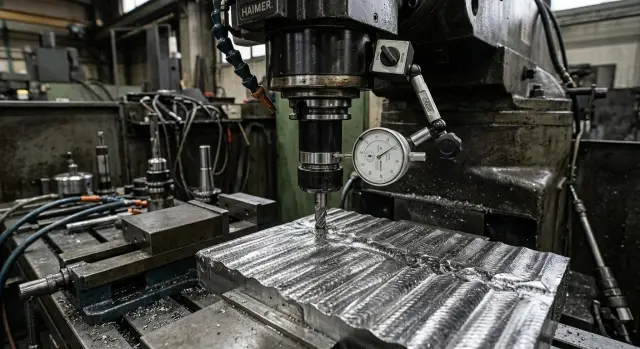
What happens when the tool is held too loosely
When the tool clamping force in the spindle drops, it rarely looks like a sudden failure. It usually starts with small shifts that are almost invisible at first. The tool no longer sits in the spindle as rigidly as it should, and that quickly shows up under load.
On a heavy cut, the cutter starts to hum. The sound gets lower, the cutting becomes uneven, and it feels as if the tool is pulling to one side. The machine is still running, but the old stability is gone.
Even if the holder was installed carefully, weak tool clamping often adds extra holder runout. On an indicator, this may look like only a small deviation, but in cutting the difference grows quickly. With a long overhang or wide milling, it becomes obvious right away.
Then the part starts to suffer. Instead of a smooth surface, you get waves, marks, and shiny stripes. The cutter alternately bites deeper and then releases the material a little. By the sound and the surface mark, this is usually visible before the size changes.
Cutter service life also drops fast. The cutting edge works with impacts instead of a steady load, so the tool dulls earlier even at a familiar setting. Yesterday the cutter handled a batch without trouble, and today the operator is already constantly adjusting feed and speed.
In the shop, it usually looks very typical. During rough machining of a steel part, the first few minutes go fine, then a hum appears, stripes show up on the wall, and after removing the cutter you can see that the edge wore out faster than usual. At that point, people often look for the cause in feed, material, or the cutter itself, even though the problem is in the clamping.
For heavy milling, this is especially unpleasant. The higher the metal removal, the more weak tool clamping affects accuracy, surface finish, and tooling costs. This kind of symptom should be treated as an early signal to check the spindle unit.
How weak clamping affects cutting
The tool clamping force in the spindle affects cutting more than it seems. As long as the cutter is moving easily, the problem may barely show up. But during entry, heavy feed, and direction changes, the load changes in jerks, and weak clamping no longer holds the holder properly.
First, a micro-shift appears in the taper. It may be very small, but on the cutting edge it already turns into extra holder runout. Even a few microns change how the teeth enter the metal: one tooth cuts deeper, another barely rubs, and a third gets a shock.
Under load
Because of that, the cutter removes metal unevenly. The chip varies from thicker to thinner, the sound fluctuates, and the machine starts to run in a jerky way. In a rigid setting, you can hear this almost immediately: a steady noise turns into a hum, short knocks, or a whistle.
The mark on the part also changes. Instead of a smooth surface, you get stripes, a repeating pitch, matte spots, or a wave after the pass. The operator often first blames the cutter or the cutting mode, even though the root cause is in the clamping unit.
If the holder moves slightly in the spindle, the load on the edge becomes impact-like. The edge heats up faster, loses sharpness, and starts to chip. That is why cutter service life does not fall gradually but sharply: yesterday the tool worked fine, and today it is already leaving a rough finish and needs replacement.
What you see in operation
The signs are usually the same: holder runout increases after installing a good tool, the surface loses its even pattern, chips appear on heavy passes, the cutting zone gets hotter than usual, and identical cutters last for different amounts of time in the same setting.
On heavy machining centers, especially with high steel removal, this connection is even more noticeable. If the machine itself is rigid enough but the surface finish still drifts, it is worth checking not only the cutter and holder, but also the clamping in the spindle.
Weak tool clamping rarely breaks the process immediately. More often, it slowly pushes cutting into instability: first noise, then runout, then overheating and chipping. The heavier the milling, the faster this chain ends with scrap or tool loss.
Where the clamping force is lost
Most often, the problem starts not in cutting, but inside the spindle. If the tool clamping force in the spindle drops, the holder does not seat as tightly as it should. From the outside, this looks minor, but in heavy milling the reserve disappears quickly.
The first thing to check is the disc spring pack and the pull mechanism. Springs wear out from clamping and unclamping cycles, the drawbar wears, and the drive loses accuracy in its travel. As a result, the spindle may seem to work normally, but the actual force is already below the standard. The operator often does not notice this right away because the machine does not always give a clear alarm.
Next, check the gripper and the retention knob. If the jaws are worn and the retention knob has wear, scoring, or the wrong geometry, contact gets worse. The force is lost gradually. First holder runout increases, then the surface quality drops, and then cutter service life falls.
Dirt also steals clamping force noticeably. Even a thin oil film, fine chips, or a burr on the taper changes the fit. The tool is no longer touching with its full surface, and the spindle holds it worse than it should. After overloaded machining, this happens often: tiny burrs remain on the taper, and you may not see them right away.
It helps to compare several holders on the same spindle. If one runs quietly while another causes noise, marks on the part, or unstable size, look at the holder itself, the retention knob, or the seating. If all holders behave badly, the problem is closer to the spindle and the draw mechanism.
The usual check goes in a simple order: inspect the springs and drawbar travel, check the gripper, retention knob, and holder taper, remove oil, chips, and burrs from the seating surfaces, and then compare several good holders. After long work under overload, it is also worth evaluating the spindle itself. This step is often skipped.
If the machine has run for a long time in heavy settings with impacts and overheating, the spindle may have lost its precise geometry. In that case, replacing one holder will not help, and the weak tool clamping will return again.
How to check the force step by step
It is better to start the check not with a device, but with the cleanliness of the fit. A thin oil film, dust from chips, or dirt on the retention knob can easily give a false picture: it seems like the spindle is to blame, when the real issue is surface contact.
-
Stop the machine and thoroughly clean the spindle taper, holder, and retention knob. Use a clean cloth and a suitable oil-removing agent. If there are dents, scratches, or seizure marks on the taper, record them in the inspection log right away.
-
Install an empty holder and measure its runout with an indicator. Then install the tool and check the runout at the cutting edge. If the empty holder runs true but the reading grows sharply with the tool installed, look for the cause in the holder, collet, tool seating, or contamination.
-
Measure the tool clamping force in the spindle with a dynamometer or the machine’s standard device. Make several measurements in a row. If the numbers fluctuate, that is also a sign of a problem: the clamping may be unstable, not just weak.
-
Make a short test cut at the previous cutting settings. Do not change feed, depth, or speed, otherwise the comparison loses meaning. After the pass, record not only the reading on the device, but also what you see on the part: did extra noise appear, did vibration increase, did the surface mark change?
-
Repeat the same measurements with another good holder. This step often saves a lot of time because it quickly separates a spindle problem from a tooling problem.
You should look at the results together, not one by one. Low force, increased holder runout, and fresh streaks on the surface usually go together. If fast edge wear is added to that, weak tool clamping is already affecting not only part quality, but also cutter life.
This check takes little time, but it gives you a clear starting point. After that, it is easier to decide what to do next: replace the holder, deal with the disc spring pack, or prepare a repair of the clamping unit.
A short shop-floor example
At one station, a steel plate was being roughed with a face mill. The setting had been tuned long before: the machine ran smoothly, the sound was familiar, and the surface after the pass was flat without visible waves.
The problem started after a routine holder change. The cutter was installed, the same setting was started, and extra noise was heard right away. The machine did not alarm, but the cutting became harsh, as if the tool were catching the metal in jerks.
At first the operator suspected the cutter, then the feed. But the feed, depth, and material stayed the same. Meanwhile, an uneven surface mark quickly appeared on the part: the face developed a fine wave, and in places there were stripes that had not been there before.
After that, holder runout was checked. On the old assembly it was within range, but after the replacement it increased. That does not always mean the holder alone is to blame. If weak tool clamping no longer holds the assembly properly, it can shift slightly under load, and then runout grows during operation, not only on a stationary indicator.
The mechanic went further and measured the tool clamping force in the spindle. The measurement showed a drop. The reason was simple: a worn retention knob was no longer providing proper pull. The taper was also not perfectly clean, and that small issue added to the problem. Together, these gave a typical situation where the machine is still cutting, but heavy milling is already on the edge.
After replacing the retention knob and cleaning the taper, the picture changed immediately. The noise disappeared, holder runout returned to the previous level, and the surface became smoother on the very first test pass. Edge wear also stopped accelerating because the cutter was no longer getting extra impacts.
Cases like this are common. When cutter service life drops, the surface becomes wavy, and the settings have not changed, it is worth checking not only the tool but also the clamping. Sometimes the problem is not in cutting, but in how the spindle holds the assembly under load.
Common mistakes when looking for the cause
Most often, the problem is searched for in the wrong place. In heavy milling, the operator hears a hum, sees stripes on the part, and first changes the cutting settings. That is a understandable reaction, but it often only hides the source if the tool clamping force in the spindle has already dropped.
The most common mistake is to increase speed in order to calm the vibration. Sometimes the sound really changes, but the weak tool clamping does not go away. On the contrary, the holder may start working even harder, and the surface finish becomes worse within just a few passes.
The second mistake is to blame everything on the cutter or balancing. Yes, a worn cutter, a poor assembly, and imbalance can create similar symptoms. But if the tool is sitting in the spindle with too little force, a new cutter will not solve it. Time is lost, and holder runout remains almost the same.
Another common miss is to limit the check to runout only. The indicator shows the outside picture, but it does not answer the question of how firmly the spindle is holding the tool under load. If you check only holder runout and not the clamping force, it is easy to mistake the result for the cause.
The problem is often made worse by ordinary dirt. A new holder is installed, but the spindle taper is not cleaned properly. A thin oil film, dust, or fine chips is enough to make the fit worse. After that, even a good holder gives poor contact.
It is also worth mentioning the first chips. When the cutting edge has already chipped, continuing rough machining is risky. The tool cuts unevenly, the load grows in jerks, and weak clamping shows itself even more strongly. In the end, the cutter, the seating, and the part all suffer.
The checking order is simple: first clean the taper and holder, then look at the contact marks, then measure runout, and only after that check the clamping force. On machines serviced after complaints rather than on schedule, this sequence often gives the answer.
If the machine has started leaving stripes on heavy settings and the cutter is lasting much less than usual, do not try to force the process just by changing the settings. In such cases, the cause is often deeper than it seems.
Quick checklist before heavy milling
Before heavy milling, it is useful to quickly check whether the tool clamping force in the spindle is enough for that load. It takes only a few minutes, and it can save a holder, a cutter, and a part.
If the unit is holding the tool at the limit, the problem rarely looks like one big failure. Usually the sound changes first, then holder runout grows, and after that stripes and waves appear on the part.
- Wipe the spindle taper and the holder taper with a lint-free cloth. There should be no oil film, chips, signs of rubbing, or tiny dents on the seating surface.
- Check the retention knob. It must suit this holder and your spindle, with no damaged thread, wear on the contact areas, or signs of misalignment.
- Measure runout first on the holder, then on the tool. Do not look at the overall impression; check the tolerance for this operation, overhang, and cutter diameter.
- Make a short test cut in the usual setting. If the sound changes from pass to pass, you feel chatter or a dull knock, do not load the unit further.
- Immediately inspect the part surface and the cutter edge. New waves, streaks, matte areas, and unusually fast edge wear usually appear together.
There is also a simple practical rule of thumb. If the same spindle-holder-cutter setup worked calmly yesterday, but today the same settings bring noise, a surface mark, and an early chipped edge, first look at the clamping, not the feed. Very often the operator lowers the settings for no reason, even though the problem is in the taper or the retention knob.
For heavy stock removal, the small details matter a lot. Even a thin oil film on the taper or a slightly worn retention knob can create weak tool clamping that you cannot see without checking, but you can clearly hear during cutting.
If two or three signs appear at once, do not continue the batch. One quick check before starting production is almost always cheaper than a damaged surface, extra setup time, and an early cutter replacement.
When you should not wait for repair anymore
If the same tool starts to run out a little more after every reinstall, the problem is no longer in the installation. This is often how a clamping unit behaves when it no longer holds the holder with the same force. In heavy milling, that reserve disappears quickly.
Signs after which it is better to stop the machine
There are symptoms where continuing to work is risky even at reduced settings:
- holder runout increases after every change or reinstallation of the tool
- the surface finish gets worse even at a gentle setting
- the cutter chips earlier than usual at the same feed and depth
- a heavy holder or long tool starts to shift on a roughing pass
- cleaning the taper and replacing the retention knob do not solve the problem
If at least two of these signs match, routine maintenance is no longer enough. Most likely, the tool clamping force in the spindle has dropped below the working level.
Why waiting will only cost more
Weak tool clamping rarely causes one obvious failure. First, it takes away repeatability. The holder sits slightly differently each time, runout grows, and the cutting edge works unevenly. Then this shows up on the part: waves, matte spots, torn marks, and drifting dimensions appear.
Then tool losses increase. One insert takes on more load, the cutter chips earlier than it should, and the spindle receives impacts that should not be there. If the clamping no longer holds a heavy holder on a roughing pass, there is a risk of the tool pulling out during cutting. That affects not only the part, but also safety.
The cause is usually inside the clamping unit. The gripper wears, the springs sag, dirt or burrs appear, the draw travel shifts, and the drive weakens. When replacing the retention knob and doing a normal cleaning does not change the picture, there is no point in guessing. You need a force measurement and a repair.
For a shop, this is exactly the kind of case where waiting almost always costs more than stopping. One clamping-unit repair is cheaper than a batch of scrap, a broken cutter, and downtime after a more serious failure. If the symptoms are already repeating, it is better to remove heavy milling from the plan until diagnostics are done.
What to do next
If you suspect that the tool clamping force in the spindle has already dropped, do not start by buying parts at random. First gather the facts. Otherwise, it is easy to replace a good unit and miss the real cause.
Record in one place which symptoms you see, on which tool and holder they appear, what the cutting settings were, and what the runout and clamping measurements showed. Even a simple table helps you quickly understand whether the problem appears only in heavy roughing or is already affecting normal settings too. That is a different level of risk.
Then decide what to replace. If the taper and seating are clean and the problem stays with only one holder, start with that holder and the retention knob. These are the most common causes. If weak tool clamping repeats across different holders, look deeper: the draw mechanism, the spring pack, the unclamping mechanism, and the spindle unit itself. Replacing everything at once is expensive and usually unnecessary.
After each replacement, do a repeat measurement and a short test on the same material and in the same settings. That makes it easier to see what actually helped and not confuse spindle wear with a bad holder.
If you are choosing a machine for heavy milling, it is better to clarify these things before you buy. You need not only enough power, but also a clear clamping reserve, the spindle type, acceptable settings for massive roughing, and service conditions.
At this point, what matters is not just the equipment seller, but a supplier who can guide you through the whole process from selection to startup and service. EAST CNC, the official representative of Taizhou Eastern CNC Technology Co., Ltd. in Kazakhstan, works exactly in that way: consultation, selection, delivery, commissioning, and service. If your task is connected with heavy metalworking, it is better to have that conversation in advance than to later look for the cause of vibration and excess wear on a machine that is already running.
FAQ
How can you tell that the tool clamping in the spindle is already weak?
Usually the sound changes first. On a heavy cut, a low hum appears, the cut becomes uneven, and waves or streaks show up on the part. The cutter also starts to dull faster than usual almost right away.
Can weak clamping increase holder runout?
Yes, it can. Even a tiny shift in the taper creates extra runout at the cutting edge, and under load the difference grows quickly. This is especially noticeable with a long overhang and wide milling.
What usually causes clamping force to drop?
The most common causes are tired disc springs, wear in the drawbar, gripper, or retention knob. Clamping force is also often lost because of dirt, an oil film, and burrs on the taper.
Where should you start if there is noise and streaking on the part?
Start by cleaning the spindle taper, holder, and retention knob. Then measure runout, check clamping force with a dynamometer, and make a short test cut in the same settings to compare the sound and the surface finish.
Is a runout check enough to find the cause?
No, checking runout alone is not enough. The indicator shows what is happening on the outside, but it does not tell you how firmly the spindle is holding the tool under load. That is why you need to look at runout and clamping force together.
Can a simple taper cleaning really help?
Yes, if the problem is an oil film, fine chips, or poor surface contact. Cleaning often removes false symptoms, but it will not fully solve the problem if the springs, drawbar, or gripper are worn.
Should you change feed and speed first?
Often not. Changing speed or feed may slightly change the sound, but the weak clamping will not go away. You only mask the cause and may dull the cutter or damage the part faster.
How can you tell a holder problem from a spindle problem?
Compare several good holders on the same spindle. If only one assembly performs badly, look at the holder or the retention knob. If the symptoms repeat with different holders, inspect the clamping unit and the spindle.
When is it no longer worth waiting and the machine needs repair?
Stop if runout grows after every reinstallation, the surface gets worse even on a light setting, and cleaning or replacing the retention knob does not help. In that case, it is cheaper to measure and repair than to keep chasing scrap and chipped tools.
What should you check quickly before heavy milling?
Before starting a batch, wipe the taper, check the retention knob, measure runout on the holder and tool, and then make a short test cut. If the sound changes, vibration appears, or fresh streaks show up, do not load the unit any further.