
Tool balancing: why the finish surface deteriorates
Tool balancing explains why the finish surface degrades at high spindle speeds even when the spindle itself appears fine.
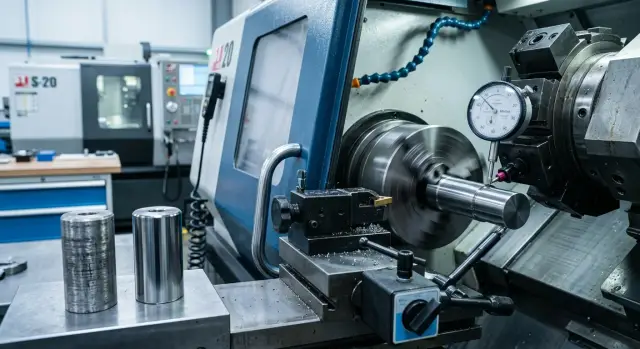
What you see on the part
The first sign usually appears on the part itself. The finish loses a smooth shine: a slight wave appears, repeating streaks, matte spots or bands around the circumference or along the pass. From a distance it looks like a fine “tremor” in the metal, although the machine may show no obvious faults.
It's useful to compare the same operation at low and high speeds. If the surface is smooth at a calm regime but the defect gets worse with RPM, the cause is often not the part geometry but the behavior of the tooling assembly in rotation. This is especially clear on a finishing pass.
Vibration marks can be easily confused with insert wear. A worn insert usually degrades the result evenly and predictably: the surface gets rougher, the edge starts to smear, and cutting forces increase. Vibration behaves differently. Bands may appear and disappear, and on neighboring parts the defect can look different even with the same program.
Typically the picture is like this:
- a wave with a repeating pitch is more often linked to oscillations during cutting;
- matte areas mixed with clean zones often indicate unstable rotation of the assembly;
- if holder runout or imbalance grows with speed, the defect is more noticeable at higher RPM.
Watch not only the surface but also listen to the machine. When the problem is vibration, the cutting sound changes: instead of a steady hiss you may hear a hum, a whistle or a periodic “singing along.” If you reduce RPM on the same pass and the noise disappears together with the bands on the part, that’s a strong clue.
In practice it often happens like this: after roughing everything looks fine, dimensions hold, the spindle shows no errors, but the finishing pass at high RPM leaves an ugly ripple. In such a situation don't immediately blame the insert or the material. First inspect the defect pattern, its relation to RPM and whether the cutting sound changes.
Why a good spindle doesn't solve everything
A healthy spindle doesn't guarantee a smooth finish. It's not only the spindle that rotates but the entire tooling assembly. If there is a slight misalignment or extra mass on one side, it will show up on the part at high RPM.
Therefore you need to check not the machine alone but the whole unit: the holder, collet, nut, adapter sleeve and the tool itself. Individually everything can look normal, but assembled they can produce runout, noise and a fine wave after the pass.
Often the problem hides in small things. Swarf, abrasive dust or dried coolant can remain on the taper, in the seating or under the collet. It isn't always visible to the eye. But at 12,000–20,000 RPM even such a thin layer can slightly shift the tool and cause chatter that is easy to mistake for a spindle fault.
Extension length affects it more than you might think. An assembly that worked quietly at 40 mm extension can leave marks at 80 mm. The farther the cutting edge is from the support, the easier it is to excite it.
Changing small parts also alters the assembly behavior. A different insert, screw, adapter or sleeve changes mass distribution. At high RPM a few grams' difference can change the cutting sound and the surface quality. If you swapped an insert or fastening, check not only the dimension but the seating fit.
Remember a simple rule: keep seats clean, evaluate the assembly as a whole, reduce extension where possible and after replacing parts verify the unit is assembled straight and without tilt.
Where imbalance usually hides
Most often the problem is not in the spindle but in the assembly itself. At high RPM even a small dent, a chip of swarf or a thin film of dirt will show on the finish.
Start by checking the taper, the collet and the draw nut. If there is a strike mark on the taper, the collet is worn or the nut pulls unevenly, the eye may miss it but the part will reveal it immediately.
Improper tool seating causes many problems. A cutter or drill can sit slightly deeper or with a small tilt, especially if the tool was changed in a hurry. In hand everything seems fine, but at 10,000–12,000 RPM you get chatter, bands and matte areas where the surface should be smooth.
After a quick tool change, check four things: the cleanliness of the taper and seating, even seating of the tool across the clamping length, the collet position when tightened and the nut's action without tilt.
Even a single chip trapped between surfaces changes the picture. The same happens if the tool is clamped too short or protrudes too far. In both cases holder runout increases and the mark on the part becomes wavy.
There’s another simple test often skipped. If you have two identical holders, move the same tool from one to the other and compare the result. If the defect remains only with one assembly, the problem is in that holder, collet or nut, not in the machine.
On the shop floor this is obvious: same program, same material, same regime, but after switching the holder the surface becomes cleaner. Usually you then find the cause — a small dent on the taper, a tired collet or a misalignment after a rushed tool change.
How to check the assembly step by step
It's better to check the actual assembly used in production. If you assemble the tool “about the same as usual,” the measurement may look good only on paper.
Start simple. Wipe the spindle taper, the holder seating, threads, clamping surfaces and the tool. Even a thin film of oil, swarf dust or a tiny dent can cause runout that is visible on the part at high RPM.
Then follow a consistent scheme.
- Assemble the tool with the same extension used in the program. If the cutter protrudes 85 mm in production, test it that way. A short extension easily hides problems.
- Check runout in two points: near the seating and at the cutting edge. If the holder is calm at the base but the number grows noticeably at the tip, the cause may be the tool itself, the seating or the extension length.
- Run the spindle in steps, for example 3000, 6000, 9000 RPM and higher if the regime allows. At each step listen and note where noise starts to rise sharply.
- After stopping, repeat the measurement. If readings fluctuate, check the tightness, seating cleanliness and condition of the collet, nut or clamping unit.
- Change one element at a time and repeat the cycle. First another holder with the same tool, then the same holder with another tool. This quickly finds the source.
It’s useful to record not only the indicator numbers but the assembly behavior. Sometimes runout is small yet noise appears only in a narrow RPM band. This is like resonance: everything is calm at 8000 RPM but at 10000 RPM the surface suddenly “ripples.”
If swapping a holder changes the picture, your search narrows. If only changing the tool does, look at tool geometry, seating and wear. This check usually saves time and at least one ruined part.
What to check before starting
Five minutes before start-up often saves an hour of troubleshooting. If a finish suddenly goes wavy, don’t rush to blame the spindle. Very often the issue is in the tooling assembly and can be noticed before the first proper pass.
Before start-up, go over the basics:
- wipe the spindle taper and the holder shank;
- keep only the extension needed for the operation;
- verify the collet, nut and the tool shank diameter;
- tighten the tool with normal force without over-torquing;
- make a short trial cut at a safe length.
If the mark on the part becomes smoother after this check, you’ve eliminated the most common assembly errors. If nothing changed, you can proceed further without wasting time rechecking the obvious.
A good guideline: a correct assembly sits cleanly, clamps evenly and doesn’t require excess extension. Then high RPM work on quality, not on accidental scrap.
Shop-floor example
In one area, after a routine holder change a part suddenly started to show a wave on the finishing pass. Before the change the surface had been smooth and without visible marks. Dimensions were still within tolerance, so the cause initially seemed odd.
The operator noticed another detail: at low RPM the machine ran quietly, but after 6000 RPM a steady hum appeared. Not a sharp grind, but a noise often blamed on the spindle. However, the spindle held size, didn’t overheat and showed no obvious seating problems.
They started measuring. An indicator at the holder taper showed small runout, almost within the usual range. Then they moved the indicator closer to the cutting edge and the difference became clear. At the base everything looked acceptable, but at the working extension the error already affected the finish.
They didn’t look for a complex fault. They removed the assembly, disassembled it, checked the collet for wear, cleaned contact surfaces, shortened the extension and reassembled. After replacing the collet and reducing extension the high-RPM noise disappeared and the wave on the part did not return.
This case shows a common trap. Looking only at the taper, it’s easy to assume everything is fine. But runout at the seating can be small while at the cutting edge it’s enough to spoil the cutting trace.
Mistakes that hinder finding the cause
The most common mistake is simple: the operator hears noise, sees bands on the finish and immediately blames the spindle. That happens, but much more often the issue is in the tooling assembly. If you don’t check the holder, collet, nut, seating and the tool, your search quickly goes the wrong way.
A second mistake is measuring runout at only one point. At the holder neck it may be nearly zero, while at the tool tip with a large extension the picture is completely different. That’s why the indicator is placed in at least two locations: near the seating and at the cutting edge.
Another trap is comparing holders with different extensions. The same assembly behaves differently with a short and a long tool. If in one test the cutter protrudes 35 mm and in another 70 mm, the conclusion will be weak. First equalize conditions, then compare results.
People often overlook small components. A worn collet clamps unevenly. A damaged nut pulls with a tilt. A loose screw in a side holder adds its own runout even though the spindle is fine. Before discussing complex causes, disassemble the unit, clean the seats and look for wear, dents or dirt.
One more typical mistake is searching only in cutting regimes. The operator lowers feed, changes RPM, reduces depth, and the defect sometimes indeed weakens. But that is often masking, not solving. If there is imbalance in the assembly, changing regimes only shifts the RPM band where it’s most noticeable.
When it’s not the assembly
Sometimes the mark on the part looks like holder runout while the cause is elsewhere. Often it’s closer to the cutting edge or the part itself.
If the insert is worn, chipped or simply unsuitable for finishing, it cuts inconsistently. Instead of a smooth cut you get rubbing, the edge snags the material and leaves waves, matte bands or a torn shine.
Look not only at wear but also at insert geometry. A large nose radius on a weak setup easily causes vibration. Too small a radius quickly shows the feed step. Edge geometry and chipbreaker design also greatly affect the result.
Cutting regimes give a similar picture. Excessive feed leaves a noticeable step. Too small a finishing depth can convert cutting into rubbing. Incorrect speed can cause built-up edge and the surface spoils almost immediately.
Check part clamping separately. A thin-walled bushing can be over-clamped by jaws. A long shaft can deflect if support is weak or extension is too large. Rotation may look steady, but under load the part shifts and the cutter removes material not where expected.
Coolant and swarf also quietly spoil the finish. If the coolant jet misses the cutting zone, the edge overheats, chips break poorly and return under the cutter. You then get scratches and spots that look like imbalance, though there isn’t one.
If in doubt, a short test helps: fit a new insert of the same brand, slightly reduce feed for a trial pass, check the part clamping and ensure coolant hits the cutting zone. If the surface improves, the holder wasn’t the cause.
What to do next
If an assembly has already ruined a finish at the required RPM once, don’t put it back into operation “just in case.” Mark it and compare by facts: what extension, what RPM, what mark on the part, which tool was in the holder.
Keep a short log for each assembly. You don’t need special software. A simple table recording holder and seating type, tool extension, RPM, feed and surface result is enough. After a few shifts this record gives more benefit than arguing at the machine.
A good habit is to give each holder its own number or tag. Then the operator writes not “the same holder” but a specific assembly. This simplifies fault-finding, especially when several similar holders are in use.
The rule is simple: keep only assemblies and regimes in production that reproducibly give a normal result. If an assembly produces noise, marks on the surface or unstable runout at high RPM, move it to a softer regime or send it for recheck.
When choosing a new machine, it helps to discuss not only the machine but also real tooling, extension and finish regimes. In EAST CNC such data can be checked during consultation, selection, commissioning and service. This doesn’t replace a shop-floor check but helps narrow down causes faster.
Keep in production only those assemblies and regimes that repeatedly give acceptable results. Anything that leaves doubt on the part should be sent for inspection or replacement.
FAQ
How do I know vibration is ruining the finish?
Look at the mark on the part and listen to the machine. Vibration usually creates a wave, bands or matte patches that come and go, and the defect gets worse as RPM increases. Another sign is that the cutting sound changes with the surface. On a low-speed pass everything is smooth, but at high speed a hum or whistle appears.
If the spindle is fine, why does the part still show waves?
Because not only the spindle rotates but the whole tooling assembly. A small misalignment in the holder, dirt on the seating, a worn collet or excessive extension can easily cause chatter at high RPM. The spindle can still hold size and show no errors, while the part surface turns wavy.
Where does tool imbalance usually hide?
Most often the issue is in the holder, collet, nut, adapter sleeve or the tool seating itself. Even a thin film of dirt, a small dent or a chip of swarf between surfaces shifts the tool. After a quick tool change a misalignment often appears: it feels fine by hand, but at speed the assembly starts to make noise.
How to quickly check the assembly step by step?
Assemble the tool with the same extension used in the program and thoroughly clean the seats. Then check runout near the seating and at the cutting edge. Raise spindle speed in steps and listen for where the noise rises sharply. If swapping one holder or one collet changes the result, you’re close to the source.
Why measure runout both at the seating and at the cutting edge?
Because the runout at the base can look acceptable while the error at the cutting extension already affects the part. The farther the cutting edge from the support, the greater the influence of misalignment and extension. Measuring only at the seating can make you miss the cause and waste time looking at the spindle.
What to check before start-up after changing the holder?
Wipe the spindle taper and the holder shank, check the collet and nut, remove excess extension and tighten without over-torquing. Then do a short trial cut at a safe length. This short check takes a few minutes and often eliminates the most common assembly mistakes.
How to tell vibration from insert wear?
A worn insert usually degrades the surface consistently and predictably: gloss is lost, the edge smears, and the cutting force rises. Vibration behaves irregularly: bands appear and disappear and the noise changes noticeably. If lowering RPM nearly removes the mark, the assembly is more likely at fault than just a worn edge.
When the problem isn't the holder?
Often the cause is not the holder at all. A new insert with wrong geometry, excessive feed, too small a finishing depth, poor part clamping or inadequate coolant can also spoil the finish. If a fresh insert, reduced feed on a trial pass, and correct coolant flow improve the surface, the holder was not to blame.
Is it OK to just reduce RPM and continue?
No — that usually only masks the defect. You may move the speed range where the assembly behaves quieter, but the misalignment or imbalance remains. If the part requires a good finish, find the cause immediately: clean the seats, shorten extension, check the collet, nut and the tool itself.
How to not lose track of the problem and when to call service?
Mark the problematic holder and record basic facts: extension, RPM, feed, tool and the mark left on the part. After a few shifts you'll see which assemblies consistently work and which cause noise and waves. If the defect persists after those checks, bring in service. In EAST CNC you can verify tooling, extension and finish regimes during consultation or servicing.