
Time to the First Good Part: Where Minutes Disappear on the Shop Floor
Analyze where time is lost before the first good part: tool search, entering corrections, measurement and waiting for program confirmation.
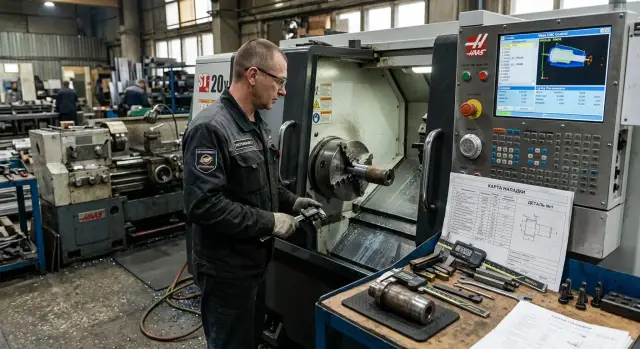
Why the first good part is delayed
Delays usually start before cutting. The blank is in place, the chuck is tightened and the program looks ready, but the first correct dimension is still far off. The operator must go through the whole chain: check the setup, pick the tool, load the program, set offsets, do a trial pass, measure the part, apply corrections and run the cycle again.
Individually these pauses seem minor. Two minutes spent finding a toolholder, another minute to confirm tool overhang, then waiting for the setter to approve a program tweak. Nobody treats each stop as a problem. Together they can easily take half an hour.
Usually there isn’t a single cause. If a tool isn’t where it should be, corrections start later. If corrections are entered late, measurements are delayed. If measurement is postponed, the program waits longer for approval. One pause drags the next and the start-up begins to stall across the chain.
On paper the route is short: mount the blank, check the tool, load the program, do the first pass, measure and correct the size. In the shop it rarely runs that smoothly. Someone looks for an insert, someone double-checks the zero, someone waits for the technologist because of a questionable program segment. The machine idles in bursts while people are occupied and don’t immediately see where the loss is piling up.
So it’s better to look not at a single reason but at the whole path to the first good part. Time the setup, the tool search, entering corrections, measurement and program confirmation separately. That kind of analysis quickly shows the weak spot. Sometimes the problem is tooling, sometimes workplace order, and sometimes the decision needs approval from someone who isn’t present.
The first good part is delayed where the process breaks into small waits. When the whole chain is visible, it’s easier to remove extra minutes calmly and without risking dimensions.
Where time goes before the start button
Losses begin before the "Start" button. While the machine is still silent, the operator is already spending minutes finding a tool, checking documents and walking back and forth. The actual cutting hasn’t begun, but time is already gone.
Most delays add up from simple things: a tool is not where expected; some holders are at another station; the drawing exists but the setup sheet or tool list is missing; the program number on the rack doesn’t match the work order or blank label. Add a few trips to the cabinet, warehouse and computer — and 10–15 minutes can disappear before the first cut.
In practice it looks ordinary. The operator picks a cutter, then goes for a holder, returns for a wrench and then notices the setup sheet lists a different overhang than the program revision open on the screen. No cutting has happened yet, but the start has slipped.
Documents also slow things down. If the drawing, setup card and tool list are in different places, someone has to gather them manually. They call the technologist, confirm the file version and compare the part marking. Work seems to be happening, but the machine remains idle.
Mismatch between program and labeling hits hardest. One extra character in a file name, an old work order version or an unclear sticker on the tool cassette triggers another check. Caution is needed, but its cost can be higher than it seems.
Good order before start looks boring: one set of documents, clear labels, tools gathered in advance and fixtures next to the machine. But the start runs noticeably faster. Even simple tidying of storage places often returns 15–20 minutes per setup.
Finding tools without running around
A lot of time burns before the first cut. The operator approaches the machine and a familiar sequence begins: one holder is missing, the needed toolholder is at the neighbor’s machine, a cassette is labeled inconsistently, some tools were not returned after the last job. The entire start-up stalls over one missing item.
The usual reason is simple: tools are prepared on the fly, not for the start. That’s almost always slower. If you assemble a complete list in advance, even before the shift, the picture changes. You can see what’s already on hand, what needs replacement, and what must come from the warehouse or setup area.
A simple rule works well: high-use items must be in the same place every day. Not left one day on the left, the next day on the right, but always in their slot. When the operator doesn’t have to remember where the chuck, holder or insert set is, they save not seconds but sometimes 10–15 minutes on one start-up.
Labeling confusion adds to the problem. If one person writes numbers by hand, another sticks an old label and a third signs only the box, mistakes repeat. Adopt one labeling format for toolholders, collets and cassettes. Then tools are easier to find, verify and return.
A quick tidy after the previous job helps: put good tools back in place, separate worn items and note replacements if a different size or type was used. It’s a small habit, but it removes the morning running around in the shop.
On the turning section this is especially clear. A new batch may need two holders, a drill, a cutoff tool and a cassette for a repeat operation. If all is prepared and beside the machine, the setup flows. If one item is missing, the whole start-up stops.
Store tools so they’re found by sight, not by walking to look for them. It sounds simple, but it noticeably reduces pauses before the first run.
How not to lose time on corrections
Whole approaches to the part are lost in corrections. One wrong zero, a mixed-up tool length or an extra digit in wear — and the operator does another trial pass, measures again and returns to the panel.
The frequent cause is the same: everyone enters data their own way. Today zeros are taken from the setup sheet, tomorrow from a phone photo, the next day from memory after a similar job. Without a single template for zeros, lengths and wear, errors are almost inevitable.
One consistent procedure across shifts works much better. The record can be on paper or electronic, but the logic must be the same: where the reference zero is, where the tool length is recorded, where the working correction goes and what was changed after measurement. Then the operator doesn’t waste minutes guessing or rechecking the same thing.
Before the first cut a short checklist is enough: verify the tool number in the program and in the turret, open the latest working corrections for this part or similar operations and place them near the drawing. Not in the phone, not in old sheets, but at the machine.
Another rule saves a lot of time: change only one parameter at a time and immediately check what changed in the dimension. If you adjust length, wear on X and feed all at once, it’s later unclear what produced the result. You’ll need another trial pass just to sort that out.
On a CNC machine this looks familiar: after measuring the diameter moved by 0.08 mm, the operator makes a single correction on the needed axis. After the next pass they measure again and see a clear result. Two calm steps are almost always faster than a series of hasty tweaks.
If the last working corrections, the drawing and a clear setup sheet are beside the machine, start-up runs steadier. Fewer pauses, fewer doubts, fewer unnecessary touches to the part.
Measurement without extra stops
Many minutes go not to the measurement itself but to the pauses around it. The first blank is out, but the caliper is being hunted for, tolerances are checked on an old printout and results are held in memory. After that the machine waits again.
A useful habit is simple: prepare all control items before the first run. The workbench should have the necessary gauges, a clean wipe, the size chart or drawing with tolerances marked. If a dimension is critical, check in advance that the micrometer or gauge is at hand, not at the neighbor’s machine.
Just as much time is wasted deciding who takes the first measurement. If this isn’t decided beforehand, the operator waits for the setter, the setter looks for the inspector and the machine stands. In a normal shift it’s better to assign the responsible person before starting the batch. For simple parts the operator often does the first check. For tight tolerances bring in the setter or QC right away, without extra calls or debates.
Record the result immediately after measurement. Memory fails even experienced people, especially when setting continues, phones ring and someone must watch the machine. One misremembered size easily causes an extra trial part and another stop.
A two-level control works well. A quick check at the machine is needed immediately after the first cut — it shows whether the size is moving in the right direction. A precise measurement comes later, when the part is near tolerance or the dimension affects fit, runout or geometry.
This order removes extra trips. There’s no point in doing a full inspection after every trial pass if it’s clear the size is still far from target. First a quick check, then a correction, and only after that a full verification.
For shops with different CNC machines the rule is one: prepare control as you prepare tools and programs. Then measurement speeds up the start instead of slowing it.
Why program confirmation stalls
Program confirmation often bogs down not because of the rack but due to unclear rules. One person thinks the technologist approves, another waits for the foreman, and the operator doesn’t want to take the risk. Tools are already ready and the program loaded, but time is spent on calls and verbal clarifications.
Another common cause is verbal changes. The technologist asked to shift the size, the setter adjusted feed, the operator understood it differently. An hour later no one is sure which version is running and who approved the change. After that people begin rechecking everything from scratch.
Extra pause often appears in the same place: the program is loaded, the dry run is fine, but the first cut is postponed. The simple reason is no one recorded who gives the final permission to run the first part.
If a shift includes an operator, a setter and a technologist, there should be one person responsible for the decision. Not three at once, but one person who says: we run or we stop. Then the chain doesn’t break at every step.
Program version should match in two places: in the panel and on the setup sheet. If the screen shows one version and the paper another, people trust neither. They open the file again, call the technologist again and search where the last change was made.
Keep the work routine simple: review the program before starting, do a dry run without cutting, do the first cut in a safe mode, confirm and record the result. Each step needs a mark, not a verbal "okay." It seems small in the first minutes, but later it matters.
One practical rule for changes: record any modification immediately. Note what was changed, who changed it and which version is now active. This can be on paper or electronic, but the note must appear right away, not at the end of the shift.
When a shop eliminates verbal changes and assigns one person for the first run, delays decrease. You see it in the shift: fewer repeated checks, less waiting at the machine and fewer arguments over which file is current.
How to cut delays step by step
Most often time to the first good part is lost not in cutting but in small pauses between actions. One routine that everyone in the shift follows helps.
- Gather everything for the start in one place: tools, setup card, drawing, program and the size list for the first check. When the file is on one computer, the cutter in a drawer and the drawing with the foreman, the start almost always slips.
- Before calling the first tool check fixturing, the blank and the clamping. Those two-three minutes are cheaper than stopping after contact.
- Enter corrections using one template. A consistent field order and a short note for each change greatly reduce confusion.
- After the first measurement don’t change everything at once. Measure, compare with tolerance and decide which correction is needed now.
- As soon as the first good part is obtained, immediately update records for the next start: actual corrections, tool positions, the first part size and notes about clamping or blank.
This routine works equally well on a small station or in a shop with several CNC machines. If the start repeats often, the difference becomes visible fast: fewer unnecessary approaches to the machine, fewer questions between operator and setter, less idle waiting before the first good part.
An example from a regular shift
The shift starts with a repeat order for a part the turner made before. It feels like an easy start: the drawing is familiar, the material is the same and the setup shouldn’t take long.
These orders are exactly what often ruin the tempo. People remember the part but not where the needed fixtures are or which program version is current.
In this shift the turner first searches for the holder for the turning tool, then a tap for the internal thread. The cabinet order is approximate: some tools were not returned to their spots, some items lack clear labels. Finding tools alone takes about twenty minutes.
Work stops again. The old program was found quickly, but the folder also has a newer revision with a feed change and an extra operation. The turner doesn’t want to risk it and waits for the foreman or technologist to confirm which version to run. The machine is idle and the shift continues.
A timeline looks like this:
- 8:05 — took the repeat order and opened the drawing
- 8:12 — started looking for the holder and the tap
- 8:32 — gathered the required tools
- 8:40 — loaded the program and saw a newer version
- 8:58 — got confirmation and did the first run
The cutting itself takes less time than the preparation. First pass, facing, threading and the control measurement take about 10–12 minutes. If the part is correct on the first try, machining takes less time than the waiting and searches before start.
Such situations consume time to the first good part. Not because of one big mistake but because of several small pauses in a row: a tool is not where it should be, the program version raises a question and no one confirms the decision right away.
For the shop this is worse than it seems. The operator is busy, the machine is silent and reports show the shift as only preparing. A review like this makes one simple fact visible: that day preparation took almost an hour while cutting only took minutes.
Mistakes that slow a start-up
Initial losses are rarely the machine’s fault. People often add pauses themselves before the first cut.
One common mistake is starting setup without a complete tool list. The operator remembers the main items but then recalls a holder, a drill, a probe or a spare insert mid-process. Searches through cabinets and carts follow. Relying on memory almost always costs more than three minutes spent checking the kit in advance.
Changing multiple corrections at once also wastes time. The size moved, and the operator adjusts geometry, wear, feed and sometimes the mode simultaneously. Then it’s unclear what caused the deviation. If the next part is out of tolerance, the troubleshooting starts from zero.
First-part measurement also causes confusion. One person takes the caliper, another the micrometer, the inspector measures the same dimension with their gauge. Without a common record everyone ends up with slightly different numbers and a dispute about who measured correctly. On a simple diameter this can take another 10–15 minutes.
A costly mistake is editing the program without fixing versions. One variant is on the panel, another in the setter’s folder and a third with the technologist. Then no one can quickly say which line changed and which version was approved.
A simple routine usually helps: assemble the complete tool kit before setup, change one correction at a time, measure the first sample with an agreed method and save every program change under a clear version. If this routine is kept consistently, start-ups go calmer and the causes of deviations are visible immediately.
What to check before the first run
You don’t need a long meeting before the first run. You need a short check at the machine.
If the goal is to reduce time to the first good part, don’t look only at the program. Minutes often go earlier: the operator searches for a collet, the inspector waits for a micrometer, the setter compares the wrong file version and then everyone stops again for a repeat measurement.
A simple routine works:
- put at the machine all tools, fixtures and gauges needed for the first run;
- verify tool numbers in the magazine and in the program before spinning the spindle;
- check the program version and tolerances on the drawing before the trial part;
- appoint one person responsible for the first run and the first measurement.
One responsible person noticeably reduces confusion. When two or three people are in charge at once, each waits for the other and the machine stands idle. One person removes extra waits.
Agree on small details in advance: who feeds the tools, who does the first measurement, who enters corrections and who gives the go-ahead to continue. It sounds simple, but it often saves 15–20 minutes in a shift.
If a shop prepares the start-up of a new CNC lathe, close some questions before equipment installation: selection, commissioning, service and the first-run procedure. EAST CNC and the blog east-cnc.kz have materials on equipment and practical metalworking advice, and the company provides machine selection, commissioning and service.
Start with a single checklist for the first run. If the team signs it off before start, delays usually drop within the first week.
FAQ
Why does the first good part come so late?
Most often the delay comes not from cutting but from small waits before it. The operator looks for tools, checks documents, verifies the part zero, enters offsets and waits for program confirmation. Separately these are minutes; together they can easily become half an hour.
What should be checked right before the first run?
First check the blank, the clamping and the fixturing, then the toolset, program version and the instruments for the first measurement. If all of that is at the machine and consistent, the start-up runs much smoother.
Does searching for tools really take a lot of time?
Yes — more often than you think. If a toolholder, collet or insert is not where it should be, the start-up stops immediately. A stable storage routine usually returns 10–15 minutes per setup.
How to cut down running around for tools?
Keep common items always in the same slot and label them with a single rule. Even better, gather the start-up kit in advance instead of fetching tools during the process. Then the tools are found by sight, not by walking.
How not to lose time on corrections?
Use a single template for zeros, tool lengths and wear values and place it next to the drawing. Change only one parameter at a time and measure the result right away. This way you quickly understand what affected the dimension.
Who should take the first measurement of the part?
For a simple part the operator usually takes the first measurement if the shift agreed on that in advance. For tight tolerances bring in the setup technician or QC immediately. The important thing is to assign a responsible person before the first pass, not after.
How not to get confused with program versions?
Compare the version in the operator panel with the setup sheet before the first cut. If someone changes the program, they should record what was changed and which version is now active. Without that note people start rechecking everything.
Can I change several corrections at once?
No — you will only slow the troubleshooting. Measure the part, make one correction on the needed axis and then check again. A calm sequence is almost always faster than a series of abrupt changes.
What to do if everyone is waiting for program confirmation?
Assign a single person who gives the final go-ahead for the first part. If two or three people are responsible at once, everyone waits for someone else and the machine stands idle. One responsible person removes extra calls and disputes.
How to quickly find where the minutes are lost before the first part?
Break the path to the first good part into short stages and measure each individually: tool search, document check, entering offsets, first measurement and program confirmation. After this breakdown the weak spot is visible and you can fix the specific pause instead of the whole process.