
A Tagging System for Scrap and Rework Without Confusion on the Shop Floor
A tagging system for scrap and rework helps you quickly understand what happened to a part, who takes the next step, and how to reduce disputes between shifts.
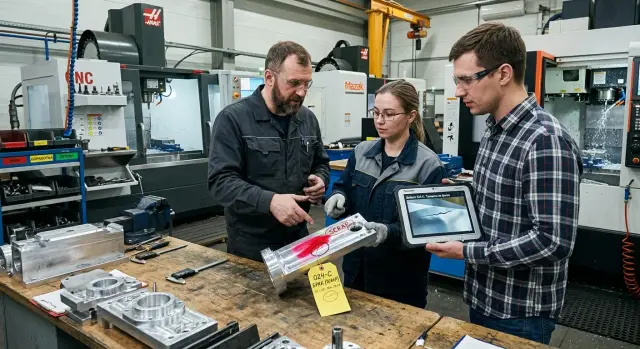
Where the confusion around scrap and rework comes from
Confusion starts not with the defect itself, but with different words for the same case. One shift writes “scratch,” another writes “gouge,” quality control says “surface damage,” and the technologist sees a mark from the cutting process. Formally, everyone is talking about something similar, but on the shop floor these are already different stories.
In metalworking, this happens all the time. After machining on a CNC machine, the operator notices a scratch on the part and sends it for rework. The next shift looks at the same part and decides it is scrap. Quality control does not see when or at which operation the defect appeared. In the end, people discuss not the part, but the wording.
If the tagging system for scrap and rework is not the same for everyone, each person puts on their own label out of habit. The operator thinks about what they see with their eyes. The technologist looks for the cause in the tool, the cutting mode, or the fixture. The inspector looks at tolerance and appearance. Everyone has a different task, so the cause of one part often sounds “different.”
Another problem is the gap between the tag and the photo. A tag can get lost, get covered in oil, or stay on the container, while the picture sits in the supervisor’s phone or in the shift chat without a part number and time. After a few hours, the photo lives on its own and the part lives on its own. Then no one is sure whether it is the same defect or a similar one.
Because of this, the argument quickly goes in the wrong direction. Instead of the simple question “what do we do next,” the search for the guilty party begins. Who missed it, who saw it first, who labeled it incorrectly, who forgot to add a photo. Time is spent arguing, not solving.
Usually the confusion looks like this:
- the part gets two different defect names;
- the cause is written in words that everyone understands differently;
- a photo exists, but it cannot be tied to a specific part;
- the part status changes from shift to shift.
It is especially frustrating when the same part moves from tray to tray several times. On paper, it is waiting for a decision, then it goes to rework, then it is scrap again. People get tired, get irritated, and stop trusting the labels at all.
That is the source of the chaos: there is no common language, no single record for the part, and no clear next step. A day later, it is already hard to remember where the defect appeared and who made the first decision.
What every tag should show
If a tag does not answer two questions right away — what happened and what to do with the part next — the shop loses time. On a CNC turning line, this is obvious immediately: one shift sets the part aside for rework, another considers it scrap, and quality control spends an extra 10–15 minutes sorting it out.
A good tag should not be long. Five fields are enough for any operator to fill out in a minute without calls or follow-up questions.
- Part status: “scrap,” “rework,” or “inspection.”
- Reason code: a short code from the common list.
- Part, batch, or order number.
- Who added the tag, date, and time.
- Photo number or file name so the image is easy to find.
Status comes first because it determines the next action. If a part is marked “inspection,” it does not go into the scrap container. If it says “rework,” the supervisor immediately understands that the part can still be returned to production.
A reason code removes arguments like “it looks like a gouge” or “something is off with the size.” It is better to write a simple code that everyone knows instead of a long description. For example: geometry, roughness, burr, chip, tool mark. Then the technologist and quality control read the tag in the same way.
The part and batch number are needed even where the item seems obvious. One shop can have similar housings, bushings, or shafts side by side. Without the number, people often grab the wrong drawing and look for the problem in the wrong operation.
The employee name and time help find the cause faster than it seems. If the operator put on the tag at 19:40, and five minutes earlier the shift changed the insert or adjusted the cutting mode, the supervisor sees the connection almost immediately. This is especially useful in metalworking areas where the same mistake can repeat across a batch of parts.
The photo should also live next to the tag, not separately. There is no need to print the picture on paper. A photo number, file name, or journal entry number is enough. Then quality control does not have to search through dozens of phone pictures for the right shot.
If even one field is missing, people start filling in the tag by hand and interpret it their own way. One short form for all shifts works better than several similar versions.
How to choose colors without unnecessary arguments
Arguments usually start not because of the part itself, but because people read the tag differently. On a turning line, one operator sees a yellow tag and thinks rework, while the inspector believes the part should wait for a technologist’s decision.
That is why there should be only a few colors. For a scrap and rework tagging system, 3–4 colors are enough. When the palette is wider, each shift remembers it differently, and the system quickly breaks down.
It is better to assign one color to one status and never change that rule, even for the convenience of one shift. If red means scrap today, it cannot mean urgent inspection tomorrow.
A good scheme looks like this:
- Red — scrap, the part does not move on
- Yellow — rework, a repeat operation is needed
- Blue — waiting for a decision from the technologist or quality control
- Green — checked after rework, can be returned to the flow
Do not use shades that are too close. Dark yellow and orange, blue and turquoise, red and pink may still be distinguishable on paper, but in oil, dust, and weak light they almost blend together. If the shop works near CNC machines and coolant, pale colors disappear fastest.
It is better to test this not at a desk, but right on the shop floor. Take sample tags, hang them by the machine, by the cart, and on the quality control table, then look at them from a normal distance. If the color cannot be recognized without error in 2–3 seconds, it does not work.
Color alone does not solve everything. It is for a quick glance, not a replacement for a decision. But when the color is clear to everyone, the shift argues less, quality control sorts parts faster, and the technologist does not waste time on extra clarification.
Another simple measure works better than long explanations: a short reference sheet near the workstations and the quality control table. It should show only the color, the status, and one short action. For example: red — stop, yellow — send to rework, blue — wait for a decision. That is enough for new employees not to guess or make up their own meanings.
How to set a reason code without a long table
A long code table almost always breaks down on the shop floor. People do not search through 40 lines when the part is already on the cart, the shift is in a hurry, and quality control is waiting for an answer. For a scrap and rework tagging system, it is better to use 8–12 reasons that appear almost every day.
The wording should be short and direct. Not “deviation from geometric parameters,” but simply “size.” Not “edge damage,” but “chip.” On the shop floor, words that everyone understands the same way work best: size, burr, runout, scratch, crack, roughness.
You can start with a set like this:
- R01 — size
- R02 — chip
- R03 — burr
- R04 — runout
- R05 — scratch
That is already enough to quickly sort most cases. If a machinist sees a shaft after machining on a CNC machine and the diameter is out of tolerance, they put “R01 — size.” They do not write who is to blame or at which operation someone made a mistake. The reason code should describe the defect itself, not the person, area, or shift.
This separation significantly reduces arguments. The reason answers the question “what is wrong with the part.” The review later answers the question “why did this happen.” If you mix these things in one tag, the records become messy: “operator error,” “bad setup,” “quality control missed it.” With such words, it is impossible to build statistics quickly.
It is worth keeping one code for cases the shop cannot decide on itself. For example, “T01 — technologist decision needed.” It is used when the defect is visible but there is no simple answer: the tolerance is questionable, the drawing can be read in two ways, or the same part repeats the issue. This code does not replace the reason; it helps prevent disputed cases from being lost.
Once a month, the table should be cleaned up. If a code is rarely used, remove it. If people keep confusing two codes, combine them. On plants that have both lathes and machining centers, this is especially useful: one short table works better than different lists for every operation.
How to combine the photo and tag into one record
If the photo lives separately from the tag, arguments start almost immediately. One shift remembers one thing, the inspector remembers another, and the technologist sees only an image without context. A single record solves this confusion: the reason code, part number, and photo stay together and can be read in a minute.
For defect marking in manufacturing, it is better not to take ten photos in a row. Two are enough. The first is a general shot of the part or assembly so it is clear where the problem was found. The second is a close-up of the defect itself: chip, scratch, undercut, burr, tool mark.
A tag or a plain sheet with the reason code is placed next to the defect. Then it is immediately clear in the photo that this is not a random image from a phone gallery, but a record for a specific case. If the shop has assigned code “D12,” it should appear both in the frame and in the record caption.
A single record usually includes:
- part or drawing number
- the operation where the defect was found
- scrap or rework reason code
- general shot and close-up
- employee name or shift name
It is better to search for such records by part number, not by the date the photo was taken. The date only helps on the day of the incident. A week later, no one will remember that the photo from “March 12, 14:37” belongs to flange 40. But the part number, batch, and operation give the right result right away.
Photos without captions quickly turn into clutter. After a couple of days, no one knows whether it is scrap, rework, or a training example. That is why photos are saved only together with a short caption: part number, reason code, shift. If there is no caption, the record has no value.
On a turning line, it looks simple. The operator finds a scratch on the seating surface. They place a sheet with code “R03” next to it, take one general shot of the part at the workstation and one close-up of the defect area. Then they enter the record under the part number, not into a folder called “shift photos.” The inspector and technologist open one row and see the same thing.
Agree right away on who takes photos during the shift. Usually it is the machine operator or the inspector after checking. A bad option is when “anyone can do it.” Then in the rush, no one does it, and the scrap and rework tagging system stays only on paper.
If the shop works on CNC machines and there are many parts, this approach saves time every day. Fewer calls, fewer retellings, fewer arguments about where the defect was found and what it looked like at the time of inspection.
How to launch the system in one week
You really can launch a scrap and rework tagging system in a week if you do not try to describe every case at once. To start, a simple set of statuses, short reason codes, and one rule for photo documentation is enough.
On the first day, the team chooses only the statuses people see every day on the shop floor. Usually three or four are enough: “scrap,” “rework,” “under inspection,” “good after rework.” Immediately assign a color to each status and do not change it later at the request of different shifts. If red already means scrap, it should always mean scrap.
On the second day, the technologist, supervisor, and quality control spend 30–40 minutes approving a short list of reason codes. Do not make a long reference list with fifty lines. To begin, it is better to choose 8–12 reasons that come up most often: size, burr, runout, tool mark, chip, setup error, damage during transport.
The third day is for preparing the tags and reference sheets. The tag should show four things clearly: status, reason code, part or batch number, and who added the mark. Put a short reference sheet on one page near the workstations. People will not read a long procedure during the shift.
On the fourth day, the supervisor does a short review right by the machine. For a CNC area, this works better than a meeting in the office. Show two or three real examples: where to place the tag, when to take the photo, who calls the technologist, and who can send the part to rework on their own.
The fifth day is for disputed cases. Take parts that two shifts or the supervisor and quality control used to argue about. For example, a turned part has a tool mark, but the size is within tolerance. The team should decide the same way every time whether it is scrap or rework, which code to use, and what photo counts as correct.
On the sixth and seventh days, remove the unnecessary parts. If people confuse two similar codes, combine them. If one color is hard to read on the shop floor, replace it now, not in a month. By the end of the week, lock in the rule with a simple formula: one part, one tag, one reason code, one photo.
This kind of launch gives a clear start without extra paperwork. Within a few days, the shift, technologist, and quality control start talking about the same problem in the same words.
One part without arguments between shifts
After machining the housing, the operator noticed a chip on the edge. In the past, this kind of part often got “stuck” between shifts: one person called it scrap, another sent it to rework, and the technologist learned about the problem too late.
A scrap and rework tagging system removes this noise if a single record shows what happened, who noticed it, and what to do next. If a tag does not give an answer in 10 seconds, it is not working well.
In this situation, the operator does not write a long explanation by hand. They put on a yellow tag because the part is not yet written off and needs a decision, and immediately enter a reason code, for example “C-04” for a chip on the edge after machining. That is already enough to keep the part from moving further down the line as acceptable.
Then quality control opens the same record and adds a photo of the defect. The picture shows the chip location, and the inspection time is noted next to it, for example 18:40. It seems minor, but it often ends the argument: the shift sees not someone else’s words, but a specific defect at a specific moment.
The technologist does not need to gather information from chats, papers, and verbal comments. They see the yellow tag, the reason code, the photo, and the inspection time in one card and give a rework decision. For example: remove 0.2 mm from the chamfer, check the size after rework, and return the part to inspection.
The next shift comes to the part and immediately understands the picture:
- status: rework, not final scrap
- reason: edge chip by code
- confirmation: photo and inspection time
- action: exactly what to do with the part
- who is waiting for the result: quality control after rework
Because of this, people do not spend half an hour on calls and guesses. The operator on the next shift does not start arguing about who is to blame. They take the right step based on the record, not on a colleague’s memory.
On a CNC turning line, this is especially useful when there are many parts and shift change is short. One clear tag on one part often saves more time than a long explanation during the morning review.
Where people most often make mistakes
Confusion on the shop floor usually starts with something simple: people want the marking to be clear, but end up making it too complicated. Then the scrap and rework tagging system exists only on paper, while the shift, technologist, and quality control read the same part differently.
The first common mistake is too many colors. If there are too many colors, people stop remembering them and start guessing. Three or four clear options work better than a rainbow of stickers. When scrap, rework, inspection, and disputed cases each have their own clear color, the chance of error drops sharply.
The second problem is free text instead of a short code. One operator writes “scratch,” another writes “mark,” and a third writes “trace after clamping.” In meaning, this may be the same thing, but in records these are already three different causes. Free text almost always breaks repeat-case analysis. A short reason code, for example for a chuck mark or an undersized part, removes this noise.
The third mistake seems minor but hits hard: the tag is placed where it cannot be seen. On a dirty surface, on the end that faces down into the container, or where the next setup covers it. After an hour, no one knows which area of the part the note applies to. On a turning line, this happens constantly: the part is turned, placed in a tray, and the tag disappears from view.
Another common confusion is when scrap and rework live under the same status. That is a bad habit. Scrap means the part is written off or kept separate until a decision is made. Rework means the part can be corrected by a clear action. If these statuses are mixed, one shift will send the part for correction, while another will already book it as a loss.
The last failure often hides at the end of the process: the record is not closed after the decision. The tag is still there, the photo exists, the reason is listed, but no one marked the final result. A day later, the same part shows up in the log again, and the supervisor wastes time on a repeat check. A closed record should answer one question: what was done with this part — reworked, scrapped, or returned to production.
A good example looks like this: a clamp mark was found on the part, the tag was placed where it could be seen, the reason code was added, a photo was attached, and after grinding the record was closed. Then the next shift has no reason to argue. They see not someone else’s guess, but a short and complete story about a specific part.
If these failures are removed, problem review takes not half a shift, but a few minutes.
Quick check before launch
Before the first launch, check not the tables and folders, but how the system works in the hands of an ordinary employee. If the operator, setup technician, or inspector looks at the part and immediately understands its status, the scheme is already suitable for the shop floor. If a person has to remember the rules, the argument will start with the very first batch.
A good scrap and rework tagging system can be read in 3 seconds. The employee sees the color, the short code, and the part number. That is enough to understand whether the part is scrap, has gone to rework, is waiting for the technologist’s decision, or has already been closed.
Before launch, it helps to go through five simple questions:
- Can the part status be seen without explanations or a call to the supervisor.
- Does each common cause have one code, not two similar versions.
- Can the employee find the photo by part number in half a minute.
- Does each shift understand who places the tag and who removes it.
- Do you review disputed cases using the record with the photo and code, not from memory.
In practice, the second point is the one that breaks most often. For example, one operator uses the code “chip,” another writes “edge damage,” and the inspector treats them as the same cause. A week later, the summary is already wrong. Leave one code for one common problem. If a cause is rare, it is better to temporarily put it in the “other” group than to create extra options.
The photo process also has to be straightforward. A person should not have to search for the image by date, surname, or shift name. The simplest path is the part number, order, or batch, if that is already how you keep records. Then the technologist opens the record and immediately sees the tag, the reason, and the defect itself, instead of piecing together the story from conversations.
Also check the roles separately. On a CNC shop floor, this removes a lot of unnecessary noise. If the operator places the tag, quality control confirms it, and the supervisor removes it after the decision, that should be set right away. Otherwise, one shift will put up the tag, another will remove it, and in the morning no one will understand what happened.
If after this check even one dispute is still being settled with “I think it was different,” it is too early to launch the scheme. First remove ambiguity in the codes, photos, and roles. Then the tag will save time instead of adding a new folder of confusion.
What to do next on the shop floor
Do not try to move the whole shop to the new system at once. It is better to take one machine, one cell, or one part type where scrap disputes happen most often. That way, the scrap and rework tagging system will show itself in real work, and people will not get tired of extra rules on the first day.
Then you need a short test, not a big project. Two weeks are usually enough to see where the tag helps and where it only adds noise. During that time, do not count everything — focus on two simple indicators: how many disputed cases there were between shifts and how many parts were sent back for repeat inspection or rework because the reason was unclear.
If the number of disputes goes down, you are on the right path. If people are still confused, the reason is almost always the same: there are too many colors and codes. After the trial period, remove the extras calmly. On the shop floor, a long list of statuses is rarely needed. When the supervisor, inspector, and technologist have 4–5 clear options in front of them, they work faster than with a half-page table.
The normal sequence looks like this:
- choose one area for the trial
- count disputes and returns for two weeks
- remove colors and codes that are barely used
- keep the rules on one sheet by the workstation
The instruction should be very short. On one page, there should only be the tag color, the reason code, who places the tag, who takes the photo, and where the record goes next. If the document is longer, people stop reading it after the second shift.
If the shop is preparing to launch new equipment, it is better to discuss marking in advance. For companies selecting or putting CNC machines into operation, this conversation is convenient already at the stage of shop preparation. For example, EAST CNC helps with selection, commissioning, and service, and at that point it is easier to agree right away on how to mark scrap, rework, and repeat inspection in daily work.
A good result looks very simple: the part received a tag, it has a clear reason code, a photo, and one clear next step with no extra calls or arguments.