
Switching from Conventional Machines to CNC Without Disrupting Orders
Moving from conventional machines to CNC without disrupting orders requires a step-by-step plan: choose initial operations, train the shift and protect output.
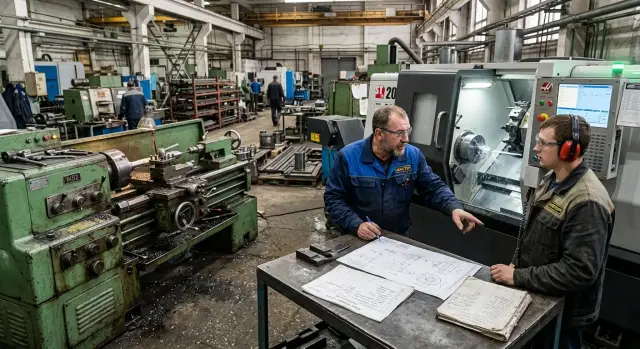
Where the problem starts
Disruptions during a CNC transition usually begin not with the machine but with expectations. Management expects a quick start, supervisors remove some parts from conventional equipment, and the new cell hasn't yet found its rhythm. Deadlines start slipping in the first week.
A sudden launch almost always breaks the plan. A CNC rarely delivers full output on day one. Time is spent on setup, the first program, tool selection, test cuts, measurements and adjustments. On paper the machine is running. On the shop floor there are not yet enough good parts.
Losses most often occur where they weren’t expected. People tend to look at cutting speed and rated productivity, while the drop appears at handoffs between people and stages. One setter is handling two machines, quality control waits for the first part, the tool rack isn’t assembled, fixtures need reworking, and an urgent order is already queued.
Typical bottlenecks look like this:
- the first good part appears too late;
- the shift waits for a setter, process engineer or QC;
- small changeovers eat half a shift;
- there is no fallback route on the old equipment for urgent orders.
There is a less obvious issue as well. While the team learns CNC, conventional machines keep pulling the remnants of the old plan, reworks and contingency. Instead of a smooth transition, the shop gets a double load.
So not all parts should be moved at once. If a batch is small, drawings change often, and setup takes a long time, that item will almost certainly derail the pace at the start. Winners are usually repeatable operations with simple fixtures and stable material.
A simple example: the cell turns bushings in large series and also makes several urgent housings with constantly changing sizes. If you move everything to CNC at once, the shift drowns in changeovers and approvals. If you move only the bushings first, the shop reaches steady output faster and then calmly takes on the more complex items.
The problem is not the technology itself. The mistake is trying to move too many operations to CNC before people, tooling and quality control work as a single chain.
Which operations to move first
The first phase should be built not around the most complex part but around the most predictable one. Good candidates are simple, repeatable parts: identical geometry, familiar material, stable batch size. They make it easier to test the program, setup and shift procedures without extra stress.
A good candidate usually looks simple. The part repeats regularly, the routing is short, the drawing rarely changes, and defects are noticeable after the first pieces. It’s even better if the batch doesn’t consist of several urgent parts that can’t be delayed for a day.
Don’t look only at pure cutting time. Sometimes a CNC operation is fast, but the whole advantage is eaten by changeovers. If a batch is launched rarely and fixtures and tools are rebuilt each time, postpone that transfer. For the first step, choose operations where setup is straightforward and the cycle repeats many times.
Parts with constant adjustments should be left out of the first wave. If the process engineer often changes dimensions, the customer asks for fit corrections, and the operator is used to "tweaking" sizes manually, CNC will quickly turn that into confusion. First move parts where the process is already stable and there are no disputes about datums, allowances and tolerances.
Keep urgent orders on the old route. Until a new operation is proven, don’t put parts that determine the week’s shipments on it. It’s safer to keep urgent SKUs on conventional machines and load the CNC with parts that can be run without panic.
At the start, one or two operations are enough. That’s enough to test the program, measure the real cycle, understand setup time, and see where the shift stumbles. If you pick five directions at once, attention will simply scatter.
How to build a plan for the first 6–8 weeks
A transition without disruptions needs a working week-by-week plan, not a broad schedule. It should be based on the real order portfolio, not pretty calendar dates. Otherwise the shop will quickly run into late deliveries, unplanned changeovers and arguments about what to launch first.
Start with a simple table. List the part, delivery date, volume, current routing and the risk of stopping shipments. Even at this stage it usually becomes clear which items you shouldn’t touch until the new cell has run a few stable shifts.
Then split parts into two groups. The first group holds urgent orders where a missed deadline immediately hits shipments. The second contains planned items with a longer horizon where there is room for a test launch, setup and initial mistakes without major loss.
For CNC, choose a part with stable demand, clear geometry and repeatable sizes for the initial phase. Leave complex and rare orders for the next wave. It’s more important to get predictable results than to use every capability of the new machine at once.
In the 6–8 week plan mark a few checkpoints: when the team prepares fixtures and programs, when a trial run happens, where time reserves for setup are included and when you’ll re-evaluate the part queue. These simple checkpoints keep the launch on track.
Schedule the trial batch not on a peak shipping day. If the busiest time is at the end of the week, run the test earlier. That gives the shift time to fix small issues without losing pace on core orders.
Time reserves are almost always necessary. Even with a ready program common things pop up: tool positioning takes longer, cutting mode isn’t right on the first try, or the actual cycle time is higher. Without buffer, the plan breaks because of one part.
Set review points in advance. One check after 2–3 weeks and another near the end of the period is usually enough. If the launch went smoothly, move the next group of parts. If not, keep some volume on conventional machines until the CNC maintains output without spikes.
How to prepare the shift
The shift learns a new machine faster when roles are clear. The most common mistake is simple: everyone assumes a colleague will handle setup, the first part and small glitches. The machine stops, people get nervous, and output falls.
Assign one person responsible for machine setup and program launch. This doesn’t have to be the most experienced turner, but it should be someone calm, used to double-check sizes and ready to own the first run. If this role is split among several people, confusion appears on day one.
Start with a small team, not the whole shift: two to three people. One setter and two operators who quickly learn the sequence and aren’t afraid to ask questions are usually enough. A strong startup group is more useful than mass training of everyone at once.
How to train without overload
Don’t try to cover all parts and modes at once. Begin with one understandable part with predictable geometry, stable blanks and simple size checks. On that part people quickly grasp the process: how to fix the part, how to start the cycle, and what to check after the first cuts.
Short practical training beats long theory. First the master shows a full cycle on one part. Then the operator repeats it under supervision. After that the team runs the same routing at normal pace as in a real shift.
The first full launch is best on the day shift, when the technologist, foreman, setter and QC are nearby. If something goes wrong, it’s solved in ten minutes instead of waiting until morning.
Keep one clear sheet at the machine, not a thick manual. It should state which tool sits in each position, how to clamp the blank, which dimensions to check on the first part, what to do on an alarm stop and who to inform if a size drifts.
When instructions are written in plain language the transition goes more smoothly. People don’t waste energy guessing and get into rhythm faster. After a few shifts you’ll see who can be moved to the next cell and who still needs a mentor.
How to keep output during adaptation
Treat the first weeks after a CNC launch as a control period, not a time for records. Chasing full machine utilization at this stage often causes the shop to lose more than it gains. It’s wiser to preserve steady output and add operations step by step.
The most reliable move is to keep insurance on a conventional machine. While the operator learns a new program and the setter catches small deviations, keep some parts or urgent items on the old route. This isn’t a step back; it’s a buffer that helps keep shipments on time if the CNC shows a problem with a tool, fixture or the first part.
Don’t move the whole volume to the new cell in one day. Start with one batch on CNC, then two, then half a shift’s load. That pace is easier for the foreman, purchasing and quality control. If something goes wrong, you revert only part of the volume, not the entire order.
Measure output in short intervals during this period. A monthly plan tells little during a launch. It’s more useful to watch shift output, setup time, the number of parts stopped by QC and minutes of machine idle time. This picture appears by the end of the day. If the night shift drops sharply, you’ll know immediately, not after two weeks.
Another common mistake is too modest a stock of consumables. During adaptation keep extra sets of frequently used tools, toolholders, chucks, jaws and simple fixtures that often appear in changeovers. One broken insert shouldn’t stop the cell until morning.
Record causes of downtime specifically. Not "machine stopped" but "waited 35 minutes for a boring bar" or "operator adjusted zero three times." Such notes quickly show where output really disappears.
The goal at the start is simple: don’t squeeze the maximum, keep the rhythm. First a stable shift, then volume growth.
A simple transition example
Imagine a cell that makes bushings and flanges in small batches. Orders vary and deadlines are tight, so moving everything to CNC at once is risky. It’s much calmer to start with one repeatable part with a simple shape, known material and well-studied size.
A good first candidate is a bushing the shop produces almost every week. It’s easy to compare the old and new process: cycle time, size stability and setup time. If the part consistently comes out well on CNC, the team sees real effects, not theory.
On the first batches the new machine shouldn’t run alone. The conventional lathe stays in play and backs up output. If a program, tool or setup error appears on the CNC, the order doesn’t stop.
A typical scheme: in week one a setter and an operator launch the bushing on CNC in small batches and check sizes after a few parts. In parallel the same order continues on the conventional machine so shipments keep to plan. When the bushing runs stable for several batches, the main repeat volume moves to CNC. Only then add a second part, for example a simple flange.
This order reduces pressure on the shift. People learn on a familiar part, not on an urgent order where any mistake immediately affects deadlines.
Mistakes that break the launch
The most common disruption starts not at the machine but in planning. The shop takes a complex part and tries to move it to CNC in the first week. The program isn’t proven, setup takes longer than estimated and deadlines already press.
For the start choose a simple, repeatable operation. If the cell immediately moves a shaft with a tight tolerance and multiple passes to the new lathe, the shift quickly loses pace. Such a choice for week one is almost always bad.
Training the whole shift at once creates problems too. On paper it seems reasonable, but in practice nobody secures the skill. People ask the same questions, mistakes repeat, and no one owns the result.
It’s calmer to pick a small group, give them a clear routing and bring the first operation to stable output. After that the experience is transferred to others. Training then proceeds faster and without unnecessary fuss.
Another typical error is accounting only for pure machine time. A manager sees a nice cycle in the program but doesn’t include setup, tool mounting, the first part and size adjustments in the plan. Then planned output and actual shop output diverge.
It’s dangerous to remove conventional machines too early. Until a trial batch holds size on several consecutive runs, keep the old route in reserve. One CNC failure must not stop shipments.
Without a trial batch a launch often becomes an expensive experiment. A small series of 10–20 pieces quickly shows where sizes drift, how tools behave and what the real cycle time is.
In short, warning signs appear immediately: choosing a complex part for the first launch, training everyone at once, not allocating time for setup, removing the old route too soon, or running the first series as a real urgent order. A good launch is calm and practical, not dramatic.
Quick checklist before start
A CNC transition often fails not on a complex setup but on small things before the first run. One short check before start often saves the shift, material and delivery date.
Focus on the first working day. If people don’t know what to launch, who decides and what to do at the first defect, the pause will stretch to hours.
Before the trial run check five items:
- the first parts are selected and their volume is clear;
- each shift has one person responsible for the launch and deviations;
- the schedule includes buffer time for the trial batch and initial corrections;
- tools, fixtures and program are really ready at the machine;
- the procedure for handling defects is clear to everyone involved.
Run through one simple scenario. Suppose the first part comes out with a diameter deviation. If the shift knows who performs the re-measurement, who makes the correction and who authorizes continuing the batch, work won’t stop. If no such order exists, people start arguing and the delay quickly eats the time buffer.
If at least one item is not covered, postpone the start by a few hours or to the next shift. That’s cheaper than stopping shipments after defects in the first batch.
What to do next
Don’t expand the launch across the whole cell at once. Start with one group of parts where sizes are clear, repeatability exists and changeovers are few. Move one shift to the new routine, not everyone. This reveals where the plan works and where people lose time.
After the first week focus on three numbers: output, scrap and downtime. A 5–10% drop in output is not by itself a reason to abort the launch. It’s worse when scrap rises or the machine often stands idle because of missing fixtures, long setups, missing programs or tools.
Analyze in the same order each time: planned vs actual parts produced, which operations took the most time, which defects recurred and what can be fixed the next week. Then don’t change everything at once. Choose two or three corrections, test them and only then add new operations.
If you are still selecting a CNC lathe, discuss with the supplier not only the model but also commissioning, shift training, tooling package and service for the first months. Often it’s not the machine’s datasheet but how quickly the shop reaches steady operation that matters. EAST CNC covers this cycle end-to-end: from selection and delivery to commissioning and service. This format is especially useful when you need not just a machine but a clear startup plan.
Consider the transition ready for the next step when one shift consistently meets the plan, scrap does not increase and causes of downtime are identified and controlled. At that point CNC stops being a separate project and becomes a normal part of production.
FAQ
Which part is best to start the CNC transition with?
Start with a simple, repeatable part: stable material, familiar geometry, short routing and easy size checks. This lets the shift work through the program, setup and measurements without unnecessary fuss.
Which parts should not be transferred at first?
Do not include urgent orders, small batches with frequent changeovers, or parts whose dimensions are constantly revised. These positions easily disrupt the pace and quickly create queues at the machine.
Should the conventional machine be kept as backup?
Yes. Keep the old route available during the first weeks. If a program, tool, or setup problem appears on the CNC, you can keep shipments on schedule without panic.
How many operations to take for the initial launch?
At the start, one or two operations are usually enough. That’s sufficient to see the real cycle, setup time and weak points of the shift without spreading people and tools too thin.
Is extra time needed for the first weeks?
Include a time buffer from the beginning, even if the program seems ready. The first part, tool setup, size adjustments and small glitches almost always take more time than the plan suggests.
Who is best to assign to the first CNC launch?
Put one setter and two to three operators on the first launch—people who quickly grasp the sequence and aren’t afraid to ask questions. Once this group works steadily, you can integrate the rest.
When is it best to carry out a trial run?
A trial run is best done on the day shift when the foreman, technologist and quality control are present. That way issues with the first part are resolved in minutes, not overnight.
Is a trial batch needed before full transfer?
Yes. Without a trial batch you run a real order blind. A small series quickly shows how sizes hold up, how tools behave and what the real cycle time is.
How to tell the launch is off track?
Watch per-shift output, scrap and downtime. If the machine frequently waits for setup, a tool or a decision on the first part, the problem is organizational, not cutting performance.
When can the next parts be moved to CNC?
Move the next group only after several calm launches in a row. When one shift consistently meets the plan, scrap doesn’t grow, and causes of downtime are known and controlled, you can expand without extra risk.