
Stripes on the finished surface: where they come from
Stripes on a finished surface often indicate runout, vibration, chips sticking, or incorrect feed. We explain the signs and a practical inspection order.
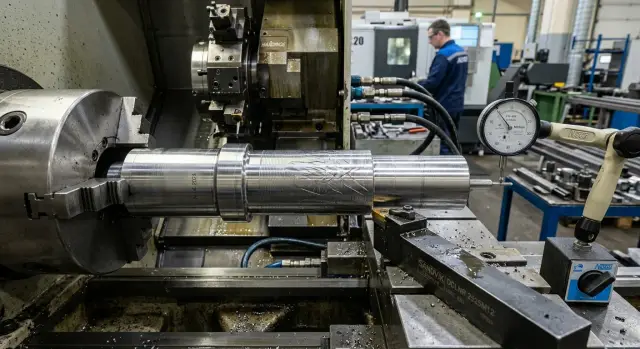
What counts as "stripes"
Stripes on a finished surface are not every mark left by the tool. Usually it’s a repeating pattern: lines appear at a clear pitch, look similar, and extend over a noticeable area of the part. A single, short or random mark is more often a scratch, a chip stuck to the surface, or a local spot — not stripes.
First look at three features: pitch, depth and direction. Pitch shows how often the mark repeats. Depth tells whether it’s a light texture or a defect that affects quality. Direction matters too: the pattern can run along the feed, around the circumference, or at an angle. Different causes usually produce different patterns.
A single scratch almost always stands out from the overall pattern. It starts at one point and quickly disappears. Spots look different as well: they lack regular repetition and resemble isolated dull or burnt patches, or areas with stuck chips.
If the same mark repeats at equal intervals, it’s worth looking for a persistent cause rather than a one-time disturbance. On a lathe such a pattern often runs along the whole length of the pass or at least over most of it.
It helps to answer some simple questions right away. Does the mark repeat at the same interval? Does the depth change toward the edge or the middle? Does the pattern run over the entire length of the part or only on one section? Does the same pattern appear on multiple parts from the same batch?
The last question usually saves the most time. If one part shows stripes while the others are clean, the cause may be accidental: a chip fragment, dirt on the blank, or a one-off clamping slip. If a similar pattern appears on two, three, or all parts, the problem is likely systemic — check the fixture, the cutting mode, or the tool.
It’s useful to compare not only the parts but the location where the marks appear. If on every blank the stripes start at approximately the same spot, that’s already a pattern and narrows the search.
A simple habit: don’t call every defect a stripe at first sight. First check for repeatability, consistent pitch and a common direction. Otherwise you can easily confuse a systemic issue with a single scratch and waste time chasing the wrong cause.
How the surface pattern suggests a cause
The surface after a finishing pass gives many clues. By looking not just at the fact of stripes but at their shape and repeatability, you can often tell whether to look at the spindle, the clamping, the cutting mode, or the chip flow area.
A regular repeating pitch often points to runout during turning or to a cutting mode unsuitable for finishing. The pattern then looks as if it was applied at the same interval along the entire length. This happens when the part sits crookedly, the chuck clamps with a tilt, or the feed is too high for the required roughness.
A wavy pattern is typically linked to vibration on the lathe. The surface in this case doesn’t just have stripes — it seems to flow slightly. The wave increases toward the end of the overhang, on thin parts, or with weak toolholding stiffness. If the sound changes during cutting and you see a regular wave on the surface, check the stiffness of the whole system first.
Random scratches look different. They have no even pitch, may break off, intersect, and appear only on parts of the part. Such marks are often left by chips that don’t break properly, wind up and then get pulled across the finished area. Another frequent cause is buildup on the cutting edge when the insert no longer cuts cleanly but drags the material.
There are local hints too. If the mark is visible only at the entry or the exit of the tool while the middle looks better, check the clamping. A weak chuck, long overhang, poorly tightened center, or an ineffective support often cause displacement exactly when the load changes.
A simple rule of thumb helps: even pitch is more often linked to runout or an excessive feed, waves indicate vibration and lack of stiffness, chaotic scratches suggest chips, buildup or dirt, and an edge-localized mark points to clamping or part deflection. That’s usually enough to avoid changing everything and wasting half a shift on guesses.
When runout is to blame
If stripes are even and repeat at a constant pitch, one of the first suspects is runout. The tool meets the part in a slightly different position each revolution, removing metal unevenly and leaving a stable repeating trace.
Such a pattern usually looks neater than vibration marks. Stripes don’t tear along the length or go chaotic; they keep the same rhythm over the pass. If the pitch repeats revolution after revolution, first look at how the part is seated and clamped rather than at the insert.
Start checks with the simplest things: the chuck, the condition of jaws, the arbor, transitional fixtures, the seating surface of the part and the end of the stop. Remove burrs, chips and dirt in the clamping area. Even a small chip between the part and the jaw can leave a visible mark on the finish. The same happens if the blank is not fully seated on the arbor or touches the stop with a tilt.
A dial indicator quickly separates guesses from facts. Measure radial runout on the outer surface and axial runout on the face. If one value moves and the stripes show a regular repeat, the link is usually direct. In finishing even a small tilt becomes noticeable.
A simple test is to reclamp the part and compare the pattern. If after reclamping the stripes shift, change or weaken, you’ve nearly found the cause. If the pattern remains the same, look deeper — at the chuck, arbor, spindle assembly, or the geometry of the blank itself.
In shops this often plays out the same way. Everything is fine after roughing, but a neat ripple appears on the finishing pass. The operator changes the feed or tries another insert, but the stripes don’t go away. Then they remove the part, clean the seating, reclamp, check with an indicator — and the stripes disappear or weaken. The cause was runout, not the cutting.
When vibration makes the stripes
Vibration is usually heard before it’s seen on the part. If chatter, ringing or a rough hum appears during cutting, the tool-part-fixture system is oscillating and the stripes on the surface are the consequence.
Visually it’s not a smooth sheen after finishing but small waves, dull patches and uneven light reflection. The surface may look slightly fuzzy or rippled even if dimensional accuracy is still acceptable.
This often shows up when the system lacks stiffness: a long tool overhang, weak part clamping, or a thin blank that starts to "sing" under load. If the part is long and the tool is projected too far, vibrations increase rapidly. The same happens when jaws hold the part over a small length or the toolholder is not fully tightened. Even small looseness changes the surface more than it might seem.
Check four things: tool overhang, clamping stiffness, the condition of the toolholder and its fastenings, and whether the sound repeats along the whole pass or only on a section. This simple check often points the way.
A good sign that vibration is the cause is when the pattern changes with cutting conditions. If you slightly reduce the feed or depth and the waves become rarer or weaker, the cause is likely vibration. Change only one parameter at a time so you can see what worked.
Example: turning a long bushing — the first millimeters are fine, then a matte rippling appears and you hear chatter. Reduce tool overhang and tighten clamping, then make another pass with a different feed. Often that’s enough to noticeably reduce or remove the stripes.
If the sound and the rippling persist, don’t fight the machine — it has shown the problem is structural and linked to oscillations.
When chips and buildup interfere
Stripes are not always caused by machine geometry. Often the cause is right in the cutting zone. Chips that don’t break, that wind and catch on the finished area, will be dragged across the surface and leave long random scratches. Their pitch is usually less even than with runout.
Buildup on the cutting edge creates a different picture. Metal adheres to the insert and the tool starts to cut with a changed edge. The surface alternates between shiny and dull, and stripes can appear and disappear even within one pass.
You can see this with a short check. Do a short finishing pass, stop the machine and inspect the insert. If there’s adhered material on the edge, the cause is right in front of you. It makes little sense to hunt for runout while chips and buildup are still possible causes.
Coolant issues are also common. If the flow doesn’t reach the cutting zone, chips evacuate worse and the edge heats more. Gummy materials are especially sensitive: on stainless, soft steels and nonferrous alloys, buildup marks are usually more noticeable than on brittle, hard materials.
Compare the chips as well: are they short and brittle or long and stringy? Does coolant reach the edge? Is there buildup on the insert after a short cut? Does the pattern change with different materials? These questions quickly indicate where to look.
If chips evacuate cleanly on one part but form a ribbon on another, the issue often lies in the material—chipbreaker—feed combination. Too low a feed often prevents chips from breaking properly. Too high a feed also spoils finish but in a different way.
A common shop picture: on a gummy steel the part comes off with sparse long scratches and the insert looks like its nose has a gray smear. On a harder material with the same settings the trace almost disappears. Such contrast usually points to buildup and poor chip evacuation rather than the lathe itself.
If the pattern varies from part to part and depends strongly on material, start with the chipbreaker, feed, coolant and edge condition. Often that’s enough to get a much smoother surface.
How feed and cutting mode spoil the finish
Stripes don’t always mean the machine is broken. Often the problem is a mismatch between feed, speed and insert geometry. The tool still cuts, but not in the way needed for a finishing pass.
Too high a feed leaves a visible pitch. The tool’s mark is regular and you see a clear helical pattern. The larger the feed per revolution, the easier it is to spot without magnification.
But too low a feed also causes trouble. It may seem that lower feed gives better surface, but in practice the edge starts to rub more than cut. The surface smears, with shiny and dull patches from heat, and the stripes become irregular.
Cutting speed changes the picture too. If speed doesn’t suit the material or the edge condition, buildup grows on the insert. Then the tool cuts with a random metal buildup rather than its intended geometry, leaving torn traces, small burrs and unstable gloss on the part.
On CNC lathes this is easy to spot: the program repeats the same mode and the defect appears similarly on all parts. If the pattern is regular and repeatable, check feed and speed before looking for looseness where it might not exist.
Pay attention to the combination of insert radius, feed and depth of cut. A large radius with too small feed and depth makes the insert rub the material. If feed for that radius is too large, the pitch immediately shows on the surface.
A quick check is simple: verify the insert radius and actual feed per revolution, check the finishing depth, evaluate cutting speed for the material, and inspect the edge after several parts. Often at this stage it becomes clear the cause is the cutting mode, not the mechanics.
Typical example: an insert with 0.8 mm nose radius runs a finishing pass with a very small depth and almost symbolic feed. The tool begins to rub. With slightly higher feed and proper speed the trace becomes cleaner and more even.
If changing the mode alters the pitch or almost removes the stripes, the cause was feed or speed. That’s a good outcome: the problem is solved by tuning, without lengthy machine checks.
How to search by steps
Search for the cause from the evidence on the part, not from guesses. Similar defects are easy to confuse, but the surface pattern usually tells a lot: do stripes run the full length or only a section, is the pitch steady or variable, is the mark deep or barely visible. Note immediately where the defect is strongest.
If you skip this, you’ll get confused. After two or three trial passes it’s hard to remember the first condition and what changed it.
A practical order of checks can be:
- Stop the machine, inspect the part under side light, photograph the mark and note where it appeared.
- Check runout without cutting. Put an indicator on the blank, chuck or arbor and see if there’s radial or axial runout.
- Remove chips from the cutting zone and inspect the cutting edge. Buildup, small chipping or wear often causes stripes as much as a bad mode.
- Make the next pass changing only one parameter — usually feed, RPM or depth of cut.
- After the pass compare the surface again and note what changed: pitch, depth, location of appearance, and cutting sound.
This approach saves time. If you change feed, RPM and insert at once you’ll get a new pattern but won’t know what caused it.
If stripes barely change after tuning the mode, check mechanics: clamping, runout, looseness and tool overhang. If the pattern noticeably changes pitch after a feed change, the cause is usually closer to the cutting mode or to how vibration starts.
A common trap: the operator sees stripes and reduces feed for finishing, while the real cause is stuck chips or a built-up edge. Or they change the insert when the chip flow is simply wrong and chips are scratching the surface.
In EAST CNC service practice a short log of observations often helps more than long arguments at the machine. Two or three careful notes after trial passes are usually enough to decide which assembly to check first.
Common mistakes
The most frequent mistake is swapping the insert immediately. It’s an understandable reaction but it often prevents finding the root cause. If you replace the insert in the first minute, the original reference point is lost and you can’t tell whether the marks were from wear, runout, chips or the cutting mode.
The second mistake is changing everything at once. The operator lowers feed, increases RPM, then tweaks coolant. If the pattern weakens, you won’t know what actually helped. Troubleshooting becomes guessing.
People also tend to search only in the machine: spindle, holder, turret — but forget about the part setup. Weak clamping, jaw misalignment, long blank overhang or dirt on the seat produce the same pattern that’s easily mistaken for vibration.
Another trap is drawing conclusions from a single part. It’s far more useful to compare several parts in a row: the first after changing the insert, the third, the tenth, and then a part after stopping and restarting. This sequence shows whether the pattern repeats every cycle or appears only in specific conditions.
A practical routine: record the original mode and tool condition, then change only one parameter, compare several parts, and check not only the machine but also the clamping, overhang and support.
There’s also a psychological pitfall. If someone recently had a case where the insert was to blame, people expect the same cause next time and may overlook chips or weak clamping even when the pattern points directly to them.
A calm, ordered check almost always beats frantic changes. One precise step gives more value than three quick swaps.
A simple shop example
After a finishing pass a shaft showed even stripes along almost the entire length of the area, with a constant pitch. It was easy to assume vibration, especially because the machine sounded louder than usual.
The operator first thought the same. He checked the insert for obvious chipping and listened to the sound on the next part. The noise was there, but the surface pattern did not look like typical chatter — the stripes were too regular.
So he didn’t immediately change feed or mode. Instead he removed the part and rechecked its setup with an indicator after re-clamping. The check showed runout they hadn’t expected: the part had sat slightly crooked in the chuck and the clamp had locked that error.
The reason was simple: a small piece of dirt on one jaw surface. After re-mounting the shaft it seated with a tilt. In that position runout easily produces a regular repeating trace. The cutting noise only distracted from the real cause.
The operator cleaned the jaws, reinstalled the part, carefully aligned the clamp and rechecked with the indicator. Then he made a new finishing pass with the same tool and nearly the same mode — the stripes disappeared.
This example is a reminder: if chips don’t stick to the part, the insert is intact, and the stripes are even, check runout first. Especially after any re-clamping. Sometimes the problem is not in cutting but in how the part sits in the chuck.
Quick check and next steps
If stripes appear again, don’t change everything at once. When an operator tweaks feed, RPM and tool at the same time, the cause hides.
Start from basics. Before a new part, clean the chuck, jaws, seating surfaces and the cutting zone. Small chips or dirt under the clamp often cause displacement and then a pattern that’s easy to mistake for a mode problem.
Then go step by step: measure runout of the blank and, if needed, the already machined surface; check tool overhang; inspect the cutting edge, especially if the insert has worked on another material; make one control pass and change only one parameter, for example the feed or RPM.
One changed parameter gives a clear answer. If the surface pattern changes in pitch, depth or frequency, you quickly know where to look next. If the picture hardly changes, the cause is likely clamping, runout, or the tool itself.
Record a few numbers: feed, RPM, depth of cut, insert grade, overhang, measured runout, and add a close-up photo of the surface. With these details a service engineer understands the situation much faster than from the phrase "the part has stripes."
If the defect returns after the control pass, don’t waste a shift on guesses. Collect the measurements and consult EAST CNC specialists. The company supplies and services CNC lathes, so here the important thing is to check a specific machine, setup and mode rather than discuss general theory.
Good results usually come not from frantic changes but from two or three precise checks: clean, measure, do one test pass — and the cause is often much closer.