
Step on the contour during seat milling: how to remove it
A step on the contour during seat milling often appears on large housings because of the pass junction. Let’s look at contour sectioning and quick checks.
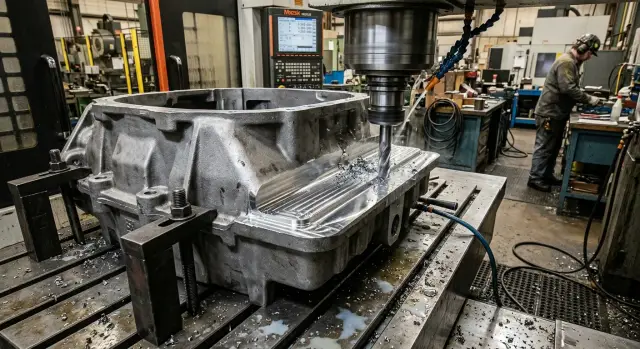
Why the step appears
After the finishing pass, the seat may look flat, but a thin shoulder remains on the contour. Most often, you can see it at the point where the toolpath closes: a fingernail catches, a feeler gauge shows a difference, and the highlight on the edge breaks.
On the control screen everything may look clean. On the part, however, a few hundredths remain. For a cover that has to sit across the whole surface without tilt, that is already enough.
The problem shows up quickly during assembly. The cover first touches the seat on one side, then starts rocking, and a gap remains on the other side. If you pull it down with bolts, the tilt does not disappear. The load simply moves to an unplanned area.
On a large housing, this defect is more noticeable because the error builds up along a long contour. While the cutter moves around the full perimeter, spindle temperature, part heating, edge condition, tool load, and axis behavior in the corners all change. The conditions at the beginning of the pass are one thing, and at the end they are already different.
A large part also handles local deformation worse. A heavy housing can settle slightly on its supports, and a long wall can shift almost invisibly after roughing. On a small part, this is barely noticeable. On a large one, the same few hundredths are already visible in the highlight and create a clear pass junction.
One closed pass around the entire contour collects all small deviations in one place. If the cutter enters the material a little differently, if the axes pass the corner differently, or if heat has increased by the end, the start and end of the toolpath will not match perfectly. In the program, the contour is closed, but on the metal a shoulder remains.
This kind of defect often looks random. In practice, the reason is usually simple: one long uninterrupted pass, accumulated error, and one junction where that error becomes visible.
Where to look for the defect
A step rarely appears anywhere at random. It usually shows up where the cutter load changes, even if the stock allowance is the same.
The first problem area is a long straight section after a change in direction. Before the turn, the tool was cutting in one mode; after the turn, the load is slightly different. A weak difference can remain in the first few centimeters of the straight section. In the shop, it is easy to miss, but the cover will show it right away.
The second zone is a corner. In the corner, the cutter removes material unevenly: just before it was cutting sideways, then the radius starts pushing it more strongly. If the housing is massive and the tool overhang is noticeable, the machine and tool respond with a short deviation. After that, a step or a mark remains.
It is also worth checking the entry into the finishing pass and the exit from it. At the beginning, the tool has not yet reached a stable position, and at the end the load is already being removed. That is why a small shoulder, a dull strip, or a mark that becomes visible after a normal wipe often remains there.
Another common point is the joint between two program sections. On screen, the toolpath looks continuous, but in the metal one section may end under a different actual load than the next one begins with. Sometimes a difference of just a few hundredths in position or a short feed jump is enough for the transition to become visible.
On a housing about 800 mm long, the defect is often not in the middle of the side, but 30-50 mm after the turn or where one program fragment is handed off to another. The operator checks the middle of the long wall, finds nothing, and the problem remains nearby in the transition zone.
If you need to narrow the search quickly, first look at four places: the area after the turn, the corner, the entry and exit of the finishing pass, and then the joints between program fragments. On large housings, the step most often repeats exactly there.
What to check before changing the toolpath
If a step appears on the contour, do not rush to split the toolpath into new pieces right away. On a large part, the problem often starts earlier: the housing may have settled slightly, the stock allowance may vary, the cutter may run out, and different parts of the program may be living off different zeros.
The same mark at the joint can have several causes at once. If you only adjust the CNC program, the defect sometimes becomes even more noticeable because the program is already adapting to a bad reference.
First, check how the part is mounted. On a large housing, the reference can shift easily because of dirt under a support, a skewed clamping force, or a weak stop point. A few hundredths are enough for the pass junction to show up around the entire perimeter.
Then compare the stock allowance after roughing around the whole contour. If one area has 0.3 mm left and another almost 1 mm, the finishing pass will run under different loads. That means the cutter will behave differently at the entry and exit.
The next check is tool runout. Even a good cutter will pull the size and leave a different mark on neighboring sections if it sits poorly in the holder. This is especially noticeable on cover seats: the contour is long, and the requirements for flatness and wall quality are strict.
After that, assess overhang and rigidity. A long overhang is convenient, but on a large housing it often causes micro deflection. On a straight section, that may not stand out, but at the joint a clear step appears.
And finally, bring all sections to the same zero. If the fragments of the program were edited separately, it is easy to get an X, Y, or radius compensation shift. On screen everything looks even, but on the metal a mark remains.
It is also useful to do a quick check on the actual part: measure the allowance every 80-100 mm and compare it with the setup. This kind of measurement often shows that the contour is too early to split. First, the cutting conditions need to be evened out.
If the setup is stable, the allowance is even, the tool does not run out, and the zero is the same, only then does it make sense to adjust the toolpath. Otherwise, you are treating the mark, not the cause.
How to divide the contour into sections
On a large housing, it is better not to machine the entire seat with one closed finishing pass. A long contour is rarely cut the same way all the way around. On a straight section, the cut is calm; before an inner radius, the tool is already being pushed harder; after the corner, it relaxes again. This is where the joint is born.
First, look at the contour as a map of changing load. Mark the places where the amount of material removed changes, where ribs, bosses, openings, or areas with different wall stiffness are nearby. Even a simple geometry on a large part rarely gives the same conditions around the entire perimeter.
It is better to split the toolpath not in half, but by cutting behavior. Long straight sections are usually handled as separate sections. Corners and radii should also be separated, because the direction of force changes there and the cutter works differently.
A simple scheme often helps: one long straight is done as a separate pass, the corner or small-radius area gets its own pass, and the next straight is separate again. If there is a boss, a thin wall, or another locally weak area nearby, it is better to pull that into a separate section too.
Do not place the boundaries where the cover is especially sensitive to unevenness. If there is a functional seating area, move the joint to a less noticeable place. It is easier to hide the transition on a secondary section than to chase it along the whole contact line later.
Each section needs its own calm entry and exit. Do not start a new pass at the corner point, and do not end it where the contact patch will later be checked. A lead-in on a straight section and the same kind of lead-out almost always give a cleaner surface.
Leave a small overlap between neighboring sections. Then the joint does not depend only on machine stopping accuracy and tool compensation. The second pass slightly overlaps the end of the first, and the transition becomes smoother.
A good example is a rectangular cover seat on a heavy pump housing. Instead of one loop around the entire contour, it is better to make four straight sections and machine the corner zones separately with a small overlap. The program will be longer, but the risk of a visible shoulder will drop significantly.
How to join sections without a visible joint
Once the contour has been split, the problem is usually not the break in the path itself, but where the section starts, how the tool runs, and where the two passes meet.
It is better to place the start of the finishing section on a calm straight section where the load on the cutter changes little. On a straight segment, the tool has time to settle, and the trace from the entry is easier to hide. If you start from a corner or near a radius, the joint will almost always show more clearly.
Then keep one direction of travel around the whole contour. If the first section goes clockwise, the rest should go the same way. When the direction changes, the side load on the cutter changes too. On a large housing, that is already enough to create a difference of a few hundredths.
Do not change the feed exactly where the sections meet. Acceleration and deceleration leave their own marks even in a careful program. It is better to bring the feed to the needed value in advance, still on the straight section, and pass the joint without transition modes.
It is better to join sections in an overlap zone, not in a corner. A small overlap gives margin and smooths out the difference in cutting marks. In practice, 2-5 mm is often enough if the tolerance and part shape allow it.
A corner is almost always worse for such a meeting. There, the tool load changes sharply, and even a small shift is immediately visible on a cover seat. On a long straight section, the same error may stay hidden.
Another common reason for a visible seam is different stock allowance on neighboring sections. If one section leaves 0.2 mm and another 0.05 mm, the cutter will behave differently even at the same feed. Before the finishing pass, the allowance should be even around the whole contour.
If you split a large contour into four parts, the practical logic is simple: start on a straight section, keep one direction around the contour, keep the same allowance, and join the sections in a short overlap. This usually helps faster than trying to remove the seam with a single tool correction.
Example on a large housing
Let’s take a housing with a rectangular cover seat about 800 x 500 mm and 6 mm deep. The material is cast iron or steel. The length of the pass alone already creates a noticeable load on the cutter and feed unit.
On such a part, the step often appears not along the whole side, but in one far corner. The reason is simple: one common finishing pass runs around a closed contour, the tool gradually heats up, the housing slightly "breathes," and at the closing point the cutter is no longer cutting the same way as at the beginning. By eye this may be almost invisible, but the cover then sits tilted or the feeler gauge catches the transition.
If one full contour is cut at once, the picture is usually like this: the first long side looks clean, the radius is acceptable, and in the last corner after closure a 0.02-0.05 mm difference appears. For a cover seat on a large housing, that is already too much.
The working method is simpler than it sounds. The contour is split not for CAM convenience, but by geometry and cutting behavior. The two long straights are machined separately, the short sides separately as well, and the corner radii are left for their own finishing passes with their own entry.
A practical sequence can be like this:
- first, a finishing pass along the first long straight with an exit 8-12 mm past the calculated end
- then a pass along the opposite long straight with the same overlap
- then the short sides, also with a small exit onto the straight section
- after that, a separate cleanup of each radius or corner with a small arc
It is better to keep the overlap on the straight sections, not hide it in the corner. The straight section handles the joint more calmly, and the indicator will almost not see the transition later. The corner, on the other hand, shows any difference in load and micro shift right away.
The difference is visible immediately during inspection. After a common pass, a 0.03 mm feeler gauge still passes in the far corner, and the indicator jumps at the joint. After splitting the contour into sections, the feeler gauge no longer passes, and the indicator shows a smooth picture within the machine and setup accuracy.
If the housing is large and the system rigidity is not ideal, this approach usually works better than trying to "push through" one closed pass with feed or tool radius correction.
Common mistakes
Many steps appear not because of the cutter itself, but because of small decisions in the program and part inspection. On a large housing, one such small thing quickly turns into a visible mark.
The first typical mistake is splitting the contour exactly at the corners because that is easier in CAM. That is a bad place for a joint. In the corner, the cutter is already changing direction, the load jumps, and even a small shift leaves a mark right away. The joint is better moved onto a straight section.
The second mistake is placing the entry and exit where the cover has to sit without the slightest gap. The trace from the lead-in, a light edge pullout, or a repeat touch later gets mistaken for a geometry problem, although the issue is simply the poor location of the entry.
The third mistake is changing everything at once after the first bad part: the cutter, the feed, the stock allowance, and the pass strategy itself. After such a change, it is hard to tell what actually removed the defect and what just happened to line up. It is much more useful to change one parameter at a time, record the joint point, and measure the same place before and after the change.
The fourth mistake is related to measurement. If you check one section near the long wall and then compare it with a point near a rib, the conclusion will be false. On a large housing, stiffness varies around the perimeter, and the part behaves differently in different places. You need to compare the same zones, in the same order, and after the same settling time.
Another common slip is making the overlap between sections too small. On the screen it looks sufficient, but on the metal a thin step remains. It is better to leave a calm length margin than to chase hundredths by hand later.
If the mark simply moved after the change, instead of disappearing, the problem is usually not the tool. Most often, the joint location or the very idea of splitting the contour was chosen poorly.
What to check after machining
Right after the pass, do not judge the surface by eye alone. On a large housing, a difference of a few hundredths may be almost invisible, but it will show up immediately during assembly.
First, run an indicator over all places where one toolpath section transitions into another. Move it slowly and without jerks. If the needle repeats the jump in the same point, that is where the difference remains.
Then check the seating face along both diagonals and one cross line. This shows not only the local step, but also the overall tilt of the face.
After that, place the cover without bolts and without clamping. It should sit calmly without rocking. If one edge sits down and the opposite side still has a gap, look for either a step at the pass junction or a local rise in the face.
Do not rush the final size conclusion either. A large housing keeps heat longer than it seems. Let the part cool and repeat the measurement. Sometimes, after cooling, the geometry shifts by a few more hundredths.
It is useful to mark on a sketch exactly where the mark, dull strip, or difference remained. Otherwise, the next part will be adjusted almost blindly. A short note like "joint 3-4, +0.02, mark visible" quickly shows whether the error repeats in the same place or moves from part to part.
If the difference disappears after toolpath correction, but the size still shifts after cooling, then the cause is not only in CAM. In that case, look at housing heating, pauses between passes, and the finishing stock removal mode.
What to do next
If the step does not appear every time, do not change the program everywhere at once. Change the section layout one parameter at a time. Otherwise, it will not be clear what actually worked: the new entry point, a different overlap, or a shorter section.
A simple routine usually helps. Run a test on one housing, measure the joint, change one parameter, and check again. At the beginning, it feels slow, but in production it saves a lot of time.
A good toolpath should not live only in the memory of the operator or technologist. Save it as a template for similar housings with the same type of cover, similar wall length, and similar part rigidity. In a month, such a template may save not just minutes, but an entire shift of repeat setup.
In the template, it is useful to record not only the contour itself, but also working notes: where each section starts and ends, which overlap gave a clean joint, at what allowance the finishing pass stopped leaving a mark, how the part behaved during clamping and after release, where the axes moved smoothly, and where an extra jerk appeared.
Before the next part, it is worth honestly assessing not only the program, but the machine itself. On a large housing, the error is often not in the contour geometry, but in the combination of three things: axis travel, machine rigidity, and ease of setup. If the table is almost at its limit, the spindle is heavily extended, and the part was clamped with compromises, a clean joint is much harder to get.
A useful habit is to estimate the weak point before starting. Long tool overhang, awkward access to one side of the housing, rotating the part for the last section, lack of Y-axis travel margin - these are things it is better to notice in advance than after the finishing pass.
If you regularly work with large housings, sometimes it is worth looking beyond one program. When the problem comes down to machine rigidity, setup layout, and batch repeatability, it helps to rethink the equipment itself. EAST CNC and the blog at east-cnc.kz have materials on metalworking and machine reviews, and the company itself helps with selection, startup, and service for CNC lathes and machining centers for such tasks.
If the same joint comes out clean three times in a row after your adjustments, do not experiment further. Lock the setup in and make it the standard for similar parts.
FAQ
Why does the step usually appear at the point where the contour closes?
It usually appears where the toolpath closes. During one long finishing pass, heat builds up, the cutter load changes, and small axis deviations accumulate, so the start and end of the contour on the part do not match perfectly even if the program looks fine.
Where should I look for the defect first?
First check the area after the direction change, the corner itself, the entry and exit of the finishing pass, and then the joints between program segments. On large housings, the defect is usually not in the middle of a long side, but near the transition zone.
What should I check before changing the toolpath?
Check part setup, even stock allowance after roughing, tool runout, tool overhang, and the same zero for all program sections. If any of these varies, a new toolpath may only move the mark instead of removing it.
How do I know the problem is not in the program, but in the setup?
If the step moves to a different place after a new CNC program, and the allowance around the contour is uneven or the housing sits differently on the supports, look at setup and roughing first. In that case, CAM is already adapting to poor cutting conditions, and the joint remains.
How should a long contour be divided into sections?
Do not split the contour in the middle just because that is easier in CAM. Break it down by cutting behavior: long straights separately, corners and radii separately, and weak areas near ribs, openings, or thin walls separately as well.
Where is the best place to start and end a finishing section?
Place the start on a calm straight section where the load changes little. Do not start or end the section in a corner or in the seating area for the cover, because even a small difference shows up there right away.
What overlap between sections usually works best?
Usually 2–5 mm is enough if the tolerance allows it. On long straight sections, you can sometimes use more so the pass clearly overlaps the end of the neighboring section and the junction does not depend on stopping accuracy.
Can a step be removed with just a radius correction or a feed change?
Rarely. If the cause is one long closed pass, changing only the radius or feed often just moves the defect elsewhere. First make the allowance and section logic consistent, then adjust compensation.
How do I check the result after machining?
Right after machining, run an indicator over all joints, then check the flatness along both diagonals and across the part, and then place the cover without bolts. If it rocks or holds a gap on one side, look for a local rise or step at the transition.
What should I do if the step appears only on some parts?
Change only one parameter at a time: the entry point, the overlap length, or the section boundary. After each change, measure the same points and record the result, otherwise you will not know what actually worked.