
Standardizing Radii in Parts: When It's Needed
Standardizing radii reduces tool changes, simplifies drawings and speeds up series production. We'll look at where it's helpful and where it can be harmful.
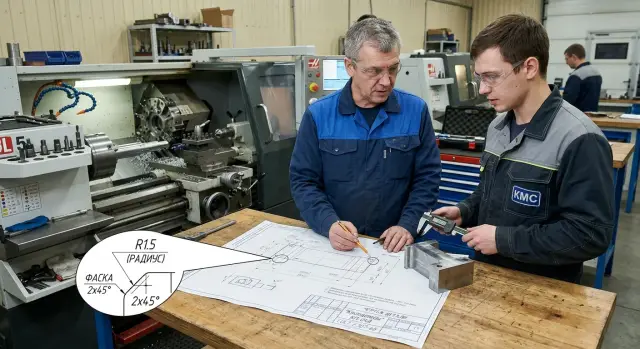
Why different radii slow down production
The more different radii on a single part, the harder it is to launch into series production. A drawing with R2, R2.5, R3, R4 and several chamfers of different sizes looks harmless on paper. In the shop each of those sizes becomes a separate decision for the process engineer, the programmer and the operator.
The problem isn't the radius itself but the number of small differences. The process engineer has to check where one tool can handle multiple places and where a different insert or cutter is already needed. The programmer edits toolpaths. The operator stops the run more often to take extra measurements. As a result time is spent not only cutting, but on constant clarifications.
Where the time goes
A new radius rarely stays just as another line on the drawing. It usually drags in another tool or insert, a separate pass with different feed, a check for undercut, and one more control dimension in the inspection card. Individually these are small things. In a series they turn into hours.
Losses grow fastest on repeat batches. Today 50 parts are made, a week later another 50, then the same item again. An extra tool change steals not only machine time but breaks the rhythm. The operator stops more often, the machine cuts less and waits more.
There is a second problem: the drawing becomes noisy. The designer sees the logic of the model, while production sees a set of nearly identical sizes that are easy to mix up. The difference between R2.5 and R3 seems small, but at assembly it can cause a gap, poor fit, or extra rework.
So standardizing radii is useful mainly for series production. One reasonable set of radii and chamfers simplifies tool selection, programming and inspection. But you can't reduce everything to a single size without analysis. If a radius affects edge strength, fit, fluid flow, sealing, or mating with another part, you mustn't change it just for shop convenience.
Good unification starts with a simple question: which radii serve the part's function, and which ones are leftovers from the model. When that distinction is made honestly, series runs more smoothly.
Where a single set of radii really helps
A single set of radii works well where the part's shape repeats and the radius doesn't determine fit, sealing or motion in the assembly. There standardization removes extra decisions on the drawing and cuts some machine setup. In series the effect is usually immediate: fewer tool changes, simpler programs, quicker inspection.
This is most visible on parts with repeating transitions. If several steps, grooves or pockets can use the same radius, production runs steadier. The process engineer doesn't need a separate tool for each corner, and the operator can keep a stable cutting mode.
The same applies to chamfers. If the part has repeating edges and the only requirement is to remove a burr, protect the edge from chipping and ease assembly, one chamfer size is usually enough. Instead of 0.5 x 45°, 0.8 x 45° and 1 x 45° you can often keep a single chamfer for all non-fit edges. The drawing gets cleaner and the chance of error drops.
A single set of radii is generally appropriate in four cases:
- the part has many identical transitions between surfaces;
- the contour has repeating edges where the chamfer only removes sharpness;
- the part is produced in series and setups happen frequently;
- the radius does not affect fit, locating, sealing or the operation of the mating part.
On series parts the benefit shows up fastest. If batches run regularly, even one extra tool change per operation becomes lost hours over time. On CNC lathes this is especially noticeable: the fewer unique radii and chamfers, the easier it is to keep a clear machining route for the whole series.
A good example is a housing or rotating part for construction equipment with several identical outer steps and a number of secondary edges. If you keep one radius on internal transitions and one chamfer on external edges, the part doesn't lose function. Production gains a simpler drawing and predictable machining.
Put simply: a single set of radii is needed where the shape should be convenient to make, not unique at every location. In such cases radii and chamfers should follow the logic of series manufacturing, not the habit of placing different sizes "just in case."
When you should not force everything to one size
Standardization has limits. If a radius affects part performance, you mustn't change it just for machining convenience. One common size can save minutes on the machine but later cause cracks, leaks or accelerated wear.
First look at areas where the radius bears load. At a step transition on a shaft, at a rib base or near a groove, too small or too large a rounding changes stress distribution. If the designer chose this fillet for fatigue or impact load, that size is better left alone.
You also must not unify radii where the part works with a mate. Fits, grooves for seals, faces with a specified chamfer, rolling and sliding zones depend on more than cutter convenience. Every millimeter relates to clearance, sealing and smooth motion.
Be cautious where the size is tied to a standard, regulation or a mating part in an assembled unit. Replacing R0.8 with R1.5 without agreement might speed production but create assembly problems.
Another group is parts where shape influences flow, contact or cleaning. This appears in supply channels, housings with fluid circulation, and areas that must be easily cleaned of oil, chips or residues. A uniform radius across transitions may look neat but sometimes performs worse.
Practically it's best to divide a part into zones. One group contains places where the radius affects strength. The second—areas with fits, seals or moving pairs. The third—sizes specified by drawing or standard. And only the fourth—transitions and edges where unification doesn't harm the part's function.
A simple example: a housing has external edges, an internal pocket and a groove for an O-ring. External edges and the pocket can often be brought to one set of radii and chamfers to reduce tool changes. The seal groove must remain as drawn, because its radius relates to groove width, depth and sealing quality.
If in doubt ask one question: is this radius required by the part or only by the machine? If the part needs it, leave it. If it's only for machining convenience, unification is usually justified.
How to pick a set of radii
If a drawing already contains R2, R2.5, R3, R4 and several nearly identical chamfers, don't rush to merge them. First gather facts. Otherwise it's easy to simplify the drawing on paper and create questions in production.
A step-by-step approach works well.
- List all radii and chamfers from the current drawing in a table. Note where each appears: outer edge, internal transition, fit, assembly edge.
- Separate sizes that affect part function: contact zones, seals, bearing fits, weld areas or fatigue-critical spots.
- Find close sizes that can be consolidated. If R2.5 and R3 do not change function, it's usually better to keep one size.
- Reduce the set to a few typical values for the whole series. The shorter this set, the easier it is to write programs, pick tools and read drawings.
- Finally, verify the set against the actual machine and tooling capabilities. The set should suit the designer and the shop.
At this stage it's useful to view the part as zones with different risk. Where a radius merely removes a sharp corner, consolidation usually goes smoothly. Where the radius sets a transition shape and affects stress, don't rush.
Simple example: a bracket has internal radii R2, R2.5 and R3 and chamfers 0.5 x 45° and 1 x 45°. After checking, only the transition near the mounting hole affects part function. The other radii only reduce stress concentrations and help machining. In that case you can keep R3 for internal transitions and one 1 x 45° chamfer for external edges. The drawing becomes cleaner and tool changes happen less often.
The set should be short but not rigid. A frequent mistake is trying to force everything to one value. Typically two to three radii and one or two chamfers per family of parts are enough.
The final check is practical. Ask the process engineer which tool will actually make the part: what insert tip radius, what cutter diameter, and whether a separate pass is needed for a small internal radius. If a rare size forces a tool change or an extra cycle, reconsider that size.
Example on a single part
Take a simple turned shaft. It has a groove, a collar and two outer edges. Such examples show the value of standardization clearly.
The drawing initially has mixed sizes: collar R0.8, second edge R1, near the groove R1.2, and chamfers that differ—one 0.5 x 45°, the other 1 x 30°. Formally all sizes are small. On the machine this is no longer trivial.
The setup person spends time not on the cut but on checks. You need to decide whether one insert can do everything, what tip radius the insert has, whether compensation must be adjusted and where sizes can be confused. If batches number in the hundreds rather than tens, those pauses accumulate fast.
After review the drawing is simplified. All non-functional fillets are set to R1 and outer edges get one chamfer, for example 1 x 45°. The part's function doesn't change, but the drawing and programming become noticeably simpler.
Practically this yields clear effects. The operator checks transitions faster. The setup person changes tip compensation less often. The process engineer can produce a clearer production drawing. The risk of confusing R0.8 and R1.2 almost disappears.
Time savings may seem modest, but they are real. On a re-setup it's often possible to save about 10–15 minutes simply because there are no extra clarifications about corners and fillets. More importantly, the part is produced more consistently from shift to shift. People ask fewer questions and incidental deviations decrease.
But one size must not be touched. If the shaft has a bearing fit, e.g. diameter Ø35 h6, you must not simplify it for convenience. That size controls the fit. Changing it or the related area without checking will make the bearing too tight or create play.
Sometimes you also must not change the fillet near such a fit. If the mating part cannot accept a larger collar radius, R1 there won't work. Rule of thumb: consolidate free edges, leave fit zones as is.
Common mistakes
Standardizing radii helps only when the designer checks part function, not just "tidies" the drawing. The most common mistake is simple: merging different radii into one without regard for fits, tool access, contact zones and assembly. It looks neat on screen, but in the assembly there may be insufficient clearance or altered edge loading.
This often happens on transitions that seem secondary. For example, an internal radius was reduced for machining convenience while a mating part nearby has tight tolerances. The assembler ends up with a part that "almost fits," and the shop spends time on fitting or rework.
Where mistakes are most costly
Another frequent issue is old sizes remaining in several places. The designer updates the drawing but doesn't correct notes, the BOM table or the 3D model. For the shop this is the worst case: the operator, process engineer and tool purchaser look at different data.
On CNC machines such discrepancies quickly cause downtime. If the model shows one radius but the released drawing another, the programmer writes a toolpath for one geometry and inspection checks against the other. Even a few tenths difference can force an extra tool change or disputes between departments.
Another typical mistake is specifying very small radii that are not available in standard tooling. On paper R0.3 looks fine. In the shop it often demands a special insert, a smaller-diameter cutter, or an extra pass. For series production such details cost time on every piece.
Chamfer confusion is no less common. Some edges are drawn as fillets, others as chamfers, with no consistent rule. As a result similar transitions on the same part get different processing for no real reason. The operator has to read the drawing more carefully and change tools more often.
A quieter error is changing a size in one part but not reviewing the whole family. This is obvious in series work when housing, cover and mating part act like they follow different rules. One element is simplified but neighboring parts still have old radii and chamfers. Formally a standard exists, but its benefit is minimal.
A good rule: when you change radii and chamfers, update the whole data set and all similar parts. Otherwise series production will quickly return to manual tweaks you were trying to eliminate.
Pre-run checks
Before a run, do a short review of drawing and model. Often 10–15 minutes is enough, and the later savings are measured in machine hours and calmer shop work.
Check the following:
- How many distinct radii remain on the part. If there are six or seven, ask again which sizes are truly needed for function and which can follow a general rule.
- Does one rare radius require a separate tool. If a size appears only once and doesn't affect fit or contact, it easily becomes an extra setup.
- Can the operator read the drawing without calling the designer. A note like "unless otherwise specified, internal radii R3" removes many questions.
- Do the 3D model, production drawing and machining route match. Radii are often changed in the model while the drawing or operation card retains the old size.
- Has the change affected functional zones. Fits, stops, datum surfaces and contact points must not be adapted to a generic radius just for easier machining.
A simple test for clarity: give the drawing to a process engineer or operator who did not design the part and ask them to explain in a minute which radii to apply where. If they hesitate in two places, the rule is unclear or exceptions are too many.
A common mistake is to standardize radii and then not check mating surfaces. On a housing the external radius is often safe to unify, while an internal transition near a fit already changes contact and spoils assembly. This is usually noticed too late, after a batch is in production.
If any check point causes dispute, delay release by a day and correct the documents. Fixing the model and drawing is cheap. Reworking a batch costs noticeably more.
What to do next
If you want to reduce time to start a series, begin with a family of similar parts, not a single item. Take parts that go through the same operations and see which radii and chamfers repeat. At that stage it's often clear that some sizes differ for no real reason.
If there's a debate between close values, it's usually better to keep the one for which a familiar tool, setup and machining route already exist. That is the point of standardization: fewer ad hoc decisions in the shop and fewer reasons to change tools during a series.
Where to start
Create a working set of typical sizes and immediately record where they apply. Designers need concrete rules, not abstract principles: which radii to use for internal transitions, what to put on external edges, which chamfers for deburring, and where exceptions start for fits, seals and mating zones.
Then update drawing templates and internal drafting rules. If you don't, old habits will quickly reintroduce random sizes. Better to state which radii apply by default and where the designer must justify deviations.
Verify the decision not on a single part but with a trial batch. One successful piece proves little. Series quickly reveal real time losses: extra tool changes, awkward setups, extra inspection, and operator questions about the drawing. A few trial pieces show this more honestly.
For stable series, discuss the drawing with production, tooling and those selecting equipment. These conversations often reveal non-obvious issues: a rare radius, an awkward tool overhang or an extra pass that isn't visible on paper. For such tasks an outside equipment supplier's practical view can be helpful. EAST CNC, the official representative of Taizhou Eastern CNC Technology Co., Ltd. in Kazakhstan, handles selection, supply, commissioning and service for CNC lathes, so in these discussions they usually consider not only geometry but real tool behavior and cycle work.
The working routine is simple: choose a family of similar parts, reduce radii to several typical values, add them to templates, run a trial batch and keep exceptions only where the part's function suffers without them.
The conclusion is simple too. Unify everything that does not affect fit, strength, sealing and assembly. If an identical radius doesn't impair part function, make it the standard. If it does, don't force the drawing to suit production convenience. Proper standardization preserves part function and removes random variation where it does no good.
FAQ
Is it worth standardizing radii at all?
Yes—if a part is produced repeatedly and the radii do not affect fit, sealing or strength. Fewer different sizes mean simpler tooling, programs and inspection.
On which parts does this bring the most benefit?
The effect appears fastest on shafts, housings and other parts with repeating transitions and edges. One set of radii and chamfers reduces tool changes and clears up the drawing.
When must a radius not be changed?
Do not change a radius that carries load, sits next to a fit or a seal, or mates with a counterpart. Minutes saved on the machine are not worth cracks, leaks or looseness in assembly.
How many typical radii are usually enough?
Usually two to three radii and one or two chamfers are enough for a family of parts. That simplifies series production without breaking part function.
Can chamfers be unified together with radii?
If a chamfer only deburrs and protects an edge from chipping, you can often use one size for all non-fit edges. If the chamfer defines assembly or a stop, keep it as the assembly requires.
How to choose one size from close radii?
First list all radii from the drawing and note where each works. Then only merge close values like R2.5 and R3 where the part does not lose function.
Is it true that one rare radius can slow the whole series?
Yes—especially in series. A single rare radius often requires a separate insert, a trajectory tweak and extra inspection, and those minutes add up for each batch.
What to check before starting a batch?
Before the run, check that the 3D model, drawing and machining route match, and whether a rare size forces an extra tool. Also make sure the operator understands the rules without calling the designer.
Do radii need to be changed in all similar parts?
Yes—otherwise the standard will quickly spread apart. If you simplified one part, review similar items and templates so old sizes do not return in the next release.
Who should be involved in the unification decision?
Include the designer, the process engineer, the CNC programmer and the operator who will actually make the part. For large series or new machines, involve the equipment supplier as well.