
Spindle taper cleanliness: how to reduce runout without instruments
Spindle taper cleanliness affects runout, surface marks and component life. Practical inspection, cleaning and contact checks you can do without instruments.
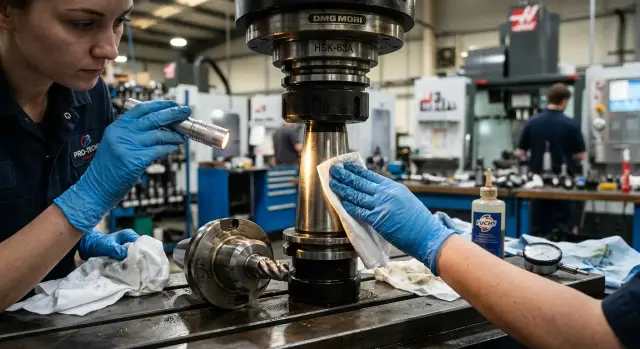
Why a dirty taper immediately causes runout
The spindle taper holds the holder not "approximately" but with very high precision. So even dust, a dried coolant drop, metal dust or a barely visible burr can shift the holder by microns. The eye hardly notices it, but the cutting responds at once.
The problem is that dirt rarely forms an even layer. Usually it’s a single spot or a narrow strip on the contact surface. The holder seats with a tilt, and the tool axis shifts. The thinner the tool and the higher the speed, the more pronounced the effect.
Typically it looks like this: the program and cutting parameters are the same, but after changing the tool the result got worse. Yesterday the dimension held fine, today there are surface streaks, slight taper or size drift on the last passes. People often look for the cause in compensation, feed or the tool itself, while the real source is the seating.
The sound also changes. The spindle on a familiar setting starts to feel rougher, as if cutting became harder. Sometimes the difference is small, but an experienced operator hears it immediately. If the holder contacts only part of the surface, the load is distributed poorly and the machine behaves unevenly.
Because of this a dirty taper is often mistaken for bearing wear. The logic is understandable: there is runout, there is noise, so the problem must be inside the spindle. But in the shop it’s much more often ordinary dirt after a tool change, careless blowing or storing a holder without protection. Bearings don’t wear out in one start, but a speck of dust can spoil the fit in a second.
On CNC machines this is especially unpleasant because the error looks intermittent. One holder works fine, the next one doesn’t. Then the operator removes it, wipes it, puts it back and the runout partly goes away. So taper cleanliness seems trivial until the first scrap or an extra hour of searching for the cause.
What to prepare for a basic inspection
Cleanliness starts not with wiping but with order around the machine. If you scramble for a wipe at the last moment and put the holder on a bench, tiny chips are almost guaranteed. Then that chip is the thing that causes runout, while the reason seems "unclear."
You don't need an expensive kit for a basic inspection. A few simple items are enough: lint-free wipes, a small flashlight, a small mirror, a fast-evaporating cleaner that doesn’t leave a greasy film, a marker or layout blue for contact checking, and a clean pad for the holder. This can be a thick cloth, a rubber mat or a clean piece of cardboard free of dust and oil.
Keep this kit separate from general tools so a sandpaper, dirty rag or grease tin won't be nearby. If the cleaner has been open for a long time check the cap and sprayer. Leaks can get oil on your hands and then back onto the taper.
Another common mistake is unrelated to the spindle: someone wipes a holder and then puts it on a dirty bench for a few seconds. After that it brings debris back to the seating.
With the kit at hand an inspection and contact check take a few minutes. It’s far easier than spending a long time searching for runout later.
How to inspect the taper and holder
First, stop the machine completely. Don’t reach for the tool while the spindle is still coasting. A few extra seconds of waiting are better than a damaged seating or a scratch on the taper.
Remove the holder and place it immediately on a clean dry surface. Paper, a plastic tray or a lint-free cloth will do. If you drop the holder onto a bench with chips, the inspection loses meaning.
Shine a light into the taper. Look not only deep inside but around the circumference, slightly changing the angle of light. Dust, oily films, small rust spots and nicks are easier to see this way than under direct light.
Look first for dark lines and spots, traces of oil with adhered dust, shiny circumferential scratches and dents at the entry edge.
Inspect the holder with the same attention. Start at the edge and check the entire seating surface. Often the issue is not deep but at the very rim: a barely visible impact mark, dried lubricant or a thin ring of dirt. A clean seating looks even, without stains or random matte areas.
One quick trick saves time. If you removed dirt and the next inspection shows it in the same place again, don’t ignore it. A repeating mark usually points not to random dust but to the source: a contaminated tool rack, careless holder changes or damage at the taper entry.
If you work on a CNC lathe every day, make this inspection short but regular. It often explains the origin of runout before any measurements.
How to clean without extra risk
Here accuracy beats aggressive chemistry. Even a thin layer of dust, old grease or a dark film can seat a holder slightly off and increase runout for no other reason.
Start by removing dry dirt with a clean lint-free wipe. Don’t press hard or try to scrape into a corner. Then degrease with a cleaner that evaporates quickly and leaves no oily film. Wipe the spindle taper and the holder shank separately, using the clean side of the wipe. If the wipe darkens quickly that’s normal — dirt is still on the metal.
A simple procedure: remove loose dust, degrease both surfaces, change wipes until they stay clean and wait for complete drying.
Many people damage the seating at this stage. Don’t probe inside with a screwdriver, awl, file or a stiff brush. Even a small scratch will later cause poor contact and be hard to diagnose.
If a film doesn’t come off at once, don’t scrub harder. Better repeat a gentle wipe with a fresh cloth. Two calm wipes usually beat one aggressive one.
Also don’t set the holder down on a wet surface. Residual cleaner or oil changes the contact. Let the metal dry completely before installing the tool.
In EAST CNC service practice this sequence is considered the most reasonable: remove loose dirt first, then degrease, then assemble dry. It takes a couple of minutes and saves hours looking for runout caused by ordinary dirt.
How to check contact without expensive instruments
You can understand how the holder seats without a dial indicator. All you need is a clean holder, good light and a very thin coat of marker or layout blue. A thick layer only hides detail and gives a false picture.
First wipe the holder and taper dry. Apply a mark to the holder taper with a single thin stroke. No need to coat it fully — just a light film to show where metal actually contacts metal.
Insert the holder and clamp it as you would in work, without extra movement. Remove the holder immediately and don’t rotate it while taking it out. Twisting the holder in the taper will smear the mark and ruin the test.
How to read the mark
Look at the shape rather than the aesthetics of the mark. Normal contact usually appears even and clear. The mark is removed where the holder presses tightly, and remains where there’s a gap.
Even removal across the working zone indicates a good fit. Separate spots or islands usually point to dirt, a small dent or a burr. A narrow ring at the edge means the holder is seating on a limited area. If clear contact is visible only on one side, there is a tilt or a local defect.
If the pattern looks odd, don’t rush to blame the spindle. Often the cause is simpler: a speck, an old oil mark or dried dirt from a previous installation. This is especially visible on a long holder where even a tiny particle immediately causes runout.
It helps to repeat the test twice. If the mark looks the same each time it’s no coincidence. If the pattern changes, first recheck both surfaces’ cleanliness and the habit of removing the tool without rotating it.
When contact is patchy or rings, start with the simple steps: clean the taper and holder again, inspect under light, then try another holder for comparison. This procedure usually saves time.
Where people most often make mistakes
The most common mistake is simple: the operator carefully wipes the holder but doesn’t look inside the spindle. Outside may look clean while a tiny chip or a dried coolant film inside the seating already misaligns the tool.
The second mistake is leaving oil where the seating should be dry. An oil film seems harmless but it alters the contact between surfaces. The holder won’t seat tightly and the contact mark becomes ragged or uneven.
A third familiar error: a cleaned holder is placed on a bench with chips, dust and rags. A couple of seconds is enough for contamination to return to the seating.
Attempts to clean the seating with sharp tools also harm it. Using a screwdriver, awl or similar sharp object easily leaves a scratch that later causes repeated poor contact.
Another mistake is ignoring a repeating mark in the same spot. If a mark appears again, the cause is probably not random. It may be a burr on the holder, damage inside the spindle or a particle stuck in one area that prevents normal seating.
Habit matters more than one-off cleaning. If you always keep the seating dry, avoid touching it with dirty gloves and watch for repeating marks, runout often decreases without repairs or complex measurements.
A short pre-start checklist
Two minutes before starting is enough to avoid fresh runout on the first part. The most common error is quick installation without checking the seating and noticing the problem only after a trial cut.
Check the taper: it should be dry, clean and lint-free. If after wiping a thread from the cloth or a thin oil film remains, the seating won’t be even. Don’t wipe the taper with your bare hand — skin leaves a mark.
Then inspect the holder along the whole seating length, not just at the face. Dirt often sits closer to the middle or the narrow part. If you find adhered dust, a trace of old lubricant or a rust spot, don’t use that holder.
Before running, these four steps are enough:
- Inspect the taper edge and the holder under good light.
- Wipe both surfaces with a clean lint-free cloth.
- Insert the holder and listen to the clamping.
- Do a short trial run.
Don’t skip the rim check. Many inspect only inside the taper while the chip or nick is at the entry edge. It’s small but acts as a stop and deflects the tool.
If after installation everything looks clean but the machine still vibrates on the trial run, don’t continue by chance. Remove the holder, recheck the seating, inspect the drawbar and try another holder.
A simple shop-floor example
A batch of bushings was being finished on a familiar operation. The program and cutting parameters were the same and the tool had been running smoothly. But after the night shift a noticeable runout appeared on the finish pass: surface marks became coarser and the size started to drift.
The operator followed the usual steps. He changed the tool and fitted another holder of the same type, since the holder often causes trouble. That didn’t help. The sound improved slightly but the part surface still showed the defect and the dimension kept wandering.
They removed the holder and inspected the spindle taper under good light. At the entry there was a dark ring. From a distance it was barely visible, but close inspection showed it was not a normal wear mark but a deposit of fine dirt and oil residue. The holder showed a similar picture: contact was limited and tilted.
They cleaned the seating calmly and carefully. First they removed loose dust with a clean lint-free wipe, then wiped both surfaces again with a suitable cleaner. They did not scrape or use abrasives. After that they reinstalled the holder, removed it and checked the contact mark.
The difference was immediate. The contact mark evened out, the dark entry ring disappeared and the one-sided tilt was gone. On the next parts the surface returned to normal. Dimensions fell back into the usual tolerance and the rough metal marks disappeared.
Cases like this are a wake-up call. When runout suddenly increases on a familiar operation, the cause isn’t always cutting parameters, the insert or the holder. Sometimes the reason is simply a dirty taper.
What to do next if runout returns
If runout comes back after a day or even after a few parts, don’t guess. First determine whether the problem goes away with the holder or remains in the spindle.
Take two or three holders you usually trust and test them in the same mode. If one shows noticeably more runout the cause is often in that holder: worn taper, nut, collet or an impact mark. If the pattern hardly changes, inspect the spindle assembly.
It’s useful to mark the holder position with a marker before installing. If the contact mark, contamination or runout zone repeats in the same spot, it’s probably not random dirt but a local defect — a dent, a burr or start of seating wear.
Cleaning removes simple causes but doesn’t fix metal damage. If you see scratches, dents or a matte spot that won’t go away after careful wiping, don’t keep working. The situation usually gets worse: the holder seats unstably and runout grows shift by shift.
In that case stop and schedule a teardown. A common mistake is to keep cleaning and swapping holders for several days while the problem is already mechanical. That wastes time and increases wear.
To avoid surprises make a short shift-level routine: inspect the taper and the active holder under good light, remove chips and oil film, check for new marks in the same sector and briefly record which holder was used and what was noticed.
Such a log seems small but after a week it shows patterns. You often see immediately that the problem appears only with one holder or after a specific operation.
If runout still returns after that, you need service rather than ordinary cleaning. For companies in Kazakhstan and other CIS countries EAST CNC supplies CNC lathes, helps with selection, commissioning and service. In that case discussions about symptoms and causes become more concrete.
FAQ
Can cleaning the taper really eliminate runout?
Yes — cleaning often helps immediately. If runout appeared after a tool change while the operation had been stable before, start by cleaning the spindle taper and the toolholder shank. Dust, dried coolant or small chips can shift a holder by microns. This is especially noticeable with thin tools and at high spindle speeds.
Why does runout often appear right after a tool change?
Usually it's dirt in the fit, an oily film, dried coolant or a small burr at the edge. After a tool change the problem very often comes from the seating, not from the program. If size was stable yesterday but today you see surface lines and noise after a holder change, check the taper first.
Is it enough to blow the taper with air?
You can, but carefully. Air removes loose dust if you don't blow chips deeper or use a dirty gun. After blowing, always wipe the taper and the holder with a clean lint-free cloth. A single blow doesn't replace a proper clean.
What should I use to wipe the taper and holder?
Use a clean lint-free wipe and a fast-evaporating cleaner that leaves no greasy film. First remove dry dirt, then degrease both surfaces. If the wipe gets dark, change it and repeat until the wipe stays clean.
Should the taper be lubricated before installing the holder?
No — the taper should be dry. An oil film changes the contact between surfaces and the holder may seat unevenly. Even a thin oil residue creates a ragged contact mark and extra runout.
How to quickly check contact without an indicator?
Yes. For a quick check, a thin layer of marker or layout blue works. Apply it lightly, insert the holder as in normal clamping, remove it immediately and do not rotate it while removing. If the mark is wiped evenly over the working zone, the fit is usually good. Spots, a ring at the edge, or contact on one side often indicate dirt, tilt or a local defect.
How to tell that the problem is not the holder?
Compare two or three trusted holders in the same conditions. If one consistently produces more runout, the problem is probably in that holder: worn taper, nut, collet or a dent from a knock. If runout is similar across holders, investigate the spindle assembly. Also, a contact mark or contamination repeating in the same place points to a local defect.
What most often damages the seating during cleaning?
Don't poke inside with a screwdriver, awl, file or a stiff brush — you'll quickly make a scratch that will later ruin the contact. Also, don't place a cleaned holder on a dirty bench or insert it while the taper is still wet.
How often should I check the spindle taper?
If the machine runs every day, do a short check before starting work and after any suspicious tool change. It only takes a couple of minutes and prevents a shift's worth of scrap. Check the taper when you hear a new noise, see lines on the surface or get size drift.
When is it time for service rather than another wipe?
Stop production if cleaning only helps briefly and runout returns quickly. The same applies to scratches, dents, a persistent matte spot or a repeating contact mark in one sector. In that case bring in service rather than swapping holders. For companies in Kazakhstan and other CIS countries EAST CNC provides machines, commissioning and service assistance.