
Small Dowel Pin Holes After Roughing: What Goes Wrong
Small dowel pin holes often drift after aggressive roughing. Learn how metal changes, where size is lost, and how to avoid an assembly failure.
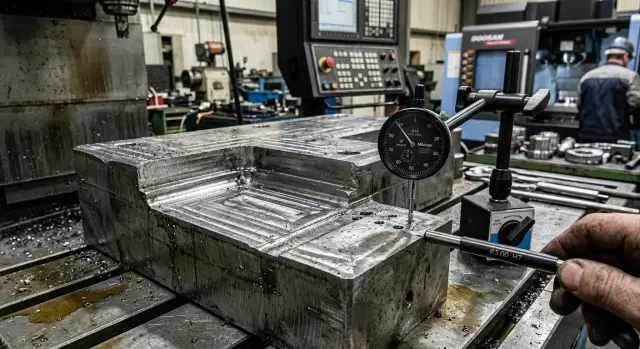
What the problem is
The problem with these holes rarely starts with diameter. For a pin, the position of the axis matters more. A hole can pass a gauge, stay round, and still fail in assembly if the center shifts by even a few hundredths.
A bolt often saves the situation. It pulls the parts together, closes the gap, and gives the fitter a little freedom. A pin does not work that way. It does not pull and it does not forgive. If the axes do not match, the error shows up right away.
After aggressive roughing, the risk is much higher. The metal near the future hole heats up, takes a load, and partly releases internal stresses. From the outside, the part may look fine, but the zone for a precision hole has already changed shape. So during machining everything seems acceptable: the diameter is there, the tool did its job, and a quick check showed nothing. But during assembly, one pin will not go in, the second needs forcing, and the third sits crooked.
Usually the picture is simple: the hole keeps its size but shifts in center; one part looks fine on its own, but paired with another, the pin no longer fits; the assembler tries to align the parts, but the pin just hits a stop. That is why dowel pin holes cannot be treated the same way as ordinary fastening holes. Here, the mistake is more often paid for during assembly, when the part is formally finished but cannot actually be used.
What roughing does to the metal around it
When a lot of metal is removed in one or two heavy passes, the area near the future hole changes more than the drawing shows. Cutting heats the material, the tool pushes on it, and thin walls and ribs start to spring back.
Thin areas near pockets and cutouts behave especially badly. While the mill is loading the part, the wall moves slightly. During the cut everything looks normal, but once the load is removed, the metal returns to a point that is not the one built into the model. If you then machine a precision hole in that zone, it already starts with shifted geometry before drilling or reaming.
Heat adds its own effect. The metal near a heavy roughing area expands, then cools and contracts. If the stresses inside the part were distributed unevenly, the area around the hole pulls the dimensions with it. You can barely see it from the outside, but for small dowel pin holes, even that kind of shift is a problem.
The trickiest part is that the diameter often still passes a gauge afterward. It seems like everything is fine. But a pin needs more than size. It needs a precise axis. After aggressive roughing, the hole may stay round while shifting by a few hundredths. For ordinary fastening, that is sometimes acceptable. For a dowel pin, it is not.
Where size usually shifts most often
The shift most often happens where the part has already been weakened: at the edge of a pocket, near a narrow cheek, on a long plate with a local cutout, or next to a thin rib. The smaller the cross-section around the future hole, the more strongly the material reacts to tool force and heat.
The problem often gets worse after repositioning. Roughing has already removed part of the internal stress, and the new clamp adds its own. As a result, the base for the precision hole changes again. From the outside, it looks like the operator did nothing wrong, but the small hole shifts in position because of the whole chain: heavy stock removal, heat, springing in a thin area, and new stress distribution after clamping.
Why pins do not forgive misalignment
A pin is not for clamping; it is for exact relative positioning of parts. A bolt can pull faces together, remove the gap, and partly hide an error. A pin cannot do that. It either lands in the right place or immediately shows that the geometry has moved.
The problem starts with a small shift in the center. On the drawing, it looks minor. In assembly, it is already a different geometry. Even if the first hole lines up, the second usually reveals the real error.
After that, people often start pulling the assembly together with bolts. The faces come together, but the hole centers do not move back into place. Instead of a proper fit, you get a tilt: one side of the pin hits, the other rubs the hole wall, and the part goes together with extra force. That is where galling, edge deformation, and signs of interference come from where none should exist.
Sometimes the assembly is still forced together. That is not a fix, only a cover-up. The error stays inside the assembly and later comes back as stress in the housing, poor seating, faster wear, or strange behavior in service. If this is a base plate, housing, or fixture, pin shift also pulls the other dimensions with it.
The signs are usually obvious: the pin is already tight at the entrance, the parts only come together after bolt tightening, a shiny mark appears on one side of the hole, and after disassembly there are burrs on the edge. At that point, it is better to stop and check the hole locations relative to each other. A few minutes of checking is almost always cheaper than a crooked assembly and a rework.
Where the risk is highest
The biggest problems appear where the metal near the future pin has already been weakened or stressed unevenly. After aggressive roughing, that zone behaves less like a rigid block and more like a spring. On the machine it may look calm, but during finishing or assembly, a shift of a few hundredths shows up.
One of the most common cases is a hole placed close to a deep pocket. While the pocket is being machined, the surrounding metal heats up and loses stiffness. If only a thin wall remains between the hole and the pocket, it is easy for it to pull to one side. Then the drill or reamer goes in a geometry that the process planner did not expect.
It also goes badly when roughing removes metal only from one side of the part. The blank loses balance in its internal stresses: one side is already relieved, while the other still holds the old shape. Because of that, the surface for the hole can rotate slightly or drift to the side, even if the setup did not change.
Long parts are especially sensitive. While the program works for a long time in one zone, one end has already heated up while the other is still cooler. Then the part cools unevenly, and the shift is not the same along the whole length.
The riskiest combinations are known in advance: a deep pocket a few millimeters from the hole, a thin rib between them, heavy one-sided stock removal, a long part, and a small pin with a tight fit. For a bolt, a shift of 0.03 mm can sometimes pass almost unnoticed. For a small pin, the same 0.03 mm already causes a tight fit, misalignment of a hole pair, or forced assembly.
How to plan the process step by step
If the part will use pins, the order of operations decides almost everything. A common mistake looks simple: heavy cutting is done right next to the future hole, and then it is drilled and reamed to final size. On the drawing everything checks out, but in assembly the pin does not go in or goes in with interference in the wrong place.
A calmer sequence works better. First, remove the main volume where it affects the datum zone and future hole as little as possible. Around the datum and the hole itself, it is better to leave stock. Do not try to get almost the final shape in the first heavy operation. A small amount of extra material helps the part survive roughing without unnecessary shift in the most sensitive area.
After heavy roughing, it helps to let the part cool and settle. This matters especially if a large volume was removed or one area was cut for a long time. Sometimes even a 20–30 minute pause gives a better result than trying to finish everything in one setup.
Then comes semi-finishing. At this stage, remove the remaining distortions, even out the shape, and prepare a stable base for precision operations. If the geometry still wanders after semi-finishing, it is too early to move on to the dowel pin holes.
This order usually helps:
- Remove the main stock away from the pin area.
- Leave stock around the datum and the future hole location.
- Let the part cool after heavy roughing.
- Do semi-finishing and check that the shape has stabilized.
- Only then machine the dowel pin holes to final size.
And one more important point: after machining the hole, it is not enough to check only the gauge. A gauge shows size and partly form, but it does not tell you whether the coordinate has shifted. For a pin, that is the main question. A hole can be perfect in diameter and still be in the wrong place. That is why the coordinate should be checked from the working datum the part will actually use in assembly.
A simple shop-floor example
A plate has two small dowel pin holes. A cover must seat on them with high accuracy. The bolts here do not set the position. They only clamp the parts; the pins hold the geometry.
Next to one of the holes, a deep pocket is machined. Roughing is done aggressively: heavy stock removal, noticeable feed, the metal heats up, and the tool pushes on the wall. On the machine, everything looks normal. The pocket size can still be corrected later, so the area seems safe.
The problem appears later. After that kind of roughing, the thin wall near the hole is pulled slightly inward. The shift is small, impossible to see by eye. But for the pin, it is already enough. The hole stays round, but its axis shifts by fractions of a millimeter.
During assembly, the first pin often goes in without an argument. It locates the part and creates the feeling that everything is fine. The second one does not want to seat. It stops, goes in tightly, or forces the cover out of alignment. Then comes the usual mistake: people try to pull the cover in with bolts. The bolts do clamp the parts together, but they do not move the hole back to the right place. As a result, one pin works normally and the other sits under stress.
At first, this may pass almost unnoticed. The joint is assembled, the gap seems fine, and the part holds. But repeatability is already lost. On the next batch, the cover seats differently: it has to be pressed, rocked, or guided by hand. The shop loses time at the simplest point: the assembler spends longer aligning the parts, the bolts take on extra work, and the pin and hole wear faster.
That is why a deep pocket next to a pin seat cannot be treated as a regular roughing zone. If the metal around the hole has already shifted, finishing the hole itself does not always save the part. The mistake is not in the diameter, but in the axis position.
Mistakes that cause the hole to shift
Usually the hole does not shift for just one reason, but because of several ordinary choices in the process. Each one seems harmless on its own. Together, they create a shift that later shows up in assembly.
The first common mistake is machining the dowel pin holes before heavy roughing. While the part is still raw, the metal around the future base holds internal stresses. Roughing removes a large volume, and the blank changes shape a little. The hole diameter may stay fine, but its position already moves.
The second mistake is bringing a large cutter too close to a thin wall next to the hole. The wall flexes, heats up, and temporarily loses stiffness. After cooling, it returns to a different place than expected. For small dowel pin holes, that shift is often already critical.
The third mistake is removing a lot of metal in one pass and only from one side of the part. Then the material pulls to one side. This is especially common on plates, housings, and parts with pockets near the pin area.
There is also a fourth typical cause: the part is measured too early. It has just come off the machine, the metal is still warm, and the operator is already checking the size. On the instrument everything looks acceptable, but half an hour later the geometry settles a little, and the hole coordinate shifts by a few hundredths.
What is often overlooked
Most often, people look only at the diameter. That is understandable: if the gauge goes in, everything seems fine. But a pin needs more than the right size. You also need to check the hole position relative to the datums, the distance between the two holes, how the part behaves after cooling, and the condition of the wall next to the hole after roughing.
Another mistake is hoping that a rigid fixture will save everything on its own. It helps, but it does not replace the operation order. If the part is first weakened by rough cutting near a thin zone, any precision finishing then happens on metal that has already changed shape.
The practical habit here is simple: first stabilize the part shape, then machine the precision holes, and finally check not only the size but also the coordinate. If you do not do that, the pin will be the first to show the problem. It will either not go in or it will force the assembly together with interference and misalignment.
Quick check before assembly
Before installing the pins, it is better to spend a few minutes on inspection than to take apart a joint that has already seized on the first fit. After roughing, the metal near the hole often still holds heat, residual stress, and a small size shift.
If the part has just come off the machine, do not rush it to assembly. While the metal is warm, the size and position may look fine, but in an hour the hole can already shift by a few hundredths. For a pin, that is enough.
Before assembly, it makes sense to check a few simple things: was stock left in the pin area before finishing, has the part cooled to normal shop temperature, are you holding the coordinate from the working datum, does the gauge or check pin go in without being forced, and does the trial assembly go by hand, without a hammer and without heavy bolt tightening.
If even one item does not match, it is better to stop and remeasure the datum and hole position. A hammer does not help here. It only hides the error, and then it comes back as misalignment, stress in the joint, or a crack at the edge.
In practice, two things cause trouble most often. First, the part is measured too early, while it is still warm after aggressive roughing. Second, the hole is checked on its own, but not in relation to the datum from which the part is later assembled.
A good sign is simple: after finishing and cooling, the check goes smoothly, and the trial assembly does not require force. If it does not work without effort, look for the cause in the part, not in the assembler.
What to do next
If a pin regularly goes in too tightly, do not try to fix only the hole size. First review the whole machining route. The problem often starts earlier, when the part picks up extra stress after heavy stock removal, and the small hole only shows that shift afterward.
A practical rule is simple: do not leave aggressive roughing right next to the place where the pin fit will be made later. If the future hole area is known in advance, it is better to keep a calm stock allowance there and remove the main amount of material elsewhere. That way the part moves less, and the hole axis stays closer to the intended geometry.
For small dowel pin holes, the operation order is often more important than a few microns of tool difference. Usually the best sequence is: first remove the main stock where it does not affect the future fit, then let the part stabilize, then machine the datums, and only after that make the precision holes. Before starting a batch, the first parts are best checked not only for diameter, but also for hole-to-hole position.
It helps when the technologist and the setup person review these things together. The technologist sees the route as a whole, while the setup person knows where the machine, fixture, or cutting mode can cause drift. When this is done in advance, the shop usually saves both time and blanks.
If the batch is already running and the pin assembly is failing, start with two questions: where the heaviest stock removal happens, and whether the holes are made too late, after the metal has already had time to redistribute stress. In many cases, this review changes not the tool, but the operation order itself.
When it comes to choosing equipment and launching parts with these fits, practical experience from a team that sees not only the machine spec sheet but also how the part behaves on the shop floor helps a lot. EAST CNC provides consultation, selection, supply, commissioning, and service for metalworking equipment, so these risks can often be accounted for before the first batch.
FAQ
Why does the gauge fit, but the pin still won’t go in?
Because a gauge mainly checks size, while a dowel pin also needs the axis to be exactly in the right place. A hole can stay round and the correct diameter, but still shift by a few hundredths, and that is enough to cause a hard stop or misalignment during assembly.
Is a shift of a few hundredths really that critical?
For a bolt, that kind of shift can sometimes still be acceptable, but for a dowel pin it often is not. If the assembly has two holes, even a small offset adds up quickly, and the second pin starts to go in tightly or not at all.
When should dowel pin holes be machined?
It is better to make them after roughing, once the part has cooled and the shape has settled. Remove the main amount of material first, leave stock around the hole area, then do semi-finishing and only after that bring the hole to final size.
Why does a pocket near the hole so often cause shift?
A deep pocket weakens the nearby wall, and heavy cutting heats the metal and pushes on it. While the tool is cutting, the zone flexes, and after the pass it returns to a different point, so the axis of the future hole shifts.
Do you need to wait for the part to cool down?
Yes, it helps. A warm part often shows one geometry right after machining and a different one half an hour later. If you rush the inspection or assembly, you may see a good result too early and only get the problem later.
Can you just tighten the parts with bolts if the pin is tight?
No, bolts do not fix this kind of error. They only clamp the parts together, while a pin requires the hole axes to match. If you force the assembly with bolts, you end up with preload, marks on the edges, and extra stress inside the joint.
Where is the risk of shift highest?
The shift most often appears at the edge of a deep pocket, near a thin wall, a narrow cheek, a rib, or on a long plate with a local cutout. The weaker the section around the future hole, the more strongly it reacts to heat, clamping, and tool force.
What should be checked before assembly besides the diameter?
Look at more than the diameter. Check the coordinate from the working datum, the distance between holes, the condition of the area after cooling, and how the trial assembly goes without a hammer or heavy bolt tightening.
Can you make the dowel pin holes first and rough machine afterward?
Doing that is risky. After heavy roughing, the part often changes shape, and the finished hole shifts in position even though its size stays normal. Then the pin is the first thing to expose the mistake during assembly.
What should be changed if pins keep going in too tightly in production?
Do not fix only the hole size right away. First review the route: where the heaviest cutting happens, where the pocket weakens the zone, when the part cools, and at which step you make the precision holes. Usually, a different operation order helps more than a new tool.