
Short runs on one machining center: the correct startup order
Short runs on a single machining center require a clear start: we’ll cover offsets, tooling, the setup sheet and quick checks between jobs.
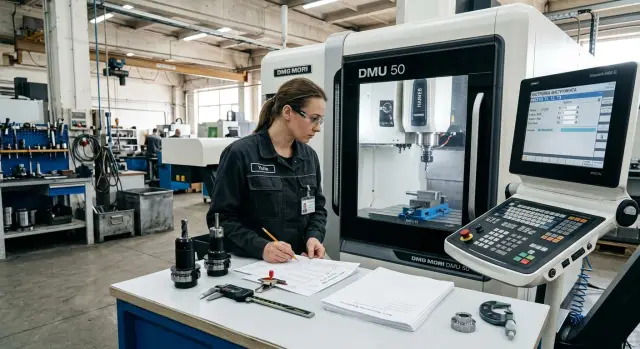
Where confusion begins
Confusion usually starts before cutting — when one machining center must run several different jobs in a shift. The machine keeps a kind of “memory” from the previous part: old offsets, worn tools, temporary corrections, notes in a notebook and one-off marks.
When the pace is high, it’s easy for an operator to continue from the last setup. If the previous part was similar, it feels natural to keep an old offset and only change a couple of lines. On the screen that looks harmless, but one forgotten Z correction or an old part zero quickly produces scrap.
Another issue is similar tools. Two endmills of the same diameter or two drills with different reach, holders in neighboring magazine slots — even experienced staff can mix them up. The mistake often hides in a small detail: the number is the same, but the actual assembly differs.
Most failures are born of normal haste. Old values are carried into a new job without a full check. The tool number matches, but the reach or insert is different. One person puts corrections into the setup sheet, another writes them in a notebook. Some notes stay at the tool rack, some on paper.
After that the shift lacks a single source of truth. Everyone consults their own note and is sure it’s correct. Offsets start living separately: in the program one set, in the machine memory another, and a third set by the machine.
Worse, the error isn’t always visible right away. The first part can accidentally be within tolerance. The real problem appears on the next tool, after a restart, or midway through the batch when time and material are already lost.
A typical example: in the morning the center machined a small flange, and in the evening they load a housing from a different blank. Tools look alike, some numbers coincide, and corrections are written in two places. The operator remembers one set, the setup tech recorded another. That’s when confusion begins and eats up the rest of the shift.
What to prepare before the first part
With short runs on one machine, problems usually start before the trial cut. One operator looks at tool lengths in an old sheet, another opens a new program, a third remembers a “visual” correction from the last job. The machine hasn’t cut yet, but the confusion is already there.
First, prepare a single setup sheet for the current job. Not two tables, not notes in phones, not marker signatures on a cabinet door. The sheet should list tool numbers, holder type, actual lengths, diameters, magazine slot and a short note where each tool is used. That sheet saves not minutes but whole stoppages when you need to know quickly what’s in the spindle and what can stay.
Also prepare offsets by part. Even if parts are similar, don’t mix them in one row with notes like “almost the same.” One part number — one offsets set — one clear record. If a part uses its own datum, mark that immediately so the operator doesn’t carry old logic into the new setup.
Before loading the blank check the program version. It’s a boring step, but it often saves the shift. The file name should match the setup sheet and routing. Inside the program compare the revision number and tool list. If the program changed since the last run, old measurements and old comments are no longer reliable.
Signatures matter more than they seem. If holders, cassettes and the inspection sheet are labeled consistently, the machine operator won’t guess whether they took the correct cutter and which magazine slot the measurement refers to.
In practice a simple routine helps: one person enters values into the control, another verifies them against the setup sheet and the inspection sheet, and only then both sign off. If the data is doubtful, don’t enter it — remeasure.
If the first part needs tools T01–T08 and only T03 and T07 change for the second part, that should be obvious in advance. Then the changeover between jobs is calm, without searching for past corrections in memory. That order keeps CNC tool management under control.
Start-up order between jobs
When two or three different parts run on one machine in a shift, failures usually start with leftovers from the previous job rather than with cutting. It’s best to keep the same order even if the new part seems “almost the same.”
First, remove all temporary notes left from the prior job. These might be handwritten tool length notes, temporary corrections in a table, test offsets and on-the-fly comments. If you leave even one such change, the next part quickly turns into a machine-wide error hunt.
Then check the tool magazine. Don’t just look at slot numbers. Verify what’s actually in each cell, which tool is really installed, the insert condition and whether it suits the new operation. CNC tool management only works when the setup sheet matches the real magazine state.
Next, choose a single rule for the part zero across the whole series. For example, always set zero from the top face of the blank and the left-front corner of the datum. If today you take zero from the vise jaws and tomorrow from the part surface, the offsets will rapidly diverge.
After that transfer data from the setup sheet — not from memory, not “like last time,” and not from photos on a phone. The sheet is for precisely those situations where similar parts cause the most mix-ups. The operator opens the sheet, enters values, checks probe offsets and only then prepares to start.
Before the first cut run a dry cycle. Spend three minutes now rather than hitting the E-stop on the first pass. The dry run shows immediately whether you mixed up the zero, safe heights, tool change or approach.
If the center machined a small bushing in the morning and a housing with a different datum in the afternoon, the transition will be smooth only if temporary corrections were cleared, remaining tools verified, the zero set by the common rule and offsets entered from the setup sheet. Relying on memory usually drags the shift out.
How to manage offsets without extra corrections
With short runs on one machine offsets quickly become a mess. The issue isn’t the machine but the habit of mixing datum, wear and one-off corrections in a single line.
The simplest rule: keep datum separate from wear. Enter the baseline after a proper setup and the first good part verification. During the run change only wear values if you need small size adjustments. That way the operator always sees the original setup and any temporary corrections made during the series.
If the size drifts, don’t change everything at once. First adjust only one group of offsets — for example, only tool length or only radius. Otherwise after five minutes no one will know which correction produced the result and which introduced a new error.
A short note next to each correction works well. One line is enough: “T12, wear X -0.02, after first check.” Such a note takes seconds but can save the shift, especially if the machine is handed to another operator or the part returns after a day.
What not to do
Don’t copy wear from an old part to a new one. Even if the tool is the same, the conditions differ: different reach, material, datum and program. Wear belongs to the specific part and run, not to the tool number generally.
Also don’t leave temporary corrections after the series ends. A new job may start with the machine set to someone else’s adjustments instead of a clean baseline.
Working routine
Keep a short scheme on the setup sheet: after the first good part record the baseline, in the series change only wear, sign each correction with a short note, and before a new part clear the previous wear. After the series verify the baseline against the original entry.
For example: you made 20 housings and adjusted Z-wear twice. Note the reason, finish the run, return values to the baseline, clear wear entries and leave a remark on the sheet. When the part returns in a week, work starts from a clear reference point rather than guesses.
How to keep tooling in order
In short runs the biggest time loss is confusion, not cutting. The same tool number gets used inconsistently, similar cutters get swapped, and old data lingers in both the setup sheet and the machine memory.
The calmest approach is to assign fixed numbers to frequent tools and don’t move them without reason. If an endmill, drill and tap appear in nearly every job, give them fixed positions. The operator then doesn’t need to remember what was in T07 yesterday.
Before loading the magazine check not only the tool but its assembly length, reach and holder type. Those differences often look the same by eye but a few millimeters turn into extra corrections and scrap.
Simple tool management scheme
A good rule: one number — one clear assembly. If under the same number you place a similar cutter from another brand, with different reach, or after regrind, that’s a different assembly. Update the setup sheet and the CNC tool records immediately.
Keep a short list next to the main sheet: fixed tool numbers, actual length and reach for each assembly, notes on tools that move between parts, and spare assemblies for the most frequent operations. This saves many small minutes across the day.
Mark tools that work across multiple parts in one shift. Those cause most offset errors. If a cutter participates in two jobs, note both parts and the allowable reach next to the number. It’s easier than later searching for why sizes changed after a job switch.
A common example: two 12 mm endmills look the same but one is in a short collet and the other in a long one. If you put the long assembly under the old number without note, the machine will use the old length and the first check will show excess material removal.
A boring routine helps here: fixed numbers, length checks before loading, clear marks on shared tools and spare assemblies by the setup sheet.
Example of switching from one part to another
In the morning the center turned a small bushing. The part is simple but sensitive to tool length and Z zero: a slight miss immediately affects the face diameter. The operator completed the first part, applied a couple of corrections and ran the short series smoothly.
After lunch a different job is loaded — a housing with a new clamp. Not just the program changes but the whole fixturing logic: new datum, new part height, different approach points. Confusion here comes from haste, not complexity. If you take old values as they are, the machine will cut as if the bushing is still in the chuck.
To avoid an error hunt the team keeps a common toolset and changes only positions needed for the housing. This saves time and reduces risk. Fewer unnecessary swaps mean fewer chances to mix up slot numbers, lengths or radii.
The routine is simple: remove the old clamp and mount the housing fixture, then check which tools remain unchanged and which must be replaced. After that reset Z zero from the new datum and check critical offsets that affect the first pass and final size.
Pay special attention to tool length, radius compensation and the part zero offset. Errors after changeovers most often hide there. Even if the tool is the same, you cannot assume the offset stays correct — the new clamp height changes everything.
Don’t run the first new part at full production speed. Do one cautious pass, stop, inspect dimensions and then run another short control cycle. For a housing measure base faces, depth and hole/pocket positions — the sizes that determine everything else.
If a size is off, the operator corrects only the relevant offset and writes the change down immediately. Otherwise by the end of the day no one will remember why the housing only worked after the third attempt.
Mistakes that eat the shift
Most time is lost not on cutting but on small table and habit mistakes. With short runs on one machine a single wrong correction easily leads to scrap, re-measure and an unnecessary dry cycle.
A common error is adjusting geometry when you should change wear. Geometry is the baseline set during setup. If an operator changes geometry after the first part, after one or two jobs no one knows the original baseline and what’s a temporary tweak. For small size corrections adjust wear only. Touch geometry only for a clear reason: tool change, new length measurement or a rebuild.
A simpler but painful trap is pasting a number in the wrong row. The screen looks alike when you rush, and the correction ends up on a neighboring tool. The operator then looks for causes in the program, material or fixturing while the mistake is a single misplaced digit.
Another frequent failure appears after a part change: an old radius compensator stays active though the new tool or path doesn’t require it. The first part runs with unexpected contour drift and half the shift is spent finding the cause. This is especially common when cutters have similar diameters.
Changing a tool without verifying the magazine slot causes trouble too. The tool is installed and length measured, but the magazine position doesn’t match the program. The table says one thing, the machine uses another.
There’s also a quiet error noticed too late: the first part was measured and a correction made but it wasn’t recorded on the setup sheet. On the next run a different operator repeats the same cycle: uses the old number, gets the same drift and loses 20–30 minutes.
Usually four habits are enough: for small tuning adjust wear, not baseline geometry; before starting verify tool number, slot and offset row; before a new program check radius compensation; and record confirmed corrections immediately in the setup sheet. It sounds simple, but this keeps the shift under control.
A short check before start
Errors rarely begin with cutting. Shifts typically break earlier: the wrong program is opened, an old zero remains, or a holder left from the previous part. Hunting for such small things takes more time than the changeover itself.
Before starting run a short routine that takes 2–3 minutes but significantly reduces wrong corrections.
- Compare the program number on the control with the job sheet. The name and revision should match.
- Check the part zero. Look not only at the value but the row where it’s recorded.
- Inspect the tool magazine and verify holders against the setup sheet. Important: slot number, reach and insert type.
- Run the first trajectory segment above the clamp.
- Decide which dimension the operator will check first.
If the shop has several similar fixtures, one more simple rule helps: before the cycle the operator points to the datum, clamp and first tool. It sounds trivial, but that pause often catches a mistake before pressing Start.
For CNC tool management keep a short paper or electronic card nearby showing program, zero, magazine composition and the first control dimension. No extra fields. The shorter the form, the more likely it will be filled.
A good sign of a proper start: before the first part the operator already knows what’s in the machine, where the datum is and which dimension they will measure first.
What to do after starting
The job isn’t over after the first stable start. If short runs happen every week, post-start routine matters almost as much as setup. A shop that records the same thing differently each time quickly drowns in small corrections.
Adopt one template for the setup sheet and don’t change it from part to part. The operator then doesn’t need to hunt for tool length and the setup tech doesn’t have to decode marginal notes. A good sheet contains only what’s needed on shift: base coordinate system and zero point, tool list by position, working offsets and tolerances for the first part, clamp sketch and re-fixture order, plus short notes on dimensions that drift most often.
Store that sheet in one place and one format. Paper by the machine is convenient in the moment, but an electronic version helps when the series returns a month later.
Don’t trust memory. Keep a history of corrections for each part: date, who changed the offset, what they changed and why. A note like “tightened X by 0.02 due to drift after warm-up” is far more useful than a new number in the table. After several runs you see which deviations repeat and which were one-off mistakes.
If a failure happens during the shift, review it immediately after work while people remember the sequence. A long report isn’t needed. Ten minutes at the machine often suffices: what happened, at which step, what tool was installed, what the operator did and what to change on the setup sheet.
If the shop lives in frequent changeovers and needs a new center, tooling selection, commissioning or service, plan that with the equipment supplier. EAST CNC and the blog at east-cnc.kz have materials on metalworking, machine reviews and practical tips, and the company handles supply, commissioning and service for CNC equipment. This approach helps when the goal isn’t just buying another machine but reducing unnecessary changeovers and keeping the shift under control.
FAQ
Where should I start when switching to another part on the same machine?
Start from a clean state. Remove temporary corrections from the previous job, verify the program against the setup sheet, check the tool magazine and reestablish the part zero from the new fixture. Only after that do a dry run and the first cut.
Should I delete old corrections after finishing a run?
Yes — clear them. Leaving old corrections in the offset table causes the new job to start with someone else’s values, and the error will show up later, not immediately.
Can I keep a tool’s wear from the previous part?
No. Don’t carry over wear values. Even with the same tool number, the fixture, reach, material and program may be different. Wear belongs to a specific part and a specific run, not to the tool ID in general.
How do I avoid mixing up similar cutters and drills?
Use one rule: one number — one assembly. If a similar cutter has a different holder, reach or condition, update the record in the setup sheet and verify the length before loading to the magazine.
What must be recorded on the setup sheet?
Record tool number, magazine slot, holder type, actual length, reach, diameter and a short note where the tool is used. That’s enough to quickly check the spindle, offsets and swaps between jobs.
What should I check before the first cut?
Before cutting, verify the program name and revision on the control, check the part zero row, confirm the actual magazine contents and the first control dimension. Then run the first trajectory segment above the clamp. Those two to three minutes often save the whole shift.
When should I change geometry, and when only wear?
Change geometry only after a clear reason: tool replacement, a new length measurement or a rebuild of the setup. For small size tweaks during a run, adjust the wear values only. This preserves the original baseline and avoids confusion.
What to do if the first part seems to be within tolerance?
If the first part appears to meet tolerance, don’t assume the job is correct until you’ve rechecked critical dimensions and completed another short control cycle. A random pass inside tolerance can hide an old zero, incorrect radius or someone else’s Z correction.
How to set the part zero during frequent changeovers?
Pick one rule for the whole series and stick to it. For example, always set the zero from the top face of the blank and a single reference corner for X and Y. That prevents transferring previous zeroing logic to the new setup.
What should I record immediately after the start and at the end of a run?
Right after a stable start, record who changed what, by how much and why. At the end of the run, return values to the baseline, clear wear entries and leave a short note. A week later this saves a lot of time on the next run.