
Shop-floor vs Office CNC Programming: When to Choose Which
Shop-floor and office CNC programming suit different tasks. We’ll compare feedback speed, data discipline and first-run quality to help choose the right approach.
Why this choice even comes up
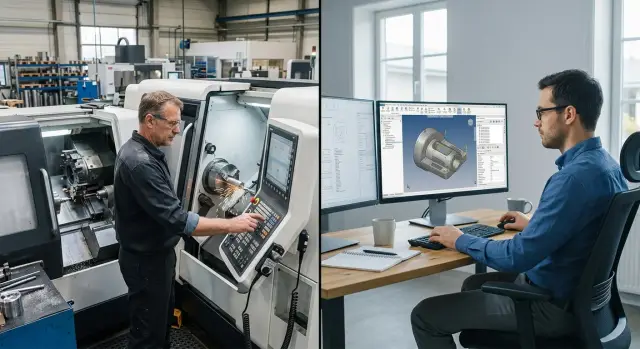
The argument about where to write and edit CNC programs doesn’t start in theory. It appears the moment a programmer walks back and forth between the computer and the machine several times a shift. At the machine you quickly see what hinders real machining: the chucking, the tool, the stock allowance, the order of operations. But it’s usually more comfortable to work with files and CAM systems in an office, not next to the equipment.
That’s why shop-floor and office formats have different rhythms. On the shop floor it’s easier to get instant feedback and immediately test an idea on the machine. In the office it’s easier to concentrate, avoid noise and not rush edits. While run quantities are small, teams often tolerate this gap. When runs increase, the difference starts to cost lead time.
The problem usually isn’t the workplace itself. It starts when edits live in verbal agreements, personal notebooks and files with unclear names. The operator remembers one tweak, the setup technician made another, the programmer later adjusted a third version on their computer. After a day no one is sure which program is the working one.
This is especially visible on the first run. Even a small edit can shift the shift plan: the machine is down, the operator waits, the next batch moves back on the schedule. In the turning section this shows up quickly because a delay often drags along re-fixturing, part inspection and the queue for subsequent operations.
Usually the question appears when three things repeat: the programmer spends too much time walking to the machine, changes aren’t recorded in a single place, and the first run of a new part too often breaks the shift plan.
So the debate is rarely about where to sit with a laptop. It’s about the order of operations. Who makes an edit, where it’s stored, who approves the version for a run, how the team communicates shop-floor notes. Without that order there will be failures both on the floor and in the office. With that order, choosing a scheme is much easier.
What the shop-floor format gives you
The shop-floor format has a strong advantage: the programmer sees the real machining, not just the model and the code. They hear the cutting sound, look at the chips, notice vibration and immediately understand how the tool and workpiece behave. These things don’t always show up on a screen.
There’s a second plus — short feedback loops. The operator doesn’t need a long explanation. They point to the place where the program interferes with work: an awkward approach, an unnecessary rapid move, a risk of hitting the chuck, an unfortunate sequence of operations. At the machine these issues are resolved faster because everyone is looking at the same process.
The shop-floor format is especially convenient for small edits. If you need to slightly change a trajectory, adjust a tool approach or shave a few seconds off the cycle, the programmer does it immediately. No need to queue the task, wait for an office response and then check again. For urgent parts this often solves everything.
This approach works best when the part must be launched the same day, the order is one-off, you’re doing the first run of a new operation, or the blank behaves unpredictably and that is only visible at the machine.
On the turning section this happens constantly. The operator runs the first part and sees that after roughing a raised edge remains that interferes with the finish tool. In CAM everything looked fine. At the machine the problem becomes obvious in a minute. If the programmer is nearby, they change the trajectory, run it again and immediately check the result.
That’s why the shop-floor format is popular where there’s a lot of urgent work and frequent changes. It may not always be the tidiest on paper, but in reaction speed and first-run quality it often wins.
Where the office format gives better results
The office is useful where the programmer needs to calmly assemble and verify the whole process, not be interrupted every ten minutes by shop-floor questions. In quiet conditions it’s easier to notice an extra move, a wrong datum or an outdated part model. Such mistakes are cheaper to catch on screen than on the first run.
The office format works especially well where processes repeat. If a shop produces a series of identical or similar parts, it’s more convenient for the programmer to keep models, past program versions, tool lists and notes from previous runs nearby. A new program doesn’t start from scratch; it’s assembled from proven solutions, which usually gives more consistent quality and fewer random edits.
Keeping files organized is also easier away from the floor. When the model, NC program, post-processor and revision live in one clear place, the team less often mixes up versions. For running the machine this is often more important than saving five minutes walking to the shop. If the operator receives a file with a clear name, the current revision and a tool list, the start is calmer.
The office format more often wins for serial parts repeated weekly or monthly, for families of parts with common datums and similar tooling, for complex trajectories that are worth double-checking before putting them on the machine, and in work where several people agree on the model, process and program.
There’s another advantage — verification before going to the shop. The programmer, process engineer and setup technician can review trajectories, tool-change points, allowances and risky spots in advance. Yes, feedback here is slower than at the machine. But the first attempt often comes out cleaner, without rushed "band-aid" edits.
Put simply: the office is almost always stronger where data discipline and repeatable results matter. For a one-off urgent part this isn’t always the best route. For a series, stable run and a clear change history — usually yes.
How to measure feedback speed
Feedback speed is easy to overestimate. It feels like having the programmer next to the machine guarantees quick fixes, but without simple measurement that’s just a feeling. You should measure not conversations or discussion time, but the interval from noticing an issue at the machine to a new program version being available for verification in production.
If the operator says, “on the second move the tool comes too close,” the timer starts. It stops not when the programmer replies in chat, but when the corrected and approved version goes into production. That measurement quickly shows the real picture.
It’s enough to record four timestamps for each change: when the issue was noticed at the machine, when the programmer accepted the task, when the new program version was released, and when the responsible person confirmed it’s OK to run.
That’s enough to see where time is lost. Sometimes it’s not CAM or the machine, but waiting for approval. If no one is designated to sign off the final version, one edit can hang half a day even if it took 15 minutes to make.
Urgent edits and planned changes should be measured separately. An urgent edit is needed when a run has already stopped: size won’t hold, trajectory is uncertain, the cycle is too long for the first part. A planned change is different — for example, you later want to shorten machining time or change a tool for a new batch. Mixing these flows in one table will distort the numbers.
It’s useful to look at repeats. If the same error stops a run three times, the problem is no longer response speed but the working procedures. That means the error wasn’t added to the knowledge base, templates weren’t updated, a checklist item wasn’t fixed, or the note wasn’t communicated to all shifts.
On the turning section this becomes clear fast. Suppose the operator always adjusts the tool approach manually before the first run. If this small tweak keeps reappearing, you should measure not only minutes to a new version but the number of repeats for a given part or family.
A simple metric set is: average time for an urgent edit, average time for a planned change, and the number of repeated stoppages for the same cause per month. These three figures immediately show whether the chosen format helps or just adds extra approval loops.
Why data discipline matters more than location
The debate about which is better easily goes off track. Problems usually start not because of the room where the programmer sits, but because of file confusion. If one part has three names, two program versions and an old setup card in the wrong folder, a failure is almost guaranteed.
One part should have one name and one working version. Not “housing_new,” “housing_final” and “housing_definitely_final2.” You need a clear part number, a version and a change date. Then the operator doesn’t guess which file to run, and the foreman doesn’t spend half an hour on calls.
Another common mistake is that different people look at different data. The process engineer opens an old drawing, the programmer works from a new model, and the setup tech uses a printout made a week ago. The program may be correct, but the run still starts late. Everyone should see the same set: drawing, model, program, tool list and setup notes.
What to keep next to the program
Photos of tooling and short setup notes save a lot of time. One photo of the chuck, jaws and fixturing often explains more than a long chat comment. If there’s a note like “tool T0303 pulls the size on the finish pass; reduce feed,” the next shift starts noticeably calmer.
A simple set of rules works well: keep one working program version, store the drawing, tool list and tooling photos nearby, sign each change with the person’s name and date, and separately note changes in cutting parameters, tooling or post-processor.
This isn’t for reporting — it’s so you can understand why a part ran fine yesterday and developed a chip on the edge today. If no one recorded who changed the cutting mode or regenerated code with a different post-processor, the team hunts for the cause blindly.
On the turning section this shows immediately. Suppose a shaft ran on Monday without remarks. On Tuesday another worker increased speed, changed the insert and regenerated code after editing the post-processor. If those three changes aren’t recorded in one place, arguing over the cause of scrap will take longer than the re-fixturing itself.
When data are in order, the programmer’s workplace becomes less important. They can sit on the shop floor or in the office, but the team still speaks the same language and reaches a stable run faster.
How to move programming out of the shop without disruptions
Moving all work suddenly to the office almost always causes extra stoppages. It’s better to pick one group of parts for a trial. Choose recurring items with clear tooling and without frequent urgent edits at the machine.
The worst scheme is “they’ll show everything to the programmer later.” Before starting, the programmer must receive a complete and identical data package. If today they get a drawing and tomorrow someone orally adds a new datum or a different allowance, mistakes are almost inevitable.
Usually this package is enough: the current drawing or 3D model with a revision number, material and blank size with allowances, the fixturing scheme and tooling list, machine-specific tool data and limits, and requirements for tolerances, surface finish and inspection dimensions.
After the first run, don’t stretch the discussion out over half a day. Set a short window for comments — for example, 15–20 minutes after the first acceptable part is produced. The operator, setup technician and programmer should attend. One says where the machine loses time, another clarifies what hinders setup, the third immediately understands what to edit in trajectories, parameters or operation order.
There’s a rule without which the whole transfer quickly breaks: edits live only in the master program. You can tweak code at the control for an emergency run, but the programmer must then make the same change in the main file. Otherwise in a week the shop will have two versions and the “which one is correct” argument will cost more time than the machining.
After a month you’ll see whether the new order works. Compare not impressions but simple numbers: how many minutes from task issue to the first stable run, how many repeat stoppages per batch, how often the operator asks for an urgent shop-floor edit. If start time drops from 80 to 55 minutes and repeat stoppages fall from three to one, the transfer paid off.
This careful transition is especially useful in turning shops with several similar machines. When data are prepared in advance and everyone edits the same file, office programming stops interfering with the shop and starts saving shift time.
Where most teams stumble
The most common mistake isn’t putting the programmer in the office. The problem starts earlier: they send a raw data package. A drawing without clear datums, oral explanations by phone, a photo of a tool instead of an exact tool list — everyone interprets the task differently and the mismatch appears at the machine.
On the shop floor these gaps are sometimes closed on the spot. The setup tech inspects the part, goes to the process engineer and quickly clarifies a dimension or datum. When work is split between shop and office, the room for improvisation shrinks. One person leaves things unsaid, another guesses, a third runs the wrong version.
Another frequent failure is edits living only at the machine. The operator or setup tech changes feed, shifts a datum, removes an unnecessary pass so the part runs, and the change isn’t recorded in the master file. The part comes out OK, but a week later the job is repeated with the old program and the same time is lost again.
Confusion almost always grows where responsibility isn’t assigned. If no one explicitly says who is responsible for datums and zeros, tooling selection and the final program version, the argument starts during the run. In such moments everyone is partially right, and the part still waits.
A simple rule helps: before the first run the team must assign who approves datums and zero points, who records the tooling set, who applies edits to the main program and who authorizes the first run.
Another mistake is trying to introduce a new process across the whole shop at once. On paper this looks fast. In practice people mix folders, use old file names, forget where to store notes and start bypassing the new flow. It’s better to take one repeatable part or family and work through the data handover there without haste.
Training is often postponed until the first failure. That’s the worst time. When the machine is down nobody wants to figure out where to save versions, how to sign edits and who must confirm a change. People start firefighting rather than following rules.
In short: most stumbles aren’t about where the programmer sits but about weak data discipline. The office format can be set up without much pain if you first agree on versions, roles and the edit procedure, then scale the scheme.
A simple example from a turning shop
A turning shop produces short runs of shafts and bushings. Batches are small: 30 pieces today, 60 tomorrow, a similar part with a different groove or fit the next day. In such work the debate about shop vs office quickly stops being theoretical. Everything shows up in minutes and scrap.
Urgent parts were initially left next to the machine. That was simpler: the setup tech got the drawing, immediately wrote or adjusted the program, made a test pass and instantly saw where the drawing didn’t match the actual tooling, chucking or allowance. For hot orders this worked. The first run was faster because issues were solved on the spot without emails and waiting.
But repeat parts were moved to the office. Templates of operations, unified program names and strict revisions were created. If a bushing had been produced a month ago the process engineer didn’t write everything anew. They took a template, changed dimension blocks, checked tooling and released a new revision so the operator could see which version was current and what had changed.
After a few weeks the picture became clear. The team was losing time where they hadn’t expected.
Urgent parts at the machine started quickly, but edits often remained "in the head" of the setup tech or in a local program copy. Repeat parts from the office took a bit longer to start, but the first acceptable part came out with fewer stoppages. The most time was wasted not on calculations but on finding the right version, checking tooling and clarifying small drawing edits.
On one shaft the difference was especially obvious. At the machine the program was fixed in 12 minutes, but on the next shift the operator used the old version and ran the dry cycle again. Formally the program was ready. In reality the shop lost almost an hour. With the office bushing it was the opposite: preparation took an extra 20 minutes, but then it was run three more times without disputes.
This example shows a simple point. Off-site programming yields better results where parts repeat and you can keep strict order in files, tools and revisions. Work by the machine is needed where feedback must be immediate: the part is urgent, geometry is fussy, and even a half-hour delay hurts the shift.
A quick check before the first run
Before the first run the issue is usually not a complex trajectory but a simple mismatch in source data. One person looks at the new drawing revision, another keeps an old 3D model, and the machine already has a program from the wrong folder. In a turning shop such a small mistake quickly becomes an extra hour of downtime.
This short check is needed in any scheme — shop-floor, office or mixed. If programming is moved out of the shop the risk of mismatches is even higher: the programmer doesn’t see the machine every day and the operator doesn’t always get the full data package at once.
Before the run the team should go through five points. First, verify the revision of the drawing, 3D model and NC program. Numbers and dates must match, not be “almost the same.” Then open the tool list and present it to the operator clearly: positions, overhangs, radii and allowable substitutes. Next, record the datum, fixturing scheme and zero point in plain words. If the setup tech and operator can interpret this differently, rewrite the description. Before the first cycle appoint one person who makes decisions if the run is stopped. Finally, put all post-run comments in one place — a file, a logbook or a run card. If comments are scattered across messengers and verbal notes, the mistake will return on the next part.
A good sign is when any team member can explain in one minute what is on the machine right now and which document they’re working from. A bad sign is phrases like “we think we took the latest version” or “we’ll set zero by feel.”
In practice this is simple. Suppose the programmer prepared the process in the office, the operator received the program, and the setup tech assembled tooling from an old card. If the team catches this before the first cut they lose 10 minutes. If after, they lose a blank, machine time and the shift’s calm.
This check doesn’t take long, but it removes ambiguity — and ambiguity is what most often breaks the first run.
What to do next
Don’t change the entire workflow at once. Safer to take one flow of parts where repeatability already exists and confusion costs time every day. In that area it’s easier to see where the office helps and where the programmer still needs to be at the machine.
Assign one person to be responsible for file versions, setup notes and the final program status. If you don’t, the argument will return: the process engineer has one version, the operator another, and the machine got a third. The mistake usually isn’t CAM or the control, it’s the exchange procedure.
It’s useful to divide tasks by workplace in advance. Keep at the machine what requires live checks: first run, adjustments from actual cutting, checking fixturing, tooling and part behavior. Move to the office what shouldn’t depend on shop noise and constant interruptions: model prep, process logic, program versions, operation templates and change descriptions.
A one-page regimen is enough: where the working program version is stored, who records post-run notes, who confirms that edits were added to the master, and when a program gets status for a rerun.
Work this way for two to three weeks and the picture clears quickly. You’ll see specific things: how often people opened the wrong file, how many edits came after the first part, how much time was lost between a remark and the programmer’s response.
If you’re also selecting a CNC lathe, it helps to discuss not only the equipment but the start-up procedure. With EAST CNC, the official representative of Taizhou Eastern CNC Technology Co., Ltd. in Kazakhstan, you can close the practical cycle: from consultation and selection to delivery, commissioning and service. This is especially relevant when you change not only the machine but the way the shop and office work together.
A good result usually comes not from a big overhaul but from one clear process the team follows every day.