
Servo Errors After a Power Dip: Shift Procedure
Servo alarms after a power dip: learn what to check on the machine, which data to save right away, and what to pass to the technician before the fault traces disappear.
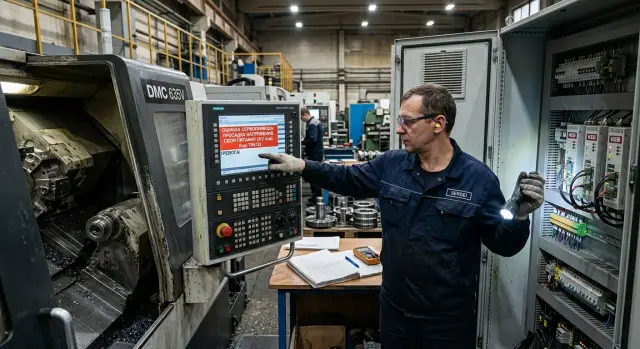
What happens after a power dip
A power dip hits differently from a complete outage. With a full blackout, the machine simply goes dark and all units lose power at once. During a dip, part of the electronics is still holding on to residual voltage, while another part is already operating at the edge. Because of that, the system may not stop instantly and can slip into an unstable state for a fraction of a second or a few seconds.
That is why the alarm often appears not at the moment of the dip, but after the restart. During a brief drop, the drive may lose ready status, the encoder may lose communication or a correct count, and the axis may lose position control. While the power is "floating," the CNC does not always have time to record a clear picture. When the operator starts the machine again, the system sees that the axis is no longer where it should be, or that the drive did not pass self-check, and only then reports a CNC servo error.
The first units to suffer are usually the ones most dependent on power quality:
- the servo drive and its power supply
- the encoder and feedback line
- the axis electromagnetic brake, if fitted
- the auxiliary 24 V circuits and relays
Each unit fails in its own way. The drive may go into an undervoltage alarm. The encoder may lose pulses or show a communication error. The axis brake may release or, on the contrary, fail to engage in time. If the axis was moving at that moment, the system later records a position mismatch.
The same alarm after a power dip does not mean the same fault. The code may be identical, but the cause may differ: a weak shop power supply, an aging power module, a bad contact in the encoder connector, a sticking brake relay, even loose terminals in the cabinet. That is why servo alarms after a power dip should not be read by the name alone. You need context: what the machine was doing before the fault, which axes were moving, whether the brake clicked, whether the screen went fully dark or only flickered.
What to do in the first two minutes
The first minutes after a voltage dip matter a lot. When servo alarms appear after a power dip, the worst thing you can do is keep trying to start the machine over and over. Repeated starts may clear the message from the screen, but they also erase part of the picture that helps explain the cause.
First, stop any new commands from the panel and do not press Reset out of habit. If several operators are nearby, one person stays with the machine and another records the time right away. You need an exact shift-clock timestamp, not "around after lunch." Later, it can be checked against the CNC alarm log, power records, and shop-floor events.
In those two minutes, five actions are enough:
- record the exact time of the fault;
- take a full-screen photo so the code and alarm text are visible;
- note which axis or unit reported the error;
- check the position of the workpiece, chuck, tool, and doors;
- stop any further start attempts until it is clear what happened.
It is better to take more than one photo. The first should show the full screen and panel. The second should be a close-up of the alarm code. If the system shows the axis number, drive number, or amplifier number, that should be in the frame too. One digit can change the meaning of the fault, and it is often written down incorrectly from memory.
The unit note is not for paperwork but for real troubleshooting. There is a big difference between an alarm on axis X, the spindle, or the hydraulic unit, because each points to a different line of investigation. If the operator immediately writes down "axis Z error during return," the service team spends less time guessing.
Also check the workpiece separately. After a power dip, the machine may stop in an awkward position: the tool near the part, the jaws not fully clamped, the slide left near the chuck. If the position looks unsafe, do not try to save the situation with a quick restart. First make sure nothing can fall, jam, or crash on the next move.
If your shop runs CNC machines from different series, keep the same procedure for all of them. That way the shift does not waste time or erase data at the worst possible moment.
What to inspect on site before restarting
First, look and listen to the machine. Do not hit Reset or start it again until you understand the condition of the power and drives. Servo alarms after a power dip often paint a false picture: one alarm disappears, but the cause is still there.
Check the power indicators on the CNC control, servo drives, and inside the automation cabinet. Lamps should glow steadily, without flicker or sudden drops in brightness. If one drive is dark while the others are on, the issue may not be a general dip but a separate power circuit, breaker, or module.
Check whether breakers, phase-monitor relays, or the UPS have tripped. Sometimes a breaker does not trip fully and stays in an in-between position, which is easy to miss. On the phase relay, check for phase loss, imbalance, or incorrect sequence. On the UPS, pay attention to alarm, overload, and discharge status.
Then listen to the servo drives. In normal startup, they become ready quietly, without a harsh hum, crackling, or frequent contactor clicks. If a drive tries to start and immediately goes into alarm, do not repeat the restart several times. That only wipes out useful traces for CNC machine diagnostics.
Also check for signs of overheating. The smell of burnt insulation, smoke, dark marks near terminals, an unusually hot cabinet door, or a hot drive area are no longer minor issues. In that condition, it is better not to touch the machine until a specialist inspects it.
Another important point is axis behavior after the stop. Check whether the axis brake is holding, especially on vertical axes. If axis Z slowly drops, shifted after stopping, or feels "soft," the machine should not be started. First you need to understand why the brake is not holding or why the drive is not keeping position.
Stop and call an electrician or service if you see at least one of these signs:
- the power on the control or drives is flickering or disappearing
- a breaker tripped, the phase relay went into alarm, or the UPS shows a fault
- there is an abnormal hum, crackling, or repeated clicking
- there is a burning smell or signs of overheating
- an axis is not held by the brake or moved on its own
In practice, it often looks simple: after a short voltage dip, the machine shows a CNC servo error on axis Z, the operator does a quick restart, and the alarm disappears. An hour later, the axis stops again. If the shift had checked the brake and phase relay right away, the cause would have been found much faster.
What data to save while the fault is still in memory
When the alarm is already on the screen, time is against you. After a reset, some records change and some disappear from quick view. That is why you first capture the situation, and only then press Reset and try a restart.
With servo alarms after a power dip, it is better to collect more than just one screenshot with the code. Then the service team does not have to guess from a single message and can see exactly what happened to the machine and when.
Capture and note five things.
- The alarm code and the full message text on the screen. Do not shorten the wording or rewrite it from memory.
- The alarm history and system event log for the last few minutes before the fault and immediately after it.
- The supply voltage reading, if the CNC or stabilizer displays it on the screen.
- The program block number, active operating mode, and tool number at the time of the stop.
- Photos of the control cabinet, drive indicators, CNC screen, and the actual axis positions.
If the machine shows several alarms in a row, save the order in which they appeared. For CNC diagnostics, that is often more useful than the very last error. The first record in the list often points to the cause, while the following ones show the chain of consequences.
Take photos both wide and close-up. The wide shot should show where the axis is, whether the tool is clamped, whether the chuck is open, and whether there is a part in the machining zone. The close-up should show a readable drive screen, module lights, and the code on the CNC panel. If the CNC servo error disappears after power off, these photos will save a lot of time later.
Also record the exact fault time from the shift clock. Later, it can be matched with the CNC alarm log, shop power data, and line operation log. If the machine stopped on the same program block as the voltage dip, that is not a random detail.
Once the data is saved, send it as one package: photos, a 10–15 second video, machine number, program number, and a brief description of what the operator was doing a minute before the stop. For EAST CNC service, this set is usually more useful than a message like "the machine showed an error and stopped."
How to restart the machine without unnecessary risk
If the servo alarms after a power dip have already been recorded, do not rush to press Reset several times in a row. It is better to start the machine once and in order. That way you do not add new faults and you do not disturb the diagnostic picture.
First make sure the power has returned to normal. Check the machine input, the breaker status, and the cabinet indicators. If the shop power is still unstable and nearby equipment keeps turning on and off, it is better to delay the restart for a few minutes.
Restart sequence
It is usually safer to go like this:
- Check that the main machine breaker and auxiliary breakers are on and that the emergency stop is released.
- Clear the alarm only by the standard method specified for your CNC and drive model.
- Perform one machine restart. Do not do a series of power offs and on again "just in case."
- After startup, check the error screens and servo drive status. If the same error returns immediately, stop.
- Home the axes without a part, with no tool near the workpiece, and at reduced feed if the system allows it.
Do not rush during homing. The operator should watch not only the screen but the machine itself: are there jerks, strange sounds, a delay on one axis, or flickering drive indicators. If an axis moves unevenly, the restart did not solve the problem.
When the axes return to zero normally, run a short dry test. Take a small section of the program with a safe path, no cutting, and no part in the chuck or machining area. The goal is simple: to see how the machine handles motion commands after a power fault, not to "restart production at any cost."
When it is better to stop
If the CNC servo error comes back, if homing fails, if the drive heats up more than usual, or if protection trips on the same axis, further startup only increases the risk. In that situation, save the CNC alarm log, note the time of the repeat fault, and send the data to service.
In practice, one careful restart is more useful than five quick attempts. For the EAST CNC service team, this sequence is also easier: it helps them tell whether the power dip itself caused the issue, whether the cabinet power is at fault, or whether there is already a separate problem with the drive or axis.
Example from a shift
On a CNC lathe, machining was going normally when the shop power dipped for a few seconds. The spindle stopped, the control screen flickered, and after power was restored an error appeared on axis Z. For the shift, this looks like a normal fault, but servo alarms after a power dip are easy to confuse with a drive failure.
The operator did not press reset several times in a row right away. He recorded the exact stop time, the alarm code, the program block number, and the tool that was in use. That takes less than a minute, but later you do not have to rely on memory to recall what happened before the stop.
Then he inspected the machine calmly. Axis Z did not hit a mechanical stop, there were no signs of impact, and the cables and connectors near the motor were in place. After one restart, the axis homed and the machine came back to life, but the fault record remained in the log.
That is exactly the kind of case where one fact means little, but a set of facts helps a lot. If the axis returned to zero, does not make noise, does not heat up, and does not lose position during a dry run, the technician will first check the power and the power-event history. If the error had come back immediately during Z movement, the search area would have been different.
Usually the technician only needs this data:
- the fault time from the control clock
- the code and message text
- the program block number
- the tool and operation at the moment of the stop
- the entry from the CNC alarm log
With that set, it is easier to separate a machine voltage dip from a fault in the servo drive, encoder, or axis brake. The difference is big: in one case you look for a shop power issue, and in the other you check the drive and mechanics themselves.
This kind of record is also useful for the service team. If equipment from EAST CNC reported an axis Z alarm once after a brief dip and did not repeat it afterward, that looks more like a power event. But if the code returns even during a calm, unloaded start, it is no longer worth delaying a drive inspection.
A good shift habit is simple: capture the fault picture accurately once. It saves hours of troubleshooting and often prevents unnecessary machine disassembly.
Mistakes that make the cause harder to find
Most often, the shift loses the cause of a fault not because of the alarm itself, but because of haste. Servo alarms after a power dip often leave a short trace: the alarm code, event time, axis status, and a couple of messages in the log. If you erase that trace in a minute, all that is left is guessing.
The most common mistake is pressing Reset many times in the hope that the machine will "come to its senses." Sometimes the message really does disappear, but along with it part of the useful picture disappears too. The service team then sees not the original CNC servo error, but the consequences of your attempts to bring the machine back to work.
Nearly as harmful is simply switching the power off and on again without recording the codes. The operator thinks it is a quick way to check whether the machine will come back to life. In reality, the CNC alarm log may clear part of the records, and the drives after the new start may show a different set of messages. Then it becomes hard to tell what happened first: the voltage dip, the axis error, or the communication failure.
There are a few more actions that seriously hurt troubleshooting:
- starting cutting immediately if the machine "seems to work" after power-up;
- changing drive, axis, or CNC parameters without the technician and without recording the original values;
- ignoring a short power dip if the machine came back quickly and did not stop for long;
- deleting alarms before someone photographs the screen and writes down the codes.
A quick test cut is especially tricky. At idle, the axis may behave normally, but under load it may go into error again. After that, a second cause gets added to the first: signs of overload, a tool impact, or a shifted zero point.
It is even worse with parameters. One wrong step changes the drive behavior, and you are no longer looking for the original fault but for a new one. If the machine is serviced by a team, they need the original data, not a "corrected" version after random changes.
And do not blame everything on the lights flickering if the machine started afterward. A brief power dip affects a machine in different ways: once without a trace, another time with a stored error in the drive, encoder, or cabinet supply. If the event happened, it must be recorded right away. That saves hours in troubleshooting and lowers the risk of another failure in the next shift.
Short shift checklist
When servo alarms appear after a power dip, the shift does not need a long investigation but a quick routine. The goal is simple: save the fault traces before the restart and do not lose the data used to find the cause later.
- Record the exact fault time. Preferably to the minute. Later it can be compared with the CNC alarm log, power data, and shop events.
- Photograph the screen with the alarm code and message text. Take both a wide shot and a close-up so the number, axis, and drive status are readable.
- Note where the CNC servo error appeared. It may be axis X, Z, the spindle, the turret, or another unit. Without that note, identical codes are easy to confuse.
- Save the alarm log. If the system allows export, export it. If not, record the last few entries in order.
If the code disappears after a reset, those photos and the time are usually the most helpful later. From a phrase like "the light flickered and the machine stopped," the cause usually cannot be found.
- Check the power on site. Look at breakers, indicators on the drives and CNC, and the incoming power status. After a voltage dip, the machine may show faults on several units at once.
- Perform a test start without a part and without load. First power up the machine, then move the axes to a safe position and make short moves one by one. If the error comes back, record the code and the moment it appears again.
Do not clear the log or repeat the restart many times before saving the records. For the service team, including EAST CNC engineers, this set of data is usually more useful than a short description like "the machine just stopped."
What to do next and what to send to service
After the initial check, do not erase the fault history or stop at "the machine showed an error." For the technician and service team, the small details matter: exact fault time, what the operator was doing, which program was running, and whether the dip happened on one machine or across the whole area.
Send the technician a short timeline of events. Add a photo of the alarm screen, photos of the drive message pages if you opened them, and a description of your actions after the fault: whether you turned off power, released the emergency stop, tried homing the axes, started the spindle, or made manual moves. That way the service team does not waste time guessing.
If the alarm repeats, note whether it returns on the same axis. When the CNC servo error comes back again on X, Z, or another single axis, the cause is usually close to that unit: the drive, cable, encoder, brake, or a mechanical bind. If the messages are different each time and appear in several places at once, it is worth looking broader and checking the cabinet power and the supply itself.
Compare that moment with the other machines in the shop. If the screen flickered at the same minute on neighboring machines, the clocks drifted, servo alarms after a power dip appeared, or the machines lost their reference, that points not to a single failure but to a shared power event. That note makes CNC machine diagnostics much easier.
What is best to send right away
For troubleshooting, one package is usually enough:
- a photo of the alarm screen and the CNC alarm log page
- the exact fault time and the program or operation name
- a note of which axis reported the alarm first
- a description of the operator’s actions after the voltage dip
- information about what was happening on other machines at the same moment
If you have a Taizhou Eastern CNC machine, it is best to send this package in full to EAST CNC service. Based on it, an engineer can quickly tell whether a site visit, a parameter check, or a power inspection is needed.
After that, make a simple decision about the machine’s operation. If it homes normally, the axes move smoothly, the error does not return, and the motor and cabinet are not heating up more than usual, the technician may leave the machine running under observation. If the alarm repeats on the same axis, the axis jerks, the motor is noisy, or there is a burning smell, the machine should be stopped until it is checked. One short pause will not cost much, but a drive or mechanical repair will cost significantly more.