
Dedicated power line for a machine: when it's needed
How to determine if a machine needs a dedicated power line: what to check for starting currents, neighboring loads and electronic faults.
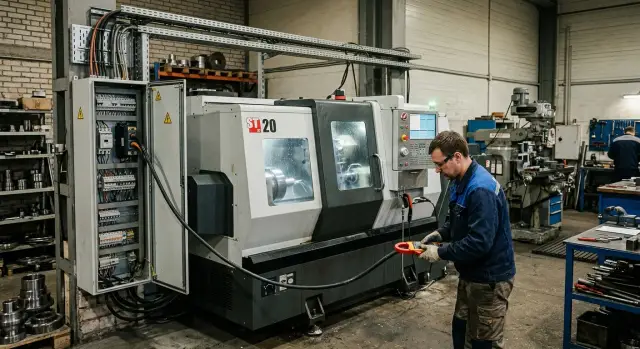
What the problem looks like in practice
On paper everything may look fine: the workshop has a main feed, breakers don't trip, and there seems to be enough kilowatts. But a new machine, especially a CNC, loads the network differently than lighting or small handheld tools. It draws current in jerks: when the spindle starts, the hydraulic unit, the coolant pump, the chip conveyor and other subsystems switch on.
Because of that, the main feed doesn't always handle a new machine as confidently as older equipment. The rated power on the nameplate doesn't tell the whole story. If a compressor, welding unit, oven or another machine runs nearby at the same time, loads add up at the exact same moment. Voltage in the shop sags, even though average calculations looked acceptable.
Voltage dips rarely look like a major outage. More often they affect small items that later add up to costly downtime. A drive can fault during acceleration. The CNC control may freeze, reboot or show unstable alarms. Sensors begin to trigger incorrectly, and the operator sees what looks like random faults: wrong zero, missed signals, a cycle stop without a clear reason.
The worst part is that the issue often isn't visible until the machine runs. While the machine stands idle, everything seems fine. The first day may pass calmly. The fault appears later, when the machine works under load and neighboring consumers start at the same time. For example, a lathe spools up and a compressor starts in the same second. Voltage briefly drops, and that's enough to cause an electronic error, even though there is no obvious network failure.
So a separate power line for the machine is often needed not as an extra precaution but to eliminate a hidden cause of future stops. In precision machining this is especially important: a single ruined cycle can spoil a part, disrupt a shift and create extra work for service.
What in the network affects the decision
You don't base the connection only on the number in the nameplate. Rated power shows normal operation, but startup load is often higher. The spindle, hydraulic unit, coolant pump and other peripherals produce short but significant current spikes. If the workshop network is already loaded, such a start will sag the voltage and electronics fail first.
Therefore a separate line is sometimes needed even where kilowatts look fine on paper. On paper there's margin, but during a real shift the breaker trips, the drive faults, the display flickers or the machine stops.
Next you check the cable. Its length and cross-section directly influence voltage drop: the longer the run and the thinner the conductor, the more voltage falls under load. For a small machine the difference may be tolerable, but for a heavy turning center it may not. A common mistake is choosing cable by price instead of by current and route length.
What is already in the panel matters too. An old breaker with the wrong rating, weak terminals, overheated connections or poor grounding can interfere with operation no less than a lack of capacity. Sometimes the issue isn't the whole workshop network but a tired segment between the panel and the machine.
You should also check voltage over a shift. In the morning the network may behave well, but closer to midday it can sag when compressors, welders or other machines are started. CNC drives and controllers cope poorly with spikes and imbalances.
Typically you look at five things: the machine's rated and starting power, the cable length and cross-section to the panel, breaker ratings and protection condition, actual voltage at different times of the shift, and the margin on the site's main incoming feed.
The last item is often underestimated. If the main feed already runs near its limit, a new machine adds not only average load but also peaks at startup. In that situation it is safer to plan a separate line right away than to hunt down random stop causes later.
Signs that the shared line is insufficient
The shared line often seems fine until the machine starts cutting metal. At idle everything looks calm, and faults appear during spindle acceleration, pump start, axis feed or the first serious tool load.
The most visible sign is voltage sag in the workshop. When the machine starts the lights flicker, neighboring motors change tone, and fans or compressors may hesitate for a second. This is not a minor detail: the network is telling you that the machine's inrush currents strongly affect the common line.
Another common sign is a breaker tripping without a clear overload per the nameplate. Power may appear within the allowed limit, but the brief starting current exceeds what the line and protection can tolerate. If the breaker trips at startup or during sudden speed increases, the cause is usually in the supply scheme rather than the machine itself.
With electronics the picture is even clearer. The CNC panel may reboot, show random errors, lose communication with drives or report faults that don't repeat. These faults are often related not to hardware failure but to supply dips and interference.
A worrying signal is when neighboring equipment performs worse at the same time: welding becomes uneven, compressors start harder, measuring devices show spikes, and VFDs on other machines give warnings. When one machine drags the whole network down, the shared line is already inadequate.
One particularly telling scenario: the machine is powered on with axes moving and the display working with no errors, but as soon as real machining begins there are stops, alarms or unstable drive behavior. This is typical when the line supports background loads but not working-load peaks.
If at least two of these signs coincide, a separate line no longer seems excessive. It's usually the normal solution to eliminate false alarms, protect electronics and avoid tripping the whole shop at every startup.
How to check the network step by step
Start with the machine, not the wall cable. Look at the nameplate and documentation for voltage, number of phases, apparent power, rated current and requirements for the breaker and cable cross-section. If the documentation lists operating modes, compare normal load with what happens at startup.
- Clarify how the spindle, coolant pump, hydraulic unit and other subsystems start. If they engage almost simultaneously, startup currents can briefly create a big voltage dip.
- List all neighbors on the same line. Welding units, ovens, compressors, crane drives and another CNC machine are the usual culprits. Some of these not only load the network but also create interference for electronics.
- Measure voltage before startup and at the moment of starting. Take several measurements at different times of the shift. If lights flicker, panels restart or protections trip at that moment, there is a problem.
- Check the margin for the breaker, cable and main feed. When a breaker is chosen with almost no margin, the cable is long and the main feed is already occupied, connecting to the shared line often ends in nuisance trips and overheating.
- Bring the data together for a decision. If the network withstands startup without noticeable sag, neighbors don't create peaks and protection and cable have margin, the shared line may be sufficient. If you're close to the limit, a separate line typically costs less than downtime and fault finding.
It's useful to observe live network behavior, not just nameplate numbers. On paper a line can look normal while in a real shift it runs at the limit. This is especially noticeable in shops where some equipment is switched on in bursts.
After this check the conversation with an electrician becomes easier. You can discuss concrete values: current, cable length, breaker type and actual network load. If you're still choosing a machine, gather these data in advance. It's easier to know whether the shared line will be enough or if separate power should be planned.
Neighboring consumers and interference
Machine power alone doesn't give the full picture. Problems more often start because of who shares the same line or adjacent panel. One machine can run for weeks OK, then fail only when welding or a compressor is started nearby.
A welding station often creates sharp current spikes. At that moment voltage drops briefly and sensitive electronics react faster than expected. The operator sees odd errors, spontaneous stops or unstable drive behavior even though the machine mechanics are fine.
Compressors also cause issues, especially if their start coincides with the machine's. The machine's inrush currents are already significant, and if a compressor starts at the same second the network takes a double hit. On paper there may be capacity, but in practice these short peaks decide the outcome.
Ovens and other heaters interfere differently. They may not give sharp starts but can keep the line occupied for long periods. That raises the average load and leaves less margin for new equipment than expected.
Who suffers first
Such interference affects not large motors but precise and sensitive devices: the machine's computer, measuring instruments, controllers and CNC modules, sensors and communications between subsystems.
If several heavy machines run nearby, the risk rises significantly. The worst-case scenario is uncoordinated starts: one operator runs a machine, another starts a compressor, a third begins welding.
So a separate line is not only about the machine's nameplate. Often it's required because of neighboring loads. A simple example: a lathe runs smoothly until the welding station starts; as soon as the welder begins, the panel shows power-related errors and the nearby measuring computer sometimes reboots. In that case you must look at the whole group of consumers, not only the lathe.
If the shop already has welding, compressors, heaters and sensitive electronics on the same area, treat the shared line as a weak option rather than the default.
A simple shop example
In a small workshop a lathe was installed next to an air compressor. Both were connected to the existing line because it was nearest the work area. On paper everything looked acceptable: the line was present, breakers were in place and equipment powered up.
Problems began in the morning when the shift started almost everything at once. The compressor drew a high starting current and the lathe started at the same moment. Lights dipped for a second and errors appeared on the machine panel. Initialization sometimes failed, and drives might not reach ready state on the first try.
The machine itself could be perfectly functional. The cause was the power supply. When a heavy, sharply starting consumer is on the same line, the machine receives unstable voltage. Electronics are sensitive: controllers, drives and sensors don't like such dips.
From an outside view this is misleading. The operator blames the machine because it shows alarms. The electrician sees the line alive and initially doesn't regard the wiring as critical. But looking at the moment of startup the situation becomes clear.
In this case the simple solution was to run a separate feed from the panel to the lathe with proper cable sizing and protection. The compressor stayed on its branch. After that startups became smooth, panel errors nearly disappeared and the lights stopped flickering.
This situation is common, especially when new equipment is placed in a already-loaded workshop. When EAST CNC supplies and commissions machines, it's better to discuss these things before connection. A short network and neighbor-load check usually saves more time than hunting a floating fault after startup.
If the machine and compressor start close in time, the shared line often turns out to be the weak point. You see that not from the nameplate but from how the network behaves during a real shift.
Mistakes when connecting
Catalog power often lulls people into false security. They see the number on the nameplate and assume the usual line is enough. But in operation a machine doesn't load the network evenly or exactly as printed in the catalog.
The most common mistake is considering only rated power and ignoring starting currents. At spindle start, coolant pump or hydraulic unit engagement, the network gets a short but sharp spike. If other consumers share the line, the breaker may not trip but electronics will degrade: dips, false alarms and drive faults appear.
Old cables are also often left in place. This is bad practice. Even if an older machine worked on the same line, a new one may have different startup behavior, cycle length and sensitivity to dips. Check cable cross-section, insulation condition, route length and contact quality before connection, not after the first emergency stop.
A separate issue is sharing a line with welding and compressors. Such neighbors almost always bring surprises. Welders create current jerks, compressors add their starts, and the network load becomes uneven. Lighting may hardly notice it, but a machine may suffer power faults and unstable operation.
People usually miss a few things: they don't account for startup mode, forget pumps, hydraulics and auxiliaries, leave the old line unchecked, attach the machine to a branch already used by welding or a compressor and discuss power too late—after the equipment is purchased.
That last mistake hurts the most. Discuss power supply at the model selection stage. If the supplier helps with selection, delivery and commissioning, it makes sense to check the shop's power layout, route length, protection and neighboring loads in advance. It's cheaper than changing cable, breakers and hunting interference after installation.
If in doubt, have an electrician verify the network and actual loads once rather than rely on an old line with assumed margin.
Quick check before purchase
Before paying for a machine collect a few simple electrical data. At this stage it's often clear whether a separate line is needed or the shop network can handle a shared connection.
Start with the machine's documentation. You need not only total power but working current, starting current, voltage requirements and connection type. For a CNC machine this is more important than it seems: two models with similar power can behave very differently at startup.
Then look at the line where the machine will be placed. If it already supplies a compressor, welding, oven, pump or large ventilation, the picture changes. Even if paperwork shows capacity, real shift conditions can produce higher loads.
A quick check usually covers five items:
- precise machine data for power, running and starting current
- a list of existing consumers on the same line and their start times
- an electrician verified breaker rating, cable cross-section and route length
- a measurement of voltage sag when starting a similar load
- margin remaining on the line in case another machine or a second shift is added
Problems often hide in two places. First, the breaker is sized too tightly and trips on startup. Second, the cable seems fine but on a long run produces excess voltage drop. The operator doesn't see the cable—only the strange faults: the drive struggles to start, electronics pick up noise and the machine throws errors.
If similar equipment already runs in the shop, ask an electrician to measure during startup. That test is worth more than arguing about whether "it should be enough." One number for voltage drop often decides the question faster than any guesswork.
Buy with margin. If you add a second machine in six months, the shared line may become the weak point. A little reserve in cable size, breaker and network capacity usually costs less than a rework after startup.
What to do next
If you have doubts, don't connect the new machine by guesswork. First compile the machine's nameplate data and the shop's power diagram in one place. You need power, rated current, voltage requirements, breaker, cable and grounding details. If the manufacturer provides starting currents, include them.
Nameplate numbers alone are not enough. An electrician should observe how the network behaves under real load when neighboring consumers run: compressor, welding, pumps, ovens, ventilation. These moments usually produce sags, phase imbalance and interference for electronics.
For measurements take a few points: phase voltages in normal mode, sag during a large load start, current on the intended supply line, grounding condition and protective device status.
Then decide whether a separate line is needed or the current scheme still has margin. If the network runs at the limit, don't skimp. A separate line often costs less than a day of downtime, an emergency electrician visit, a batch of scrapped parts or a failed startup.
Consider the cost of risk as well as cable and panel prices. If the machine will run shifts and sensitive consumers are nearby, the shared line quickly becomes an expensive compromise. In a small shop this is obvious: one compressor start and the panel already flashes errors.
This discussion is best held at the equipment selection stage. When choosing a machine consider not only spindle and tooling but also the shop's power conditions. That way it's easier to know in advance whether the network is sufficient or a separate feed, new breaker and interference protection should be planned.
If equipment is selected together with EAST CNC specialists, this conversation can happen before delivery. EAST CNC, the official representative of Taizhou Eastern CNC Technology Co., Ltd. in Kazakhstan, helps with selection, delivery, commissioning and service. That allows you to verify connection requirements in advance and avoid dealing with these problems after the machine is already on site and waiting for startup.