
Roughing and finishing cutters: when saving money hurts your dimensions
Using one roughing and finishing cutter in a single operation can speed up the start, but the size often drifts. Here’s when it is better to split the tools and reduce scrap in production runs.
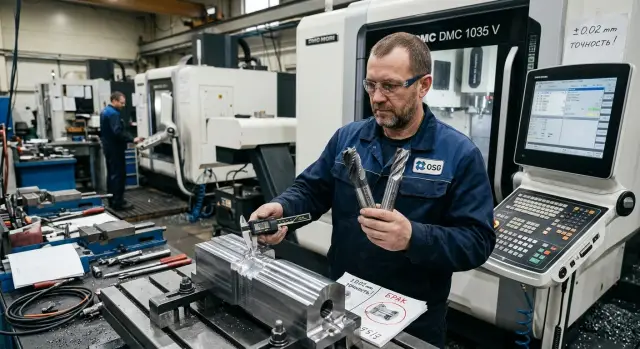
Why the size drifts already in the first batch
The size often drifts not because of the program, but because of the machining strategy itself. The most common mistake is simple: the same cutter is used to remove the main allowance and then immediately bring the part to the finish size.
While the tool is removing a lot of metal, it works under a heavy load. In the cutting zone, the temperature rises quickly, chip evacuation changes, and the edge starts to lose sharpness. By the finishing pass, the cutter is already cutting differently than it did at the start of the cycle. You cannot see that on the drawing, but on the part even a small shift can push the dimension above or below target, especially when the tolerance is tight.
Wear also starts earlier than it seems. After the roughing pass, the edge has already taken heat, impact load, and small chips. The tool still cuts, but it pushes harder against the material. That increases vibration, and thin sections of the part start to flex. The surface may still look fine, but the size is already drifting.
The first parts often only hide the problem. The machine is still cold, the cutter is fresh, and the offsets have barely been touched. Two or three parts pass inspection, and the process seems to work. Then the usual picture appears: after warm-up, the size shifts, correction helps only for a short time, and then the spread starts growing again. By the end of the shift, the operator spends more time holding tolerance than producing parts.
That is why saving money on the second cutter looks good only on paper. In a real production run, it quickly turns into extra measurements, stops, and size-related scrap.
What happens when one cutter does two different jobs
Roughing and finishing ask different things from the tool. Roughing needs load capacity, stable chip removal, and the ability to remove volume calmly. Finishing needs a clean edge, a smooth cut, and a predictable mark on the wall.
When those jobs are mixed, the tool quickly loses what is needed for accurate size. After the heavy cut, the edge is no longer as even, the actual radius changes a little, and the cutter drifts more in the cut. It still cuts, but the size becomes less stable from part to part.
This shows up most clearly on parts with thin walls, deep pockets, and internal corners. During roughing, the cutter is pulled off course more than the machine sound suggests. Then the same tool goes into finishing, but now with different stiffness and a different edge. As a result, the straight surface may still hold, while the corner or thin wall starts to wander.
The operator usually notices the problem not from the program, but from how the part behaves. The size drifts after the first few pieces, the wall gets an uneven shine, the corner holds worse than the straight surface, and the thin wall starts to "breathe" even on the same settings. Then the usual manual fight begins: feed is reduced a little, spindle speed is changed, the offset is touched more often than usual. Sometimes that saves one batch, but it does not make the process stable.
If you separate the tools, each cutter does its own job without compromise. The roughing cutter removes the volume, and the finishing cutter comes in with a small, predictable allowance. In that setup, the size usually stays more consistent right from the first parts.
Where separating the tool gives a clear benefit
Separation is especially useful where the cost of a mistake is higher than the cost of a second cutter. The longer the series, the faster wear builds up. One cutter first removes a large allowance and then tries to hold size even though its behavior has already changed by the middle of the batch.
When roughing and finishing are separated, the process becomes calmer. The roughing tool takes the load and the chips. The finishing tool works on a predictable allowance and suffers less from overheating, impact, and accidental size drift.
The difference is easy to see in several cases:
- the series is long, and wear compensation has to be adjusted more and more often;
- the tolerance is narrow, and the blanks vary in allowance;
- the part has thin walls, deep pockets, or a large tool overhang;
- setup changes and a restart cost more than a second cutter set.
This is especially obvious on thin walls. The roughing pass pushes harder on the material, the wall shifts slightly, and if the same cutter is used for finishing, it comes to size after heavy work. That is where the typical spread comes from: the first part still passes, the third is already on the edge, and the sixth becomes scrap.
The same problem appears when the allowance changes from blank to blank. One cutter gets a different load every time, and the resulting size wanders. With a separated setup, things are simpler: roughing removes the extra stock with margin, and finishing meets nearly the same conditions on every part.
A good example is a housing with a pocket and a long thin wall. If the material is first removed with a roughing cutter and then a separate finishing cutter takes a stable 0.2–0.3 mm, the size usually stays more consistent and the surface comes out cleaner. The first good part also comes faster, because the corrections are clearer and there are fewer of them.
How to check the setup before starting a series
You can spot the problem before a large batch if you look at more than just cycle time. On the first blanks, check the real allowance first. On the drawing it may look one way, but in practice there may be an extra 0.3–0.5 mm near the wall or in the pocket corner. For one cutter, that is a completely different job.
Next, it helps to split the evaluation into two parts. First, see how the tool removes the main volume of metal: is there too much heat, deflection, built-up edge, or visible edge wear? Then separately check how it holds the final size and surface finish on the last pass. If everything is mixed into one overall judgment, the reason for scrap gets lost.
A proper check does not take long. Run a short test on 5–10 parts in two versions: one cutter does both roughing and finishing, or roughing removes the volume and finishing brings the part to size. Compare not just the first part, but the whole short series, and it is better to measure both at the start of the test and closer to the end.
Do not look only at the average size. The spread often says more. If the one-cutter setup stays in tolerance only barely, while the separate setup runs more calmly, the savings already look doubtful.
It also helps to record simple numbers right away: how many parts come out before the size starts drifting, after how many minutes of cutting a touch-up is needed, and which section of the part is affected first. You do not need complex tables here. You need data that lets the shop lead make a quick decision during the shift.
The process sheet should keep a short, clear threshold for changing the tool. For example: when the size has drifted by more than 60% of the tolerance, the side wall roughness has increased, or after the eighth part a noticeable offset adjustment is needed again. Then there is less debate on the shop floor, and it becomes faster to understand where one cutter is still acceptable and where a separate setup is needed right away.
Example with a housing and a thin wall
Take an aluminum housing with a deep pocket and a 2.5 mm wall. The wall size has to stay within +/-0.03 mm, and the bottom of the pocket needs to be clean, without visible steps. On a part like this, it is easy to be tempted to do everything with one cutter: fewer tool changes, a shorter program, and a simpler start.
On a trial batch, that can really look fine. At the beginning of the shift, the cutter is sharp, the spindle and part are cold, and the size holds. A few of the first housings pass inspection, and it seems like the setup worked.
The problems come later. By the eighth part, the cutter is already slightly worn, the tool and metal have warmed up, and the thin wall starts to move. The shift itself may be small, but for this geometry even a couple of hundredths is enough to create scrap or a batch that has to be sorted separately.
The operator notices this before inspection does. He tightens the offset, reduces feed, listens to the cutting sound, and watches the mark on the wall. On paper there is one tool, but in practice the series runs slower because the settings need constant adjustment.
When a roughing cutter and a finishing cutter are used as a pair, the part behaves more consistently. The roughing cutter removes the main volume and leaves a small allowance on the wall and bottom. The finishing cutter then comes in calmly, with less load, and does not pull the wall with it. The difference shows not only in the size. The surface mark is the same from the first part to the end of the batch, and the operator has to touch the offset much less often.
For such housings, separating the tools is usually more honest than trying to save money with one cutter. Yes, the program includes an extra tool change. But the shop does not lose time adjusting after every couple of parts, and it does not end up with a pile of borderline sizes.
Mistakes that wipe out the savings
Most often, the money is lost not on the cutter price, but in the first hours of work. The most common mistake is to take a heavy cut and then immediately run a finishing pass with the same tool. After that load, the edge is already behaving differently, the tool heats up more, and it can shift the size slightly. On one part, that is still hard to notice. By the tenth, the problem is already visible.
The second mistake is leaving too little allowance for finishing. The logic seems simple: the less you remove on the finishing pass, the more accurate it will be. In practice, if the allowance is too small, the cutter often does not cut at all; it just rubs the surface and repeats the drift left after roughing. The size does not improve. The finishing pass should clearly cut metal, not just touch the wall.
The third mistake is judging from one successful part. The first part after setup and with a cold tool often looks excellent. But a series tests the process honestly. If after 8–12 parts you already have to noticeably touch the offset, the setup is weak, even if the first measurements looked great.
Sometimes people try to fix the problem only with cutting parameters. First the feed is reduced, then the spindle speed is raised, then the depth of cut is changed. If you have to move the numbers every couple of hours, the issue is usually not only the parameters. More often, the machining strategy itself is built poorly.
Common things can also spoil the result: spindle or holder runout, too much tool overhang, uneven tooth engagement, or trying to finish a thin wall right after a heavy roughing cut with the same tool. Each of these is already unpleasant on its own. Together, they quickly eat up the size margin.
Quick checks before the first shift
Before starting the batch, it is better to spend 20 minutes checking than to chase size on the tenth part. If one cutter must both remove stock and hold the final geometry, these checks matter even more.
First, check runout in the holder. Even a good cutter will cut unevenly if the tool sits off-center. For roughing, that can sometimes be forgiven, but on a finishing wall, runout quickly creates taper, chatter, and size drift.
Then take several blanks from the same batch and verify the real allowance. Not by the drawing, but in practice. If one part has 0.8 mm of stock and another already has 1.2 mm, the same program will create a different load, and therefore a different final size.
Next, do not look only at the first part; run a short series. Measure the first, fifth, and tenth parts at the same points. That makes it easier to see whether the size is drifting because of warm-up, edge wear, or unstable clamping.
For a pocket, width alone is not enough. Check the bottom separately, the wall height, the internal corner or radius where extra material often remains, and also the size immediately after machining and after a short pause. Often a simple thing appears: the bottom is still in tolerance, but the wall has already drifted. Or the corner holds worse than the straight surface.
Another small thing that is often missed: a spare cutter should be ready before the series starts. It is better to assemble it in advance, measure the overhang, and enter the offset. Then the replacement will take minutes and will not break the rhythm.
If, after these checks, the size on the first, fifth, and tenth part behaves the same way, you can start the batch calmly. If the spread grows early, saving money on one tool almost always ends up costing more.
How to calculate the cost of a cutter without fooling yourself
The most common mistake in the calculation is simple: people look only at the purchase price. One cutter almost always looks cheaper than a pair, where one removes the main allowance and the other holds the size. But in the shop, you pay for more than the tool. You also pay for adjustments, extra measurements, machine downtime, and parts that ended up in a borderline size.
If you calculate honestly, you need to look at the full trail of the decision: the cutter price, the setter’s time after the first parts, scrap and re-sorting, machine downtime because of an unexpected tool change, and the cost of the first good batch that can be handed over without long sorting.
Borderline size has an annoying feature. It does not always create obvious scrap right away. Some parts pass, some go to re-check, and some sit right at the tolerance limit. On paper that is not yet a disaster. In reality, the operator measures more often, the setter adjusts the offset more often, and the series starts slower.
Let’s say one cutter costs 30,000 KZT, while two separate cutters cost 44,000 KZT. The 14,000 KZT difference seems significant. But if six of the first 60 parts fall into a borderline size, you are already losing time on re-measurement, sorting, and deciding whether to keep the batch or rework it. Even 8 minutes per part quickly turns into almost an hour of lost time.
Now add an unexpected tool change. The machine stops for 20–25 minutes, the operator changes the tool, checks the first part again, and adjusts the offset. During series startup, that is often enough for the tool-price difference to disappear in the very first shift.
So it is better to compare not the cost of one part, but the cost of the first good batch. If separating the tools gives a stable size already in the first dozens of parts, it is often cheaper overall, even when the cutter set costs more upfront.
What to do next
The best way to settle the argument is a short trial on your own part. Take the same contour and run it in two versions: with one cutter and with separate roughing and finishing passes. Record not only the size, but also cycle time, spread across the first parts, edge condition, and the point when the tool starts to pull the size.
If you do not have these numbers, the decision is almost always made by eye. Then size drift gets blamed on the material, the operator, or bad luck. It is much easier to spend an hour on a test than to chase drift across the whole batch.
After the trial, it is worth setting simple changeover rules: what allowance and feed remain for the roughing cutter, what the finishing cutter removes, and at what deviation the tool is changed instead of trying to stretch the batch with corrections. It also helps to save the actual measurements of the first good part, not just the program.
If a new series is unstable from day one, it is worth discussing not only the tool, but the machine itself. For tasks like this, EAST CNC usually looks at the part as a whole: geometry, material, required rigidity, commissioning, and ongoing service. That kind of discussion often helps you understand earlier whether the issue is in the cutting setup or in the machine’s capabilities.
And one more rule that really works: do not stop at the first successful part. Come back to the setup after the first hundred pieces and see when exactly the size starts to drift — on the 20th part, the 60th, or closer to the end of tool life. After that, it makes sense to adjust the tool change point, the finishing allowance, and the control points.
A calm series start comes not from the cheapest tool, but from a clear machining setup. When the roughing and finishing cutters do not interfere with each other, it is much easier to hold the size every day.
FAQ
Why are the first parts fine, but then the size drifts?
Usually the dimension drifts because one cutter first removes a large allowance and then tries to hit the finish size with the same edge. After the first few parts, the tool heats up, wears a bit, and cuts differently. The first workpieces often hide the issue: the machine and tool are still cold. After warm-up, the spread grows and the size starts to wander.
When is it better to use separate roughing and finishing cutters?
Separate the tools if the run is long, the tolerance is tight, or the part is thin and not very rigid. Another clear case is when the stock allowance varies and the operator has to keep adjusting the offset. If the size is already moving toward the tolerance limit after 8–12 parts, one cutter usually just adds extra work.
What allowance should be left for the finishing pass?
Leave enough allowance so the finishing cutter actually cuts the metal instead of rubbing the wall. For many parts, a stable finishing allowance of about 0.2–0.3 mm works well, but the exact value depends on the material, rigidity, and tool overhang. If the allowance is too small, the finishing pass does not correct the drift left after roughing.
How can you check the setup quickly before starting production?
Run a short test on 5–10 parts using two setups: one cutter for everything, or separate roughing and finishing. Measure not only the first part, but the first, fifth, and tenth at the same points. Watch the spread, how often you need to adjust, and the edge condition. That will quickly show which setup holds size more calmly.
On which parts does tool separation give the biggest effect?
The issue shows up most clearly on thin walls, deep pockets, internal corners, and with a long tool overhang. In those areas the cutter is easier to deflect, and the part springs back more. On such parts, a separate setup usually gives more consistent dimensions and a cleaner surface across the whole batch.
Why does offset correction only help for a couple of parts?
Offset tweaks only change the size for a while; they do not remove the cause. If the edge has already heated up, dulled, or started pushing harder on the material, the spread will soon come back. When the operator has to adjust the offset more and more often, it is better to rethink the cutting setup instead of trying to save the batch with corrections alone.
What should you check before the first shift so you do not chase scrap later?
First check spindle runout and the actual tool overhang. Then measure the real stock allowance on several blanks from the batch, because different allowance immediately changes the load. After that, run a short series and compare the size right after machining and after a short pause. That will show whether the problem is in the tool, clamping, or warm-up.
How do you honestly calculate whether saving on one cutter is worth it?
Look at more than just the cutter price. The calculation should include extra measurements, sorting, machine downtime, adjustment after the first parts, and unexpected tool replacement. Often two cutters cost more at the start, but the first good batch comes out cheaper and faster.
When is one cutter still acceptable?
You can do it if the run is short, the tolerance is not tight, the stock is even, and the part is rigid and simple. A single-cutter setup can also work fine for roughing and semi-finishing, where a small spread does not matter. Even then, it is better to confirm the decision with a short trial, not just one good part.
What should you do if the size has already started drifting during the shift?
Check where the shift started: the wall, the bottom, the corner, or the size after a pause. If the size drifted after warm-up and you already have to keep touching the offset, stop the setup and separate roughing from finishing. Do not keep pushing a batch at the tolerance edge. It is usually faster to change the tool or the setup than to sort through borderline parts later.