
Removing an Internal Chamfer After a Deep Hole Without Drift
Removing an internal chamfer after a deep hole requires a stable tool. Let’s compare options for production runs, common mistakes, and quick checks.
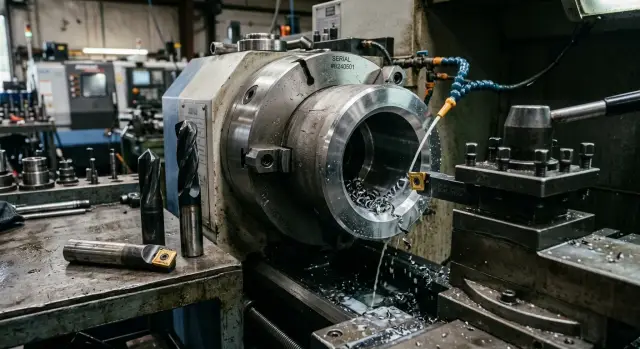
Why the chamfer drifts after a deep hole
An internal chamfer after a deep hole is almost always harder to keep under control than it looks on the drawing. The tool works far from support, often with a long overhang, and even a small drift is immediately visible on the edge. Where a short hole gives a clean chamfer with little effort, a deep hole quickly starts to "wander" in width and angle.
One common reason is manual touch-up after the main cycle. Each time, the operator feeds the tool a little differently: the force changes, the depth of entry changes, and the stop point changes. On one part the chamfer comes out cleaner, on another it ends up a few tenths wider. For a one-off job, that is still acceptable. In a production run, this spread quickly becomes a problem.
Long overhang makes the effect worse. Inside the hole, the tool behaves like a spring: the smaller the diameter and the greater the depth, the easier it is for side force to pull the cutting edge off course. Even if the deviation is small, the chamfer is already uneven around the circumference.
There is another obstacle too: the burr left after drilling. Because of it, the first contact is uneven. The tool does not enter the edge smoothly, but catches on the protrusion and starts cutting at an angle. If chips are still left in the hole, if there are signs of vibration, or if the axis is slightly off, the problem becomes even more obvious.
In series production this usually leads to several consequences at once: the chamfer width varies, some parts need manual cleanup, the cycle is disrupted, and the risk of a remaining burr grows. It looks especially frustrating on a CNC lathe: the machine itself holds dimensions steadily, while the final operation introduces random variation.
Usually, it is not one mistake but the sum of several. Long overhang, a rough entry, burrs after drilling, and manual touch-up gradually combine into an unstable result. That is why you should look not only at the shape of the chamfer, but also at how the tool enters the hole and what condition the edge is in before this operation begins.
What affects accuracy the most
Accuracy is not lost only at the moment the chamfer is cut. More often, the error builds up earlier: because of weak rigidity, extra overhang, and chips deep inside the hole. If these things are not kept under control, the tool starts taking the path of least resistance and leaves a chamfer with different widths around the circumference.
The first thing to check is the relationship between hole diameter and depth. The smaller the diameter and the deeper the hole, the less room there is for overhang. On a part with a 12 mm hole and a depth of 70-80 mm, even a few extra millimeters can already create a noticeable drift.
The second factor is holder rigidity. A universal tool is convenient for one-off jobs, but in production it often loses out. A holder designed for a specific diameter and length keeps the path better and springs less at entry and exit. On a CNC machine, this is especially visible: the program repeats the same movement hundreds of times, and a weak setup repeats the same mistake.
Cutting parameters also matter directly. Too much feed leaves a rough mark and can tear the thin edge. Too little feed starts rubbing instead of cutting, and the chamfer comes out torn. The same goes for spindle speed: if it is too high for the tool and material, the edge overheats and the chamfer gets a smeared finish. It is usually smarter to start with a calm mode and increase it after the first stable parts.
Coolant is not just a formality here. It has to carry chips out of the depth of the hole. If chips stay inside, the tool is cutting not clean metal, but a mix of metal and already cut particles. That leads to scratches, edge chatter, and random chamfer width.
Another common source of disagreement is a vague chamfer specification. A phrase like "just break the edge" almost always leads to different interpretations by the setup technician, the operator, and quality control. It is much easier to work when the chamfer is given as a number, for example 0.3 x 45° or 0.5 x 45°. Then both the tool choice and the result check become clearer.
In practice, accuracy comes down to four things: minimal overhang, a rigid tool, calm cutting parameters, and a clean cutting zone. Once one of these drops, the chamfer starts behaving on its own.
Which tools work in production
For series work, the shape of the chamfer itself is not the key point. What matters is the tool’s ability to hold the axis consistently inside a long hole. If the tool drifts even by a few hundredths, the edge immediately starts to wander, and manual touch-up comes back into the process.
The most predictable option for a precise chamfer is a boring tool with a ready-made chamfer profile. It holds size well when the overhang is short and the tool itself is rigid enough. On bushings and simple housing parts, this often gives the cleanest geometry. But a deep hole has limits: the greater the overhang, the higher the risk that the tool will start to spring and push the chamfer off course.
A reverse countersink is better for a different task: when you need to reliably break the edge on the exit side of the hole. It usually gives a uniform width around the circumference and behaves more steadily in production, as long as the chamfer is not too small. For parts where the operator used to remove burrs by hand from the back side, this is often the most practical option.
A piloted tool wins where a regular tool starts searching for its own path. The pilot rests on the already machined surface and centers the cutting part better. It will not fix poor concentricity in the part itself, but in a stable batch it noticeably reduces drift.
Where accuracy drops first
A spring-loaded deburring tool is convenient when the task is simply to remove a burr. It works fast and tolerates small fluctuations. But it holds a chamfer of the same width less well. If the drawing calls for geometry, not just a clean edge, this option often disappoints early in the run.
A combined tool also looks attractive because it saves a pass. On a simple part, that can really work. But if the geometry is more complex, a combined setup often creates more setup issues than it saves in cycle time.
To simplify the choice, the picture looks like this:
- for a precise chamfer with short overhang, a profiled boring tool is often chosen;
- for the exit edge, a reverse countersink is more convenient;
- for a long hole, a piloted tool works more calmly;
- for simple deburring, a spring-loaded chamfering tool is enough.
In production, the best tool is not the one that can do everything, but the one that gives the same chamfer on the fiftieth and the five-hundredth part.
How to choose the right tool for the part
When choosing a tool, the first thing to look at is not the shape of the chamfer, but how the tool behaves inside the hole. If the hole is narrow and deep, a weak holder almost always pulls the edge off axis. In the end, one part may still look acceptable, but after that the chamfer starts spreading in width.
For holes with a large depth-to-diameter ratio, solutions with hole support or a pilot usually work better. They wander less and hold size more evenly across the batch. This is especially important in series machining, where manual touch-up immediately hurts the cycle.
Usually, the choice comes down to a few clear options. A reverse countersink is suitable when you need to chamfer the back side and there is no room for a regular approach. A boring tool with a chamfer insert is convenient if the hole is not too deep and a short cycle matters. A piloted tool holds geometry better when the chamfer has to repeat part after part. A special chamfering tool made for one size makes sense in a large batch if the shape does not change for a long time.
Often, chips spoil a good idea. If the material produces long chips and the coolant does not flush them out of a deep hole, the tool starts working through a clogged channel. The chamfer tears, the edge dulls sooner, and the operator begins adjusting the parameters by hand. That is why it is better to check coolant flow and chip shape on the trial batch.
For a large batch, you should not only count seconds in the cycle. Sometimes one tool cuts the chamfer 3 seconds faster, but the insert lasts twice as little. Over a long run, this easily eats up all the gain through stoppages and adjustment time. It is more useful to look at the total cost: edge life, repeatability, and changeover time.
There is also a simple practical question: how long does it take to change a worn insert? If the operator can replace it in a minute and does not need to reset the tool, that option is often more profitable than a fussier tool with a long setup.
For a 10 mm hole with an 80 mm depth in a production steel part, I would first check a piloted tool. It usually gives a more even chamfer than a free reverse countersink and is less affected by small spindle runout. On a CNC lathe, that often means not only a cleaner edge, but also a smoother process.
How to set up the process step by step
A stable chamfer starts not with cutting parameters, but with accurate starting dimensions. If the hole depth is guessed or too much overhang is left, the tool almost always starts wandering, especially in a deep channel.
For a production part, it is better to set the process correctly once than to keep adjusting it all day in small steps. This approach protects both the cycle and repeatability.
Setup order
-
First, check three things: the actual hole depth, its diameter, and the required chamfer width. Do not rely only on the drawing. After drilling and boring, the real geometry often differs slightly.
-
Then reduce the tool overhang to a minimum. Leave only the length needed to reach the edge and exit the cutting zone smoothly. Extra 10-15 mm in a deep hole quickly turn into drift.
-
Make not just one trial part, but at least three in a row. The first one may come out well by chance. The second and third immediately show whether the process holds size and whether the edge loses sharpness too early.
-
If you change feed, spindle speed, or plunge depth, do not look only at the chamfer itself. Check the entry into the hole, the exit from the cut, and the mark on the surface. These areas quickly show whether the tool is cutting straight or already pulling sideways.
-
Once you find a working mode, record it immediately: spindle speed, feed, tool position, chamfer width on inspection, and the point when the edge is changed. It is not the most exciting part of the job, but it saves time on the next batch.
On a CNC lathe, this sequence is almost always better than constant small adjustments during the shift. If the operator keeps "tweaking" the settings, the process quickly loses repeatability.
A good launch target is simple: three parts in a row give the same chamfer, there is no early edge wear, and the cycle does not grow because of manual touch-up. If even one of these does not line up, go back first to the overhang and the actual hole geometry.
Example for a production part
On a production housing part, the problem shows up very quickly: a 8 mm hole, 60 mm deep, with the chamfer needing to be removed on the internal edge after the deep pass. On paper, the operation looks simple. In reality, manual chamfering breaks the rhythm and gives different results from part to part.
Usually the operator uses a hand tool after the main cycle. On one part the chamfer comes out neat, on another a light burr remains, on a third the width shifts by a few tenths. For a one-off part, that can still be accepted. In production, these deviations quickly turn into extra inspection and lost time.
In this situation, it is more sensible to remove the manual operation and install a reverse countersink with a pilot. The pilot runs on the hole and keeps the tool on axis, so the cutting part is pulled sideways less. On a long, narrow hole, the difference is usually visible right away.
On a CNC lathe or machining center, the setup is simple: first the hole is brought to size, then the reverse countersink reaches the internal edge and forms the chamfer in the same position every time. The operator does not return to the part by hand. The cycle becomes smoother, and chamfer variation decreases.
On a trial batch, it is best to watch several indicators right away: chamfer width across several consecutive parts, remaining burr on the exit edge, vibration marks, cycle time, and tool wear after the first run. If after 20-30 parts the chamfer still holds size and the burr does not come back, the process can be locked into the routing sheet. If the chamfer starts to wander, first check the pilot, tool runout, and feed.
For a production part, the effect is usually very clear: the operator does not waste extra seconds on manual touch-up, inspection becomes simpler, and the edge comes out cleaner straight from the machine.
Mistakes that ruin the chamfer and the cycle
The first good part guarantees nothing. Often the chamfer looks fine at startup, then the size drifts, the edge becomes rough, and people only start looking for the cause on the tenth or twentieth part.
Usually the problem is not rare defects, but ordinary shop-floor habits. Here is what to check first:
- too much overhang "for every case";
- a drilling mode that was never changed for chamfering;
- trying to remove a wide chamfer in one heavy pass;
- chips that were not cleared from the cutting zone;
- inspection based on the first part only.
The most common mistake is unnecessary overhang. The farther the cutting part is from support, the easier it drifts off axis. In a deep hole, this shows up especially fast.
The second typical problem is leaving the drilling settings unchanged. A drill and a chamfering tool cut differently. If feed and speed are not reconsidered, the chamfer may come out with chatter marks or burrs, and the time saved is only apparent because the part still needs cleanup.
Another bad scenario is trying to take the full chamfer width in one go. On a narrow edge, that sometimes works, but in production it is often better to make two calm passes than one heavy pass that causes scrap and a machine stop.
Chips ruin more chamfers than people expect. Even a good tool will not help if curled chips stay in the hole, catch on the edge, and destroy repeatability.
And one more simple rule: do not trust one part. Check the start, the middle of the batch, and the moment before insert change. If the chamfer starts drifting on the 30th part, look first at overhang, chips, and wear, not the program.
Short checklist before startup
Before a production run, it is worth spending 10 minutes on a check. In a deep hole, the chamfer is usually pulled off by not one major failure, but several small ones happening at the same time: too much overhang, weak coolant flow, a dull edge, and an inaccurate note in the setup sheet.
If the operation repeats from batch to batch, it is better to make this sequence mandatory:
- write down the hole diameter, full depth, and chamfer angle without abbreviations;
- check the actual tool overhang after changing the holder, insert, or arbor;
- make sure the coolant reaches the cutting zone, not just that the pump is running;
- define in advance a clear wear sign and the replacement moment;
- measure not one part, but three in a row.
Even a good tool will not save the process if these points are skipped. For a production part, it is better to lock in the startup order once than to keep chasing the chamfer at the machine every time.
What to do next
Do not change the whole process at once. For this kind of operation, it is better to take one trial part, run it through three cycles in a row, and measure the chamfer each time. Look not only at the size, but also at the burr, edge cleanliness, and signs of drift.
If the chamfer is already "wandering" after the third cycle, do not blame the insert alone. Much more often the cause is tool overhang, a weak holder, axis play, or unstable coolant flow.
For a first comparison, two options are usually enough; you do not need a long list of fixtures. For example, you can compare a reverse countersink and a stiffer piloted tool for your part. Compare them using the same criteria: chamfer width and shape after three repeats, edge cleanliness without manual touch-up, cycle time, and ease of restarting the process.
If the issue is not only the tool but also the choice of machine or machining scheme, it makes sense to discuss the task as a whole. EAST CNC supplies CNC lathes and other metalworking equipment, and the company blog at east-cnc.kz regularly covers practical topics on setup, tooling, and series machining. It is useful when you need not guess the answer, but calmly compare the part, the tool, and the process itself.
FAQ
Why does the internal chamfer drift after a deep hole?
Most often it’s caused by a combination of small factors: too much tool overhang, a burr left after drilling, chips inside the hole, and manual touch-up. The tool enters the edge unevenly, flexes, and cuts a different width around the circle.
What should I check first if the chamfer width keeps changing?
Start with three things: the actual hole depth, the real tool overhang, and the edge condition before chamfering. If the depth is off, the overhang is too long, or a burr is still inside the hole, you won’t keep the chamfer even.
Does a shorter tool overhang help?
Yes, it often helps right away. The shorter the overhang, the less the tool bends inside the hole and the better it holds the axis.
What tool is usually used for chamfering the exit edge of a hole?
For the exit edge of a deep hole, a reverse countersink is usually the most convenient choice. If the hole is long and narrow, a piloted tool often holds the chamfer more evenly and drifts less.
When should a piloted tool be used?
It’s used where a regular tool starts looking for its own path. The pilot rests on the hole, centers the cutting part better, and reduces drift in production runs.
Why does manual touch-up work poorly in series production?
Because the operator feeds the tool a little differently every time. On one part you may not notice it, but in a run the variation quickly disrupts the cycle, inspection, and edge quality.
What cutting modes are better at the start?
For startup, it’s better to choose a calm cutting mode instead of chasing seconds right away. Too much feed tears the edge, while too little starts rubbing instead of cutting.
How do chips and coolant affect the chamfer?
Use coolant so it carries chips out of the depth of the hole instead of just flowing into the area. If chips stay inside, the tool cuts through debris and leaves marks, burrs, and uneven chamfer width.
How do I know the process is stable?
Don’t trust a single good part. Run at least three parts in a row and check whether the chamfer width, edge quality, and cycle time stay stable without manual correction.
What should I choose for a 10 mm hole with 80 mm depth?
For a hole 10 mm in diameter and 80 mm deep, I’d start by checking a piloted tool. It usually behaves more calmly than a free tool and holds repeatability better on a CNC lathe.