
Remote machine diagnostics: when it saves a day
Remote machine diagnostics save time when you gather photos, video, error codes, the event log, and part-and-tool data in advance.
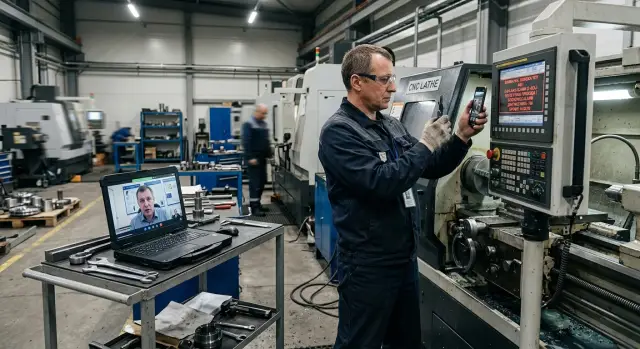
Why fault analysis gets delayed
Remote machine diagnostics rarely slow down because of the call to service itself. Usually the reason is simpler: the engineer cannot see the machine with their own eyes and first gets a secondhand account from the operator, setup technician, or shift supervisor. At this stage, it is easy to lose half the meaning.
One person says, “the machine stopped and is beeping.” Another remembers that the tool was changed just before that. A third adds that a warning had already flashed an hour before the stop, but the machine kept running. For CNC machine service, these are not small details, but the basic data. Without them, the first answer is almost always too general.
The problem is that the same symptom often points to different causes. If an axis will not move, the issue may be a sensor, drive, parameter, mechanical stop, or an error after setup. If the spindle will not start, the cause may be in the program, an interlock, overheating, or a pressure drop. From the outside it looks like the same lathe breakdown, but very different things have to be checked.
Most of the time is spent not on the repair itself, but on reconstructing the chain of events. The engineer needs to understand what happened before the stop: was the machine running in automatic or manual mode, who changed what, were there any CNC error codes earlier, was there a power failure, did the operators hear an unusual sound? If the picture is blurry, the analysis moves in fits and starts: service asks a question, the shop goes to clarify, and then comes back with only part of the answer.
That is why familiar frustration appears. In the shop, people expect advice like “press this” or “clear the error,” while service first asks for facts. From the outside, that can feel like a waste of time. In reality, without facts you can only remove the symptom and get the same stop an hour later.
In EAST CNC service practice, requests are resolved fastest when the operator immediately records the error code, the stop time, and what the machine was doing at that moment. Then the engineer gives a precise first step instead of a long list of guesses.
When remote diagnostics saves a day
Remote machine diagnostics really save time when the fault leaves clear traces before the engineer arrives. The best case is when the screen shows an exact error code and the stop repeats at the same point in the cycle. Then service is not dealing with a vague complaint like “the machine sometimes stops,” but with a specific situation and a clear starting point.
It is even better if the operator can show the exact moment of the failure. A short startup video, the CNC screen, the program number, and the sound of the machine often tell more than a long phone call. With this data, the engineer quickly rules out extra theories and understands where to look: in the settings, sensor, drive, program, or the operator’s sequence of actions.
Usually remote analysis works quickly if several conditions match. The error code is readable and does not disappear right away. The fault repeats on one operation or one cycle step. The operator can film the screen and the startup without pauses or lengthy explanations. For the first check, it is not necessary to open the control cabinet, drive, or mechanical assembly.
A good example is a situation where a lathe breakdown appears only when the machine reaches the same tool. If the operator sends a photo of the alarm screen, a startup video, and the program number, the engineer can tell even before the visit whether it is related to a parameter, correction, position sensor, or an assembly that needs to be inspected on site. Sometimes that is enough to solve the issue the same day. Sometimes service immediately sees that a site visit is unavoidable and brings the needed spare parts and measuring tools.
That is the practical value of remote diagnostics. It does not replace on-site repair, but it removes empty theories. The shop either gets the machine back to work faster or avoids losing a day on a visit that would not have helped anyway.
When a visit is unavoidable
If remote machine diagnostics runs into a risk for people or an obvious mechanical failure, a long call is no longer useful. In such cases, an on-site inspection is needed, and the operator needs one clear step: stop the machine and do not try to “force” it back into operation.
A machine that does not power on at all is rarely brought back by phone. The cause may be in the power line, breaker, fuse, emergency-stop circuit, or inside the cabinet. Without measuring the power and checking the components, service only sees the symptom.
After an impact, a sudden jam, or a tool crash, remote analysis also quickly reaches its limit. If you hear metal clanging, or see a tilt in the turret, chuck, cover, or carriage, it is better not to restart the machine. One extra start can add the spindle, guides, or feed drive to the repair.
Smoke, a burning smell, signs of overheating, and oil leakage are no longer a case of “let’s try clearing the error.” Here you need someone with access to the components who can check cables, terminals, the pump, hydraulics, or the lubrication system. Photos can show the direction of the search, but they cannot support a safe decision.
It is also worth mentioning intermittent faults. Today an axis will not home, an hour later everything works, and tomorrow the problem returns. Over the phone, such cases often look like a CNC error, but on site it turns out to be a poor contact, a worn sensor, a cracked cable, or vibration in a specific mode.
Stop remote analysis immediately if:
- the machine shows no signs of life;
- metal is heard or a tilt is visible after an impact;
- there is smoke, a burning smell, or an oil leak;
- the fault appears randomly and cannot be repeated on command;
- there is a safety risk for the operator near the breakdown.
For any CNC machine service, this is a normal boundary. If safety is in doubt, the remote format ends. In such cases, EAST CNC recommends not touching the machine, recording the last sign of failure, and sending the request for a site visit.
What to prepare before calling service
One accurate set of data often saves more time than a long explanation over the phone. When service can see the screen, the work area, and understands the step at which the machine stopped, analysis goes much faster.
First you need the basic details: the full machine model, serial number, and the brand and version of the CNC system. For a lathe, this is not a formality. Two similar machines may differ in drives, sensors, and parameters. If the machine was supplied by EAST CNC, it is better to name the model and configuration right away.
Then you need not a retelling, but a precise fact. Send the full text of the on-screen message, the number or code of the CNC error, and the stop time. A phrase like “something came up on the axis” helps very little. A photo of the error screen is more useful than memory.
After that, show what was happening around the failure. For the first analysis, five things are usually enough: a photo of the error screen, a photo of the whole machining area, a close-up photo of the tool and part, a short video of the restart or the moment of the stop, as well as the program number and the workpiece material. If you have information about the last part that came out correctly, include that too.
Another important point is what changed before the fault. Was the tool, offsets, program, workpiece, air pressure, or coolant flow changed? Even such a small detail sometimes explains a lathe breakdown faster than a long conversation.
If you need to gather the data quickly, ten minutes and a simple sequence are enough:
- Safely stop the machine and do not reset anything right away.
- Record the fault time and the machine number.
- Photograph the error screen before Reset.
- Briefly note the last action before the stop.
- Take a general view and a close-up of the problem area.
If the control allows you to open the alarm history, save the alarm log too. When service already has the error code, stop time, and a few clear photos, the first theory about the cause appears much faster.
How to take photos and videos that actually help
Good photos and a short video often give service more than long explanations. You do not need perfect filming. You need a clear sequence.
Start by taking a general view of the machine. The frame should show the work area, the position of the workpiece, and the tool. This lets the engineer immediately understand at what stage the fault occurred and whether it is related to tooling, the door, the chuck, or material feed.
Then take a close-up of the CNC screen. The error code should be readable without guessing. It is best to hold the camera straight in front of the display, without glare or a strong angle. If the message is long, hold the frame for a few seconds.
After that, you can record a short clip during startup or axis movement, if it is safe. Sound is no less important than the picture here. Grinding, clicks, spindle hum, or a sudden drive stop quickly narrow the list of causes. It is better not to comment over the recording — clean sound is more useful.
A practical order is this: general view of the machine, screen with the alarm, the problem assembly, a short startup with sound, and the nameplate if the model is not visible right away. Three short clips of 10–15 seconds are almost always better than one long video of several minutes.
There is also a common mistake. For the sake of a “better shot,” the operator opens a dangerous area, removes a cover, or reaches the phone inside the machine. Do not do that. A good service team, including EAST CNC engineers, would rather receive a normal but safe video than a risky shot near moving parts.
A shop-floor example
On a lathe, the alarm appears not during cutting, but right after a tool change. The machine takes the next position, performs indexing, and a few seconds later the CNC gives an error. The part was running fine before that, so the operator’s first thought is understandable: the turret is broken.
But this kind of lathe breakdown is not always mechanical. Sometimes the cause is much simpler: an offset was lost, the tool was assigned to the wrong position, or the holder replacement changed the overhang.
In a typical case, the operator does not retell the problem from memory. Instead, they send three things right away: the CNC error code from the screen, a short indexing video, and a photo of the part after the last pass. The video shows how far the machine works normally and at which second the alarm appears. The part photo shows whether the tool touched the workpiece and whether there is an obvious size shift.
That is often enough for the engineer to make a working conclusion instead of giving a general list of causes. If the code points to positioning and the video shows that the turret does not reach the lock, the issue is in the indexing assembly. If the code is related to tool call-up and the mechanics work smoothly, the problem is more often in setup, the tool table, or the command sequence.
The difference is big. In the first case, service prepares a visit for a specific task: check the sensor, coupling, locking, cable, or drive. In the second case, the operator gets a precise list of actions on site and may return the machine to service without disassembling the assembly.
Mistakes that waste time
Often a breakdown takes longer not because of the fault itself, but because people remove the traces that would have helped service understand the cause quickly.
The most common problem is one blurry photo of the screen. In such a shot, you cannot see the code, alarm time, machine mode, or nearby messages. If the screen is photographed at an angle, the engineer has to guess. One clear shot of the panel and one overall shot of the machine are more useful than five blurry photos.
The second mistake is giving CNC error codes from memory. The machine may still have an old code from yesterday’s stop, while a new one appeared today. The operator sees a familiar message and repeats it automatically, although the reason is already different. It is better to photograph the codes or copy them character by character.
The third mistake is restarting the machine immediately. The wish is understandable: everyone wants production back as fast as possible. But after a restart, the message history often disappears, the axis state is reset, or the link to the moment of the fault is lost. In the end, the data for fault analysis becomes poorer, and service spends extra time clarifying details.
And one more common problem is trying to fix the machine at random. If the operator changes several settings at once or performs several unchecked actions in a row, it becomes hard to tell later what caused the issue: the original fault or the new settings. In such cases, the engineer first has to reconstruct the sequence of events and only then look for the defect itself.
What to do after the data is collected
It is better to send the collected photos, videos, and error codes in one message, not in pieces. When service receives everything at once, the engineer does not spend half an hour asking things like “send the screen too” or “what happened before the stop?”
In the message, it is enough to include the machine model, serial number, error code, stop time, what action triggered the problem, how long the machine has been down, and what the operator already checked on site. Such a package noticeably speeds up remote machine diagnostics.
Right away, clarify what actions the operator can perform safely and what should not be touched before the inspection. Sometimes service allows a restart, checking air pressure, or inspecting an external sensor. But assembly disassembly, parameter resets, and work inside the cabinet should be left to the engineer.
Even if a visit is unavoidable, the preliminary analysis is not wasted. It helps determine which specialist is needed, what tools to bring, and whether consumables or spare parts are required. Often this saves not just an hour, but a whole shift.
If the machine was supplied by EAST CNC, the service team can review the materials in advance and plan the diagnostics and visit faster. For the shop, the result is always the same: the more accurately the data for fault analysis is collected, the faster a proper solution appears — over the phone or on site.
FAQ
When does remote diagnostics really save time?
Yes, if the fault repeats in the same cycle step and a readable error code stays on the screen. A screen photo, a short startup video, and the program number often give the engineer enough information for the first accurate step.
When is an on-site visit needed right away?
Do not wait if the machine will not power on, if you hear metal after an impact, or if there is smoke, a burning smell, or an oil leak. In that case, stop the machine and wait for an engineer on site.
What should be prepared before calling service?
First note the machine model, serial number, error code, and exact stop time. Then add a photo of the screen, a general view of the work area, photos of the tool and part, the program number, and a short note about what the machine was doing before the fault.
Why should you not reset the error right away?
Because after a reset, the alarm history often disappears and the link to the moment of the fault is lost. First take a photo of the screen and record the time, then agree on the next step with service.
What photos and videos actually help an engineer?
Take a general view of the machine so the workpiece and tool are visible, then a close-up of the CNC screen without glare. If it is safe, record a short startup with sound: clicks, grinding, or spindle noise help the engineer understand where to look faster.
Is one error code enough for analysis?
No, one message is not enough. The same code can appear for different reasons, so service also needs the stop time, the cycle step, the program number, and what changed before the fault.
What is important to remember before the stop?
Be sure to mention whether the tool, offsets, program, workpiece, air pressure, or coolant flow was changed. Small details like these often explain the fault faster than a long memory-based explanation.
What is the best way to send materials to service?
Send everything in one message: the model, serial number, error code, fault time, photos, video, and a short description of the last action before the stop. That way the engineer does not have to piece the picture together and can answer faster.
What if the error appears and disappears?
Most often the cause is a bad contact, a sensor, a cable, or vibration in one operating mode. If the fault comes and goes, do not change settings blindly and do not keep restarting the machine over and over.
Can a machine that will not turn on be fixed over the phone?
If the machine shows no signs of life at all, it is rarely brought back by phone. Service needs to check the power supply, emergency-stop circuit, breakers, and cabinet components, and that requires an on-site inspection.