
Remote commissioning: when it helps
Remote commissioning doesn't always fit. We'll look at when it saves days and when an engineer's on-site visit is faster and safer for the shop.
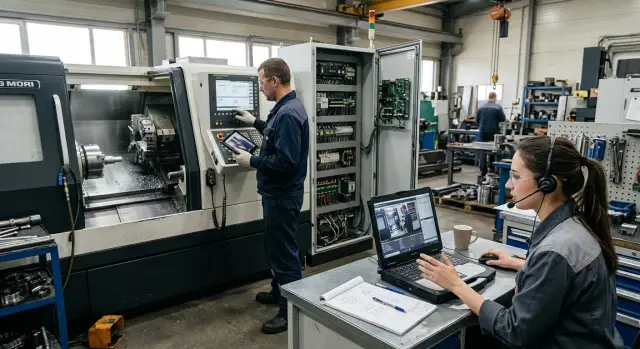
Why this choice is debated
The debate about commissioning format comes up at almost every start-up. The remote option looks faster and cheaper: no travel time, no trip expenses, and no need to schedule an engineer's visit. If the machine is standard, the site is ready, and the crew already has similar experience, this approach can really save a day or two.
But starting a CNC machine is a stage where a small mistake quickly turns into downtime. The shop waits for the first part, the operator needs a clear sequence of actions, and management watches the deadlines. One misconnected unit, unprepared air or power, or a missed axis setup — and the savings at the start disappear within a single shift.
So stakeholders view risk differently. Purchasing thinks about budget. Production counts the start-up day. Service considers how many issues can only be noticed next to the machine. Each perspective is valid, so there's no universal answer.
The debate usually gets sharper when the machine is new to the team, the site wasn't fully prepared beforehand, the first batch must be ready immediately after start-up, or non-standard fixtures and automation are attached to the equipment.
Video and calls help, but they don't solve everything. A camera doesn't always show misalignment, play, extra vibration, or overheating. It's hard to judge how the machine behaves after an hour under load on video. It's even harder when one person is on camera but several assemblies need checking.
The choice of format directly affects shop timelines. Remote commissioning can be completed in half a day if everything is prepared in advance. Or it can stretch into several short sessions with pauses to find tools, set up communications, and repeat checks. An engineer's visit is more expensive upfront but often provides a more predictable day of commissioning.
The point isn't which format is better in general. The question is always the same: where is the risk of downtime and scrap lower for this specific start-up?
When remote commissioning is truly convenient
The remote format works well where standard installation is already done. The machine is positioned, power, air and cooling are connected, necessary fluids are filled, and grounding is checked. If the mechanical side is fine, the engineer can quickly run the first start-up without spending a day traveling for one to one and a half hours of work.
This mode is convenient for checking basic parameters and the machine's initial reactions: homing axes, zeros and reference points, sensor states, emergency circuits, coolant feed, simple axis movements, spindle operation at low RPM, tool change, and alarm messages on the screen. Many errors repeat from one start-up to another: a required mode wasn't turned on, a signal was swapped, a transport lock wasn't removed, or the wrong parameter was selected after first power-up. These issues are often found quickly over video.
Remote format is especially helpful at first power-up, when the operator needs precise step-by-step commands: what to press first, in which order to home axes, where to open the error log, and which parameter to check after a reboot. If the person at the machine calmly follows instructions and can show the screen, cabinet and required assembly close-up, the work proceeds without unnecessary pauses.
This approach is also useful after start-up when minor questions arise. The first day rarely resolves everything completely. After a couple of shifts, a short session may be needed: check a cycle, clarify a correction, restore a setting after an operator error, or confirm the machine holds repeatability on a simple part. For these, an engineer's visit is often unnecessary.
In practice remote support is most convenient for a typical start in a shop with stable internet and an employee who is ready to stay with the equipment the whole time. In those conditions it saves not only travel costs but also several days of waiting.
When you can't do without an on-site engineer
If the machine needs to be brought to stable operation on site, an engineer's visit is often better than remote support. Remote help works when the base is already ready. It performs poorly where hands-on inspection of mechanics, connections and the actual condition of the machine is required first.
The most common case is equipment just assembled after transport. On paper everything may look fine: power is on, units connected, CNC boots up. In reality, transport often causes misalignments, loosened fasteners, assembly errors and small issues a camera won't show. An engineer on site notices these faster.
A separate topic is leveling, foundation and geometry. If a machine sits off-level, it quickly affects part dimensions, guide wear and vibration. You can discuss dial indicator or level readings on video, but you can't personally check how the machine reacts when tightening supports, how an axis behaves over travel, or exactly where an error appears. That needs someone with tools and experience.
A visit is almost mandatory when the site lacks its own mechanic or electrician. An operator can show the screen, reboot the system and perform simple commands. But they shouldn't be expected to handle terminals, sensors, drives, lubrication and guards. If there's a lot of that work, remote format turns into a long chain of pauses, photos and guesses.
There's also a simple practical criterion: do you need the first part to be within tolerance right away? When production expects not just a start but a viable first batch, an on-site engineer usually pays off faster than it seems. They check fixturing, tooling, modes, offsets and immediately separate a program error from a machine problem.
If the machine makes noise, overheats or vibrates, there's no debate. These signs must be listened to, measured and investigated on site.
For EAST CNC deliveries this is especially noticeable at the stage of putting new equipment into production. If the client has few service specialists, on-site work in complex cases is almost always shorter and cheaper than several days of remote attempts.
What to check at the site before start-up
Remote commissioning most often fails not because of complex settings but because of small on-site details. The engineer on call can see the screen but can't tighten a terminal, move a hose or bring a dial indicator. If the site isn't ready, remote work becomes a long call with pauses.
Start better with basic conditions rather than software. The machine must have stable power, proper grounding and air at the required pressure. If voltage fluctuates, grounding is only formal, or the pneumatic line leaks, searching for parameter errors makes no sense.
Before the session gather photos and a minimal toolset. It's useful to remove the cabinet cover, photograph the operator panel, labels, power and air connection points. Photos should be clear and well lit. A single shot of a nameplate or connector often saves half an hour of questions.
Check the communication beforehand. A simple test takes a few minutes: walk around the machine with a phone, start video and talk for 3–5 minutes. If the picture freezes, prepare a backup communication channel.
Assign one responsible person at the machine for the entire session. This is a common weak point. When different people come to the equipment in turns, the engineer spends time repeating instructions. One person who can read the screen, hold tools and calmly follow step-by-step commands speeds the start-up noticeably.
Tools and measuring instruments should not be hunted for at the last minute. Usually a set of wrenches, screwdrivers, a multimeter, hex keys, a flashlight and rags is enough, with calipers, a dial indicator and a magnetic stand nearby. The exact list depends on the start-up, but the minimum should be at hand.
If the site is prepared, remote commissioning goes smoothly. If there's no power, air, communication or a person on site, an engineer visit is usually more honest and faster.
How to run commissioning without unnecessary pauses
Problems during remote commissioning are more often due to poor organization than to the format itself. One unclear point on site can easily eat 20–30 minutes: the needed cable is missing, the electrician left, or the operator doesn't know which screen to show.
Agree on a single working window from the start: date, exact time and the list of people who will be on site for the whole session. If the operator, electrician and responsible person join in turns, the start-up quickly becomes waiting.
A day before the start it's useful to send the engineer short materials from the site: overall photos of the machine and surrounding area, the control cabinet, the CNC screen after power-up, and the assemblies that are already a concern. Often one short video replaces ten clarifications.
Before applying power, run a short check. On site confirm network state, air, fluid levels, the emergency stop, grounding and free travel where needed. If something raises doubts, stop immediately rather than troubleshoot after the first error.
During the start-up don't try to enable everything at once. A simple sequence works: instruction from the engineer, action on site, confirmation of the result. Usually verify power-up and the screen first, then the emergency circuit and basic signals, then sequentially run the axes, and check spindle and auxiliary units at low settings.
Record every error immediately: exact code, when it appeared, the action before the failure and the readings on the screen. Notes like "something won't start" are almost useless. But a single screenshot with an error code often saves an hour.
After the first session a short call the next day is helpful. Ten to fifteen minutes is enough to compare notes, check recurring errors and decide whether you can proceed without an on-site engineer.
Where time is most often lost
With remote start-ups delays usually come from preparation, not the machine. The session begins, the engineer connects, but installation isn't finished. Someone runs a cable, someone looks for an adapter, someone is only now checking air or power. As a result the first 30–40 minutes are spent waiting rather than starting.
Poor equipment visibility also wastes time. If an assembly is filmed in poor light, with a shaky phone and from a single angle, the engineer can't read markings, see a sensor position, connector condition, or module indicators. The same check then requires several attempts. Good lighting, close-ups and a second person help.
Another frequent mistake is changing several parameters at once. They correct an offset, then immediately change a limit, disable a check, and then get a new error. It's hard to figure out what caused the failure. It's faster to go one step at a time: one change, one test, one recorded result.
Confusion in labeling slows things more than expected. On a diagram a cable is labeled one way, on site another, and sensors may have unreadable tags. The operator refers to one limit switch, the engineer thinks of another. Such small things can take an hour even though the actual check would take five minutes.
Another costly mistake is trying to cut a part right after first power-up. The urge to speed up is understandable, but without dry tests this is almost always a bad idea. First verify return to zero, axis movements, clamping, lubrication, cooling and reactions to commands without cutting. Otherwise a rushed attempt can cause an accident and force a rollback to basic checks.
Example from the shop
A new CNC lathe arrived at a shop. The team placed it, connected power and air. On paper everything looked ready for start-up, so they decided to begin remotely.
The engineer connected by video and immediately asked not to run a test cycle. First they inspected the control cabinet, panel screen, emergency circuit and input signals. This took less than half an hour and it quickly became clear the issue wasn't in the parameters.
One sensor showed an incorrect state on the screen. The mechanic on site opened the relevant assembly and found the sensor connector had been plugged into the wrong place after installation. The error was small, but it prevented a normal start.
After fixing it the team showed the panel screen again. The engineer asked to manually test the limit switch, the drive response and the signal feed to the system. When everything matched, the machine homed without stopping.
They then ran a short test cycle without a part and then with a simple blank. The machine executed the program correctly: axes moved as expected, the clamp responded without delay, and there were no alarms. In this scenario an engineer visit would have taken more time than the actual adjustment.
This example shows the boundary between formats. Remote support helps when the machine is installed, power and air are connected, and there's an electrician or mechanic who can quickly check assemblies by hand. But the same scenario breaks down fast if there's no person with basic experience on site. If the machine sits unevenly, the spindle is noisy, hydraulic fluid leaks, or wiring faults require searching across the whole machine, an on-site visit is almost always faster.
How to quickly choose the format
Remote commissioning works well only when the site is already prepared. If basic things aren't done, a call becomes a long pause between "we'll check now" and "five more minutes."
Before choosing the format run a short check. The machine should be level and securely installed. Power, grounding and compressed air must be ready and verified. The phone or tablet camera must clearly show the screen, working area and cabinet. At least one responsible person should be on site, and preferably a mechanic and an electrician if the start-up isn't trivial. One more important point: the first task must be clear and limited. For first power-up, axis checks, basic settings and a short test, remote format usually fits.
There's another often-ignored criterion: the cost of downtime. Calculate it in advance without undue optimism. If the machine is needed "whenever it's ready," you can start remotely. If its absence delays a whole shift, shipment or line start, an engineer visit may cost less than a lost day.
A simple guideline: if the site is prepared, communication is stable, and the task is limited to basic commissioning, remote format is usually justified. If there are no people on site, the electrical work isn't ready, or the first part needs complex setup, remote will typically only drag out the process.
For EAST CNC clients this is especially clear: when the shop prepares the place, power and responsible personnel in advance, remote support goes quickly. When the site is finished during the call, time is spent not on the machine but on fixing the preparation.
What to do next
First, calculate the cost of downtime, not just the travel fee. If the shop loses a shift because of each pause, the format debate ends quickly: choose the option that will get the machine running with the fewest attempts.
Remote commissioning isn't for everyone. Choose it based on two things: how complex the machine is and how prepared the site is. If the equipment is already installed, power and air checked, fixtures ready, and a competent person is nearby, a remote start usually goes well. If much is unknown on site, an on-site engineer usually saves time.
A practical rule: choose remote if connections are complete, communication is stable, and someone responsible is present. Plan an engineer visit if it's the first start of complex equipment, a new line, or a non-standard configuration. Don't delay an on-site visit if there were previous connection, geometry, hydraulic or safety errors.
Appoint the person responsible on site in advance, not on the day of the call. This person should be at the machine, know where the documents are, who controls electrical access, and who can quickly record video, photos and panel readings. Without that person even a simple start extends to hours.
Another useful step is to collect questions before the first session. Usually this list includes screen errors, unclear signals, connection status, photos of the cabinet, network parameters and a list of actions already taken. One such file noticeably reduces repeats.
If you need a CNC machine start-up in Kazakhstan or other CIS countries, EAST CNC handles supply, commissioning and service of metalworking machines. On the blog east-cnc.kz the company also publishes equipment reviews and practical metalworking materials. In any case, start with a short site assessment: after that it's usually clear whether remote support will be enough or an engineer visit should be planned.