
Reduce changeover time on repeat orders
How to cut changeover time on repeat orders: we review tooling, tools, program structure and simple checks that deliver fast results.
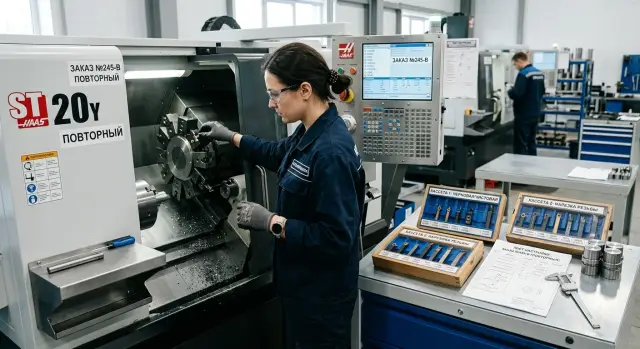
Why repeat orders still run slowly
A repeat order often takes almost as long as a new one. The issue usually isn’t the part itself but that the shop keeps the result, not the whole path to it. The program exists, but the tooling is in another cabinet. The tool is working on a different part. Previous tweaks live only in the setup person's memory.
On paper the order is familiar. In practice many things change between the last run and the new one: the operator, the chuck, the jaw set, the tool order in the turret. Each small change costs 5–10 minutes. Together these easily add up to an extra hour of downtime.
Time is usually lost not to one big problem but to short pauses between actions. The machine waits while people search, confirm and recheck. They look for the right tooling set, open the old program and try to figure out which version worked, re-enter tool offsets and corrections, recall the zero point and clamping scheme, and wait for the first part to re-establish dimensions.
So for repeat orders the setup often starts almost from scratch, even if the part itself is well known.
It's easy to tell whether a delay was a one-off or a systemic problem. If a run failed once due to a sensor fault, an urgent operator swap or a bad batch of blanks, that’s a random fault. If on almost every return order time is spent searching for tooling, checking program versions and re-setting tools, the problem is the process.
A good rule of thumb: if two similar runs of the same part take noticeably different times and the timing fluctuates, the process relies on people’s memory instead of a clear routine. This is common in machining, even on modern equipment. A faster repeat run usually starts not by buying a new machine but by organizing what you already have.
Where time is lost most often
To really speed up changeovers, first you need to see the small losses. A shop rarely loses an hour at once; it loses 3–7 minutes at each step. By the end of the shift that becomes noticeable downtime.
Most often time is lost searching for tooling. The needed set rarely sits in one place: jaws in a cabinet, an arbor on a trolley, a spacer by another machine. The operator spends time searching and checking rather than setting up.
The same goes for tooling. If holders, cutters and drills aren’t labeled and storage locations keep changing, a familiar order feels like a new one. A person picks a similar tool, checks overhang, insert and fit, then goes for another. It may seem like a couple of minutes, but such stops add up across a shift.
Unrecorded tweaks also cause delays. In the last batch someone may have reduced the feed on the finishing pass, changed the operation order or shifted a compensator slightly. If that’s not noted next to the program and the setup sheet, the next shift rebuilds everything. Sometimes the right decision is only found after a trial part.
A long first run is often caused not by a complex part but by extra checks. People open old program versions, repeatedly verify offsets, run dry cycles longer than needed, and recheck things already known from the previous series. Caution is necessary, but over-caution costs time.
Individually these seem minor. Together the pauses can easily turn a familiar changeover into an extra 30–40 minutes. On CNC lathes this is especially noticeable with small repeat batches, where each stop immediately hits production rhythm.
What to prepare in advance
A fast changeover starts before the machine. If an order returns for the second, third or tenth time, there’s no point rebuilding the setup from memory each time. Gather a clear data set once and return to it.
The most useful item is a single-part setup sheet. It should include not generic notes but exactly what the machine needs: the installation scheme, tool overhangs, operation order, basic dimensions, photos of the tooling and practical notes from the last run. A good sheet saves not hours on paper but tens of minutes on each following batch.
If an order repeats often, assign a permanent tooling set to it: chuck, jaws, spacers, stops, simple gauges for setup checks. When the same order is assembled from different pieces every time, time is spent searching, comparing and doubting. It’s much simpler to grab a ready kit from the shelf, mount it and follow a known routine.
Labels have a quick effect, though they’re often postponed. Label not just tools, but jaws, spacers, gauges, cassettes and boxes. If the part number, diameter, overhang and storage location are visible at a glance, the operator won’t spend 15–20 minutes on minor searching.
Keep actual sizes from the last good batch, working tool offsets, the program number and version, photos of the assembled tooling and short notes about what was adjusted in one place. When the history of an order is nearby, a repeat run stops being something new.
This is especially noticeable on repeat batches of bushings or flanges. If the last run preserved the real size from the first part, the cutter offset and photos of the jaws, the next start goes smoother. The setup person doesn’t dig through old folders, call a colleague, or guess why the part didn’t seat on the first try last time.
A quick changeover routine
A fast changeover follows a simple rule: the operator shouldn’t have to search, remember and decide on the fly. Remove all extra actions between removing the previous batch and starting the next.
After work ends, return the previous kit to its place immediately. Don’t leave tooling, jaws, arbors, gauges or tools by the machine "for a minute." Those minutes grow into half an hour when someone later looks for a missing element or doubts which kit was used last.
A consistent sequence helps:
- Mount the pre-assembled tooling in the usual order. If only one element changes on repeats, don’t touch the rest.
- Check basic dimensions with a short checklist: datum, overhang, clamp, part zero.
- Load the required program and immediately check part number, revision and comments in the filename.
- Run the first part calmly and watch not only the dimension but also clamp behavior, feed and tool approach.
At this stage a checklist beats memory. Even a strong team makes mistakes when a job looks too familiar and simple.
After the first part, record final tweaks immediately: offsets, tool corrections, noting clamp issues and actual cycle time. Then the next start won’t begin from scratch but from a verified point.
A good sign of this routine: any operator on the shift can repeat the changeover at nearly the same pace. For shops with repeat CNC orders this noticeably reduces downtime without buying a new line.
How to simplify tool handling
Tooling often slows a repeat run more than the program. If the operator selects holders, searches for inserts and sets overhang each batch, the changeover becomes a lengthy setup again.
The simplest move is to assign a permanent tool set for repeat parts. For a group of orders keep the same holders and, where possible, put them in the same turret positions. Then the operator doesn’t rebuild the assembly logic each time, and the program usually needs fewer position-related tweaks.
Another useful habit: don’t change tool overhangs without reason. If the previous run produced good parts, there’s no need to re-measure everything "by eye." When the assembly remains the same, dimensions return faster and fewer trial parts are needed.
The same applies to inserts. Keep a spare set near the workstation rather than hunting through drawers mid-shift. Even 10–15 minutes on such details quickly becomes an extra hour of downtime per week.
For turning work this is especially clear on repeat batches of bushings, shafts and flanges. If the roughing cutter is always in one position and the finishing cutter in another, the operator can check the turret in a couple of minutes and move straight to offsets.
After a successful batch, record not only the program number but working tool settings: which holders were in the turret, what overhangs were used, which inserts ran well, and which cutting modes produced no vibration or excess wear. A short note makes the next repeat much easier.
If the area runs several similar orders, agree on a standard turret position scheme. It’s a simple decision but removes confusion and unnecessary swaps.
How to make the program structure clear
The program must be readable without long searches. If the operator scans code each time looking for an offset, dimension or tool number, the machine just waits.
A unified template for the beginning and end of programs works well for typical parts. At the start keep the same line order: zero call, offset check, spindle speed, feed, first tool. At the end have a clear finish: retract, stop spindle and return. When that framework doesn’t change, it’s easier to spot what’s different in the current job.
Names and comments should also stay consistent. If the roughing pass is always labeled the same and a cut uses the same tool number in the shop logic, mistakes drop. On CNC lathes this is notable: two almost identical parts are easy to mix up if one program has comments and the other doesn’t.
Frequently changed dimensions are better placed at the start of the program or in a separate parameter block. Then on repeats the operator edits 2–3 values instead of the whole code.
DIA_FIN = 28.00
LEN_FIN = 76.50
ALLOW_X = 0.30
ALLOW_Z = 0.20
Such a block is easier to check against the setup sheet than hunting for sizes throughout the file.
Old programs are often cluttered with temporary tweaks. Someone added a bypass, someone changed a feed, someone left a "restore later" comment. After a month nobody remembers why. So after a successful run create a clean working version and remove rough inserts.
Keep it simple: the working version sits separately and is used for runs, a backup is stored without new edits, the filename shows part, revision and date, and comments are written consistently across typical operations. For shops with many repeat CNC orders, this discipline pays off fast without new tooling.
Example: a repeat batch
Imagine a common case: the same part returns every two weeks. It could be a bushing, flange or a housing for the next assembly. The order is familiar and the program exists, yet it still takes nearly as long as a new part.
On one such job a recent changeover took nearly a whole shift. The setup person searched for jaws, checked old records, adjusted a tool correction and rechecked operation order in the program. The machine spent most of the time idling.
After that the team assembled a ready kit for that order: labeled jaws, a tool list with checked overhangs, a short one-page setup sheet and a saved program without old, unnecessary tweaks.
At the next start things went differently. The operator didn’t try to remember what was used last time but grabbed the ready set and followed the short sheet. First installed tooling, then tools, ran the program dry and only then ran the first part. The simple routine removed long discussions at the machine.
The difference was immediate. Previously the first good part came near the end of the shift. After organizing, it arrived roughly an hour and a half after work began. That gain didn’t come from one big change but from a dozen small, consistent actions.
But that effect lasts only if the team doesn’t change the routine between runs. If one person puts jaws in the common cabinet, another edits the file at the machine and a third works from memory, time quickly drifts back.
Mistakes that stretch changeovers again
On repeat orders time is lost less by complex operations and more by habits carried between shifts.
The first mistake is when precise settings live only in one operator’s head. He remembers overhangs, clamping order and a couple of mode tweaks, but another shift might follow. The result: the shop spends 20–30 extra minutes rebuilding what could be recorded in a short setup sheet.
The second mistake seems small but hits repeatedly: the same part has different names. In the program it’s one code, on the routing it’s another, and the storekeeper calls it something else. People then fetch the wrong tooling or open the wrong file and everything is checked manually again.
Often a failure follows a familiar pattern: after a run the tooling was dismantled and stored without labels, jaws and stops lie separately and nobody knows which kit worked, the program was edited on the machine and the final version wasn’t saved, and the first part was started without a quick verification.
The last item is costly. Three to five minutes to check datum, offsets, tools and the current program version is almost always cheaper than scrapping the first part or facing another stop. On CNC lathes this is visible immediately: a wrong offset or an old program tweak disrupts the whole rhythm.
After each successful batch leave a clear trail for the next person: a single part name, a photo or a drawing of the assembled tooling, a tool list, the saved program version and a short note on settings. Then a repeat run won’t depend on one operator’s memory.
Short pre-start checklist
Before a repeat run, the batch often stalls not because the part is hard but because of small mismatches. One wrong file, one holder in the wrong slot, one unchecked zero – and the machine waits again.
So before starting, walk through a short checklist:
- Tooling is pre-assembled and stored as a kit for this order;
- Tools are placed in the same turret positions as the last batch;
- Program version matches the setup sheet;
- Zeros and control dimensions are checked before cutting;
- After the first good part someone immediately records any tweaks.
In practice that is usually enough. If the tooling kit is labeled, tools are in the same places and the program is in the correct version, the machine can be started much faster. If even one item is missing, a repeat order turns into an almost new setup.
One more simple rule: after the first part don’t scatter to other tasks. One person checks dimensions, another records tweaks on the setup sheet. For the next run this usually saves more time than rushing off on launch day.
What to do in the coming weeks
Start with one order that returns more often than others. Don’t try to organize the whole catalog at once. Choose one clear part and measure the current changeover in minutes. That will show where time is lost: searching for an arbor, tool changes, zero corrections, extra lines in the program or repeated size checks.
Measure not as "about an hour" but step by step: from the last part of the previous batch to the first good part of the new one. Such measurement quickly clarifies reality. It often looks like a machine problem, while in fact 20–30 minutes are eaten by disorder in small details.
For that order assemble a permanent kit: a dedicated place for tooling, a labeled tool set and a simple setup sheet. The sheet should note datum, tool overhangs, offset numbers, clamp, the control size for the first part and the check order.
Then bring the program to a single template. If an operator keeps searching where the safe approach is, where the tool change occurs or where feed was manually edited, time will be wasted again. Keep one clear CNC program structure for similar parts and remove old tweaks nobody can explain.
For the next 2–3 weeks follow this plan:
- choose one repeat order and time the current setup;
- assemble a permanent tooling kit and a setup sheet for it;
- clean the program and adopt a single template;
- run 2–3 more batches and compare actual times.
Look not only at total time but at stability. If the first changeover took 52 minutes and after two batches it’s 34, that’s a good result. If time jumps from shift to shift, the process still depends on one person’s habits.
This approach reduces machine downtime without large investments. If after organizing the bottleneck remains in the equipment or layout, then it’s time to discuss hardware specifics. EAST CNC can help not only with machines but with selection, commissioning and service tailored to machining tasks. Often only after organizing processes does it become clear what technical solution is really needed.