
Readiness Checklist for Robotizing a Work Cell (Without Rushing)
This readiness checklist helps you see when a robot will bring results and when the cell still needs leveling in cycle consistency, feeding and buffering.
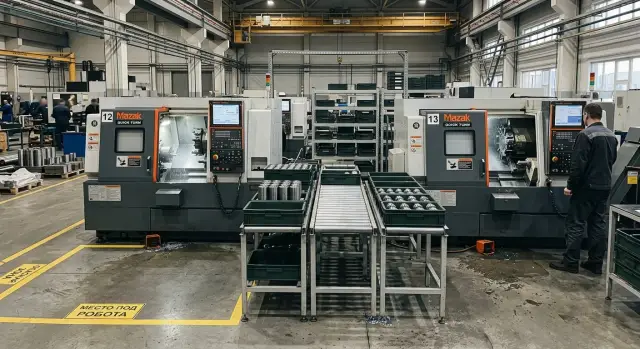
Why a robot is often installed too early
A robot often looks like a quick fix when a cell already runs with interruptions. But it doesn’t fix chaos. If the process relies on one operator’s experience, random pauses and manual workarounds, those weak spots only become more visible after automation.
On a CNC lathe cell you can see it quickly. While a person loads a blank, they can afford to wait an extra 10 seconds, adjust the part, remove chips or double-check the job. A robot can’t do that. It needs a steady cycle and a clear sequence of actions. Otherwise the cell starts waiting on itself.
The most common mistake is installing a robot where the cycle varies. One run is 55 seconds, the next 70, then a stop for measurement or tool adjustment. For a person this is normal; for automation it is a broken rhythm that soon causes downtime for the machine, the gripper and the feeder.
The same applies to blanks. If feeding depends on how the operator packed the batch, the condition of the pallet, or who brought the container from the warehouse, the robot will begin to fail—not because it’s bad, but because the input changes every time.
It’s too early to place a robot if a cell shows clear signs:
- the cycle noticeably changes from part to part;
- blanks arrive in different orientations or different containers;
- there is no even small buffer between operations;
- changeover is done from memory rather than a simple step-by-step routine.
Buffers are often underestimated. Without one, any hiccup in one operation stops the whole chain. A person can temporarily manage this by hand; a robot just stops and waits for the next signal.
Another common source of losses is batch changeover. When there are no simple rules about who changes tooling, who loads a program, who brings containers and how parts are routed, automation does not speed things up. It adds another point where mistakes can happen.
So readiness checks start not with choosing a robot model, but with simple things: a steady cycle, clear feeding, a small buffer and a defined changeover logic. Then the robot truly adds pace instead of new stoppages.
What a ready cell looks like
A ready cell is not recognized by a shiny machine or a clean floor. You see it in the rhythm of work. Shifts run at the same pace and part output doesn’t jump without reason.
If on Monday the cell produces 120 parts and on Wednesday 80 with the same people and parts, a robot won’t fix that. It will only hit the same fault faster. Automation works where the process already holds itself without constant manual corrections.
An operator at such a cell is not firefighting. They don’t catch a part arriving sideways, hunt for a different container, or press a part in by eye because the fixture behaved differently again. Most of their actions repeat from cycle to cycle. That’s a good sign.
Blanks behave predictably too. They arrive in a consistent format, are placed in an expected order, and don’t require a new grabbing logic every time. If one batch is loose, another in a cassette, and the third on a pallet without orientation, the cell is not ready. A robot needs repeatability, not guesswork.
On a lathe cell the picture is usually simple: blanks sit in identical containers, the machine picks them the same way each time, the fixture holds dimensions without frequent surprises, and the finished part goes to a designated spot without obstructing the next cycle. There are no unnecessary motions between these steps.
Machine, tooling and containers must work together. If the machine is prepared for automatic loading but the container is inconvenient, the operator will still intervene. If the container is fine but jaws are frequently adjusted manually, the result is the same. A ready cell is assembled as one working system, not a set of accidental solutions.
There’s a quick test. If the lead can step away briefly and the cell keeps producing without small hiccups and questions every half hour, the base is already there.
How to check cycle stability
If the cycle varies noticeably from part to part, a robot will only make the issue more visible. It doesn’t remove pauses by itself. It needs a steady rhythm.
Start by taking a series of identical parts and measure the time for the same operation. Better to record not 3–5 parts but at least 20–30 in a row. On a lathe, time is usually measured from the moment the machine is ready to load until the next identical point.
Look beyond the average. Compare the best, typical and worst cycle, then assess the spread. If the best cycle is 85 seconds, the average 92, and the worst 140, the cell is still uneven. The operator adapts during the shift; the robot does not.
Then analyze each stop by cause. Don’t write just “there was a pause.” Record precisely: operator spent longer aligning the blank, the machine waited for a measurement, chips interfered with part removal, the next blank was missing, someone adjusted the chuck or tool.
This quickly shows where the cycle breaks most often. Sometimes the problem isn’t the machine but small things around it. Five extra seconds for a manual blow-off or waiting for a pallet easily turn into tens of minutes lost per shift.
Count how many manual actions affect the takt. If the operator checks fixturing every time, flips a blank, confirms a panel command and manually places the part in a tray, the cycle depends too much on the person. In such a case automatic loading usually becomes unstable.
A simple guideline: for a series of identical parts the cycle repeats almost the same, reasons for deviation are clear and rare. If the spread stays within 10–15% and manual interventions are few, the cell can be considered for automation. If not, remove extra pauses first — it’s cheaper than reworking the whole project later.
How to tell if part feeding is predictable
Look at the actual path of the part to the machine, not the cell layout. If the blank always arrives in the same position and the same place, the robot will cope. If the operator sometimes corrects, flips or searches for a suitable blank in a box, failures will start immediately.
This point is often underestimated. Many only look at the machine, while the problem is in the container, trolley or how people bring blanks to the loading zone.
Begin with simple observation during a shift. Track 20–30 feeds in a row and note where the operator intervenes manually. On a lathe this shows quickly: one part taken from the tray immediately, another had to be rotated, a third set aside due to a burr, a fourth required a pause because the container was nearly empty.
Check blank orientation in the container closely. If half the blanks lie base up and half base down, someone will always rotate them. A robot needs one consistent logic, not a set of exceptions.
Predictable feeding usually means four things: the blank comes to the machine from one place, orientation in the container is always the same, the operator does not adjust the part before loading, and the stock at the machine is enough for continuous work without constant deliveries.
Also check the stock at the machine itself. If the cycle is 50 seconds and the tray empties in 10 minutes, the person will intervene constantly. Then the robot won’t get a steady flow even if the gripper and program are set correctly.
If feeding is unstable, don’t start with a robot. Simplify the container, remove manual flipping, and set a single feeding point. After that the cell usually looks much clearer: you’ll see if it’s ready for automatic loading or not.
Why a cell needs a buffer
A buffer is needed when neighboring operations run at different rhythms. One machine keeps the cycle almost fixed while the next operation sometimes speeds up or takes a couple of extra minutes for inspection, container change or bringing blanks. Without a reserve, any small issue immediately halts the whole chain.
On a lathe cell this is obvious. A CNC lathe produces a part every 80 seconds, while the operator at the next station sometimes needs 2–3 extra minutes for first-part checks or changing a pallet. Without a buffer the robot or machine will start waiting. With a buffer the cell keeps working while people cover the short delay.
A buffer smooths differences between operations; it doesn’t hide chaos. If failures last 20 minutes every hour, extra parts won’t save the cell. But a buffer does protect well from normal short pauses common in most shops.
Calculate buffer in both units and minutes. This shows how many parts you need between operations and how long the cell can run without stopping. Then check if there’s room and containers on the floor. Otherwise parts may exist but have nowhere to be placed.
A simple calculation is usually better than guessing. If the next operation can be delayed 10 minutes and the machine makes one part per minute, a buffer under 10 parts is already risky. If such delays are rare but last 15 minutes, increase the stock.
Check physical layout too. Where will full pallets go, where will empty containers be, how will a trolley move, and will the buffer block a walkway? On paper it often looks neat; on the floor you quickly find there’s room for one pallet but not for turning a pallet truck.
If the cell cannot survive even a short pause between operations, the robot will stand idle more than it works.
How to break down changeover into clear steps
If every changeover happens from the foreman’s memory, the cell is not ready for a robot. It needs order: the same logic switching from part A to part B, without extra calls, guesses or manual decisions on the spot.
First, describe exactly what changes during a switch. The list is usually short: jaws, program, tool corrections, container for finished parts, sometimes the way blanks are stacked. If this isn’t written down, people improvise during the changeover and it almost always takes extra time.
It helps to assign responsibilities. One person changes jaws and checks clamping. Another loads the program and verifies the version. A third brings the new container and removes leftovers. When everyone has their role the pauses and arguments drop.
Make the sequence short and identical for each changeover: stop the previous run, count remaining blanks, remove old container, place the new one at a marked spot, change tooling, load the program, check the first part and record the changeover time.
The weakest point is usually human ad-hoc choices. Reduce them to simple rules. For example: when clamp diameter changes, the operator always takes the jaw set from a specific bin; when the program changes, the setup person verifies the number against the routing card; when the new part is taller, the cell uses a predetermined container. The fewer verbal options, the easier automation becomes.
Test the routine in a real shift, not just on paper. Time at least three changeovers and see where people wait for each other. Often you discover a simple issue: jaws and program are ready, but no one brought the container. Such a detail later leaves the robot without work.
If changeover time stays within predictable limits and steps don’t change shift-to-shift, the cell is close to being ready.
Step-by-step readiness check
A robot doesn’t fix a weak cell. If the cycle varies, blanks arrive irregularly, and changeovers are done differently each time, automation will only cement that disorder. It’s easier to check one specific flow than the whole shop.
Take one part. Not the most complex, but one where the process already looks steady. On a lathe this is often a position with clear fixturing, stable processing time and few manual interventions.
- Choose one part for the check. Focus on repeatability, not margin.
- Gather facts over several shifts. Record net cycle time, small stops, causes of downtime and changeover duration.
- Check the full movement of the part: how blanks are fed to the machine, where they wait, who removes finished parts and how.
- Run a trial using the usual shift schedule, not a tidy one-hour slice.
- Remove bottlenecks before talking about a robot. Sometimes a buffer of a few parts, clearer feeding, or a simple changeover card is enough.
This check quickly sobers expectations. For example, a cycle may be steady, but changeover time varies because tools are searched for and the first part is manually inspected. In that case tidy up changeover first, then recalculate automation economics.
Mistakes before commissioning
The robot is rarely “to blame.” Problems start earlier, when the cell is prepared based on a pleasant average. If the machine cycle is 52 seconds sometimes and 68 at others, the average says little. It’s more useful to look at the spread across 30–50 consecutive cycles: where the operator waits, where the machine idles, where a blank arrives late.
Another common mistake is leaving manual sorting in front of the machine. While a person flips parts, removes rejects and picks a “suitable” blank from a box, feeding will never be steady. On paper loading is automatic, but in a real shift the robot waits because someone hasn’t sorted the container.
Experienced shops also misplace buffer space. Machine, robot and guards are installed but there’s no room for intermediate containers. Parts are temporarily left in walkways, batches mix, and the operator starts carrying parts by hand, breaking rhythm.
People also confuse the project goal. Automated loading alone doesn’t make a cell stable. If stack height changes, allowances vary, containers differ or operators feed blanks differently through the shift, the robot will only reveal old faults faster.
Another mistake is planning changeover without a trial day. On paper everything seems simple: remove jaws, change gripper, call a program and production begins. In a real shift small issues appear: no room for a second container, batch marking needs manual checking, the first part requires longer confirmation than expected, and setup tech and operator perform the same tasks in a different order.
If you want fewer stops, check not only the machine and robot but the whole part path: from incoming container to the finished batch location.
Example on a lathe cell
On a small lathe cell one part model runs almost the whole shift. It’s a common bushing for a serial order: the machine takes a blank, turns the OD, bores the hole and breaks the edge. The operator doesn’t run to the machine every two minutes because the process has been leveled.
Cycle time has almost no surprises. If today a part finishes in 94 seconds, an hour later it’s still around 94–98 seconds. Short stops happen but not ten times per shift. For automation this is a good sign.
Feeding is simple. Blanks arrive in a standard container and are placed in the same orientation. The operator doesn’t have to rotate the blank by hand each time or check top and bottom.
There’s a small buffer between feeding and finished-part removal. It’s enough so the cell doesn’t stop because of short pauses on the next operation. Usually they keep stock for 15–20 minutes of work. That’s enough to avoid idling due to one trolley delayed at a passage.
Changeover is not a half-hour quest. The lead follows a short instruction: fit the jaws and tooling, load the job program, inspect the first part, make adjustments if needed, and authorize serial running.
If that routine is repeated the same way every shift, the cell is close to ready. There’s no magic: a steady cycle, predictable feeding, a buffer between operations and a simple changeover.
Compare this to a neighboring cell where they turn one part now and another an hour later, with blanks tossed into different boxes. In the first case a robot usually settles in quickly. In the second, order must come first. It’s fairer and cheaper.
Quick checklist and next steps
A robot brings results where the process is already steady. If the machine sometimes speeds up and sometimes waits for a blank, automation will idle along with it. Before commissioning, answer a few simple questions.
What to check
- Does the machine cycle stay within a narrow time window over a series of identical parts?
- Is part feeding done the same way each time, without constant manual corrections?
- Is there a buffer that covers short hiccups between operations?
- Is changeover performed by a clear routine with known changeover time?
- Does the cell deliver repeatable results without constant foreman intervention?
If only two or three points are reliably met, first remove the causes of variation. Often simple measures suffice: level the fixture, fix the feeding order, add a buffer of a few parts and write the changeover steps on one sheet.
Then address one weak spot at a time. If feeding is the issue, make blanks arrive consistently without ad-hoc operator actions. If hiccups are between operations, calculate a buffer that covers a 3–5 minute pause. If changeover varies, break it down by roles and times.
When the issue is the machine layout, cell layout or lathe selection, involve those who handle these tasks regularly. In Kazakhstan such problems are handled by EAST CNC: the company supplies CNC lathes, helps with selection, commissioning and service. They also publish equipment reviews and practical metalworking materials on their blog.
A good robotization project begins not with the robot but with an honest check of the cell. If the process already holds rhythm, automation pays off. If not, fix weak points first.
FAQ
How do I know a cell is being robotized too early?
Putting a robot in too early is common when the cycle varies a lot, blanks arrive in different conditions, and changeovers rely on the foreman’s memory. Fix those issues first, then evaluate automation.
Can I rely only on average cycle time?
No. The average hides problems. Measure a run of 20–30 identical parts and compare the best, typical and worst cycles to see real variability.
What cycle variability is still acceptable?
As a rule of thumb, a spread of 10–15% across a series of identical parts is acceptable to start. If jumps are larger and repeat, the robot will end up waiting often.
What counts as predictable part feeding?
Predictable feeding means the blank arrives from the same place, in the same orientation, and the operator doesn’t flip it by hand before each load. If container, position or stock change during the shift, feeding is unstable.
Why does a cell need a buffer between operations?
A buffer absorbs short pauses on the neighboring operation. Without it, a small delay immediately stops the whole chain and the robot just waits with the machine.
How to quickly estimate buffer size?
Translate the typical delay of the next operation into parts by the machine takt. If the next operation can be delayed 10 minutes and the machine makes one part per minute, a buffer under 10 parts is risky.
When is a batch change considered suitable for automation?
A changeover is ready for automation when everyone follows the same short routine and roles are clear: who changes jaws, who loads the program, who brings new containers. If steps are improvised, a robot will add confusion rather than speed.
Can I install a robot if the operator often adjusts the part by hand?
Usually no. Frequent manual adjustments indicate the fixturing, container or feeding lacks a consistent rule. Remove those manual steps first, then add the robot.
Where to begin checking a cell for readiness?
Start with one repeatable part, not the whole shop. Measure several shifts to find where time is lost, who intervenes manually, and how the blank moves from incoming container to finished parts.
What should I do first if the cell isn’t ready?
Don’t rush to buy. First level the cycle, simplify containers and part orientation, add a small buffer and document the changeover steps on one clear sheet.