
Production bottleneck: setup, cycle time or part routing
A production bottleneck isn't always the machine. We show how to tell losses from setup, loading cycle, tooling and part routing.
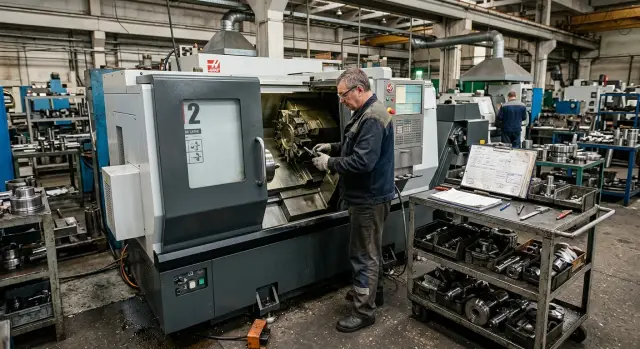
How the problem shows up on the shop floor
Problems rarely start with a breakdown. More often everything looks quiet and almost routine: the batch size grows, people are busy all day, blanks and the program are available, but shift output hardly changes. Yesterday the shop made 42 parts, today the order doubled, and the output is still 40–45 pieces.
On a turning line this shows up quickly. Parts reliably reach one operation, then begin to pile up in trays and on carts. A neighboring machine is sometimes overloaded, sometimes idle in bursts, because the flow is uneven.
Another common picture: the operator is busy all the time, but the machine still waits. It waits for the next blank, a tool change, the first-part inspection, re-fixturing or a batch from the previous operation. From the outside the shop looks busy without pauses. In fact dozens of short stops accumulate during the shift.
Usually you can spot this by several signals: shift outputs stay almost flat while batch sizes grow; the same operation consistently gathers a queue; the most painful interruptions repeat at the same positions; by the end of the shift there is a lot of WIP and few closed parts.
If delays repeatedly occur on the housing, shaft or flange with similar processing, it’s rarely a one-off fault. The process contains a constraint that repeats from batch to batch.
People often explain this simply: "we didn’t make it", "we took longer to set up", "the tool failed". But if you look not at overall busyness but at the part’s path, the point of delay becomes visible quickly.
How to search for the bottleneck step by step
Start not with the whole shop but with one part and one real route. Otherwise numbers mix: one operation is fast, another waits for the crane, a third stops due to a tool change. In that picture it’s easy to mistake normal shift noise for a real problem.
First choose the part for which the plan slips most often. Then take its actual route without “average” diagrams and assumptions. You need a simple picture: where the part is cut, where it’s loaded, where it stands, where it waits for an operator or transport.
After that break time down:
- Record setup, pure cutting, loading and unloading, and waiting separately.
- Capture 10–20 consecutive cycles without rounding.
- Mark where a queue grows before an operation.
- Mark where the machine idles without a part or without an operator.
- Compare numbers by shift, not by memory.
This kind of breakdown usually clarifies everything. The report cycle may look like 6 minutes, but inside those 6 minutes there may be 3 minutes of cutting, 40 seconds of loading, 30 seconds waiting for the crane and another 90 seconds of small pauses. If you look only at the total number, the cause disappears.
A simple table is enough to start. One row — one cycle. No need for complex analytics. You need honest timestamps: when loading started, when cutting began, when the operator waited, when the machine stood empty.
What to look for in the numbers
If a queue builds before the same operation while neighboring machines periodically wait, the problem usually sits at that operation. If the queue does not grow but cycle time fluctuates, look at loading, tooling and operator actions. If the first shift gives one result and the second is noticeably worse with the same order, the cause is often work organization.
Small example. On a turning operation cutting takes 2 minutes 20 seconds and is almost constant. But loading sometimes takes 35 seconds, sometimes 1 minute 40 seconds. Then the first thing to analyze is not the cutting mode, but part supply, clamping and removing the finished blank.
Such analysis rarely looks spectacular, but it quickly shows where the shop loses the plan.
When the problem is setup
Setup eats output not in the report but on the shift. The machine cuts fast, but the batch finishes late because people spend too much time preparing.
This is especially noticeable on small batches. If the shop changes three or four items a day, long setups can easily consume half a shift. Then the constraint is not the spindle or the program but the transition from one part to another.
The clearest sign is the first good part appearing too late. The operator looks for chucks, fixtures, the gage, the right program and the correction table. Then they catch the dimension, adjust offsets and sort the first pieces. In such cases the problem is almost always setup.
The same things repeat: tooling is stored in different places, the program seems available but needs checking and tuning, and adjustments and trial passes grow after a changeover.
A simple check: compare output on long runs and with frequent product changes. If the same machine holds the plan on a large batch but output falls sharply on small orders, the cause is almost always setup time.
Example. A part takes 2 minutes to machine, but setup takes 70 minutes. For a batch of 40 pieces cutting gives 80 minutes; preparation takes nearly as long. If there are three such batches in a shift, the shop loses more than three hours just on transitions.
Another sign is unstable starts after each setup. Dimensions “drift”, the operator frequently tweaks offsets, and the inspector returns the first pieces. With poor setup the drop happens exactly at the transition between part numbers.
First fix the searching and extra motions: collect a tooling kit for the part, organize programs clearly, fix the action sequence and measure time to the first good part. Often this is enough to recover a noticeable part of the shift without buying a new machine.
When the loading cycle is the bottleneck
Sometimes cutting runs fast but output still misses the plan. The spindle finishes its cycle, the door opens, and the machine waits for a person, a container or a lift. The problem is not metal cutting but actions around the machine.
This is most visible on short cycles. If cutting lasts 20–40 seconds any extra operation near the machine immediately affects output. The operator removes the part, blows the chuck, adjusts location or checks size while the machine is already ready for the next start.
A common mistake is to look only at the cutting time in the program. The screen looks fine, but the real cycle measured on the shift varies: one run took a minute, the next one and a half, then less than a minute again. The cause is usually manual actions taking different times each time.
Usually grounded things slow it down: the part takes time to position, the operator cleans and measures at the machine, one person runs several machines and cannot be at each finish, finished parts wait for containers or a crane, blanks are placed inconveniently and each approach costs extra seconds.
A good sign of this situation is stable cutting time and unstable hourly output. If the program cuts the same but pieces per shift jump around, measure not only the machine cycle but the pauses between cycles.
Example. A lathe turns a short bushing in 28 seconds. But the operator spends 18 seconds removing the part, 12 seconds installing a blank, 10 seconds blowing out and 15 seconds measuring. The real cycle is now more than a minute. If there are two or three such machines the operator inevitably starts falling behind.
So measure four times separately: cutting, part removal, blank installation and waiting for external help. After that it usually becomes clear where minutes are lost.
When tooling is the limiter
If output drops in waves rather than on every part, the cause is often the tooling. The machine runs the same program, the operator keeps the same settings, but an insert survives long on one batch and fails noticeably sooner on another.
The first alarm: insert life varies more than the normal process should allow. On Monday a set lasts for hours, on Wednesday the same tooling needs replacement much earlier. After wear dimension drifts, surface quality declines, and measurement and adjustments increase.
Usually the picture is simple: tools are changed more often than normal, the operator stops to measure more frequently, dimensions drift gradually and surface quality fails near the end of life. Sometimes the tool cupboard does not even have enough inserts for a full shift without intervention.
If several of these signs match, look beyond cutting mode. The cause often lies in the combination of blank material, real fixture rigidity and the tool itself. The same insert behaves differently if stock allowance varies, the blank has a hard skin or the part is clamped less rigidly than during a trial.
It’s useful to watch spread, not average life. If an insert should last for 120 parts, but one set makes 140, another 70 and a third 95, that’s not just consumption. Such stops break the shop rhythm.
On a turning operation this shows quickly. First the operator tweaks X offset hourly, then more often checks size, then changes the insert early because the surface no longer passes. It looks like a lack of pace, but time is spent on frequent adjustments and checks.
In this case check actual stock per batch, stability of the insert grade, holder condition and real tool life in the shift log. If the picture evens out after that, you won’t need to chase loading or routing issues.
FAQ
How do I know there is already a bottleneck on the shop?
Look at shift facts, not overall bustle. If the batch size grows but output stays nearly the same, a queue builds before a single operation, and there is a lot of WIP by the end of the shift, the shop already hits a constraint. Another common sign: the operator is constantly busy, but the machine still waits for a blank, inspection, or tool change. Many short pauses like these eat the plan.
Where to start looking for the cause on a turning shop?
Take one part and follow its real path through the shift. Don’t use the average process chart from the tech data—record where the part is machined, where it sits, and where it waits for an operator, crane, or inspection. Then record 10–20 consecutive cycles without rounding. Split times into setup, cutting, loading, unloading and waiting. After this measurement the loss point usually becomes obvious.
How to distinguish a setup problem from a long machining cycle?
Compare long runs with short batches on the same machine. If the machine holds the plan on large runs but output drops sharply when the product mix changes frequently, the problem is usually setup time. Watch time to the first good part. If the operator spends a long time finding chucks, fixtures, gages or the right program and then fine-tuning offsets and sorting the first pieces, the loss is in setup rather than cutting.
When is it not the machine but loading and unloading that slows things down?
Check the difference between cutting time and the full cycle. If the program cuts consistently but hourly output jumps around, look for losses around the machine: part removal, loading, blow-off, measurement, and bringing blanks. This hits short cycles hardest. For 20–40 second cuts any extra manual work immediately reduces output.
How to tell whether tool life, not work organization, is breaking the output?
Tool problems usually show in waves. One insert set lasts long on one run and wears out much earlier on another; the operator stops more often to check measurements, adjusts offsets and changes inserts before the shift ends. Look at spread, not just average life. If one set makes 140 parts, another 70, and another 95, this is not normal wear. Check the actual stock allowance, fixture rigidity, holder condition and the tool grade.
When does the part routing cause the bottleneck?
This happens when too much time passes between short operations. The part is moved across the shop, inspected, then returned to another machine for the same datum. On paper the flow looks logical, but transport and waiting eat minutes. Track the real movement: how often the part is moved, where it waits most, whether the same datums are set on different machines, and whether adjacent operations can be combined or reordered.
Why shouldn’t I look only at the average cycle time?
Because averages hide spread. A report might show 5.5 minutes per part and look fine, while one piece takes 4 minutes and the next 7. For the shop that variation already causes problems. Shifts are broken by real drops, queues and repeated short stops, not by pretty averages.
What counts as the end of the setup?
Setup ends not when the start button is pressed, but when the shop reaches steady production without constant fine-tuning. If after start-up the operator keeps chasing dimensions and adjusting offsets for 20 minutes, that is part of the setup loss, not normal serial work. Don’t exclude it from losses.
Should I immediately change the program, tooling and routing?
No. Changing program, tooling and routing at once just confuses the cause. If you change modes, tooling and sequence simultaneously you may see output rise but won’t know what worked. Better: one hypothesis, one measurement, one change. That way you find the real loss and avoid wasting money.
When does it make sense to think about a new machine?
First squeeze losses from the process. If measurements show you've already optimized setup, loading and routing and the output still hits a limit, then consider a new machine. At that stage discuss the specific part, batch and shift mode. With those details you can work with EAST CNC engineers on selection, commissioning and service under the actual task.