
Preparing the Shop for Installing a Machining Center
Preparing the shop for installation of a machining center: how to check the site, power, chip removal, tool storage and movement routes.
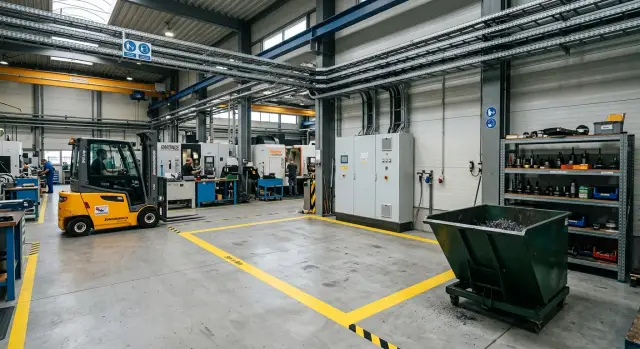
What derails an installation when the shop isn’t ready
Installations of machining centers rarely fail because of one big problem. Usually it's a bunch of small things nobody checked in advance. On installation day this hurts most: the machine has arrived, people are on site, but you can’t bring it in or connect it.
The most common failure is simple. On paper the machine fits, but in reality it doesn’t fit along the route. The gate may be the right size, but a pallet blocks a turn, a column or an old cabinet interferes near the installation spot. Unloading drags on for hours, and sometimes the equipment is left until the next day.
Most installation delays come from four things:
- no one measured the actual route from the gate to the installation point;
- the floor has an unevenness, cracks or a weak spot;
- the power supply isn’t ready by the start date;
- aisles are blocked by containers, pallets, chips and workpieces.
The floor is often underestimated. If the base is skewed, installers spend time leveling and finding the cause instead of starting the machine. That later affects machining accuracy and the machine’s lifetime.
The same goes for electricity. If there is no ready power feed for the CNC machine, the breaker is missing or connection points aren’t agreed, commissioning stops. The machine may be in place but it can’t run.
Mess around the installation area impedes just as much as a weak floor. When chip bins, empty packaging and pallets pile up nearby, people and equipment move slower and with greater risk. For companies like EAST CNC that handle supply, commissioning and service, this is one of the most common reasons for avoidable delays. A prepared shop saves real hours at the most expensive moment of start-up, not just abstract "timelines."
What to confirm before the machine arrives
Most failures don’t start on installation day but earlier, when the shop only looks at the machine’s footprint and forgets everything that comes with it. Start preparation from the full delivery list: base, control cabinet, chip conveyor, coolant tank, pendant and other remote units.
Check not only length and width but also packed height, opening sizes and space for bringing parts in. Often the issue isn’t the machine body but the cabinet that won’t pass through a door or the conveyor that wasn’t given side clearance. If EAST CNC supplies the equipment, it makes sense to request the installation drawing and a list of all units that will be on site.
Also confirm the machine weight and support points. For the floor the concern is not total weight but how it’s distributed. Rigging crews need that data too: hoist, forklift and slings are chosen by actual weight with a safety margin, not by eyesight. An error of even a few hundred kilograms can disrupt the whole unloading schedule.
Resolve technical utilities in advance as well. Check voltage, total power, connection type, cable cross-section, breaker requirements and grounding. If the machine needs compressed air, confirm pressure, flow and the connection point. That way the power supply for the CNC machine won’t have to be reworked at the last minute.
Another common mistake is uncoordinated dates. Delivery, unloading, installation and commissioning should follow one plan. If the machine arrives but the electrician, crane or person responsible for acceptance is unavailable, the shop loses time and money from minute one.
Installation site and the floor
People often only look at the machine dimensions in the catalog and assume that’s enough. In practice you need extra room. Allowance is required for door opening, service access, chip removal and routine cleaning.
The operator also needs a proper working zone. If the cabinet, tool trolley or chip bin are tight against the machine, the operator has to go around it. That’s uncomfortable and unsafe. Start by marking not only the machine outline but the entire working area around it.
Check the floor across the whole area, not at a single point. If there’s a slope, a seam offset between slabs or a settlement at the edge, installation will take longer: the machine will need more time to be leveled and its geometry later corrected. For a first check a long spirit level or a laser level is usually sufficient.
Small shops most often misjudge load distribution. Count the machine weight not only as a total but by support points. A heavy center section may press unevenly on the slab, especially if the floor is old or has voids underneath. Ask the supplier for a support pattern and foundation requirements. For EAST CNC customers this is usually resolved at the selection stage — which is correct: after delivery it’s too late to find out if the site will hold the load.
It’s useful to mark the machine outline on the floor, location of the control cabinet, operator zone, chip container and service access. After marking it’s clear what obstructs installation. Often these are not walls but ordinary items: old boxes, racks, shelves, cabinets and drawers. They’re easier to remove in advance than to disassemble on installation day.
A simple test: if you can open the machine doors, get to at least two sides and perform cleaning around the marked outline, the spot is good.
Power and utilities
For starting the machine the electrician and utility feeds are often more important than free floor space. You can deliver the equipment on time, but start-up won’t begin if the connection point lacks power or the panel is improvised.
Calculate actual load and bring the required power to the exact machine location. Temporary lines across aisles usually cause issues. If the machining center is installed in a far corner, check cable routing, conductor size and breaker reserve in advance.
Don’t evaluate the panel superficially. Check the breaker, cable, grounding, terminal conditions and spare capacity. If the line already powers other machines, it’s better to give the new machine a separate feed than later hunt down the cause of voltage drops and random stops.
Many machines have requirements beyond electricity. If compressed air is needed, deliver it with required pressure and stable supply. A compressor “somewhere in the shop” doesn’t solve the problem if a long line to the machine has leaks and pressure loss.
Plan coolant, water and drains before installation as well. This is especially important in a cramped shop where hoses quickly obstruct people and trolleys. A practical scheme: power comes to the installation point without temporary extensions, air is on a dedicated leak-free line, coolant and water feeds don’t cross aisles, and drains are accessible for cleaning and not located under the machine.
Leave reasonable access to the panel, valves, filters and all lines. If a simple check requires moving boxes or squeezing between the machine and the wall, the shop will lose an hour at the first minor fault.
Chips, coolant and cleaning around the machine
Dirt around a new center appears faster than it seems. In the first days the shop gets not only finished parts but chips, coolant splashes, clogged filters and constant trolley traffic. If this isn’t planned, people start walking around puddles, placing bins randomly and losing time every shift.
Near the machine allocate a clear spot for chip containers and waste trolleys. Reserve it immediately so the bins don’t block aisles or obstruct maintenance.
The chip removal route should be short and direct. The fewer turns, thresholds and narrow points, the easier the cleaning. If a trolley must pass through the assembly area or by finished parts, dirt spreads quickly through the whole shop.
Provide free access to the coolant tank, pumps and filters. The technician needs proper approach space for cleaning and replacing consumables, not a slit where only a hand reaches. A common mistake is placing the machine too close to a wall so routine cleaning later requires dismantling half the shop.
Protect neighboring areas in advance. A screen, partition or at least a marked boundary on the floor helps keep splashes and fine chips contained. This is especially useful if inspection is nearby, fixtures are stored close, or other machines are adjacent.
Set a simple routine from the start: who removes chips at shift end, who monitors coolant level and cleanliness, when the tank and filters are cleaned, and where empty and full containers stand. In a small shop such organization shows noticeable results within a week. When waste has a designated place, start-up runs calmer and the adjacent area doesn’t turn into a dirty corridor.
Tools and fixtures next to the machine
If tools lie everywhere, start-up quickly becomes chaotic. The operator searches for a collet, the setup technician carries measuring tools across the shop, and a heavy chuck ends up on a random shelf. You can avoid this before installation.
Place a dedicated cabinet or rack next to the machine — not across the shop, but a few steps away. When a tool change happens several times a day, an extra 10–15 meters becomes constant time loss.
Organize storage by function: cutting tools, collets and adapters, measuring instruments and setup fixtures should be in separate places. Then people don’t rummage in a common drawer and won’t grab the first thing they see.
A simple layout usually beats a complex one. Store heavy chucks and fixtures low, daily-use items in the middle area, and only light boxes on the top. Reserve a separate drawer for micrometers, probes and indicators.
Label cells immediately. A basic sticker solves half the problems: if a place is assigned to a specific tool, loss is noticed right away and a new employee understands the order faster.
Keep a small table next to the machine for assembling tooling, checking stick-out, verifying marking, placing setup cards and measuring devices. Without it assembly happens on a pallet, a random cabinet or on the body of neighboring equipment.
On paper this looks minor. In practice a tidy storage zone beside the machine saves time every day and reduces the risk of dropping expensive fixtures.
Movement routes for the machine and workpieces
Installation problems often start not at the foundation or with electricity but in the aisles. The machine may not pass through the gate, clear a turn or may hit a low beam. Walk the route from unloading to the installation point in advance — with a tape measure, the plan and real dimensions of all components.
Check door and gate widths, corridor heights, turning radius, protruding columns, cable trays and thresholds. On paper the route may look fine, but in reality a single extra rack can make it too narrow. If the machine will be moved by crane, pallet jack or forklift, confirm those vehicles’ dimensions and the required clearance beforehand.
The usual obstructions are ordinary things: pallets at walls, temporary trolleys, narrow spots at gates, floor-stored packaging and opposing flows of people with workpieces. These are where time is most often lost.
Set the delivery route aside from normal shop traffic for at least a day. Otherwise the forklift transports equipment while the same aisle carries incoming blanks, chip removal and staff movement. That causes pauses and raises the risk of collisions.
Also reserve a space for temporary unloading and unpacking. It should be large enough for crates, fixtures, fasteners and rigging work. If packing is opened at the gate and parts are then carried across the shop, installation inevitably takes longer.
In a small shop the effect is especially noticeable. Sometimes one free corridor just 30–40 cm wider saves several hours on installation day.
Step-by-step preparation checklist
When preparation is scheduled, it goes smoothly. Most panic comes from small things: cable not brought in, passage blocked, no space allocated for tools.
A convenient sequence looks like this:
- Two weeks before. Gather machine requirements and draw a simple area layout. Mark the footprint, service zone, operator position, tool storage and internal equipment routes.
- One week before. Finish electrical work. By this time the power supply for the CNC machine should be ready, and the area cleared of pallets, excess packaging and anything that would block installation.
- Three days before. Walk the area on foot. Check the floor, passage widths, gate height, unloading spot and chip removal containers. Plans almost always look better than reality.
- On delivery day. Assign people by zones. One person meets the vehicle and rigging crew, another manages access to the electrical panel, a third keeps passages and the installation spot clear.
- Right after installation. Don’t rush the first part. First check the machine level, power connections, air and coolant supply, chip removal system, tool cabinet access and a safe passage around the machine.
In a small shop this sequence saves a lot of time. Installers don’t wait for the electrician, the operator doesn’t hunt for a collet in another room, and the forklift doesn’t weave between crates.
Example for a small shop
In a small shop free space is often next to an active area. In one typical case a vertical machining center was planned against a wall where pallets, empty packaging and some raw material packing had been stored.
At first the spot looked almost ready. In reality the rigging crew would have lost time there. The forklift couldn’t turn easily, the path to the machine was narrow, and there was no room for a tool trolley or a chip bin.
The shop didn’t wait for installation day. A couple of days before the machine arrived staff moved storage to another corner, cleared excess items and marked the floor. It immediately became clear where the machine body would go, where the service area would be and how workers would deliver blanks.
They then checked four things separately: passage width for the pallet jack and forklift, clearance for machine door opening and operator work, the power connection point and the spot for the tool cabinet and fixtures.
The electrician routed a separate feed for the CNC machine and verified cable length to the control cabinet in advance. The technician placed a lockable cabinet for tooling nearby so collets, chucks and measuring instruments weren’t left on random benches.
One more simple step helped a lot: the shop set defined movement routes. Blanks were delivered from one side, finished parts removed on the other, and packaging was no longer left in the aisle. During installation nobody obstructed anyone.
On installation day work went smoothly. Installers placed the machine on the marked pad, connected power and began commissioning without extra rearrangements. That’s how good preparation usually looks: no rush, no downtime and no small mistakes that extend the whole start-up.
Common mistakes before start-up
Pre-start problems almost always relate to the surroundings, not the machine. The shop checks the machining center dimensions but forgets cabinet doors, access to components, service clearance and the operator’s working area.
As a result installation seems on track but then it turns out a side panel can’t open, a trolley won’t pass or there’s nowhere to put a pallet of tooling. Such small things can easily eat a day or two.
The five most common errors are:
- considering only machine length and width, not service zones;
- bringing power without checking the breaker, grounding and cable size;
- placing the chip container in the main aisle;
- storing tools and fixtures too far from the workstation;
- assigning preparation to several people without a single responsible person.
Electrical mistakes are especially costly. The cable may be laid and the machine delivered, and then the electrician finds the breaker is undersized or the line sags at start-up. Installation stops even though everything looks almost ready.
Chip and tooling mistakes show up quickly too. If a container stands in the main aisle, people walk around it with blanks in hand. If holders, chucks and measuring tools are in the other end of the shop, the operator loses 15–20 minutes per shift just walking.
The simplest organizational mistake is even easier: no one oversees the full preparation. When a single person compiles floor, power, passages and tooling questions into one list, start-up goes noticeably smoother.
Quick check the day before installation
The day before installation the site must be ready without excuses. If the crew arrives and pallets still stand on site, temporary extensions run across the floor and there’s no unloading zone, the work halts immediately.
Look at the area through the installer’s eyes. The machine footprint should be clear and obvious: where the base will stand, how cables run, from which side tools and blanks are delivered. The floor should be clean, dry and level. Any remaining chips, oil or trash must be removed in advance.
A quick pre-installation check covers five points:
- the marking is readable and there’s no extra packaging or blanks nearby;
- the panel is ready, cable is in place and grounding is checked;
- the passage for the forklift or crane is open the whole way;
- chip containers and cleaning area are already designated;
- the rack for tools and fixtures doesn’t block access to the machine.
Specifically check the power supply for the CNC machine. A common error is that the cable exists but the cross-section is wrong, the breaker isn’t appropriate or the connection point is too far. On paper everything is ready, but the installation crew waits for the electrician.
A practical method: at the end of the day appoint one responsible person and walk the route from the gate to the installation point. You’ll immediately see whether the equipment will pass without extra maneuvers, where packaging might get damaged and whether there’s enough space for safe unloading.
If EAST CNC leads the commissioning, sending photos of the site, panel and passages beforehand helps resolve disputed points before the equipment arrives and avoids losing a day to rework.
What to do next
After checking floor, power and routes don’t wait until delivery day. A few days before the machine arrives compare the shop plan with the rigging crew: installation point, opening sizes, carrying-in route, space for packaging and equipment access. A short call often clears most questions before work begins.
On day one don’t try to perfect everything. Instead note small adjustments during the shift: where the operator has difficulty reaching a tool, where fixtures are placed temporarily, where chips accumulate, whether there’s room for a trolley and service access. These notes are more useful than a general “looks OK.”
Usually you change what’s around the machine after the first parts, not the machine itself. Often the chip bin is too far, costing minutes every approach. Sometimes holders, chucks and measuring tools are scattered so the operator makes extra steps and gets distracted more often.
So chip removal and tool storage for the CNC should be refined based on real use, not only on drawings. If chips block a passage, move the bin closer and set a clear removal route. If a tool is searched for more than a minute, the storage location is wrong.
When launch-related questions remain, resolve them immediately. EAST CNC operates as the exclusive official representative of Taizhou Eastern CNC Technology Co., Ltd. in Kazakhstan and covers the full cycle: selection, supply, commissioning and service. If one team handles these stages, it’s easier for the shop to agree on the layout, schedule and site requirements.
A good result is simple: the machine was placed without fuss, the first shift ran calmly, and after two or three days a few precise adjustments were made. That’s how a normal start-up usually goes.
FAQ
Where should I begin preparing the shop?
Start with a simple layout of the area. Mark not only the machine outline, but also the control cabinet, chip conveyor, coolant tank, aisles, operator zone and maintenance access.
Is knowing only the machine footprint enough?
No. That's not enough. Check packed height, doorway sizes, turns along the route and any external components, because often it's the cabinet or conveyor that won't fit, not the machine itself.
How much space should I leave around the machining center?
Leave clearance for door opening, service access, cleaning and chip removal. If an operator can't comfortably approach the machine from at least two sides, the location is not suitable.
How do I know if the floor will support the machine?
Request the machine weight and the pattern of support points from the supplier, then check the floor with a spirit level or laser level. If the floor has inclination, cracks or weak spots, fix them before the equipment arrives.
What electrical checks are needed before installation?
Verify voltage, total power, connection type, cable cross-section, breaker sizing and grounding. If the line already feeds other equipment, it's better to put the machine on a separate feed than troubleshoot voltage drops later.
Should I prepare air, coolant and drain lines in advance?
If the model requires compressed air, provide it at the required pressure and with stable delivery. Plan access to the coolant tank, filters and drain so hoses don't cross aisles or get in the way.
How do I check the route for unloading and bringing the machine in?
Walk the entire route from the gate to the installation point with a tape measure and real dimensions of all components. Remove pallets, temporary carts and anything that narrows the passage, and reserve space for unloading and unpacking.
When should preparation start and who should be in charge?
One to two weeks is usually enough. Appoint a single person responsible for preparation so they can collect floor, power, passage, unloading and tooling questions into one checklist.
Where should tools be stored and where to put chip containers?
Place a dedicated cabinet or rack within a few steps of the machine. Keep chip containers out of the main aisle. This way the operator won’t walk across the whole shop and trolleys won’t block installation or routine work.
What should I check the day before the machine arrives?
A day before installation check the layout marking, clean and dry the floor, ensure the panel is ready and cable is in place, open the route for handling equipment and clear the unloading area. Fix any temporary issues before the crew arrives.