
Power supply for a CNC machine: what to check before installation
Check the power supply for a CNC machine before installation: phases, voltage sags, grounding, protection and risks to drives, the CNC and sensors.
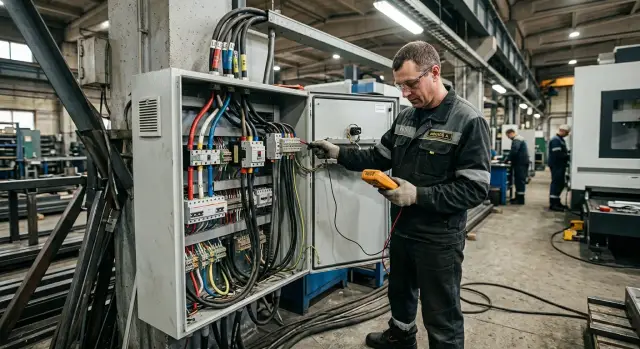
Why the power network is checked before installation
Many people only look at spindle power and think that’s enough. In reality the machine loads the network much more broadly. Along with the spindle there are axis drives, pumps, lubrication systems, the control cabinet fans, sometimes hydraulics, a chip conveyor and the CNC control itself. During start-up and acceleration the load changes sharply, and a weak line shows this immediately.
Problems often start before the first part is machined. The machine may take a long time to ramp up, show drive errors, lose zero after a restart or stop when the coolant pump runs. Even a short voltage sag interferes with electronics and causes faults that at first seem random and unrelated to power.
The worst scenario is when the equipment is already delivered and placed, but the network isn’t ready. Then the workshop has to urgently redo the panel, pull a different cable, change the breaker, rebalance loads across phases and hunt for grounding issues. That almost always costs more than a proper check before installation. You pay not only for materials but also for downtime, rescheduling commissioning and lost time.
Phase and grounding mistakes are better caught early. Wrong phase sequence can make some equipment rotate the wrong way. Poor grounding adds noise that makes sensors and electronics unstable. These faults are hard to catch later: the machine may run fine during the day and fail in the evening with no clear reason.
In practice this happens often. The site looks almost ready, but after the machine arrives it turns out the line was sized for lighting and handheld tools, not for real metalworking. One hour of measurements before installation is usually more useful than two days of troubleshooting afterward.
What breaks when the power is poor
A CNC machine tolerates even short power dips poorly. The operator often only sees an error on the screen, but several components are stressed at that moment.
Drives often react first. With a deep sag they lack voltage to work properly and fault out. Practically it looks simple: an axis stops, the spindle fails to reach speed, the program is interrupted.
Voltage spikes and sags hit the control cabinet power supplies and the power parts. They run hotter, and constant overheating shortens service life quickly. A failure may not happen the same day, but the lifetime is noticeably reduced.
Contactors and relays suffer too. With a poor network the coil may pull in and drop out, contacts burn, and chatter appears. At first this looks like a minor nuisance—an assembly doesn’t start on the first try—then it becomes real failures.
Sensors and encoders are another problem. They need stable power and clean signals. When voltage fluctuates, a sensor can give false triggers and an encoder can report position errors. For the machine this risks lost accuracy, failed homing or a stopped cycle mid-process.
Servomotors for axes and spindle, power supplies for the CNC and I/O modules, contactors, relays, breakers as well as sensors, limit switches and encoders suffer most. After a sudden shutdown you often need to recheck faults, return-to-zero, axis positions and feedback status.
In the workshop it looks familiar: the network sags for a few seconds, the machine is restarted and seems alive, but the first part is scrapped due to axis shift. The cause isn’t the program—the drive or feedback wasn’t checked after the outage.
Voltage fluctuations are not only a risk for expensive repairs. They are lost time, lost accuracy, extra setup work and ruined blanks.
What parameters to measure in advance
It’s not enough to know only one thing: "we have 380 V." You need numbers for the actual network, not an electrician’s or shift supervisor’s general impression.
One measurement in an idle shop is almost useless. Data should be taken during a normal shift when usual consumers operate: compressor, pump, fume extraction, welding, furnace if it’s on the same line. Only then do you see how the network behaves under real load.
What to measure before the machine arrives
- voltage on each phase over the shift;
- voltage sag when the compressor, pump or other heavy load starts;
- phase imbalance and frequency near 50 Hz;
- feeder cable cross-section, line length to the connection point and the rating of the incoming breaker;
- presence of a working grounding connection with good contact.
Measure phase voltages several times: morning, mid-shift and peak hours. If one phase sags noticeably more than the others, drives and the machine’s power section get extra stress. Electronics don’t like that either: false errors and unexpected stops begin.
People often miss sags at a neighbor’s start. That moment shows whether the network is enough for the machine. If voltage drops sharply when a compressor starts, the CNC can fault and the servo system lose stability. For this check use an instrument that records minimum and maximum, not just the current value.
Cable and breaker errors are just as common. Even if nominal power matches on paper, a long line with too small a section gives extra voltage drop. The incoming breaker must handle working and starting currents, but shouldn’t be chosen just because it’s larger "to be safe."
How to check the network step by step
Do the check before the machine is brought into the shop. That way you’ll know if the line is suitable and won’t lose a day of installation over a weak breaker, a long cable or phase imbalance.
Start with the machine manual. Write down rated voltage, number of phases, frequency, current draw, recommended breaker and cable requirements. If a similar machine is already in the shop, don’t rely only on past experience: the new model may have different current, starting behavior and protection needs.
Then take actual measurements at different times. Mornings are often calmer; during the day, when the shop is busy, the picture changes.
- Measure line-to-line and phase voltages at the start of the shift.
- Repeat in the middle of the day when more equipment runs.
- Take another measurement at maximum load.
- Check phase rotation.
- Compare the breaker, cable cross-section and line length with the machine manual.
If the line is long, don’t look only at the breaker rating. The breaker can be correct while the cable causes significant drop under load. On paper everything matches, but in practice the drive faults, the spindle won’t reach speed and electronics catch errors.
Record not only voltages but also measurement conditions: date, time, what was running in the shop and where the instrument was placed. A simple table with measurement point, time, voltage, shop load and comments often saves more time than long on-site discussions.
If the machine goes to a new site, open the power line diagram. That immediately shows if extra consumers are on the branch that will later cause sags and random stops.
How to decide if the line is sufficient
You evaluate a line by the total load on the branch, not by a single breaker in the panel. If other consumers already use that branch, the machine may be unstable even with normal no-load voltage.
List everything connected to the branch. Count not only the machine but also neighboring units: hydraulic power units, coolant pumps, chip conveyors, extraction, area lighting, chargers, compressors and welding. In practice such "neighbors" often eat the current margin.
Look at starting currents as well as steady power. The spindle, hydraulic units and cooling pumps draw more at start than in normal operation. Because of that, a line that looks suitable on paper can sag in real life. For CNC electronics that’s a bad state: the drive faults and the control cabinet sees errors.
If a machine, a welding station and a large compressor share a branch, don’t take the risk. Welding and compressors produce sharp load spikes. It’s usually smarter to give the machine a dedicated line even if the shop’s total power seems to allow connection.
When assessing a line consider total load, starting currents, margin for short peaks, cable length and voltage under load. Don’t be stingy with margins. If the branch is almost at its calculated load, any simultaneous start will cause a sag.
Check long lines separately. If the machine is far from the main panel, voltage drop on the cable can become significant, especially when the spindle accelerates. A useful habit: measure voltage at the panel and at the connection point, then repeat under load. If the difference is noticeable, the cause is usually line length, cable section or an overloaded branch.
Sometimes the line holds the machine idle, but when the compressor and coolant pump start the drive immediately faults. The culprit is a shared branch without reserve.
What protection is really needed
If the network is unstable, good wiring alone isn’t enough. Protection must cover several issues because a short fault can put a drive, power supply or control board out of operation.
Start with the breaker. People often oversize it "just in case." That’s a bad idea. Breaker rating and characteristic should follow the machine manual and wiring diagram. A too-small breaker trips at start; a too-large one may not disconnect the line in time when a real problem occurs.
A phase monitoring relay is also useful, not a needless expense. It watches imbalance, phase loss and wrong rotation. For a machine these are common causes of odd faults: the spindle won’t reach speed, drives report errors and the operator looks for failures where there are none.
Impulse spikes need separate protection. Install surge protection (SPD) or a similar device that absorbs spikes and keeps them out of the electronics. CNC boards, sensors and power supplies tolerate such hits worse than expected, especially after a thunderstorm or near heavy equipment.
Another common mistake is sharing the branch with other heavy loads. If the line already feeds a compressor, welding or a furnace, sags are almost inevitable. The CNC needs a dedicated line with proper cable section and good grounding. Poor grounding is not only a safety risk but also causes floating errors that are hard to diagnose.
Don’t rush to a voltage stabilizer. Sometimes it helps, sometimes it only increases cost, noise and another failure point. First measure the network under load and see how often and how much voltage changes, then decide.
Common site mistakes
The site often looks ready until the machine is put into operation. On paper everything checks out: power is available, a breaker is installed, a cable is present. Problems start the first day when spindle, pump and drives start together.
The most common mistake is simple: measuring voltage without load. A multimeter shows steady numbers and the network is considered fit. But once the machine draws current the voltage sags and the electronics see a different picture.
Phase imbalance causes as many problems. It is sometimes not checked at all, especially if similar equipment used to be in that spot. That’s not a valid argument. With imbalance one phase is overloaded, motors heat up and drives fault for no clear reason.
Another mistake is taking an old cable from the warehouse and running it without calculating cross-section. Externally the cable may look intact, but insulation ages, conductors weaken or connections are poor. The line heats, the breaker behaves inconsistently and sags appear at acceleration.
Often the branch is shared with a welding post or another heavy consumer. That is fine until the first welding arc is struck. After that the CNC sees power faults, spontaneous stops and drive errors even though the machine itself may be perfectly fine.
It’s a bad idea to add protection only after the first failure. If the site network is unstable, electronics and power supplies are hit from the start. A single incident may not break a unit immediately, but life expectancy drops quickly.
Before installation a few simple actions usually suffice: measure voltage under real load, check imbalance and phase order, recalculate cable section and line length, allocate a separate line for the machine and set protection before commissioning.
A shop example
A CNC lathe was connected to a common line where a compressor, coolant pump and a couple of old machines already ran. On paper everything looked fine: there was voltage, the breaker didn’t trip and the machine powered up.
Problems didn’t start immediately. While idle the machine was fine. But when the operator started the spindle and the compressor kicked in nearby, voltage dropped noticeably. After a few seconds the spindle drive threw an error, sometimes dropped the cycle and the electronics tripped into fault.
At first they searched for a machine fault. They checked sensors, cables, drive settings and even suspected a factory defect. Two days went by, but the problem wasn’t mechanical or in the settings.
When the electrician measured the line during the compressor start, the picture became clear. One phase sagged much more than the others under load. For the machine this meant unstable power: drives couldn’t hold speed, protection triggered and the controller reported a network error.
The solution was simple. The machine was moved to a dedicated line and phase imbalance and voltage behavior under load were checked again before commissioning. Failures stopped before the first production run.
Cases like this are common. If you only look at the machine itself, it’s easy to go down the wrong path and lose time. It’s much cheaper to check the network in advance than to disassemble otherwise working equipment.
A short checklist before delivery
One short check before delivery often saves days of downtime. If the network isn’t ready, installation is delayed and the first run will have errors that could have been detected earlier.
Before the machine arrives check five things:
- phase voltages at different times of the shift;
- phase imbalance and rotation;
- breaker and cable cross-section for the expected load;
- working grounding;
- no other heavy consumers on the same branch.
Collect all data in one table: phases, breaker, line length, cable cross-section and measurement results. Then you can see weak points before installation. Sometimes the problem is trivial: the cable is too long, the breaker was chosen without calculation, or another hungry consumer is on the same branch.
If any point raises doubt, call an electrician with proper instruments. One pre-installation visit almost always costs less than searching for faults after startup.
What to do next
If you already have measurements, immediately compare them with the machine manual. Check required voltage, number of phases, frequency and allowed deviations. Even a small gap between manual specs and the real line leads to extra costs: drives fault, electronics reboot and installation drags on.
Prepare the feed entry before delivery. Assemble the panel, breaker and cable of the correct cross-section and a dedicated line in advance, not on the day the machine arrives. Then the installation team can connect equipment without pauses and the shop won’t need to hunt for an electrician and missing materials.
The working routine is simple: gather no-load and under-load measurements, check phases and line length, estimate starting currents and hand the data to the engineer or supplier before installation. Then agree on protection and the connection diagram.
Don’t rely on checking "on-site" after delivery. For CNC this is a false economy. One bad start due to a sag or phase imbalance can stop machine commissioning and add costs for diagnostics, part replacement and shop downtime.
If you are preparing a site for EAST CNC equipment, pass these measurements in advance. The company supplies CNC lathes and machining centers and supports the project from consultation and selection through delivery, commissioning and service. Network data usually show quickly whether the site is ready or if the line and protection need strengthening.
FAQ
Is it enough that the shop has 380 V?
No. Having **380 V** on the nameplate is not enough. Check the voltage on each phase during the shift, voltage sags when nearby equipment starts, frequency, grounding and the load on that branch. Without these data the line may look fine, but the machine can start failing on day one.
When is the best time to check the network before installing the machine?
Take measurements before delivery and during a normal working shift. Check in the morning, mid-shift and at peak time when the compressor, pumps, extraction or welding are running. This shows the real situation, not an "empty" network without load.
How can I tell if the problem is power-related?
Often the first signs are small oddities: the spindle takes a long time to reach speed, an axis stalls with an error, the CNC reboots, or the coolant pump doesn’t start on the first try. Another common sign — after a short power loss the first part is out of tolerance because an axis shifted.
Does a CNC need a separate power line?
If welding, a large compressor or a furnace are on the same branch, it’s better to give the CNC its own line. A shared branch may hold no-load voltage but sag when a neighbor starts, which leads directly to drive errors and stopped cycles.
Why check phase order and imbalance if the voltage looks normal?
Check phase sequence and imbalance before connecting. Wrong phase order can make some equipment run the wrong way, and strong imbalance overloads one phase, heats the power parts and disrupts drives. These faults are hard to catch because they don’t happen every hour.
What should I check in the cable and breaker before delivery?
Compare the machine manual with the actual line. Look at cable cross-section, line length and breaker rating, and how the line performs under load. A long thin cable often causes extra voltage drop, and an oversized breaker doesn’t solve that problem and may delay fault disconnection.
Does a CNC always need a voltage stabilizer?
Don’t rush to buy a voltage stabilizer. First measure the network under load and identify what spoils the supply: sags, phase imbalance, an overloaded branch or bad grounding. Often a dedicated line and proper protection are enough; a stabilizer only adds cost and another failure point.
What to do after a short voltage sag or power loss?
Immediately check errors, return-to-zero, actual axis positions and feedback. Don’t start the first part “by feel” even if the machine powers up. After a sag a drive or encoder can be mispositioned and produce scrap without any visible program fault.
Can bad grounding cause intermittent errors?
Yes, this happens often. Poor grounding increases interference, causing sensors and electronics to behave inconsistently. The machine can run fine during the day and crash in the evening for no obvious reason.
What data should I give the supplier or engineer before installation?
Provide voltage per phase at different times, data on imbalance and phase order, line length, cable cross-section, breaker rating and a list of heavy consumers on the branch. With these figures an engineer will quickly tell if the site is ready or needs reinforcement and protection changes.