
Part goes out of tolerance after cutoff: where to look for the cause
Part out of tolerance after cutoff? We explain how the cutoff location, overhang, support and insert geometry change dimension and runout.
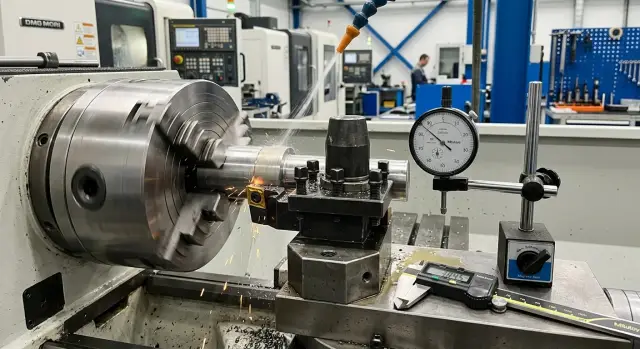
Why the size shifts specifically after cutoff
While the blank is clamped, the part’s shape is supported by the whole system: the chuck, the remaining material and the thin bridge at the cut zone. At the moment of separation that support disappears and the part immediately behaves differently.
That’s why the size measured on the machine and the size after removal often don’t match. In the clamp the part looks straight and stable, but after separation internal stresses redistribute. A thin wall slightly changes shape, a long part can deflect along the axis, and the face can develop a tilt that the clamp had previously restrained.
This is most visible on bushings, rings and long thin parts. While the jaws hold the part, deformation is partially hidden. After the cutoff it appears during inspection.
The last millimeter of cut has the strongest effect. At the end of the cutoff the insert works in the weakest zone: the cross-section is small, stiffness drops and the part is easier to deflect. If the insert is off-center, the feed too aggressive or the tool rubs instead of cutting, the face can get a burr, a central “nub” or a slight tilt. After that not only the length changes but also the runout.
Typical early signs are immediate: the size in the chuck is fine, but after removal it’s off by a few hundredths; the face looks rubbed rather than clean; the burr is larger on one side; re-clamping produces axial or OD misalignment.
Look for the cause not after the full operation, but at the moment of separation. That’s when small things start to matter.
Where to look for deviation
If the problem appears only after separation, one size measurement is not enough. Check four points right away: outer diameter, overall length, face and runout. Often the diameter itself is fine, but the face shifts and length or fit “follows” it.
Measure in the same sequence. First inspect the part immediately after cutoff, then let it cool and repeat the same measurements. If numbers change noticeably, the cause may not only be the cutoff itself but heating, internal material stress or how the part was released at the end of the cut.
Use a single datum. If you measure length from the face, check runout in the same setup — otherwise you compare different control methods, not parts.
Record results for several consecutive parts: size right after separation, size after cooling, runout by OD, face deviation and the part number in the series. One part rarely gives a clear picture. Three to five parts will show whether the deviation is random or repeats in a pattern.
If the first part is still within tolerance but the next ones gradually drift, check heat in the cutting zone, insert wear and conditions at the moment of final separation. That pattern typically means the issue accumulates rather than appears instantly.
How the cutoff location affects the result
The same program can produce different outcomes simply because of where the cutoff line falls. First check not the feed but the distance from the cut to the nearest support. The closer the cut to the chuck, steady rest or another rigid support, the more stable the part will be in the last moments.
Moving the cutoff farther from support makes the blank spring more. A thin remaining metal strip holds the axis poorly, and after separation the face can shift and runout increases. On long thin parts this is immediately visible. On short, stiff parts the effect is weaker but still present.
The worst case is a thin bridge left at the end. While the part is still connected to the bar, stresses are held inside the metal. Once the bridge is cut through or tears, the part can rotate slightly, settle or release some internal stress. On the indicator it looks like a sudden change in size, even though the cut seemed fine just before.
Check cuts near thin walls separately. The metal is weaker there and the cutter easily pushes it sideways. A bushing with a thin flange or a cup with a thin bottom often shows this behavior: everything seems fine before separation, but after separation the face and fit start to drift.
If possible, compare two variants in the same batch: a cut closer to the support and one farther away, or next to a massive section and next to a thin wall. If variation shrinks in the stiffer location, you’ve almost certainly found the cause.
If you can’t change the cutoff position, leaving a small finish allowance on the face after separation often helps. First separate the part safely, then do a short finishing pass to remove the shift and restore dimension.
Why overhang pulls size and runout
One of the first things to check is overhang. The longer the unsupported length, the easier it bends under the cutter force. Even small deflection moves the axis, and the size shifts not during roughing but at the very end.
This is more noticeable on cutoff than on a normal pass. A cutoff tool presses narrowly and deeply while the part’s stiffness falls toward the end. While the cross-section still holds shape everything looks stable. But the final millimeters cut harder: a thin bridge remains, the metal springs, the tool pushes the part and runout appears.
A long bar stock aggravates the issue. If extra length protrudes from the chuck or feeding unit the system behaves like a spring. Vibration appears, the cutting sound changes, and marks of vibration remain on the face and OD. After separation such parts often show runout, though size looked normal before cutoff.
Thin, long blanks amplify the error quickly. Sometimes a few extra millimeters are enough to turn a calm operation into an unstable one.
A simple rule: before cutoff leave only the overhang that’s truly needed. If you can remove 5–10 mm, do it. Often that’s enough to make the face flatter and bring size and runout back within tolerance.
What support gives the part
Often the issue isn’t the insert but loss of support at the worst moment. While the bridge still holds the part, things seem calm. When the metal is almost through stiffness drops sharply and the part shifts down or sideways. From that come length drift, uneven face and extra runout.
A support isn’t always necessary. A short, rigid part is often separated by the machine without help. But a thin bushing, a long pin or a part with large overhang should be supported until separation.
The type of support depends on the part. A steady rest helps if a long blank wobbles before cutoff. A tailstock center suits when a center exists and the axis must be held until the end. A catcher is useful where the part is almost separated and must be softly received so it doesn’t drop on the tool or into the chips.
Support can also harm. A thin part is easily crushed even by small force, and after unloading the size will shift. In that case it seems the cutoff is guilty while the support actually deformed the part.
On first parts look for simple signs: does ovality grow after separation, is the face cleaner but size unstable, does runout change from part to part, are there marks of support on a thin wall. If yes, the support works too roughly or engages at the wrong time.
The timing of the support is as important as its type. If applied too late the part already began to shift. If too early the support itself displaces the axis or presses the wall. Usually support is introduced just before the last cut segment, when stiffness is low but the bridge still holds shape.
In practice start with minimal force and check several parts. If the face evens and runout drops without marks of crushing, the chosen scheme is correct.
How insert geometry changes the face
When size degrades after cutoff many first look at clamping or parameters. But the face is often ruined by the cutoff insert itself. In the final segment cutting force quickly rises, the bridge weakens and any small detail of the geometry becomes visible.
A narrow insert gives a smaller kerf and saves material — convenient. But such an insert is easier to deflect sideways if the part is thin, the material ductile or overhang large. As a result the face is not perfectly flat and runout appears after separation.
A wider insert holds direction better but loads the part and the cutting assembly more. If stiffness is insufficient, that option also produces a poor face. So compare inserts of different widths on the same part, with the same overhang and feeds.
Rake angle and chipbreaker shape affect not only chip formation but the cutting behavior. A sharp geometry cuts more gently and often leaves a flatter face. If the chipbreaker doesn’t suit the material and feed, chips press on the groove walls, the insert wanders and the size drifts at the very end.
A worn edge almost always increases cutting force. The insert no longer cuts cleanly but rubs and presses the metal. On a thin bushing this is visible immediately: the face darkens, a burr appears and after separation the shift grows.
The simplest check is practical. First install a new insert of the same grade and repeat measurements. Then, if needed, try a different width. Evaluate chip shape and face quality after each pass. This isolates the cause faster than replacing everything at once.
Step-by-step fault finding
If size shifts only after separation, don’t immediately change feed, chucking, insert and cutoff point simultaneously. It’s easy to lose the real picture that way.
Follow these steps:
- Measure the part before cutoff while it is still clamped.
- Right after separation check the same part for length, face, OD and runout.
- Reduce overhang and repeat the trial with the same parameters.
- If the shift remains, add part support.
- Only after these steps install a new insert of the same shape and test again.
This order saves time. If you change overhang, support and insert at once, a good result may look accidental.
Often the answer appears on the first step. Large overhang easily shifts size on thin bushings, rings and long small-diameter blanks. Support helps when the part begins to spring or sag before separation.
Keep the insert change for last. A new insert of the same geometry quickly shows whether wear, a micro-chip or face wandering were the cause. If the new insert differs in shape you’ll have changed two variables at once.
A short record after each trial simplifies the search: overhang, whether support was used, which insert was installed and what the size outcome was. Usually three to four parts are enough to see a pattern.
Common mistakes in troubleshooting
The most common mistake is changing everything at once. People increase speed, change feed, fit a different insert and move the holder in one run. After such a test you can’t tell which change moved the size or caused runout.
Second mistake — measuring only hot parts or only cooled parts without comparing both states. Faces and zones near the cut on thin parts often stay warm and shift by a few hundredths. If you ignore that effect control gives a false picture.
Another problem is missing small play in the cutoff assembly. The holder can shift slightly in its seat, the insert may not sit fully, or the clamp screw may hold less than it seems. Visually this is almost invisible, but the part will quickly show face shift, taper and extra runout.
Build checks in a simple sequence: first measure several cooled parts the same way, then check insert seating, cleanliness of the pocket and tightening, after that inspect overhang, support and cutoff point, and only then touch cutting parameters.
Don’t immediately blame the material without checking machine and tooling. Yes, different batches behave differently. But if you don’t check chucking, overhang, holder and the separation process you can easily accuse the material where the cause is purely mechanical.
In practice the problem often consists of two small issues together. For example, a part with extra overhang and an insert with slight play in the pocket — separately tolerable, together they push the size out of tolerance.
Example with a thin bushing
A good example is a thin bushing cantilevered far from the chuck. Suppose OD 28 mm, wall 1.5 mm, and cutoff is done with about 55 mm overhang. Until separation everything looks normal: OD holds and length seems fine.
The issue appears at the very end. While the blank is still connected to the bar some stiffness remains. Once a thin bridge is left the bushing begins to shift. After separation quality control shows runout increased and the face shifted and became less even.
Operators often search the cause in the previous finishing pass, although the failure comes from the final separation.
Thin bushings usually have two causes at once. Large overhang makes the part soft and the cutoff tool not only cuts but also pushes it sideways. If the insert geometry is “pulling” the cut, lateral force grows even more. When the bridge breaks the part can tip down or rotate slightly and that’s enough to cause extra hundredths and noticeable runout.
Correction is usually simple. First reduce overhang if the process allows. Then add a catcher or support so the part won’t fall at separation. After that choose an insert that cuts gentler and presses less sideways. Often these steps are enough to bring runout back to normal and stop face variation between parts.
Quick check before a new batch
Before a new run spend a few minutes on a short check. In cutoff small things most often cause scrap: an extra millimeter of overhang, a worn edge or a shifted cutoff point.
A convenient check order:
- verify the blank overhang before start;
- inspect the insert edge and pocket;
- confirm the cutoff point matches the drawing and the actual datum;
- produce one trial part and record not just the length but runout and face quality;
- repeat the same control on 3–5 consecutive parts.
This short cycle quickly reveals the fault pattern. If the first part is OK but later parts drift, look at heating, chucking and insert wear. If deviation exists immediately, the usual suspects are overhang, tool position or the cutoff location.
What to do next
Once you stabilize size and runout, document the working variant right away. Otherwise in a week it will be hard to remember what exactly helped.
Record the setup in the process card: cutoff location, overhang, support method, tool height, insert grade and geometry, and feed at the end of the cut. These small details most often change the result.
Also keep baseline measurements: size before cutoff and after it, runout by OD and face, overhang length at cut, chuck type, presence of support and actual insert wear. Such a sheet saves a lot of time at the next run.
If scrap repeats at the same parameters, look wider. The cause may be not a single adjustment but the tooling: a weak holder, excessive overhang, wrong insert, a worn chuck or poor support at the end of the cut. Small fixes then only mask the real problem.
If you need help selecting a machine, tooling or the process layout, this can be discussed with EAST CNC. The company supplies CNC lathes, helps with selection, commissioning and service, and publishes materials on equipment and practical metalworking tips on the east-cnc.kz blog.
FAQ
Why is the size correct in the chuck but out of tolerance after cutoff?
While the part is clamped, it is held by the chuck, the remaining bar stock and the thin bridge at the cut zone. After separation that support disappears, internal stresses redistribute, and the shape changes slightly. That’s why the size in the chuck and the size after removal often differ.
What should I check first if the part goes out of tolerance after cutoff?
Check not just one dimension but outer diameter, length, the face and runout. Then repeat the same measurements after the part cools down in the same setup — this will quickly show where the shift starts.
Can extra overhang cause both size and runout issues?
Yes — very often. The longer the unsupported segment, the easier it bends under the tool forces. Even a small deflection changes the axis and the size, especially in the final millimeters of the cut. If possible, reduce overhang by 5–10 mm as a first step.
How do I know the cutoff location is the problem?
Make two trials on the same part: cut closer to the chuck and farther away, or next to a massive section and next to a thin wall. If variation is smaller where the part is stiffer, the cutoff location is almost certainly the cause.
When should I use a support or other backing?
Short, rigid parts often don’t need support. Thin bushings, long pins or parts with large overhang benefit from support to hold the axis at the end of the cut. Apply minimal force — too much support can crush thin walls and create errors after unloading.
When is it time to change the cutoff insert?
Don’t rush to change the insert first. First reduce overhang and check support; then install a new insert of the same geometry and re-test. That way you’ll know whether wear, a micro-chip or the process layout was at fault.
What signs show the insert is ruining the result?
Usually visible on the face and by the sound of cutting. If the face looks rubbed, a burr or central ‘nub’ appears, chips form poorly and cutting feels heavier, the insert no longer cuts cleanly and starts to pull the part.
Why shouldn’t I measure only the hot part?
Because a hot part and a cooled part can give different numbers. Thin walls and the area near the cut can stay warm and change size by several tenths. Without a repeat measurement after cooling you may get a misleading picture.
How to find the cause without chaos and wasted trials?
Change one factor at a time and record results for at least 3–5 consecutive parts. If you alter overhang, feed, insert and holder in one run, you won’t know which change fixed the size or runout.
What should I record after a successful setup so the problem won't return?
Save the working setup immediately: cutoff location, overhang, tool height, support method, insert and end-of-cut feed. Also record baseline measurements before and after cutoff — this greatly speeds up the next run.