
Marks from orientation changes: how to improve the surface in 5-axis machining
Orientation-change marks spoil the finish of complex surfaces. We show how to adjust CAM, approximation tolerance and tool orientation without needless trials.
Why marks remain after axis rotation
In 5-axis machining the tool not only follows a path but constantly changes its tilt. That shifts the contact point on the surface. At one moment the cutting edge works closer to the tip radius, at another the flank takes more of the load.
Even if the step between passes barely changes, the resulting cut pattern already looks different. That’s why a part can show stripes after 5-axis finishing where the model looks perfect.
In finishing these defects usually appear as thin lines, changes in sheen or barely visible steps. The part can still be within dimensional tolerance. But dimensional tolerance doesn’t guarantee a good surface because it doesn’t describe the microtexture left after the tool contacts the metal.
This is most noticeable on complex shapes. When the axes rotate, CAM adjusts the tool to preserve access, the angle of attack or a safe stick-out. If the rotation is abrupt, the transition is immediately imprinted on the metal.
How to distinguish these marks from vibration and runout
Marks from orientation changes are usually local. They often start where the machine changes an angle on a rotary axis, while the areas before and after look smoother. Under light that zone may appear dull or, conversely, overly shiny.
Vibration creates a different pattern — it typically produces frequent ripples over a long section. Runout behaves more uniformly and repeats with each spindle revolution, because the issue is tied to the cutter’s rotation rather than a specific moment of axis rotation.
People typically look for several signs at once: the defect is tied to the rotation point of the axes, the part size remains correct, the stripes change noticeably under different lighting, and neighboring areas of the same path can look much cleaner.
A common case: an operator machines a smooth 3D surface, gets correct dimensions, but finds a transverse stripe after unloading. Often the problem isn’t the cutter or the spindle. These are orientation-change marks when the contact angle shifts faster than the finishing trajectory can accommodate.
Where to start checking
Look not just for the mark, but for the point where the tool tilt changes sharply. On a 5-axis machined surface the defect may appear one or two passes later, so watch both the visible mark and the tool motion in simulation.
Open the problem area in CAM with the tool vector, axis angles and feed visualized. Focus on places where the axes snap the tool into position rather than rotate smoothly. You’ll usually see one of several deviations: a sharp kink in tool tilt, excessively dense trajectory points on a short segment, an angle jump at a surface boundary, or changed behavior on approach, retract or collision-avoidance moves.
Then compare that area with a nearby clean zone on the same part. If tool, stepover and material are identical but the surface pattern differs, the cause is often how CAM drives the tool at that spot. The clean zone shows the norm; the problematic zone — the deviation.
Also check whether the strategy changes along the path. Some transitions are nearly invisible in the global view but strongly affect the finish. At an edge CAM may recalculate tilt, switch smoothing, or shift the contact point. On complex surfaces the difference quickly shows in the streak pattern.
How to separate CAM issues from cutting conditions
To avoid changing every setting at once, first compare simulation with the real part. If orientation-change marks are already visible in the trajectory, hunt in CAM: limits on angles, smoothing, tolerance or surface traversal rules. If the simulation looks smooth but the metal shows steps, then inspect feeds, spindle speed, tool runout and machine behavior during axis rotation.
A short test on the same area is useful. Re-run the finish pass with the same trajectory but reduce feed by 20–30%. If the mark noticeably fades, the cause is likely cutting conditions or vibration. If the pattern remains in the same place with little change, the issue is probably the trajectory itself.
This approach saves time by narrowing the cause quickly instead of blindly adjusting tolerance, tool tilt and cutting modes.
CAM settings that most often spoil the finish
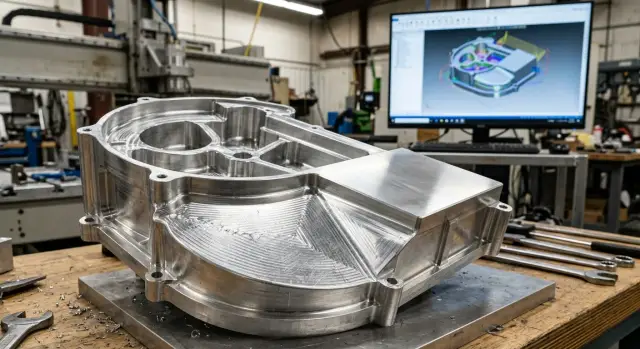
Finishing in 5 axes rarely fails because of one gross mistake. Usually the surface suffers from a combination of small settings that seem harmless alone. On the part you can see how light breaks across stripes and a new pattern appears after axis rotation.
One of the most frequent sources is too large a step between passes. On screen the trajectory may look dense, but on a complex shape that step produces a noticeable wave. It shows up quickly on radii, transition regions and where tool tilt changes.
A coarse approximation tolerance causes no less trouble. CAM approximates the surface with many short moves, and if the tolerance is big the path no longer follows the model accurately. On a plane this can go unnoticed, but on a curved surface orientation-change marks and uneven sheen appear immediately.
Problems also arise at seams between adjacent passes. If the system builds them with a small gap, overlap differs: one pass removes a bit more, the next a bit less, and instead of a smooth finish you get a banded area. The operator then looks for a cutter issue even though the trajectory is at fault.
Another common case is overly short segments. When the path is broken into many tiny lines, the axes start jerking at rotations. The machine loses smooth motion, feed fluctuates, and the tool tip leaves a repeating mark. This is especially visible on heavy parts.
The chosen strategy changes the surface pattern as well. Parallel passes yield one look, flow-based machining another, and constant-ridge strategies behave differently. On complex geometry it isn’t always wise to use a single strategy across the whole part.
In practice people most often check four things: step between passes in curved zones, finishing approximation tolerance, seams and overlap of neighboring passes, and segment length plus smoothness of axis rotations.
If marks persist after adjusting these parameters, then look at tool orientation on complex surfaces and at the overall processing strategy. In 5-axis CAM, small numbers matter more than they appear at first glance.
How to edit the trajectory step by step
If orientation-change marks remain, don’t change every CAM setting at once. It’s easy to waste time and lose track of which change fixed or worsened the surface.
It’s more effective to modify one parameter at a time. That way you see which adjustment removed a streak and which did nothing.
First isolate the problem zone and assign it a single finishing strategy. If flow, morph and swarf are mixed in one area, finding the source is hard. For the disputed spot keep one pass type and refine it until the result is smooth.
Next, reduce the step between passes gradually. Don’t halve it immediately. Cut the step by 10–20%, regenerate the path and check whether the surface pattern became smoother. Sometimes the mark isn’t the rotation itself but an insufficiently dense pass grid.
Then check how adjacent areas join. Often the streak is visible at the border between two zones where direction or tool tilt changes. If CAM allows, enable transition smoothing, align pass directions or slightly increase overlap between neighboring regions.
After that limit sudden tool rotations. When A or B axes change angle too quickly, the machine leaves a visible mark even with a good step. Limiting the rate of tilt change, using soft lead/lag and gentler orientation on tight radii helps.
Run a simulation after each change. Watch not only for collisions but also tool behavior at surface inflection points. If the path became smoother and tilt changes without jumps, you can usually see that before real cutting.
This order reduces trial runs dramatically. On a complex cast part the issue can disappear after two tweaks: slightly smaller step and smoother transitions between zones. If you change everything at once, you may get a plausible simulation but the same mark on the real part.
A good sign is surface improvement without a large rise in machining time. If obtaining a cleaner finish requires extreme path densification, the root cause is often not only the step but the overall tool motion logic.
How to choose approximation tolerance
Approximation tolerance sets how closely the CAM path follows the model surface. If it’s too coarse, finishing shows small steps and orientation-change marks become more noticeable.
Don’t start with the smallest number; start from the surface requirement. If the part must go straight to assembly without lengthy hand finishing, choose a tolerance smaller than the expected surface deviation. A simple guideline: if the allowed deviation is ~0.01 mm, finishing in CAM often makes sense at ~0.002–0.005 mm rather than 0.0001 mm.
Too-tight tolerances are harmful. CAM breaks the path into many tiny segments, the controller brakes more often and the machine loses smooth motion. As a result the finish after 5-axis machining can be worse even though the setting looks more precise.
Signs of an overly tight tolerance include a much larger program size, lower feed rates on smooth segments, jerky machine motion, changing cutting sound, and different surface patterns on neighboring passes.
Another mistake is using very different values in adjacent operations. If semi-finish is at 0.01 mm and finish at 0.0005 mm, the tool follows a very different path and you can get a visible boundary between passes. Keep values closer and reduce tolerance gradually.
Also observe how the controller behaves on short segments. One machine can follow tiny segments smoothly; another will slow down and leave extra marks. So check not only CAM simulation but also a short real test.
A practical routine: set a moderate tolerance, then evaluate feed and surface marks, and only then tighten the value. If the machine runs smoothly but marks remain, reduce tolerance a bit. If the machine starts jerking, you’ve exceeded its capabilities.
On equipment for complex metalworking this balance is crucial. A good finish comes not from the smallest number but from a value the machine and controller can execute steadily over the whole path.
How tool position changes the surface pattern
Even with a good trajectory the surface can band if the tool tilt changes too abruptly. On a complex shape you’ll see the same stepover but a different sheen and streak direction after each axis rotation.
A common reason is the contact shifting to the cutter tip. Cutting speed at the tip is lower, so the metal cuts less evenly. That creates matte spots, arcs or visible orientation-change marks.
A small tilt that keeps contact off the tip usually helps. Make adjustments in small increments. When CAM reorients the axes by a large angle over a short distance, the machine reacts differently and the surface pattern changes immediately.
On long passes a calm, steady tilt often works better than an aggressive one. If the angle stays nearly constant across the section, the cutter marks look more even and require less polishing.
Also consider the tool assembly. Large stick-out and long holders increase compliance. The path may appear smooth in CAM, but the real part can show fine waviness — especially where axes rotate together.
Sometimes a simple change helps: reduce stick-out by 10–15 mm or use a shorter holder. The finish after 5-axis machining often becomes noticeably smoother without changing cutting parameters.
Comparing approaches, a constant tilt usually gives a steadier, more predictable mark on long smooth sections. A normal-based tilt follows the geometry more accurately but tends to vary more and emphasizes transitions between zones. On bends and radii test both options on a short fragment.
A good example is a mold with double curvature. Following the normal yields accurate geometry but often produces a ragged sheen. Using a small constant tilt and avoiding contact at the cutter tip yields a calmer, cleaner surface.
Watch not only model deviation in CAM but how the contact patch travels along the pass. When the angle changes for no clear reason, the part will show it quickly.
Example on a complex part
Imagine a part with a smooth transition into a deep pocket. Geometry looks calm: large radius, soft slope, no sharp ledges. But after finishing the result is mixed. One radius comes out smooth while a neighboring area shows distinct stripes.
This often happens where the system abruptly reorients the tool. The trajectory can look neat, but the part still bears orientation-change marks. Highlights make it obvious where movement was smooth and where axes slightly jerked.
In 5-axis CAM don’t change everything at once. Narrow the search to the problem zone first. If a clean area is nearby, tool, cutting mode and general strategy are likely fine. The error usually lies in local settings.
What to change in that case
Start with two parameters only on the problem area: reduce the step between passes and tighten the approximation tolerance. Keep the tool and spindle speed the same so the comparison is fair.
For example, if the step was 0.4 mm, try 0.25 mm. If tolerance was 0.01 mm, test 0.005 mm. This won’t always fully solve the issue but often weakens the stripes and shows the next direction to try.
If the mark remains, adjust tool tilt slightly — not by 10°, but by 1–3°. Small changes often help more than large ones because the surface is already close to normal and you need only calm axis motion at the transition.
After a trial pass look not only at whether the finish improved. The pattern itself is more informative: if stripes became fewer, softer or shifted, the setting worked. If the pattern stayed in the same place with the same width, the cause is likely path accuracy rather than tilt.
On such parts success usually comes from two or three small tweaks: first step and tolerance, then a mild tilt correction, and only then a full recalculation of the zone.
Time-wasting mistakes
A natural but often misleading reaction is to immediately reduce feed when seeing marks. Sometimes that softens the pattern slightly, but the root cause is often how CAM moves the axes or how the tool enters the area. The machine then simply spends more time cutting the same bad trajectory.
If the mark appeared after an axis rotation, first examine that transition: where the tool angle changes, how often CAM recalculates movement, and whether there’s an abrupt vector jump. On complex surfaces two similar trajectories can yield different marks even at the same feed.
Another wasteful habit is changing many parameters at once. People tweak feed, stepover, tolerance, smoothing and tilt in a single pass, and then can’t tell what helped. The working method is simpler: one parameter, one short test, one recorded result.
Often operators fit a new tool and run finishing because the cutter is new. Newness won’t hide runout. If the shank seat has dirt, the collet is worn, or the tool is clamped unevenly, the finish will show fine ripples. Visually this can resemble a trajectory issue and lead to hours of unnecessary CAM changes when a quick assembly check would have solved it.
Another common confusion is mixed tolerances in one zone. For example, the main area uses one approximation tolerance while the transition uses a coarser value. CAM generates both fragments without a visible error, but the part shows a boundary you can’t see on screen. People then try to polish the mark instead of aligning settings.
Simulation can also mislead if you rely on it alone. It catches collisions and gross errors well but doesn’t always show runout, actual fixture rigidity, tiny mark jumps or machine behavior on very short segments.
A practical order: first check the trajectory, then tool assembly, then consistency of tolerances, and only after that adjust feed. This approach cuts trial runs and finds the real cause faster.
Quick check before running and next steps
If orientation-change marks are visible in the model, don’t run the whole finishing pass. First test a single difficult area where curvature changes and axes rotate often. The problem will show there quicker and you won’t spend half a day on a long run.
Look not only at the path but at the tool contact map. If the contact patch shifts abruptly and the axes make short frequent corrections, the machine will almost always leave a visible pattern. A good cutting mode won’t save you if CAM produces nervous motion.
A short pre-run checklist is usually sufficient: find where axes change angle too abruptly, compare step across the surface, check approximation tolerance and tool tilt, ensure the tool keeps stable contact through transitions, and select one difficult zone for a trial pass.
Make the trial short but honest. Don’t test on an easy area. Choose a small radius, a surface bend or a pocket. After the pass inspect the finish under consistent lighting and don’t change five parameters at once — otherwise you won’t know what fixed the mark.
Typically proceed stepwise: slightly reduce tolerance, then check step, then tweak tool tilt. The order matters. Often the issue disappears after two adjustments without a full strategy overhaul.
Record results immediately. A three-line note saves a lot of time: which parameter changed, by how much, and what happened to the surface. After a few tests you’ll see which settings work for this part and which only add machining time.
If the problem goes beyond CAM and involves machine stiffness or axis behavior, involve commissioning and service staff. For example, EAST CNC works with CNC lathes, machining centers and automated lines and helps with selection, commissioning and maintenance. In such cases it’s easier to separate trajectory errors from machine limitations.
FAQ
How can I tell if marks are caused by an orientation change of the axes?
Look at the defect location. If the stripe appears next to an axis rotation and the area before and after looks smoother, the cause is often a change in tool tilt. Vibration usually extends over a longer distance and produces finer ripples. Runout repeats the pattern every spindle revolution, while an orientation-change mark is typically localized.
Where should I start my inspection?
Open the problematic area in CAM and enable the tool vector, axis angles and feed along the path. Look for places where the tilt changes abruptly or where trajectory points are overly dense on a short segment. Then compare that zone with an adjacent clean area. If tool, material and stepover are the same, investigate how the tool is moved at that point.
Should I immediately reduce the feed?
No — don’t change the feed first. If CAM drives the tool nervously, the machine will simply cut the same bad trajectory for longer. Run a short test on the same area and reduce feed by 20–30%. If the mark barely changes and stays in the same place, fix the trajectory rather than the cutting parameters.
Which CAM settings most often create stripes in the finish?
Most often it's caused by too large a step between passes, coarse approximation tolerance, poor seams/overlap between neighboring passes, or overly short segments. On complex shapes these small issues quickly produce stripes and uneven sheen. If CAM switches strategy at an edge or between zones, marks appear very quickly too.
How to adjust the trajectory without needless trials?
Change one parameter at a time. That way you immediately see what removed the mark and what only increased machining time. Start with the problem zone, assign a single finishing strategy to it, and gradually reduce the step between passes. Then check seams between zones and only after that adjust tool tilt.
What approximation tolerance should I use for finishing?
Start with a moderate tolerance and tighten it based on results. If you expect about 0.01 mm surface deviation, a practical CAM value for finishing is often 0.002–0.005 mm rather than an extremely small number. Watch the machine behavior: if the controller slows down, feed drops on smooth segments, or the sound of cutting changes, the tolerance is likely set too tight.
Can too small a tolerance make the surface worse?
Yes. An overly small tolerance splits the path into many short segments and the machine can lose smooth motion. In that case the finish can be worse even though the CAM number looks more precise. Choose a value the machine and controller can reliably execute over the whole path.
How does tool tilt affect the surface pattern?
When the contact shifts toward the tool tip, cutting speed there is lower and the metal cuts less evenly. That creates matte spots, arcs or noticeable orientation-change marks. A small, steady tilt that keeps contact off the tip usually works better than a sharp change. Change tilt in small increments (1–3°) and check the result.
Why can a part be within tolerance but still have a poor surface?
Because size tolerance and surface quality are different things. A part can meet dimensional tolerances while still showing steps, sheen changes or fine stripes left by the tool. In that case inspect not only dimensions but also the microtexture under consistent lighting. That reveals where the trajectory or tool position harms the finish.
What quick test should I do before the full finishing pass?
Pick a short but challenging area: a small radius, a surface bend or a local pocket. The defect will show quickly there and you won’t waste time on a long run. Do a trial pass, examine the finish under the same lighting, and record each change. A few short tests usually reveal whether to adjust stepover, tolerance or tool tilt.