
Order Queue on Two Lathes: How to Prioritize
Order queues on two lathes often miss deadlines when urgent and long runs are mixed. We cover simple rules, examples and quick checks to prioritize work.
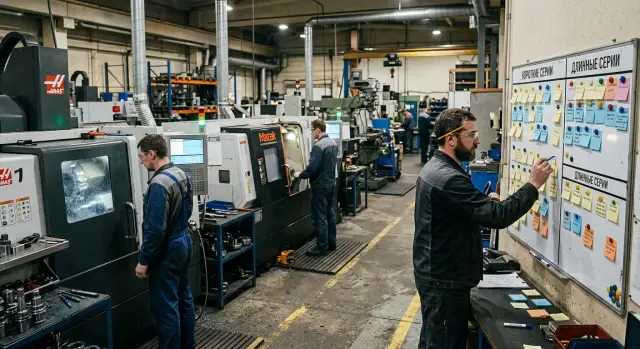
Where chaos starts with two lathes
In a bay with two turning machines, disorder usually doesn't begin because there aren't enough hours. It starts with constant rescheduling during the shift. While the plan lives only in the foreman's or operator's head, the queue breaks at the first urgent phone call.
The most common scenario is this: a long run is already in process, tooling is set up and the dimension is established, and then a small urgent order arrives. They push it forward because it's "quick" and the customer is waiting. On paper that seems reasonable. On the shop floor it has the opposite effect. The long run is broken, the machine is retooled, and work on the original job doesn't resume immediately.
A couple of hours later another problem appears. A fixture hasn't been delivered for one order or blanks aren't ready, and the operator changes the plan again. One machine waits even though that order is marked urgent. The other machine is loaded with anything that can run without pause. Both machines appear busy for most of the shift, but delivery dates still slip.
This mode is often called flexibility. In reality it's a chain of small losses: new setup, rechecking the first part, searching for a cutter, waiting for a program, extra transfers of blanks between machines. On two machines this is especially obvious because there's little room to maneuver. If one machine waits for tooling for 40 minutes, the other can't indefinitely carry the whole flow.
It's easy to tell when the bay already lives in manual chaos. The shift plan is changed several times, small urgent batches constantly wedge into long runs, and by the end of the day there are fewer finished orders than expected despite high apparent utilization.
The problem is usually not people. The problem is the shop doesn't have a simple rule: which order goes first, which can be moved, and which must not be touched even when there's noise around.
What to gather before making the queue
To keep the plan from turning into a debate at the board, first collect the same facts for every order. Not guesses or deadlines like "about Friday," but a short card with facts. Without these data any plan will fall apart by mid-shift.
The most common mistake is simple: the schedule lists only the shipping date. That isn't enough. Two orders can have the same deadline, but one takes 40 minutes and the other consumes almost the whole day including retooling. Without those numbers the shop almost always pushes the wrong job forward.
For each order record five things:
- the exact date and time when the order must leave the bay;
- cycle time per part and the batch size;
- how many minutes the changeover takes;
- whether the order can run on the second machine without quality loss or extra rework;
- whether the batch can be split or must be run whole.
That's enough to remove most ad hoc decisions. The deadline shows when the order can't be delayed. Cycle time and batch size give the real duration. Changeovers change the picture more than many expect: a short run of 25 parts can look light but take half a shift if it needs a long transition.
Also verify what the second machine can actually do. On paper both machines often seem interchangeable, but in practice one may not accept the required diameter, may lack axis travel, or may have different tooling. Put a simple note next to the order: "both machines" or "machine 1 only."
For non-splittable batches clarity is needed in advance. If a job can't be broken up due to inspection, packing, heat treatment or customer agreement, mark it immediately. Otherwise the dispatcher may start half the batch in the morning and by afternoon it becomes clear that splitting only added an extra changeover and delayed the next job.
A convenient format is very simple: one line per order and several mandatory fields without long comments. If for a batch of bushings you see deadline — tomorrow 16:00, cycle — 2.5 minutes, quantity — 120 pcs, setup — 35 minutes, can run on both machines, and can be split, then the decision no longer needs to be pulled from memory.
How to separate short and long runs
Deadlines on two machines are broken not so much by order volume as by excessive changeovers. When short batches cut into long ones, the operator spends time on setups and the long run stretches to the end of the shift or spills to the next day.
The simplest approach is to separate work into two types from the start. A short run is a batch the machine closes quickly and without long workstation occupation. A long run is an order that holds the machine for a noticeable part of the shift and tolerates stops poorly.
A practical rule: long runs form the backbone of the plan, short runs are inserted into free windows. A window appears before a big run begins, after it finishes, or when the second machine is freed earlier. This way you don't break the whole schedule for one urgent job and don't pile up small work until evening.
It's useful to keep a few hard limits:
- don't interrupt a long run if delaying the short batch won't break its delivery deadline;
- group short runs together if they use similar material, tooling or chucks;
- limit urgent insertions in advance, for example one or two per shift;
- if two small batches require the same setup, run them consecutively.
In practice this looks calm and even a bit boring, and that's a good sign. The first machine takes a long batch of housings for most of the first half of the shift. The second closes two short runs of bushings and adapters because they need a similar setup. Then the second either takes the next short job or picks up part of the long order if it can do so without a new setup.
When not to split a long run
If a long order is already running, it's better to bring it to a clear stopping point: the end of the lot, a pallet or a shiftable volume. Otherwise the bay loses time twice — on the stop and on the re-entry. There's usually one exception: the short run is truly urgent and the customer's loss from delay exceeds the cost of your extra changeover.
This is especially noticeable for CNC machines. Even ten extra minutes for changing tooling, checking the first part and adjusting the program quickly eats the shift's buffer. A good plan therefore usually looks simple: fewer interruptions, fewer urgent insertions, more similar parts in sequence.
How to prioritize step by step
Queues break more often because of habit than complex calculations. One job is added verbally, another is forgotten after a changeover, a third is put "just in case" at the top. To avoid a shift of constant manual decisions, collect the day's and shift's orders in one list and process them by the same order.
First, write out all orders that can realistically enter production today. Not only what needs closing in a few hours, but everything that must leave by the end of the day. Next to each order note the deadline, setup time and available machine. If a part runs only on one machine, mark it immediately. Otherwise you might occupy that machine with convenient work and later create a bottleneck.
Then follow five practical steps.
- First, assign long batches to the machine where they will proceed without unnecessary stops.
- Then look for windows of 30, 60 or 90 minutes. Insert short urgent runs there if they don't require heavy retooling.
- If a short order is urgent but would consume half a shift in setup, don't automatically put it first. Compare time losses with the risk of missing the deadline.
- Reserve time for one unplanned job. Even 30–60 minutes often save a shift when an add-on order arrives or the first part goes to scrap.
- As soon as the first batch is complete, quickly rebuild the remainder of the plan. After the real start the picture almost always changes a bit.
A simple example. Machine 1 has a long run of housings for six hours. Machine 2 can alternate two short runs of bushings and flanges. If an urgent order for 20 parts arrives mid-shift, it's better to insert it into the second machine's next window than to remove the long run from machine 1. Otherwise you pay time for the stop and the new setup again.
This order is good because the foreman sees not only urgency but the cost of each switch. The plan on paper isn't perfect but it fits the real shop.
Example shift in one bay
At the start of the shift the bay receives five tasks: two long runs and three urgent small orders. If the foreman begins moving them around by calls and requests, both machines will quickly fall into constant retooling and fewer parts will be finished by evening than expected.
Suppose machine 1 is already set up for a long run of 180 housings. The setup here is rare and long: special chucks, its own cutter, a test part and first-pass inspection. You shouldn't pull this machine every hour and a half. Otherwise time is spent on stops rather than cutting.
It's logical to give machine 2 the urgent small items. Its setups are simpler, so the operator can close two short orders before lunch, for example 12 and 20 parts. This only works if the material is at the machine and the inspector knows when to pick up the first good part.
The third urgent order shouldn't be put across the long run. Check whether it partially matches the current setup. If machine 1 can produce another 10 urgent parts without changing tooling, the operator makes them after the control measurement and returns to the long series.
The whole shift then looks steady. From 8:00 machine 1 holds the long run with few pauses. Before lunch machine 2 closes two short batches and hands over urgent parts to shipping. After lunch machine 2 moves to a second long series, and machine 1 inserts the third urgent order into its window without a full new setup.
By the end of the shift urgent jobs are ready and the big run hasn't been chopped into 10–15 piece fragments. This order usually works better than constant yanking: one machine keeps a long rhythm, the other handles urgency, and the foreman only changes the plan where it costs almost nothing in time.
How to account for changeovers and idle time
Changeovers wreck even a neat plan if they're counted as secondary. Often schedules include only cutting time while changing chucks, fixtures, tooling and programs is treated as "between tasks." In practice these minutes consume the shift, especially on short runs.
Count setup as part of each order. If a batch turns 40 minutes and preparation takes 25, the order's real place in the queue looks very different. Then the dispatcher sees not a pretty theory but the full time the machine will be occupied.
If two parts require different tooling, don't schedule them back-to-back without clear benefit. A frequent mistake: an urgent small order is inserted between two similar long runs, creating two extra changeovers instead of one. Sometimes it's faster to run the urgent batch on the second machine, and sometimes it's wiser to wait for a window and not break the flow.
When to move an order to the second machine
A transfer makes sense only when it actually saves time and doesn't create the illusion of progress. Compare not only the machine's free minutes but the whole trail of the order:
- how long changeover on the second machine will take;
- whether the needed tooling and fixtures are there;
- whether the transfer will derail an already planned batch;
- how many minutes you'll actually gain.
If the gain is 10–15 minutes and the risk of shifting two other orders is high, the move is usually unnecessary. If the second machine is already set for a similar part and the saving is about an hour, the decision is obvious.
Short idle windows are also better planned. Not every pause must be closed with a big job. For 15–30 minute windows keep a short list of works that can start quickly and without new setup: small repeat batches, finishing leftover quantities, a control part after the previous series or a simple operation on already installed tooling.
This works especially well where the foreman already knows which orders are compatible by chuck, tooling and program. The machine doesn't stand and staff don't decide at random.
Mistakes that create manual chaos
Chaos doesn't begin when there are many orders but when the queue is changed on a whim. In a two-machine bay this is obvious: any new urgent order is placed first, the previous one is pushed back, then they swap again. As a result the plan lives separately from actual loading and the shift spends time on arguments and retooling.
The most common mistake is always promoting the most urgent job. On paper it looks like client care, but on the floor it causes long runs to never finish, short runs to multiply, and the operator to change tooling and modes several times a day. If this goes on for a week, the bay loses hours to switching rather than cutting.
Equally bad is chopping a long run after every new request. If a batch of 300 parts is running steadily, don't fragment it because of a 20-piece order if the deadline can wait until the next window. Otherwise the long run stretches over several days and work-in-progress accumulates between machines.
Where the plan breaks most often
Another frequent mistake is promising deadlines before checking real conditions. A manager or foreman looks only at a free window in the schedule and doesn't confirm whether the tooling is available, the fixture is ready, the program loaded or the inspection station free. After that the shift gets a nice date that can't be met.
Missing the first-part inspection also hits deadlines. When the shop rushes everyone wants to start the series immediately. Yet the first part shows offset, wrong tool runout or a program mistake. Skipping the check can cost not 10 minutes but half a shift for rework and sorting.
You usually notice failure by several signs: deadlines promised before the setup check, long runs chopped into small pieces, urgent orders pushing everything aside, and only one person knowing job statuses.
The worst habit is keeping the whole plan in the foreman's head. While they're present the bay somehow moves. When they go to lunch, on vacation or to another machine, questions start: what to launch next, what's already checked, what awaits tooling, what can be moved. For a CNC shop this isn't enough. You need a simple, visible order: job sequence, setup status, first-part control and a clear rule when an urgent order really goes out of turn.
Quick check of the plan before launch
A shift plan looks good only on paper. Before starting it's useful to do a short check. Both machines should start without pause, the operator shouldn't run for clarifications, and an urgent order shouldn't break the whole day.
If the plan is assembled correctly you can see five things at the start:
- every order has a deadline, a quantity and one responsible person;
- both machines have work from the first hour and continue without empty windows;
- setups are planned consciously and don't consume half the shift;
- an urgent order can be inserted without three moves of other batches;
- the operator already knows what to run after the first batch.
The first point often breaks the rest. If an order has no owner, any question stalls: who confirms material, who permits a move, who says if the batch can be split. As a result a machine stands idle even though the plan seems ready.
Then check time loading. Between the end of one job and the start of another there should be no blank hour or even twenty minutes without reason. Sometimes it's better to put a short batch after a long one than to keep the second machine empty waiting for tooling.
Be strict with setups. If four or five changeovers of 40 minutes accumulate in a shift you've already lost too much time. That means sequence needs rebuilding and grouping similar parts by chuck, tooling or material.
Simple urgency test
Try mentally inserting an urgent order in the middle of the day. If that requires moving three other batches, rewriting operator tasks and recalculating time on both machines, the plan is weak. A normal plan holds at least one urgent window or a clear place for a quick swap.
One more simple check: the operator should see not only the current job but the next one. If after the first batch they go asking what to do next, dispatching still lives in people's heads rather than in a clear order.
A good plan before start doesn't look perfect. It looks clear: who is responsible, what is on each machine, where setups are and where the urgent job will fit if it arrives at 11:00.
What to do next
If the queue changes by calls, urgent requests and the foreman's habit, don't try to fix everything at once. The worst is introducing a new rule every day and then guessing what worked.
Pick one rule for a week. For example, short runs are launched only in one morning window and long runs aren't interrupted without cause. Or the opposite: urgent short orders are scheduled only after the current part is finished, without sudden swaps mid-cycle.
Next you need measurement. Without numbers even a good order quickly becomes a dispute. Record every order move, note downtime reasons, count unplanned setups separately from planned ones, and at the end of the shift log actual output per machine. After a week compare plan and fact.
Look not only at output. Sometimes a bay makes the required number of parts but loses too much time on switching between orders. If you see many transfers, extra setups and frequent pauses in a week, change the queue rule.
It's useful once a week to analyze one specific day. For example, on Wednesday you planned to finish a long run on machine 1 and two short runs on machine 2, but in reality both machines spent half a day on changeovers. Such an analysis quickly shows where the plan is weak: deadlines, tooling preparation, or wrong order distribution.
If the bay constantly hits changeover limits, the problem may not be only dispatching. Sometimes the incoming order flow doesn't suit the current pair of machines. In that case it makes sense to discuss the task with EAST CNC - the official representative of Taizhou Eastern CNC Technology Co., Ltd. in Kazakhstan. The company handles selection, supply, commissioning and service of CNC lathes, so the conversation can be concrete: which machine better holds long runs, where to leave a window for urgent orders and how much time setups really take.
Keep the rule that produces the steadiest output. Remove the rest.
FAQ
Where to start planning the queue on two lathes?
Start with one line per order. Write down the dispatch deadline from the shop, the cycle time, batch size, changeover time, which machine can run it, and whether the batch can be split. If you don't have these facts, the shift will quickly fall into arguments and urgent reshuffles. A deadline alone doesn't help until you see the full machine occupation time.
How to tell if a run is short or long?
Look not at the number of parts but at how long the order holds the machine including setup. If the batch is closed quickly and doesn't take a noticeable part of the shift, it's a short run. If the order runs for hours and handles stops poorly, it's a long run. This division is enough to work with. Exact thresholds can be set by each shop based on their setups.
Should a long run be stopped for an urgent order?
Usually no. If a long run is already stable, it's better to take it to a clear stopping point: end of the batch, a container, pallet or a shiftable volume. Interrupt only when the urgent order truly cannot be delayed without client loss. Otherwise you pay twice: for the stop and for restarting.
When does it make sense to move an order to the second machine?
Move an order only when the second machine gives real time savings. Compare the setup time, availability of tooling, the second machine's current queue and the risk of shifting its tasks. If the gain is 10–15 minutes, the transfer usually isn't worth it. If the second machine is already set up for a similar part and saves around an hour, the move is justified.
Why do deadlines slip even though both machines are almost always busy?
This is a common trap. Machines can be busy while the shop loses the shift to changeovers, tool searches, awaiting fixtures and repeat checks of the first part. Check how much time is spent on switching rather than cutting. Deadlines slip not from lack of load but from excessive breaks inside the queue.
Should you keep reserved time for urgent orders?
Yes. Keep at least a small time window. Even 30–60 minutes often saves a shift when an add-on order arrives, material isn't ready or the first part needs adjustment. Without that buffer any unplanned job breaks the day and creates cascaded reschedules.
How to reduce losses from changeovers?
Count changeovers as part of each order, not as incidental between jobs. Then schedule similar materials, tooling or chucks back-to-back. Also use rules: limit urgent insertions and don't chop long runs without a good reason. This keeps machines cutting metal rather than standing for setups.
How to tell the shop lives in manual chaos?
You'll usually notice it quickly. The plan is changed several times per shift, one person knows the status of jobs, and once they leave everyone asks what to start next. Another sign — small urgent batches keep inserting into long runs, and by evening there are fewer finished orders than expected.
How to quickly check the plan before starting a shift?
Before the shift starts, check simple things: every order has a deadline and an owner, both machines have work from hour one, the operator knows the next batch, and an urgent job can be inserted without redoing the whole queue. If inserting one job requires moving three others, the plan is weak. Better rebuild it before start than in the middle of the day.
What to implement first to remove chaos without a big overhaul?
Pick one rule and keep it for a week. For example: long runs aren't interrupted without cause, and short runs are only placed in predefined windows. At the same time track transfers, downtime reasons and unplanned setups. After a week compare plan vs. actual and keep the rule that delivers steady output.