
Operator Feedback in CAM Without Arguments or Extra Words
Operator feedback in CAM works when the note includes sound, chip shape, cycle time, and the exact section of the toolpath.
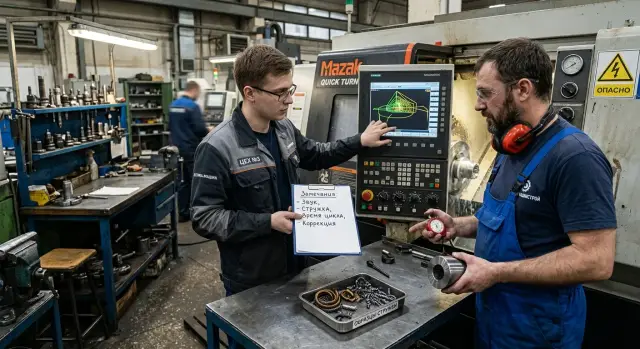
Why comments do not reach CAM
The problem is usually not that the operator “explained it badly” or the programmer “did not want to listen.” More often, the meaning gets lost on the way from the machine to CAM. A verbal comment lives for a couple of minutes, then someone retells it in their own words and the important details disappear.
At the machine, the operator says: “It whistles on the finishing pass after the plunge.” Half an hour later the programmer hears a different version: “the machine is noisy.” From that phrase, it is impossible to tell where to look — at the entry, on the arc, at the exit, in the feed, in the spindle speed, or in the allowance.
Words like “noisy,” “takes too long,” or “bad chips” are almost useless. The programmer needs a clear link to a specific point in the process. If it is missing, they open the toolpath and start guessing. That is usually where it ends.
There is a second reason too. The operator remembers a moment from real work: after a tool change, on the second part, closer to the chuck, before exiting the groove. The programmer looks not for a “moment,” but for an operation, a transition, and a code line. They are talking about the same thing, but they see it differently.
This is especially noticeable on a lathe. The operator may say: “It squeals on the second shoulder.” For them, that is enough: they heard the sound and saw the chips. The programmer needs more. They need to understand which tool was working, which part of the profile it happened on, and whether it repeats on every part.
When a message has no facts, the conversation quickly turns into an argument. The operator is sure there is a problem because they can hear and see it. The programmer looks at the simulation and does not see a clear failure. In the end, they are no longer discussing the CAM toolpath, but whose impression is more accurate.
Only feedback from the operator to CAM works well when it includes a short observation and an exact reference. Without that, the note stays a shop-floor conversation, not a basis for correcting the program.
What the programmer needs in one note
The programmer changes the toolpath only when they see a checkable fact, not an opinion. If the note cannot be opened and matched to the operation right away, it almost always turns into a round of clarifications.
A good note can be read in half a minute. It contains enough data to show where to look for the cause: in the feed, the entry, the tool exit, the allowance, or the machining strategy itself.
One note should include five things:
- part number and operation
- tool and toolpath section
- what is heard during cutting
- what the chips look like
- the actual cycle time
That is already enough to work with. For example: part 2147, operation 30, tool T04, noise appeared in the last third of the finishing pass, chips were long and sticky, and the cycle was 6 minutes 40 seconds instead of the usual 5 minutes 50 seconds.
It is best to write the observation in the same order it will later be checked in CAM: part and operation, then tool, then section, sound, chips, and time. That makes the note easy to compare both with the simulation and with what happened at the machine.
If the section is named too vaguely, the programmer may lose 15–20 minutes just finding the right spot. If there is no chip description, they often change the wrong parameter. If time is not stated, it is unclear whether this is a real cycle loss or just the feeling that the machine is moving slower.
A good note is not long. It is precise.
A short shift template
A note should take less than a minute. When the operator writes in one consistent format, the programmer does not see a general complaint, but a set of signs that can be checked in CAM and at the machine.
A convenient format looks like this:
1. Part / operation / tool
2. Sound: what exactly and on which section
3. Chips: shape, length, color
4. Time: target and actual
5. Repeat: when and how many times it happened
It is better to fill in the lines with simple words. Not “there are machining problems,” but “on the finishing pass along the outer diameter it whistles for 2–3 seconds.” Not “the chips are bad,” but “the strip is long, bluish, and wraps around the part.” The fewer vague words you use, the higher the chance the program will be corrected on the next iteration.
The first line is needed so the right operation can be opened immediately. If the tool is not specified, the note can easily get lost: one part may have several similar passes. The second and third lines show what is happening during cutting. Sound often points to vibration or excess load, while chips help explain how material is leaving the cutting zone.
The fourth line is not for reporting, but for choosing a solution. If the cycle grew by 8 seconds, it makes sense to first check for an extra rapid move or too cautious an entry. If the time did not change but the sound got worse, it is worth looking at the feed, depth, or a specific section of the toolpath.
The fifth line separates chance from repetition. One strange sound after a insert change and three identical repeats on one operation are very different priorities.
Here is a note that is usually accepted for work without follow-up questions:
"Body A17 / OD finishing / T0303. A short whistle appears for 2 seconds at the exit. Long, light-blue chips, wrapped around the part a couple of times. Target 1:40, actual 1:49. Repeated 3 times on the 2nd and 5th parts of the shift."
Such a note can be checked immediately, without calls or guesswork.
How to set up collection step by step
If one machine calls the sound a “whistle” and another calls it “singing,” the programmer will not understand what actually happened. You need a common vocabulary. At the start, 4–5 sound words are enough: steady hum, whistle, chatter, impact. Each word should have one meaning for the whole shift.
The same principle works for chips. Do not ask people to invent a new description every time. It is better to show 2–3 examples of normal chips for a specific operation once and keep them near the workstation. Then the operator compares the actual result with the sample instead of searching for words on the fly.
Next, you need a simple rhythm:
- the supervisor and programmer agree on short sound words in advance
- for frequent operations, 2–3 samples of normal chips are kept
- the operator records the note immediately after the part or cycle
- each note includes only one symptom
- new notes are reviewed every day at the same time
Writing the note right after the part changes a lot. By the end of the shift, people mix up tool numbers, forget the toolpath section, and combine several problems into one. A short note made while the issue is fresh is usually more accurate, even if it is only one line.
Separating symptoms also saves time. If you write “it is noisy, chips are stringy, cycle grew” in one message, the programmer has to guess what happened first and what is connected to what. Three short notes are more useful than one general complaint.
Reviewing them at the same time every day also matters. If the team looks at notes this morning, tomorrow evening, and then three days later, the system quickly falls apart. It is easier to choose one moment, for example after the first batch of parts, and keep it every working day.
After a week, it will become clear which wording helps change the toolpath and which only irritates people. After that, the form should be reduced to the minimum and keep only what helps find the exact pass, tool, and cycle deviation.
How to describe sound, chips, and cycle time
The programmer does not need emotions; they need signs that can be checked. So instead of “cuts badly,” it is better to write what the operator actually hears and sees: “whistle,” “chatter,” “hum,” “long chips,” “cycle became 30 seconds longer.”
The word “badly” does not help. One person uses it for a light whistle on entry, another for strong vibration on the finishing pass. When the note is precise, the argument usually ends quickly: the programmer opens CAM and looks at the specific section.
For sound, it is better to use simple words and not try to diagnose it right away. “Whistle at material entry” is more useful than “the tool is unstable.” It is even better if the operator adds the moment it starts: “the whistle began on the second pass along the outer diameter.”
For chips, you need visible signs. Long chips may mean the chipbreaker is not working. Torn chips often come with vibration. Blue chips point to overheating or too heavy a cutting condition. If the chips change only at the end of the pass, that is important too.
Cycle time is even simpler. Do not write “it got slow.” Compare it with the standard: “the part used to run in 4:10, now it is 4:55.” That difference immediately points the check toward feed, extra approach moves, or repeated motions.
One good note can look like this: “Whistle on the finishing pass along the outer diameter, started with the third part. Chips are long, partly blue. Cycle was 3:20, now 3:50. Repeats on every part.”
That is enough to compare the program with what is happening at the machine and avoid arguing over wording.
Example of a note without extra words
If the operator writes “it is noisy” or “the cycle grew again,” the programmer has nothing to work with. You need a short note linked to the part, operation, tool, and the place where the problem appears.
Part: flange
Operation: OP20
Tool: T03
Section: finishing pass near the face
Sound: chatter is heard near the face on exit
Chips: long strip, catches on the part
Cycle: was 48 s, now 57 s
Check: feed on the finishing pass and tool exit
This format is better than a normal verbal comment. The operator does not diagnose or argue about the settings. They simply give facts: where the sound is heard, what the chips look like, and how much the cycle time increased.
For the programmer, that is enough to open OP20, find T03, and check two places in the CAM toolpath: the feed on the finishing pass near the face and the tool exit from the cut. Chatter often appears exactly there, and the long chip strip only confirms that the section should be reviewed.
A bad note sounds like this: “Something is wrong with the flange again, the machine is clattering, we need to fix the program.” There is no operation, no tool, no section, and no cycle number. With a phrase like that, everyone understands the problem differently.
If you need one more comment, add only a fact. For example: the chatter is not heard throughout the whole pass, only at the end. Or: the chips catch on the part twice in one cycle. That is already enough for the note to be worked on.
Where things usually break down
Most comments are lost not because the programmer is stubborn. The note simply does not show what exactly should be changed in CAM. If the operation, tool, and failure moment cannot be found quickly, the toolpath stays unchanged.
Most often, the problem is in the way the message is written. The operator saw everything correctly, but passed it along in a way that made the programmer guess. In the shop, there is usually no time for that.
Typical failures look like this:
- no tool number or operation
- several problems mixed into one note
- the message was sent a day after the shift
- someone asks to “speed it up,” but gives no numbers
- instead of facts, the conversation turns into an argument about approach or work style
A good note is always tied to a place and one observation. For example: tool T08, operation O120, at the 42-second mark a whistle appeared, the chips came off as a long strip, and the whole part cycle was 3:40. That text can already be checked against the code, feed, and entry into the material.
A bad version sounds like this: “The program needs to be faster, it runs too heavily.” There is no number, no section, no sign. The response will be a series of clarifying questions, and the operator will feel ignored again.
In practice, one simple rule works well: one note — one problem — one fact. If it is noisy, write about the noise. If the chips are stringy, write about the chips. If the cycle is longer than normal, give the number and the operation where it shows up.
A quick check before sending
Before sending, spend 30 seconds on a short filter. If the note does not pass these points, the programmer will ask follow-up questions first instead of opening the toolpath.
- the part, operation, and tool are listed
- the section where the problem should be found is clear
- only one repeatable symptom is left
- there is a target vs actual time comparison
- the text can be read in 20 seconds
A good note can always be checked again at the machine. The programmer does not need text like “it seems to cut heavily,” but a short repeatable fact: where it happens, on what, with which tool, and how exactly it appears.
For sound and chips, stick to simple words. “Whistle at the exit from the pass” is better than “an unpleasant foreign noise.” “Short blue chips at the 120–140 mm transition” is better than “the chips are weird.” The fewer opinions and the more observations, the fewer arguments.
On a CNC lathe, the difference is especially noticeable. One operator writes: “T02 is noisy, cuts slowly.” Another writes: “part shaft 40Х, rough outer pass, T02 CNMG, section 85–110 mm, steady hum appears on the second part in a row, cycle 1:52 instead of 1:37.” The second note can actually be worked with.
If even one point is missing, it is better not to send the message right away. It is easier to add what is missing and remove the extra text than to spend time on long back-and-forth later.
What to do after the first week
After seven shifts, you already have enough material for decisions. Even one week is enough to spot repeats: the same section is noisy, the same operation produces long chips, and the same cycle time keeps going above the norm.
Collect all notes from the week into one table or log. Do not analyze each one separately. First look for what repeated at least twice on the same part, with the same tool, or in the same operation. Repetition is more useful than long discussions.
Then divide the notes into four groups:
- repeats on the same CAM toolpath
- cases where cycle time increased
- identical comments on sound and chips at the same settings
- one-off notes without time, tool, or section
The first three groups should be reviewed right away. The last one is better sent back for clarification. Otherwise, the discussion will quickly slide into phrases like “something was wrong,” and there is nothing to do with that.
After that, separate toolpath errors from machine limitations. If the unpleasant sound appears only in one place in the program, the cause is often the approach, tool exit, step, or depth of cut. If the problem repeats across different programs and different parts, and the notes keep mentioning vibration, overload, or poor chip evacuation, it is worth checking the machine itself, the fixtures, and the setup.
After the first week, it is best to lock in one common template for everyone. If the operator writes “it whistles on the exit,” and the programmer still lacks the tool number, section, and cycle time every time, the system will not work. A short, strict format is almost always better than free text.
A simple example: in one week, six notes came in for one part. In four of them, the same wording appeared: “T03, internal roughing pass, 00:42–00:49, whistle on exit, long chips, cycle +11 sec.” That is already enough to check a specific section and correct the toolpath without unnecessary shop-floor discussion.
If the review shows that correcting the program will hardly help, it is better not to stretch the argument. In such cases, the task can be moved to a technical inspection. EAST CNC, the official representative of Taizhou Eastern CNC Technology Co., Ltd. in Kazakhstan, handles supply, commissioning, and service support for CNC lathes, so these issues are best discussed not as a dispute between the operator and the programmer, but as the condition and capabilities of the machine.
The conclusion is simple: remove duplicates, keep one clear template, and split all notes into two groups — “fix the toolpath” and “check the machine”.
FAQ
Why do verbal comments often not help the CAM programmer?
Because people retell the note in their own words and lose the link to the machining area. A phrase like `the machine is noisy` does not tell the programmer where to look: at the entry, in the cut, at the exit, in the feed, or in the allowance.
What should be included in one note so it gets worked on?
Keep five facts: the part, operation, tool, toolpath section, and the symptom itself. Then add the chip type, the actual cycle time, and how many times it repeated.
How should you describe sound at the machine?
Write what you actually hear and tie the sound to a specific section right away. For example: `a whistle on exit from the finishing pass for 2 seconds` or `chatter near the face at the last few millimeters`.
How do you describe chips without vague words?
Look at the shape, length, color, and behavior of the chips. A good note sounds like this: `long bluish chips, wrapped around the part twice` — that is already enough for a check.
Why mention cycle time if the problem is already audible?
Yes, without a number you are leaving only a feeling. Compare the target and the actual result right in the note: `was 1:40, now 1:49`, and the programmer will understand faster whether to look for extra motion or adjust the cutting conditions.
Can you describe several problems in one message?
It is better to write one symptom in one note. If you mix noise, chips, and cycle growth in one message, the programmer will start guessing what caused what.
When is it better to record a note — right away or at the end of the shift?
Send the note right after the part or cycle. After a few hours people mix up the tool number, the toolpath section, and the moment when it happened, and by the end of the shift they often blend different cases into one complaint.
How can you quickly tell whether a note is ready to send?
Check the note against a simple filter: there is a part, operation, tool, section, and one clear symptom. If you also include the target and the actual time, the message will almost certainly go for review without extra questions.
How do you tell whether the problem is in the toolpath or in the machine itself?
If the same failure repeats in the same place in the program, start by correcting the toolpath. If similar complaints appear across different programs and parts, check the machine, fixtures, and setup instead of arguing only about CAM.
What does a good short note for a programmer look like?
This format works well: `Body A17 / OD finishing / T0303. A short whistle appears for 2 seconds at the exit. Long, light-blue chips, wrapped around the part a couple of times. Target 1:40, actual 1:49. Repeated 3 times.` It gives everything needed to open the right operation and check the section.