
Oil in the coolant emulsion: how to find the source within one shift
Oil in the coolant often comes from the hydraulic system, way-lubrication or a faulty return. Same-shift checks can save tools and prevent rework.
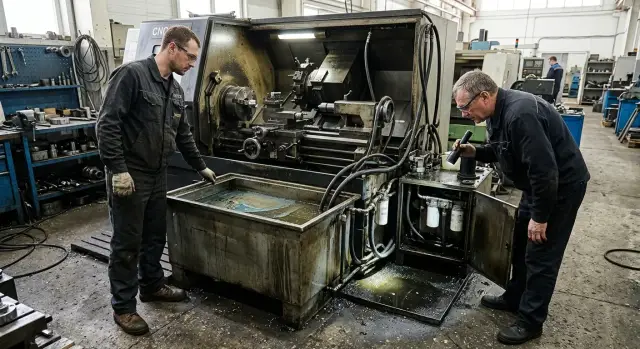
Why you can’t postpone the check
An oily rainbow on the tank and a greasy mark on your finger is not "a little oil." It’s foreign lubricant already changing the coolant’s properties. While the machine runs, the film sits on top and prevents the fluid from removing heat from the cutting zone effectively. The coolant performs worse exactly when the tool needs consistent heat removal.
Cooling usually suffers first. The insert or cutting edge runs hotter and dulls faster, leaving matte patches, stains and uneven marks on parts. On gummy materials this shows up quickly: the cutting sound changes, chips darken, and the tool behaves as if it were worn.
The problem doesn’t stop there. Parts come out dirtier, a greasy film remains on the surface, and fine chips stick to the coolant and don’t leave the work area properly. That increases the risk of scratches, rework and rejects.
Early signs are often visible within a single shift:
- a rainbow film or dense oil islands on the tank surface;
- a greasy spot on a white wipe after touching the coolant;
- the tool heats more than usual and loses its edge sooner;
- dimensions drift on long passes because of extra heat;
- parts come out dirtier and chips seem sticky.
Waiting until the next day is costly for a simple reason: the pump circulates the mixture and oil spreads through the whole volume quickly. In a few hours it’s already in the tank, in the return and on machine components. Finding the source becomes harder. If you act the same day, cleaning the surface, a quick inspection of components and a targeted repair are often enough. If you delay, oil in the coolant shortens tool life, ruins part cleanliness and can force a full fluid change.
What to do in the first 30 minutes
First, stop any topping up. Don’t add coolant, hydraulic oil or way-oil until you know where the contamination is coming from. Otherwise the trace mixes quickly and the cause becomes much harder to find.
Take two clean clear containers. Sample one from the very surface where the oil film collects and the other from below the top layer. Even this simple test often gives the first hint. If the surface contains almost only oil while the depth looks normal, the leak is fresh or intermittent. If both samples are cloudy and greasy, the problem has already spread through the volume.
Then immediately record levels at three points: the coolant tank, the hydraulic tank and the way-lubrication tank. Don’t keep this in your head — write the numbers down or at least take a timestamped photo. In an hour a difference of a few millimeters can show which system is losing fluid.
Next, inspect the tank, troughs and the drain area in good light. Look into the tank, troughs under the working area, coolant return points and the section where chips leave into the drain. Don’t look only for surface film. Watch for fresh streaks, greasy stripes on walls, rainbow trails in corners and sticky deposits where only coolant should be.
If the machine recently ran a long cycle, check the drain area at the end of the operation. Sometimes oil only enters the coolant in one axis position or at moments when hydraulic pressure is higher than normal.
During these thirty minutes you should not start repairing the machine. Preserve the scene and collect simple evidence. Then checks of the hydraulic system, way-lubrication and coolant return will produce leads you can act on in the same shift.
How to check the hydraulic system
If the hydraulic system is adding oil, the film on the coolant usually grows during clamp action, chuck operation, turret movement or another unit powered by the hydraulic station. So watch not only the tank but the coolant behavior during the cycle.
First, record the hydraulic tank level on a cold machine. Mark it or photograph it. Then let the machine reach normal temperature and check the level again. A small change is possible, but a noticeable drop without an external leak already means oil is going somewhere.
Before inspecting, wipe the area around the hydraulic unit, hoses and fittings. On dirty surfaces old marks only confuse you. After wiping, a fresh leak is visible immediately: it shines, gathers dust on the edges and often runs in a thin trail downward.
Check these four places first:
- hoses at bends and near crimps;
- fittings and threaded connections;
- hydraulic cylinders and rod exits;
- pipes and joints near the hydraulic station.
Use both eyes and hands. Wipe under a connection, not just beside it. If the wipe picks up clean oil rather than coolant, the source is already close. At cylinders pay attention to the rod and dust seal — a thin fresh streak often appears there and is easy to miss.
Then match the inspection to machine operation. Run a cycle that actuates the hydraulic units more often: clamp, unclamp, rotate, feed. If the coolant film thickens at the return window during that time and the hydraulic-tank level drops, the hydraulic system is very likely the source.
A practical check: look at the coolant before the cycle and after 10–15 minutes of frequent hydraulic action. If the film grows in that interval and the hydraulic level slowly falls, don’t delay repairs. Even a small leak quickly worsens cooling, chips begin to stick and part surface stability is lost.
If there’s no external leak but the signs remain, check internal drains and any heat exchanger connected to the hydraulic system. These cases are rarer, but the pattern is the same: the tank empties while film reappears in the sump repeatedly.
How to check the way-lubrication system
Way lubrication is one of the most frequent oil sources in coolant, especially if the film appears mid-shift. It’s better to check on a machine that has warmed up and run with coolant for 20–30 minutes. On a cold machine lubrication traces often look weaker.
First, inspect the oil feed. If the meter dispenses too much or the system lubricates the guides too often, excess oil won’t remain on working surfaces and will run down. On a CNC lathe this is usually visible as fresh oil tracks under covers and in trays, which then flow straight into the tank.
Check the usual lubrication interval for that machine. Recall whether the dispenser setting or cycle timing changed recently. Then measure the oil level in the reservoir at the start and end of the shift and compare consumption to what it used to be under a similar workload. If usage increases by 1.5–2× without reason, it’s not normal. Typical causes are an overfeeding dispenser, a sticking valve, damaged tubing or an incorrect setting after maintenance.
Next, follow the oil path. If it’s safe, open covers and trace the route from the feed point to the ways and then down to the covers, sump and drain troughs. Look for fresh light streaks rather than old dirty film. They’re easiest to see right after a lubrication cycle.
On a correct machine oil stays as a thin film on the ways and should not pour out. If it collects under a cover and immediately flows into the coolant trough, you’ve almost found the source. Often the fault is local: a worn seal, a loose scraper or a cracked tube near a fitting.
A useful trick is to place a clean wipe at a suspect point for 5–10 minutes after a lubrication cycle. If it quickly soaks up clean thick oil and a fresh film appears in the tank, the way-lubrication is going where it shouldn’t.
If you have several identical machines, compare oil consumption and the condition of ways on a neighboring machine. In the shop the difference is obvious: one machine loses noticeably more oil per shift and its coolant tank gets a film sooner. That’s a good clue where to search before the next run.
What to check in the return and drain
If oil shows up in the tank within an hour after start, inspect not only pumps but the coolant return path. Flow often breaks along the way: chips block pockets, troughs stagnate, and oil accumulates on top. You usually see oil at that point first.
Start with a simple cleaning. Remove chips from pockets, drain troughs and strainers. Even a thin layer of fine chips changes flow: liquid slows, heavy particles settle and light oil stays on top and doesn’t go further.
Ask the operator to run coolant return for a minute and watch how it returns to the tank. Normal return is smooth, without overflow or quiet puddles in corners. Where flow stops or pools, look there for oil separation.
Check these zones:
- pockets and corners in the working area where fine chips collect;
- drain troughs and strainers before the tank;
- chip conveyor, if a thick oily mixture leaks from it;
- filters and partitions inside the tank where flow slows.
Then look inside the tank. If one compartment has a thicker film than the others, the cause is often not the tank itself. A partition, filter or inlet channel usually slows the flow and oil rises where the coolant is calm.
A small thing that’s easy to miss: dirt under a strainer or behind a partition. From above the drain may look clean, but below the passage can be half-blocked. Coolant then bypasses and a thin oil layer stays on the surface.
A quick test: mark the film level with a marker, then clean troughs, strainers and pockets, run the machine for 10–15 minutes and compare. If the film reduces or moves to another compartment, you’ve narrowed the search.
How to determine where the oil came from
If a film is already on the surface, don’t guess by sight alone. Look at three things at once: which tank loses level, how the oil behaves, and after which cycle the film grows faster. That way you usually find the source within one shift rather than wasting a week on debates.
First compare tank levels at the start and end of shift. Note the hydraulic station, way-oil reservoir and coolant tank. If the hydraulic system lost 0.7 L while the way-lubrication was unchanged, the search narrows quickly. If the way-oil tank drops, causes are typically overfeeding, a leaky unit or an incorrect feed after service.
The oil’s feel also helps. Hydraulic oil is often heavier, stretches longer and sometimes smells stronger. Way-oil is tackier, leaves a heavier film and clings to tank walls. If the film is rainbow, thin and spreads fast, check whether traces from two sources are mixing.
Also note after which mode the film thickens. If it grows after long axis motion or after a lubrication cycle, start with the ways. If it increases after clamping, rotating a unit or holding pressure, begin with hydraulics. If the film appears after stopping, inspect the return: oil may have been draining there slowly.
For clarity, keep a short shift log:
| Time | Hydraulic tank level | Way-oil tank level | When film thickened | What the machine did |
|---|---|---|---|---|
| 08:00 | Normal | Normal | No | Start |
| 11:00 | -0.3 L | Unchanged | After clamp | Part series |
| 15:00 | -0.6 L | -0.1 L | After holding pressure | Same series |
Such a log quickly removes guesses. If oil appears every time after the same cycle, search in the specific unit rather than across the whole machine. That saves both the technician’s time and the tool.
Example from the shop
After lunch an operator on the turning area found a thick film in the coolant tank. Before lunch the machine had been turning the same part normally, but mid-shift the coolant darkened and a greasy layer appeared on the surface. An hour later complaints about smell, chip buildup and size instability usually begin, so they acted right away.
They checked the simplest thing first — levels. The hydraulic tank was almost unchanged, but the way-oil tank had dropped noticeably. That narrowed the search immediately. If hydraulic oil were the source, its tank usually falls first. Here the picture was different.
The operator and the technician opened a trough under one guide and saw obvious oil overflow. Oil didn’t stay where it should; it ran into the coolant return and into the tank. This already affected parts: the insert picked up a sticky mix of fine chips and oil, and the edge wore sooner than normal.
They then took three simple steps:
- reduced way-oil feed to the normal setting;
- cleaned the clogged return channel;
- rinsed the trough and removed the surface film from the tank.
They ran the same part again and checked the tank. The result was visible in the same shift: almost no new film formed, the coolant looked more uniform and chips no longer clumped into dirty masses.
The lesson is simple. When the hydraulic tank is stable but way-oil is being used up faster than normal, search not across the whole machine but at the lubrication feed, outlet points and the return nearby.
Mistakes to avoid the same day
When an oil film appears in the tank, the worst response is guessing. One wrong step wastes half a shift and costs tools.
The most common mistake is changing all the coolant immediately. It seems logical, but without measurements and inspection this just hides the source. If oil comes from hydraulics, way-lubrication or the return line, the new mix will be contaminated again during the same shift. First check levels, note where the film collects and only then decide whether a full drain is necessary.
Another bad idea is pouring detergent, degreaser or solvent into the tank. The film may break temporarily, but the cause remains. Meanwhile the coolant’s properties change, cutting performance suffers and rubber seals receive extra chemicals. After such an attempt it’s harder for mechanics to tell what spoiled the mixture: a leak or a quick "fix" attempt.
Don’t immediately blame the concentrate either. Defective concentrate happens, but shop causes are usually simpler: a leaking hydraulic hose, an overfeeding lubrication pump, chips blocking the return trough, or a misaligned drain pipe. If you blame the concentrate you may miss the real leak and lose tools on the next batch.
A very common error: someone notices oil, discusses it at the machine and restarts work without documenting facts. In an hour nobody remembers how fast the film grew or what the hydraulic level was.
Before a restart make a short record:
- photograph the tank, the film and the area around pumps;
- note levels in the coolant tank, hydraulic station and way-lubrication tank;
- record time, coolant concentration and visual condition;
- remove the surface film and check how quickly it returns.
This takes about 10 minutes and pays off. You’ll see whether oil arrived instantly or accumulated slowly. On a CNC lathe this often helps separate a machine fault from a mixing error.
The most expensive mistake is hoping the oil "will disperse by itself." It usually does not. It keeps degrading cooling and lubrication where the tool needs stability.
Check before a new start
Before returning the machine to normal operation, don’t switch it back automatically. Spend 10–15 minutes on a short check and you’ll immediately see whether the cause is gone.
First mark levels in all tanks: hydraulic, way-lubrication and coolant. A marker on the sight glass or a phone photo is enough. If after a short run one level falls and another rises, the search becomes easier.
Then remove the oil film from the coolant surface. If you leave it, it will quickly circulate and give a false picture. Use a skimmer, oil-absorbent wipe or manually remove the top layer. The point is to remove the upper layer, not just mix it in.
Next check the return. Chips, sticky residue and old slurry often hold oil in pockets and then it returns to the tank. Inspect troughs, drain windows, the return channel and the area under the machine. There should be no puddles or stagnation.
Before a trial run do this short checklist:
- mark levels before start;
- remove the surface film;
- clean the return and drains;
- ensure the area under the machine is dry.
Run a trial part on a familiar operation where you know the normal cutting sound and coolant behavior. Don’t start a long program — 5–10 minutes is enough to see early signs.
During the run watch for foam, smell and the tank surface. If foam becomes heavy, smell oily and a rainbow film appears again, the source isn’t fixed. Also inspect the tool: a fresh greasy deposit on the toolholder and sticky chips tell you a lot.
After the trial compare levels again. This simple step often saves tools, technician time and another shutdown in the same shift.
What to do if the film returns
If the film comes back after cleaning the tank and replacing coolant, don’t rely on memory. Look for repeatability. The source often shows itself not in a single moment but by when and after what the oil reaches the surface.
Keep records for two to three shifts in the same format. Be consistent each time; inconsistent notes won’t help. It’s useful to log not only the tank but what changes around the machine during a shift: when the film first appeared, how many parts were made, how hydraulic level changed, how much way-oil was used, and what’s visible in troughs and the return area.
If in one shift the film appears after warm-up and in the next almost immediately after start, that’s a clue. If the hydraulic tank level drops, search hydraulic leaks. If way-oil usage rises fast, check dispensers, lines and feed points.
After measurements open the schematic for your machine model. Similar machines often differ in pipe routing, drain points and return layout. Check where hydraulic lines run, where way-lubrication returns and if there’s any shared section where oil could get into the coolant.
When you call service, don’t say only "oil floated up again." Provide good data: which shift shows the problem more, which unit loses level, were there hydraulic repairs, were lubricators changed, was any return trough or return hose disturbed. Then the search starts from concrete points, not guesses.
If you need a model-specific analysis, you can contact EAST CNC. The company supplies CNC lathes and provides commissioning and service, so with a schematic and symptoms it’s easier to know which units to check first.
Until the cause is clear, don’t leave the machine on a long cycle without control. A single sheet of shift measurements often saves a whole day of unnecessary disassembly.
FAQ
How can I quickly tell that oil got into the coolant?
You can usually see an oily rainbow film on the tank surface and a greasy mark on a white wipe after touching the coolant. The cutting sound often changes, chips darken, and parts come out dirtier than normal.
What should I do in the first 30 minutes after the film appears?
Stop any topping up and don’t try to “dilute” it. Take two samples — one from the surface and one from deeper down — then note levels in the coolant tank, hydraulic tank, and guide-lubrication tank. This preserves the situation and speeds up finding the source.
Can I continue the shift if the film is small?
Don’t delay. Oil spreads through the volume quickly, and in a few hours it becomes much harder to locate the source. While the machine runs you lose cooling efficiency, tool life and part cleanliness.
How do I check whether the oil comes from the hydraulic system?
Check the hydraulic tank level on a cold machine, then again after warm-up and operation. Wipe hoses, fittings, cylinders and joints, then run a cycle with frequent clamp or chuck action. If the tank level drops and the film grows during that cycle, the hydraulic system is likely the source.
How can I tell if the guide-lubrication is at fault?
Look at oil consumption over the shift and for fresh streaks under the covers and in the trays. If a clean thick oil spot appears under the ways after a lubrication cycle and the coolant tank quickly gets a new film, the guide-lubrication system is usually to blame — check the metering, tubing, valve or seal.
Why check the coolant return and drain if the spot is already visible in the tank?
Because oil often separates in stagnant spots, check pockets, sumps and strainers along the return. If chips block a trough or a filter slows the flow, oil can float up there and later reach the tank. Cleaning these zones often narrows the search immediately.
How do I distinguish hydraulic oil from way-oil?
Compare three things: which tank loses level, how the oil behaves, and after which cycle the film thickens. Hydraulic oil usually stretches more and is linked to clamping actions, while way oil is tackier and often appears after a lubrication cycle. Use levels and timing together to identify the source.
Should I change the whole coolant immediately?
No — that’s a bad first move. New coolant will recontaminate quickly if the leak remains. First remove the surface film, record levels and find where the oil is entering the system.
What to check before restarting the machine?
Remove the surface film, clean the return and make sure the area under the machine is dry. Mark levels in all tanks, then run a short trial on a familiar operation for 5–10 minutes. If the film reappears quickly, the cause is still present.
What to do if the film returns after cleaning and coolant replacement?
Don’t rely on memory. Log when the film appears, which component loses level and after which mode it thickens. If data are unclear, collect consistent measurements over a few shifts and call service with those numbers rather than a vague description.