
Mode-change log: how not to lose adjustments between shifts
A mode-change log records operator adjustments, passes them between shifts and reduces confusion in machine settings.
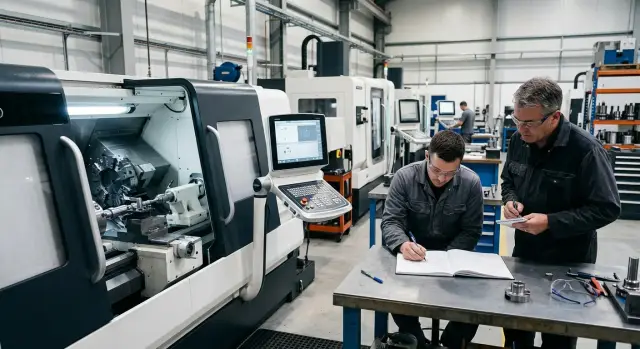
Why adjustments get lost between shifts
When an operator changes a mode and doesn't record it, the shop starts to rely on memory. While the person stands at the machine, the setup holds. After the shift, the meaning of the adjustment often goes with them.
Verbal agreements don't last. One operator reduced feed due to vibration and casually told a colleague. A few hours later nobody remembers the exact value or reason. The next day someone else restores the old settings because they see only the numbers on the screen, not the reasoning behind the change.
Without a log even a successful adjustment quickly disappears. It remains in one operator's head and doesn't become the rule for the whole shift. As a result, the shop encounters the same problem again as if it were seeing it for the first time.
This is especially noticeable on CNC lathes when parts are produced in series. The first shift found a gentler mode and achieved a clean surface. The second shift can ruin it with a single reversed tweak — not out of bad intent, but because the context wasn't passed on.
Confusion usually appears in the same places: feed is changed to remove chatter or surface marks; spindle speed is adjusted to reduce heat and tool wear; a different tool is mounted but not noted; wear compensation is added and the next shift doesn't understand where the difference came from.
One change almost always leads to another. If an operator reduced feed, the cycle time increased. The next shift tries to recover time and raises speed. Then the tool wears faster and quality drifts again. Everyone sees only their piece of the shift, so without a record a temporary measure easily becomes "the norm."
In series production the problem grows fast. A mistake in modes doesn't stay single; it repeats across dozens or hundreds of parts, and the shop spends time later asking why yesterday everything was fine, but today rejects appeared, noise increased and tool wear accelerated.
Recording operator adjustments isn't about paperwork. It's needed so CNC mode changes don't turn into a set of random decisions. Otherwise each new shift starts almost from scratch, even though the right solution was found yesterday.
What to record in the log
A simple log shouldn't collect everything. It should record only changes that affect the result: dimensions, surface finish, tool life, cycle time and the risk of scrapped parts. If an operator changed a mode and the part improved or worsened, it should be recorded.
Usually it's enough to log changes in feed, spindle speed, depth of cut, tool compensation and other settings the operator adjusts during work. If feed was reduced at night due to vibration and in the morning another operator restored the old value, the shop wastes time solving the same issue twice.
A log only works when a short meaningful comment accompanies the number. The entry "feed 0.18" is nearly useless. The note "reduced feed from 0.22 to 0.18 due to vibration on finish pass, part 42X, operation 030" already helps the next shift.
A minimal set of fields usually looks like this:
- date and shift;
- machine, program, operation and part;
- what was changed;
- reason for the adjustment;
- who made the entry and who checked it.
That's enough to avoid arguing from memory. If the log is kept on paper or in a shared electronic form with one template, any shift quickly understands what happened before them.
Notes in a phone or loose scraps near the machine almost always fail. The phone stays with the person, not the shop. A scrap gets lost, covered in oil, or placed where no one looks. Even worse is someone writing "slightly reduced" and another interpreting that differently. The log must have one location and one format.
The person who actually changed the mode should make the entry. Not the foreman who learned about it two hours later, nor a setup technician writing from memory at the end of a shift. The entry is checked by the person responsible for the area: shift lead, foreman or setup tech. This should not be a long procedure—just confirm the adjustment is understandable and can be used going forward.
How to implement a log without extra bureaucracy
A log only sticks when filling it takes less than a minute. If the form is long, people fill it later or stop using it. The rule is simple: one page, one template, one procedure for all shifts.
Don't create different versions for each foreman or crew. When the night shift writes one way and the day shift another, entries can't be quickly compared. It's much easier to have one form for the whole shop or at least for a group of similar machines.
Usually 5–7 fields are enough. If a person can't complete the entry in 30–40 seconds, the form is overloaded. A practical version looks like:
- date and time;
- machine number;
- program or operation;
- what was changed;
- old and new value;
- reason and result;
- who made the entry.
That's enough to understand what the operator did and why. Don't add columns just for the sake of order, like "department" or "area number," if those details are already known from the job. Extra lines only slow people down.
Before launching the log, agree when entries are mandatory. Otherwise one person will log every tiny action and another will not note a significant feed change. Usually four situations suffice: feed or speed changed, a compensation was shifted, the tweak removed a defect or vibration, or the change produced a stable result on repeat. Minor actions that don't affect size, tool life or cycle time shouldn't be logged—otherwise the log becomes a noise dump.
Storage location matters. Don't hide the log in the foreman's office or "somewhere in a folder." It should be by the machine: on a clipboard, in a magnetic pocket or on a tablet next to the control. If the log is hard to find, people will stop using it.
In practice it's simple. The operator reduces feed due to vibration, gets a clean surface and records the adjustment immediately. The next shift sees the note at the machine, doesn't repeat the same mistake and doesn't waste an hour re-tuning.
If the shop has different machines, including more complex models, don't complicate the form in advance. Start with a short template and check daily use. If it doesn't catch on, the problem is almost always that people are forced to write too much.
How it looks in a typical shift
A typical shift shows why a log is needed. The operator starts a series, listens to cutting, watches the chips and measures the first part. On the second or third part a slight vibration appears. There's no scrap yet, but it's clear the tool won't last long in this mode.
The operator doesn't wait for the batch to finish. He reduces feed slightly to remove chatter and stabilize the process. Then he makes another part, measures again and inspects the surface. If the vibration is gone and the cycle only grew by a few seconds, the adjustment paid off.
He makes a short record immediately—not at the end of the shift or on a scrap of paper that will be lost. This moment is when the log is most useful because the entry is accurate, not "from memory."
Usually five lines are enough:
- date and shift;
- program or operation number;
- which mode was changed;
- why it was changed;
- what resulted after the adjustment.
Then the most useful part begins. The next shift arrives and reads the last entry before starting the series. The new operator already knows there was vibration on this operation and that feed was reduced yesterday. He doesn't need to re-discover the same thing, ruin a trial part, or argue about who changed what.
On a shop with repeating series it's noticeable right away. One person fixed the problem and the next continued with that fix. Recording operator adjustments stops being a personal habit and becomes a normal part of shift handover.
The foreman's role is simple. He doesn't rewrite the log or collect long reports. He checks whether the adjustment helped: did the vibration stop, does the size hold, did the cycle time grow too much, is the tool wearing faster. If the solution works, it can stay until the next setup. If it's a temporary measure, write that.
After a few shifts the picture becomes clear. You can see which changes truly save a series and which only mask the problem for an hour or two. The log helps not only to pass information without confusion but also to find recurring faults faster.
Mistakes that make the log fail
A log is useful only when an entry quickly answers three questions: what was changed, why, and which operation it applies to. If those answers are missing, the next shift works by guesswork again.
The most common mistake is simple: the operator writes the new value but not the reason. An entry like "feed 0.18" is nearly useless. Why was it reduced? Because of vibration, cutter overheating, roughness or stock runout? Without the reason the next shift will likely return to the old mode and the same problem will recur.
No better is the variant where the tweak is recorded too late, when the shift is already over. From memory people often swap numbers, especially if they changed feed, speed and depth several times during the day. One operator remembers 0.12, another is sure it was 0.15. A day later nobody knows which entry was correct.
A log quickly loses value if it fills with abbreviations only the author understands. "Adj.", "part ref.", "ok" or "like on 3rd" doesn't help the morning operator. It's better to write plainly: "reduced spindle speed due to overheating" or "increased feed after replacing the insert."
Another common mistake is mixing different parts in one entry. If a row contains housing, shaft and bushing, the log confuses rather than guides. This is very visible on a lathe where one machine runs different operations.
A bad sign is when old entries are erased, blotted out or rewritten cleanly. Then the log becomes a neat notebook without history. History is needed: if a new adjustment made things worse, the foreman must see the previous value and compare it, not rely on memory.
Typical problems look like this:
- an entry exists but you can't reproduce the mode from it;
- two operators interpret the same line differently;
- you can't tell what the setting was before the change;
- after a shift handover modes are changed again "by eye."
A good example from everyday work: during the evening shift an operator reduced feed due to vibration on a specific part. If he immediately recorded the reason, part number and old value, the night shift won't waste an hour re-searching. If he only wrote "reduced feed," the log sits on the desk uselessly.
How to start a log on the shop floor
If adjustments to feed, speed or depth live only in the operator's head, the log won't start on its own. First you must stop the habit of tweaking modes on the fly and not recording anything. Otherwise a week from now the same chaos will be next to an empty table.
On a CNC lathe area it's better to begin not with a perfect form but with a clear routine. The log must be so short that the operator fills it between parts and the foreman quickly checks the entry at the end of the shift.
-
Set one rule for all: any change of CNC modes is recorded immediately after the adjustment. Not at the end of the day and not "when there's time." If an entry wasn't made, the next shift isn't obliged to rely on it.
-
Choose one format for the whole area. Don’t keep some records in a notebook, some in Excel and some in the foreman's phone. One sheet at the machine or one shared electronic form works better than several "convenient" options.
-
Run a short briefing at the machine. Fifteen minutes is enough. Show a real case what to write: machine number, program or part, which mode was changed, old and new values, reason and outcome.
-
For the first week check entries daily. The foreman or setup tech should look not only for rows but for meaning. Phrases like "tweaked feed" or "got better" don't work. You need concrete numbers and a short reason.
-
After a week shorten the form. The initial version is almost always overloaded. If a field nobody fills doesn't affect work, remove it. If skipping a field later causes errors, make it mandatory.
Usually the shop adapts to this routine in 2–3 weeks. After that shift handovers run smoother: the incoming shift sees what was changed, why and what effect it had. Knowledge stops being lost between people and mode errors surface before they spoil a batch.
If the pilot fails, the cause may not be discipline but equipment, tooling or an unsuitable machine for the task. In such cases it's useful to review practical materials on the EAST CNC blog or consult the company's specialists: they handle selection, supply, commissioning and service of CNC machines for metalworking. That's a logical next step when the log shows the shop is limited by the machine, not by information transfer.
How to quickly check that the log works
A good log can be checked in a couple of minutes. If it needs long explanations, it's already failing. On a shift it should be immediately clear what changed, why and whether the setting can be reproduced without guessing.
The simplest test: open the last 10 entries and see if you can reconstruct the work sequence from them. If in at least three cases the incoming operator asks "what did they mean here?", the form needs fixing.
Check five things:
- each adjustment has a separate entry;
- author and time are visible;
- the setting can be reproduced on the machine with concrete values;
- the next shift understands the reason for the change;
- it's clear which part, operation or program the tweak refers to.
If the log passes this check, it can be used as a working tool. If not, the problem is usually the form, not the people: it's too long, too vague, or leaves room for guesswork.
A useful test on the shop: give an entry to an operator from another shift and ask them to explain what happened. Then ask if they could reproduce the setting without calling a colleague. That test quickly reveals weak points.
For example, the entry "Part 2145, external turning, steel 40X. Feed: 0.22 -> 0.16 mm/rev. Spindle speed unchanged. Reason: surface rippling after the 8th part. Entry by Sadykov, 19:40" is immediately clear. It shows the adjustment, the reason and where to apply it.
And the note "adjusted the mode, got better" can be treated as empty. It helps neither in the morning nor after a week nor during defect analysis.
What to do next
Don't try to launch the log across the whole area at once. Better pick one machine and one part where mode tweaks are frequent and disrupt handover. It's easier on that example to see whether the log really helps or people just tick boxes.
Two to three weeks are usually enough to collect a realistic picture. In that time repeated adjustments become visible: where feed is repeatedly reduced, where speed is changed for the same part, where mornings waste time fixing yesterday's issues. If entries repeat, that's a signal to review the base modes.
The working cycle is simple: pick one machine and one part, collect entries without gaps for 2–3 weeks, note recurring adjustments, decide what to change in the standard mode, and remove unnecessary fields if people get confused.
The log form should be refined as you go. If an operator doesn't know where to write the reason, the field label is poor. If everyone writes comments differently, add short options like "vibration", "overheating", "surface roughness", "tool wear." The simpler the form, the more likely it's filled correctly.
Once a week review not only the adjustments but their value. Sometimes one short entry saves 15–20 minutes on every handover. Sometimes it cuts scrap on a repeating operation. That quickly convinces skeptics.
If the pilot shows results, roll the approach out to neighboring operations gradually. First fix the habit in one place, then expand. This prevents the record-keeping from collapsing after the first busy week.
Sometimes records are tidy but problems remain. Then the cause may be equipment, tooling or machine selection. In those cases it's useful to consult EAST CNC materials or specialists: they help with selection, supply, commissioning and service of CNC machines for metalworking. That's the next step when the log proves the shop is limited by the machine rather than by information transfer.