
Memory Batteries and Encoders: When to Replace Them Without Risk
Memory batteries and encoder batteries fail quietly. We cover replacement intervals, risk signs and a simple schedule to keep your machine from unexpected downtime.
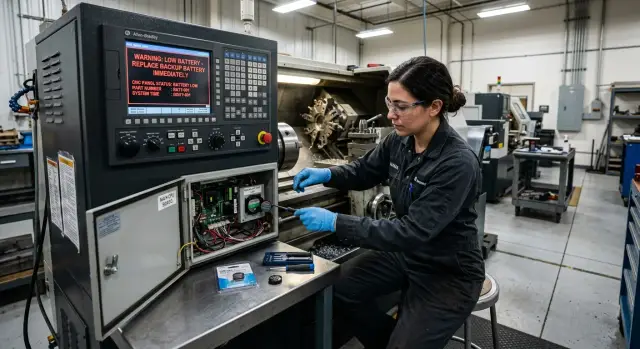
Why a small battery can stop a machine
A small battery can halt a machine worth many times more. The reason is simple: it preserves data that the CNC needs to start up correctly after power loss. If the battery is drained, the system can lose stored settings, and the encoder can lose reference data for axis positions.
While the machine is powered, the risk is often invisible. The controller runs from the mains, and a weak battery may not show any symptoms. The problem usually appears after shutdown, an unexpected power cut, or an overnight outage. In the morning the operator starts the machine and gets an alarm instead of production.
For the shop this almost always costs more than it seems at first. You lose more than one hour of operation. The queue of parts is delayed, shipments shift, the technician drops current tasks to find the cause. If the machine is loaded with an urgent order, downtime quickly turns into direct losses.
Typically the consequences look like this:
- the operator and the machine stand idle;
- the production schedule is disrupted;
- service is called urgently, not by plan;
- some settings must be restored manually;
- the first start after repair takes longer.
A scheduled battery replacement takes little time and is inexpensive. It's done on a timetable, in a convenient window, with the correct battery and clear instructions. Emergency recovery follows a different scenario: the machine is already stopped, data may be lost, and any wrong action can add several hours of downtime.
This is especially noticeable where memory and encoder batteries are installed on several machines. If there is no replacement schedule, the weak spot remains unnoticed until the first power loss. After that event the risk rises sharply, because the battery is the sole thing keeping the data.
The choice is simple: either replace the battery in advance during planned maintenance, or pay for an unplanned stop and rushed recovery. For most shops the second option is almost always more expensive.
What memory and encoder batteries hold
On a CNC machine two different items are often confused: the memory battery and the encoder battery. They do different jobs, and their failures show up differently.
The memory battery keeps the CNC's service data when power is off. This usually includes machine parameters, tool offsets, zero offsets, some drive settings and other records the machine needs to work as before. If this battery is completely drained, you may get empty or scrambled values after power-up.
The encoder battery is linked to axis position. On many machines it helps retain absolute position while the equipment is unpowered. After startup the system still knows where the axes, carriage or spindle assembly are in the coordinate system.
Practical difference
The memory battery stores CNC system data. The encoder battery stores position data needed by the axes. In the first case parameters and offsets suffer. In the second, an axis loses awareness of its position.
That is critical for axes. If the system doesn't know the precise position, it cannot move safely. The machine must not guess where the tool is or how far it is from a stop, chuck or part. Therefore loss of position data often ends with a blocked start or a requirement to re-home the axes.
After data loss the recovery scope varies. Sometimes loading a backup of parameters and performing a homing routine is enough. But often you must re-enter tool offsets, zero offsets, check travel limits, restore absolute encoder marks and run a test cycle without a part.
On a lathe this easily becomes the loss of a shift. The battery itself is inexpensive, while finding the correct parameters, re-tuning and machine downtime cost much more.
When to replace in advance instead of waiting for an alarm
Don't wait for the machine to warn you. Once an alarm appears, the time margin may be very small, and downtime can stretch over a shift or longer.
First, check the documentation for the machine, the CNC and the battery. That is where the service life or interval is usually specified. If the numbers differ, it's safer to use the shorter interval and record it in your maintenance calendar immediately.
Using the same schedule for the whole fleet usually fails. Two similar machines age differently: one may run in a hot shop in three shifts, while another runs less intensively with fewer stops.
Heat noticeably shortens battery life. The higher the temperature in the electrical cabinet, the faster capacity is lost. Long idle periods also hurt: when the machine is unpowered, the battery must hold memory and encoder data without mains support and discharges faster.
In practice it's better to schedule replacement by calendar rather than waiting for an alarm. A simple approach is to assign a date in advance and check it during every planned service. That makes it easier to combine the replacement with a service window and avoid stopping the machine at an inconvenient time.
When calculating intervals consider several factors:
- what the CNC and battery manuals state;
- how often the machine is fully powered down;
- cabinet temperature in summer;
- whether there have already been warnings about memory or encoder issues;
- the machine's age and the date of the last battery change.
If the machine runs hot, is often without power, or the replacement history is unclear, shorten the interval. And record it in the service log with a date and responsible person.
This is especially important for a fleet. One lathe might be serviced every two years, another every year. Separate schedules are almost always more useful than a single common one because they reflect actual load rather than an average across machines.
Signs that indicate risk
When memory and encoder batteries near the end of life, the machine usually gives early signs. The problem is they are often treated as minor and postponed to a convenient window. That's a bad habit: the battery is cheap, but machine downtime is noticeably more expensive.
The clearest signal is a low-battery message on the CNC screen. Even if the machine still runs fine, you shouldn't wait. Such a warning rarely goes away on its own. It usually means the time margin is small, especially if the equipment is frequently powered off.
There are subtler signs. After a power outage the machine may forget the time, shift zero points or behave as if some settings were reset. Sometimes this isn't obvious: everything looks normal after startup, and the first issue appears only during setup or on a test part.
Common risk signs include:
- the system clock shows the wrong time;
- errors after power cycles that didn't occur before;
- an axis takes a long time to find zero or does it unreliably;
- the service log shows an old replacement date or no replacement recorded.
Repeated occurrences are especially worrying. If a warning, clock reset or error appears not once but every few starts, delay is dangerous. This is not a random machine quirk but a sign that the memory or encoder power reserve is nearly exhausted.
Often the scenario is: the machine worked fine in the evening, was shut down, and in the morning alarms about reference or parameters appear. People start searching through sensors, drives or the mains. In the end the culprit is the battery that someone planned to replace next month.
A separate risk is poor record-keeping. If nobody knows when the battery was last changed, that's a reason to check it immediately. For CNC service a proper log is as important as the replacement itself. One accurate entry often saves long downtime and unnecessary troubleshooting.
How to replace a battery without extra risk
Many mistakes begin before the actual replacement: using a similar-looking battery instead of the correct model, working without a backup, or changing the cell too late. For such a small part the cost of a mistake is too high.
Do not rely on visual markings alone. First consult the documentation for your CNC, drive or encoder and verify the exact battery type: voltage, shape, connector and configuration. Identical size does not mean the battery is compatible.
Have the new battery at hand before starting work. Immediately record the replacement date in the service log or at least on a label inside the cabinet. In a year or two that small note will save time when determining how long the element has been in service.
Before changing memory and encoder batteries back up everything you can:
- a backup of CNC parameters;
- tool offsets, tables and zero points if the system allows it;
- a list of active alarms and service messages;
- the specific instruction for your control cabinet.
Next, follow the replacement sequence required by your CNC. On some machines the battery is changed with power on so memory does not reset. Others require a service mode or a specific procedure. There is no universal rule, and improvisation usually leads to extra work.
After replacement don't rush the machine back into production. Power up, then calmly check the display: are there new messages, did zero points shift, do axis references work correctly, is any axis signal missing? For a lathe, check the turret and homing separately.
This check takes 10–15 minutes. Recovery after an error can take half a day.
If you have several machines, don't replace batteries from memory. Keep a simple list: machine model, battery type, last replacement date, who changed it and what was checked after startup. That order reduces the risk of emergency stops more effectively than last-minute haste.
Where mistakes happen most often
One of the most costly errors is installing a "almost the same" battery. It may look right, but voltage, connector, size or type can differ. For memory and encoders this is a false economy. The machine may reject the replacement immediately or fail later when a shift is underway.
Another common mistake is waiting for the first panel warning. Because the battery is cheap, it's treated as minor. In reality the alarm often comes at an inconvenient time: mid-production, at night or before shipment. Then a simple operation turns into urgent repair with hours lost.
Replacing a battery without a parameter backup causes just as many problems. People rush, swap in a new battery and hope everything goes smoothly. Sometimes it does. But if parameters, zeros or homing need restoration, lacking a copy immediately prolongs downtime.
Poor record-keeping also causes trouble. A shop may have five, ten or twenty machines while replacement dates are scattered across messages or remembered by a single technician. After six months no one remembers which machine got serviced and which didn't. The result: one machine is serviced too early and another is missed.
A common schedule for all machines rarely works. A new machine and an older one with long service life operate under different regimes. If one runs two shifts and another is rarely powered, a single interval gives a false sense of order.
Usually five simple rules are enough:
- install only the correct battery model;
- replace it before an alarm, during a planned window;
- make a parameter backup in advance;
- keep a separate log for each machine;
- review intervals at least once a year.
The battery itself rarely looks like a serious problem. But these small things are exactly why a shop most often loses time when it least expects it.
Real-world example from the shop
Two CNC lathes were operating on the same line. Both ran two shifts, so even a short stop immediately hit the schedule. On one machine they planned to replace the battery for a long time but kept postponing it: the machine was busy and there were no errors, so "it can wait."
They left it for the weekend with the old battery. On Monday the operator started the machine and immediately got an error. Worse, the system had lost zero positions, and no one dared to run a part.
The problem wasn't the battery itself but the consequences of its failure. The technician checked parameters, re-did references, consulted documentation and ran the machine without a part. While one machine stood idle, the other carried the whole flow. By midday it was clear the downtime had already cost more than a planned replacement in a short window between orders.
Cases like this show the difference between the cost of a cheap part and the real price of a failure. The battery is inexpensive. But if it's replaced too late, the shop pays with people's time, missed output and added stress for the operator.
This stop could have been avoided. A timely scheduled replacement while the machine still worked normally would have taken far less time than post-failure recovery. If the line is busy without pauses, it's better to stop the machine for 20–30 minutes on purpose than lose a whole shift with an unclear restart time.
Monthly check
Once a month it's useful for the lead or technician to spend 10–15 minutes on a quick walkaround. For memory and encoder batteries this is usually enough to avoid a mid-shift alarm.
Keep one clear log with data for each machine. Human memory fails quickly, and a battery ages by calendar even if the equipment was rarely used.
During the check do a few things:
- verify the last replacement date for each machine;
- review panel warnings even if there are no obvious faults;
- update backups of parameters and offsets after any adjustments;
- confirm you have spare batteries for your CNCs and encoders in stock;
- set the date of the next check immediately.
If you have machines with different controls, check them on the same day of the month. It's easier to see the big picture: which machines need replacement soon and which still have margin.
One more useful habit: if an operator notices even an occasional battery warning, record it in the log the same day. Otherwise in a week no one remembers which machine it was and how often it repeated.
In EAST CNC's service practice the problem often starts not with the battery itself but with the lack of a precise last-replacement date and a fresh parameter copy. A tidy log, the correct batteries in stock and a scheduled next-replacement date usually eliminate this risk.
What to do right now
Don't wait for a panel alarm. With memory and encoder batteries the failure is usually not the price of the part but disorder: nobody knows what battery is in which machine, when it was last changed, or whether there's a spare on the shelf.
Start with a simple inventory. For each machine note the model, CNC type, battery type, quantity, installation location and last replacement date. If you don't have the data, mark it as unknown. An empty line in the log is better than false confidence.
It's most convenient to collect this in one table. Add two extra fields: planned replacement date and responsible person. Then a CNC battery change stops being an urgent task and becomes a routine part of maintenance.
If your fleet is already large and records are inconsistent, sort this out with your service team. EAST CNC provides not only machine supply but also commissioning and service, so it's often easier to put these processes in place from the start than to recover a machine after memory loss.
The sooner you tidy up this issue, the smaller the chance that an inexpensive battery will one day stop an entire line.