
Part marking after machining: laser, impact or label
Part marking after machining: comparing laser, impact marking and labels by speed, readability and effect on the surface.
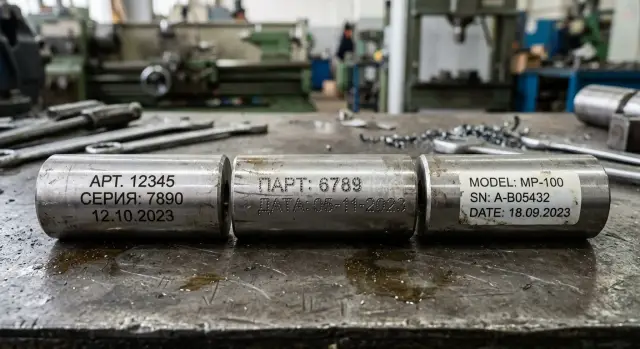
Where marking problems arise
Marking problems usually start not in the drawing but on the finished part. On paper there is space for a number, but on the shop floor you may find the free area too small, uneven or occupied by a working surface.
This happens with shafts, flanges, housings and small serial parts. After turning or milling there are chamfers, radii, holes, fits and contact zones. In the end you may have a narrow patch left for the mark, where the text still has to fit so it will be readable later.
Ordinary shop conditions make things harder. Oil, coolant residue, fine chips and even fingerprints change how a mark looks and how readable it is. A dry part may look fine right after marking, but an hour later in the warehouse the number may be harder to read, clogged with dirt or located inconveniently.
There is another side: the number must be readable not only by the operator. Inspectors, storekeepers, assemblers and sometimes customers read it. If a mark is visible only under a lamp and at a certain angle, that’s a weak solution. In real work the number is searched for quickly, often among dozens of similar parts.
A common mistake is placing the mark where it doesn’t belong. If it lands on a mating surface, sealing edge, clamping area or a zone with tight tolerances, further problems begin. Even a small mark can interfere with assembly, inspection or the part’s function.
Usually challenges converge: little space, a rough surface, shop conditions that reduce readability and a limited safe area for marking. Until you test on the real part, any method may sound acceptable in theory.
What to check before choosing a method
The error is often introduced before the marking station — at the part design level. The same number behaves differently on stainless steel, aluminum and plain steel. In some materials the mark remains sharp, in others it fades, scratches the surface or loses readability after washing.
Start by specifying the material and the surface condition after machining. A mark on ground steel looks different than on a cast blank or anodized aluminum. If the part will be painted, polished or heat treated later, that also affects the choice.
Next, measure the area available for marking. A short serial number needs only a few millimeters. A Data Matrix or a long code requires a flat area with margin. If space is tight, a label may encroach on a working zone, and an impact mark may end up too close to an edge.
Volume matters too. A single mark on a prototype and continuous marking in a series are different tasks. When hundreds of parts pass a station per shift, an extra 10–15 seconds per piece quickly adds up.
Before choosing, answer a few simple questions: what metal is the part made of, how much room is available for the code, is it a one-off number or a continuous flow, must the mark survive washing, oil, storage and transport, and who will read it — a person or a scanner?
The last point is often underestimated. If the code is read by an operator’s eye, requirements differ. If a handheld scanner must read it in a warehouse or QC, contrast, symbol size and scanning angle become important.
Simple example: a small aluminum part after milling will hold a label easily, but after degreasing the label may come off. So consider not only the moment of application but the whole path of the part until assembly or shipment.
Laser, impact and label in plain terms
Shops usually pick one of three options: laser, impact marking or a label. Their goal is the same, but they operate differently.
A laser marks without contact. The beam alters the top metal layer and leaves numbers, symbols or a code. There is no dent, and the inscription usually looks even and neat.
Impact marking works mechanically. A head rapidly strikes the metal and creates dots that form letters and numbers. The mark is both visible and tactile because the metal is slightly displaced.
A label is the simplest if you need a number quickly and without leaving a trace on the metal. It’s printed and stuck on the part or packaging. The information is immediately readable, but there is no permanent mark on the part itself.
The difference is clear on the same batch. On a clean, dry part the laser often gives a sharp inscription. On a rough surface, and when the mark must survive storage and transport, impact marking can hold up better.
Labels are simpler, but have more weak points. Oil, dust and coolant residues affect the adhesive, and heavy roughness prevents a flat application. On clean packaging a label works well; on an oiled part it does not.
The laser also has conditions. It needs a clean surface without an oil film, otherwise contrast drops. Impact marking tolerates roughness and light contamination better, but it leaves a mechanical impression, which is not acceptable for every part.
In short: use laser for neat permanent marks, impact for deep durable marks, and labels for fast temporary marks.
Where speed matters
Speed matters where a part cannot be delayed after machining. If the batch goes straight to assembly, shipment or storage, extra seconds per part quickly eat up a shift’s time. This is especially visible in series production.
Applying a label is the fastest — but only if the surface is already clean and dry. If coolant, oil or fine chips remain, time is spent wiping and drying. Then the fastest method loses its main advantage.
A laser usually keeps a steady pace in repetitive batches. You set the program once, fix the part, and the cycle runs without surprises. Over tens or hundreds of identical parts it wins not by a single operation but by the stability of the whole series.
Impact marking slows work when small text, long numbers or dense symbols are needed. Each sign takes time, and deep marks take even longer. If the part is small and hard to clamp, the operator loses extra seconds on each setup.
In practice speed often depends not on the method itself but on preparation: how quickly the operator loads and unloads the part, whether it must be rotated precisely, if tooling changes are needed between batches and whether the surface must be cleaned before marking.
Example: a small bushing after turning. A label is applied quickly but only after degreasing. Laser takes a bit longer per piece, but it usually doesn’t slow the flow across the batch. Impact is generally slow here because fixturing and small font costs too much time.
Where markings read best
Humans and scanners read marks differently. The eye forgives a lot; scanners need contrast, sufficient symbol size and proper geometry.
A laser often yields the cleanest marking on a flat area. If the surface is smooth and the material not overly reflective, numbers and Data Matrix codes read reliably. On curved, rough or highly reflective surfaces the result is less even and small codes may fail.
Impact marking wins where parts are handled, moved and kept in non-ideal cleanliness. A recessed mark stays visible even after light dirt, oil film or dust. For a scanner it’s not always better than laser, but for the machine operator an impact mark is often easier to interpret at a glance.
Labels are easiest to read for people, especially when large text, article numbers, batch numbers or color coding are needed for the warehouse. For internal accounting this is convenient. But if the part is heated, washed or exposed to coolant, the label degrades faster than a direct metal mark.
Don’t guess with a small Data Matrix. Test it on your material, with your roughness and coating. The same code on stainless, aluminum and painted parts behaves differently.
Rule of thumb: for small codes on a flat area, laser is usually best. For dirty environments and rough handling, impact is often better. For warehouse and large inscriptions — labels. If people read the mark, symbol size typically matters more than font.
A pretty font rarely saves poor readability. If symbols are tiny, contrast weak or the code is in an inconvenient place, problems start on the first working day.
How the method affects the surface
The surface often matters more than the mark. If the number lands on a mating area, sealing zone or a surface to be ground later, problems follow. The part may not fit as intended, or some of the marking will disappear after finishing operations.
A laser barely presses the metal, but it’s not entirely without effect. On steel it often darkens the surface, and on some alloys leaves a slight heat mark. For a housing, cover or external plane this is usually acceptable. For a polished surface or an area with tight tolerance, test a sample first.
Impact marking is harsher. A pin indents the material so the mark lasts even after washing and in dirt. But thin walls, narrow edges and light parts tolerate it poorly. Metal may deform slightly, which is critical when dimensions are tight.
A label does not touch the metal. That’s useful where scratching, heating or deforming is unacceptable. Its weakness is obvious: oil, chips, coolant and friction. In a warehouse labels live calmly; in a shop they often need replacement.
As a rule, don’t mark mating surfaces, sealing areas, zones to be ground or painted, and edges of thin-walled parts. Good results come when the mark is applied not to a convenient spot, but to a safe one.
Step-by-step selection
Start from the goal. One part may need a mark that lasts a few days for storage, another needs a number that survives washing, oil, assembly and transport. For internal traceability a label is often enough.
For traceability the requirements are stricter. Understand in advance whether the mark will survive washing, storage and transport. For shipment to a customer clarify what they expect: text, serial number, code on the part or a tag on the packaging.
Then look at the part. Find an area where the mark won’t fall on mating faces, threads, seals or visible faces. After turning or milling this is often an end face, a flange or a separate flat pad.
If there is no safe zone, don’t risk a working surface. In such cases a label on the packaging or tray is sometimes better than a permanent mark on the part.
Check the required mark lifetime. If the part will be painted, frequently handled, washed or rubbed during assembly, a label loses quickly. Laser usually gives a neat, clean inscription. Impact holds longer but leaves a dent.
Then do a short practical test: mark 5–10 parts from the real batch, measure the full cycle from setup to inspection and compare results against requirements for location, symbol size and readability.
If a method saves a few seconds but damages the surface or yields questionable readability, that saving disappears quickly. In the shop it often leads to re-sorting, re-marking or shipment issues.
Common shop mistakes
First mistake: placing the mark where there is no proper pad. On a curved surface, a rough machining mark or next to a chamfer even a good method gives poor results. Laser contrast is uneven, impact blows off center, and labels peel at the edges.
Tests are often done on a clean, dry sample while the production batch is already oily or covered with coolant residue. Real work then differs from the sample: labels stick worse, laser tone changes, and operators waste time cleaning each part.
Another common mistake is using too small a font. On paper everything looks neat, but on the shop floor the mark is not read under a lamp from 10 cm. After washing and storage small symbols quickly disappear, especially on dark or uneven surfaces.
Many consider only the moment of marking and forget what happens next. If the part will be painted, shot blasted or sent to aggressive washing, some marks simply vanish. This becomes apparent on the first batch: the sample passed, but the warehouse can’t read numbers the next day.
A more costly mistake is to look only at the price of marking. In reality you must consider the whole cycle. If the operator spends time finding a place, rotating the part, cleaning the surface, checking readability and redoing rejects, a cheap marking method becomes expensive.
A simple helpful test: take a real part from the series, leave oil on it, run it through the following operations and then check the result. This immediately shows what works in the shop and what only looks good on a sample.
Example selection for a real part
Take a common case: a batch of steel flanges going to storage and assembly after machining. The number is needed not for beauty but for internal tracking. It later helps find the batch, shift and route if there are questions about size, material or returns.
If flanges stay briefly in the warehouse and the number is only needed until shipment, a label often solves the problem. It’s visible, readable and doesn’t require marking each flange individually. But after painting, washing or rough transport it can be lost. For a number that must persist longer, it’s a temporary option.
A laser is usually more convenient for such a flange. On a flat area it gives an even mark without dents. A batch number or short code reads well and the surface changes minimally. If the flange later goes into an assembly and the number must stay after mounting, this is often the most reasonable choice.
Impact marking fits where maximal durability matters and appearance is less important. It holds up well even in a dirty shop. But avoid it on thin flanges — the impact can deform an edge, leave a mark near a working zone or spoil an area that must remain flat.
For this part the choice often looks like: label — if the number is only needed in the warehouse or until shipment; laser — for a permanent readable number without notable surface effect; impact — for maximum durability if there is space away from thin edges and working planes.
If you need one universal method for most steel flanges, laser often wins. It leaves the number, doesn’t interfere with assembly and doesn’t add risk to the surface.
Pre-launch check
Before the first batch do several trials on the exact part that will be used. This shows whether the mark survives washing, transfers between stations and normal shop handling.
A good launch shouldn’t require long adjustments. If the operator repositions the part several times, changes height, refocuses or hunts for the marking spot, there is already a problem. In a series such details become lost time and extra rejects.
During trials check a few things: does the code read on the first try with a common scanner or without long inspection, can the operator place the mark in one clear cycle, does it avoid working surfaces, does readability hold after washing and transport, and do you track marking rejects separately from machining rejects.
On metal this is especially visible. Laser may give weak contrast on a shiny surface even if the sample looked good. Impact holds firmly but sometimes mars an area needed for assembly. Labels are convenient in storage and routing but depend strongly on oil, washing and friction.
Example: after turning a bushing the code was placed next to the bearing fit. It’s easy to read, but this spot participates in assembly. It’s much wiser to move the mark to the end face or an external zone that won’t be in contact.
If the code reads reliably, the operator doesn’t lose minutes and the part moves on, the method is correct. If not, change the marking location or method before starting the series rather than after the first QC complaint.
What to do next
If marking already fails, don’t switch methods at random. First, summarize options in a simple table: how long the mark lasts, how many seconds the operation adds and what risk it poses to the part surface. The picture usually becomes clearer.
Laser often gives a clean and durable inscription, but for some parts the limitation is the marking cycle time or the available area. Impact is good for rough heavy parts but not everywhere due to the indentation. Labels are fine where speed matters and longevity is not critical.
Then run a short test — only on your parts. Someone else’s sample guarantees almost nothing. You have different material, roughness, coolant residue and a different route through washing, storage and assembly.
Check a few things: does the mark read after cleaning and transport, does it interfere with mating areas and working planes, how long the operation really takes at the machine or station, does it produce dents, overheating or peeling, and can the operator repeat the process reliably.
If you commission a new station, discuss marking before finalizing the processing route. Otherwise the part is ready, free space is minimal and the required code must be placed where it’s inconvenient or risky. It’s much easier to choose a zone, code format and operation location early in the project.
This is especially noticeable in serial metalworking. Extra 15–20 seconds on marking quickly reduces output per shift.
If you select equipment while defining the process, solve this at the project stage. At EAST CNC such requirements can be considered in consultation and machine selection so you don’t have to redesign the route, tooling and marking location on finished parts.
FAQ
Why do marking problems often appear after machining?
The issue often appears on the finished part. After machining the free area can be too small, uneven or located in a working zone where marking is not allowed.
What should be checked before choosing a marking method?
Start by checking the metal, the surface condition and the available area for the code. Then check whether the mark will survive washing, oil, storage and who will read it — a person or a scanner.
When is an ordinary label enough?
If the number is only needed until storage, shipment or for internal shop use, labels are often sufficient. On an oily part or after washing a label sticks worse, so for long-term marking it’s usually not the best choice.
When is laser marking the better choice?
A laser is suitable when you need a permanent neat mark without a dent in the metal. It works best on a clean, flat area where text or a small code is required.
When is impact marking preferable to laser?
Impact marking is used where the mark must last and not disappear in dirt, oil or during transport. It leaves an indentation, so avoid placing it near thin edges, fits or zones with tight tolerances.
Which method is the fastest to work with?
On a clean, dry surface a label is the quickest to apply. In a series the laser often keeps a steady pace because the operator sets the cycle once and then doesn’t spend extra time on each part.
Which marking reads best — laser, impact or label?
For a scanner a laser code on a flat area with good contrast is usually best. For the human eye in the shop, a deeper impact mark is often clearer, especially on dirty parts.
Can marking damage the part surface?
Yes. Impact marks indent the metal, laser can change color or slightly heat the surface layer, and labels don’t damage the metal but can peel off due to oil, chips or friction.
Where should you not apply marking?
Do not put marks on mating surfaces, sealing zones, threads, edges or areas that will be ground or painted afterwards. Prefer an end face, flange or a separate flat area away from contact zones.
How to test a marking method before running a series?
Test on several parts from the actual batch, not just a random sample. Run them through washing, handling between stations and inspection, then check readability, cycle time and surface condition.