
Preserving a Machine During Downtime: What to Do in Advance
Preserving a machine helps you get through downtime without rust, leaks or malfunctions. We explain how to prepare guides, hydraulics and electronics.
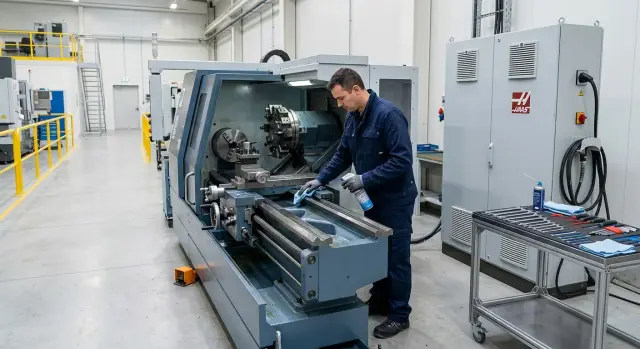
Why downtime damages a machine
A long pause seems harmless: the spindle doesn't spin, the axes don't move, there’s no load. But the machine ages even in silence. The worst problems build up slowly and are often noticed only at the next startup.
The first risk is moisture on exposed metal. If the workshop temperature changes, condensation collects on cold surfaces. This happens often in winter, during seasonal transitions, and after a cold night. A thin film of moisture stays on guides, chucks, mandrels, screws and other unprotected spots. At first there's a light film, then spot rust appears.
The second problem is lubrication. While the machine runs, oil spreads over guides and screws. During a pause some oil drains down and the protective film thins. The metal becomes nearly dry and the first start after downtime goes harder than expected. Components get extra friction where there used to be almost none.
Dust contributes too. It settles on lubricant, mixes with it and turns into sticky grime. That mix holds moisture and acts like a fine abrasive. It’s especially bad if the machine stands near grinding, welding or cutting where the air contains a lot of particles.
Soft parts age without movement. Seals lose elasticity, edges can stick to mating surfaces, and hoses gradually harden. Hydraulics tolerate long idleness poorly, just like constant overload. After a pause this often shows up as sweating, small leaks and uneven operation.
During downtime a machine loses several protections at once: the oil film, a clean dry metal surface, some rubber elasticity and the smoothness at first startup.
If a shop in Kazakhstan cools at night and warms during the day, the risk is even higher. Temperature swings quickly collect moisture where you don’t expect it. So preservation isn’t paperwork — it reduces wear exactly when the equipment seems to be doing nothing.
Where to start before stopping
Preparation doesn’t start with oil and covers, but with basic cleaning. If you leave chips in the working area, under covers or in the machine bed corners, they will attract moisture, scratch surfaces and make startup harder. Fine chips are the worst: often invisible at first, later they end up in guides, seals and trays.
First clean all places where machining waste collects. Don’t stop at the table or chuck. Check telescopic covers, the spindle area, the sump, the chip conveyor and pockets where coolant and chips usually settle.
Then remove coolant residues and dirt from exposed metal. Dried emulsion leaves sticky deposits and rust forms underneath quickly. A clean surface has two benefits: the metal suffers less from moisture, and fresh oil streaks are easier to spot.
Before shutdown it’s useful to run a short check:
- remove chips from the working area and from under covers
- clean exposed surfaces from coolant, dust and dirt
- check oil levels in required units
- look for leaks on hoses, fittings and under the machine
At this stage don’t disassemble the machine without reason. It’s enough to understand its current condition. If oil is already at minimum and there are traces under the hydraulic unit, don’t leave it until startup. After a few weeks a small issue often turns into a real failure.
One often‑skipped but useful step: record the stop date and the machine’s condition. Add a few photos — the working area, the control screen hours, oil levels, suspicious spots. Later you won’t have to guess whether a leak appeared before or after the pause.
If a workshop has several machines, this habit saves time. After a month no one will remember which machine stood dry and which already had a film on the metal.
How to protect guides and exposed metal
Rust usually doesn’t start from a big problem. It’s simpler: a drop of moisture, a fingerprint, coolant residue on a ground surface. So protecting guides and exposed metal always starts with cleaning. Remove chips, wipe guides and exposed metal parts, then dry them completely.
After that apply a thin layer of protective oil. Thin — not generous. If you flood the surface, oil will collect dust and dirt and later be hard to remove. A uniform film is enough to shield metal from air and moisture for several weeks.
Pay most attention to ground surfaces and places where metal is exposed: guides, exposed spindle areas, outer parts of the chuck, and mating surfaces. If there are zones that are easily touched by clothing or tools, cover them with a clean dry cloth after oiling. A dirty fabric only makes things worse.
Fingerprints are often underestimated. On bare metal they leave moisture and salts, and in a couple weeks dark spots appear. Work in clean gloves. If you touched a treated surface, wipe it and refresh the oil film.
Check the chuck, taper and seats separately. Chips, coolant deposits and a thin film of hidden grime often remain there. Clean these areas thoroughly because they affect clamping accuracy and tool seating later.
A simple routine:
- clean surfaces from chips, dust and coolant residues
- wipe the metal dry
- apply a thin layer of protective oil
- cover ground and exposed spots with a clean cloth
If the machine will stand more than a month, quickly inspect exposed metal every 1–2 weeks. It takes a few minutes and small rust spots are easier to remove right away. Before startup remove covers and wipe off excess oil from surfaces that require precise seating.
What to do with hydraulics and lubrication
Hydraulics and lubrication systems don’t like long idleness if left unchanged. A small leak becomes a puddle in a month, and low oil level later introduces air into the system at first startup. Automatic lubrication lines can dry, clog with dirt or fail to deliver oil where it’s needed on the first day back.
Before covering the machine, check the hydraulic power unit and the lubrication system with hands and eyes. You’ll often save the most time after downtime here.
Check the tank, hoses, connections and fittings. Oil traces, wet spots and dust buildup usually show leak points immediately. Check the oil level against marks. If it’s low, top it up to the norm but don’t overfill. Then walk through the auto‑lubrication lines: tubing must not be pinched, cracked or blocked. It’s useful to ensure lubricant reaches the delivery points rather than staying in the line or reservoir.
If you find a leak, don’t postpone repairs. Over a few weeks oil won’t stop leaking by itself; low level later brings air into the system, pump noise and jerks at first start. The same applies to old hoses and cracked seals — they typically don’t improve while idle.
After long downtime hydraulics and lubrication need a calm return to work. Don’t give the machine full load immediately. First check levels, listen to pumps, and make sure the system reaches normal operation without strange noises or delays. A few minutes of checks here often save an entire shift later.
How to protect electronics from moisture and dust
Electronics suffer during long downtime not from load but from the air in the shop. Dust attracts moisture, condensation settles on terminals, and after startup strange errors, sensor faults and ventilation issues appear.
Start by removing accumulated dirt. Clean filters, grills and fans in the electrical cabinet. If a filter is caked with oily dust, moisture stays inside longer and heat dissipates worse. A fan clogged with dust may run noisily but moves little air.
After cleaning close the cabinet and all machine doors tightly. Check gaskets, latches and cable entries. A small gap quickly pulls in dust, coolant mist and humid air. Leaving a door slightly open for ventilation is a bad idea.
If the workshop is damp, put a desiccant inside. This is especially useful in seasonal transitions when daytime is warm and nights are cold and metal collects condensation. Place desiccant bags so they don’t touch boards, terminals or fans. For long downtime check them every few weeks and replace if wet.
Another common issue is nearby activities. Parts washing, open chemicals, cans of cleaners or a pile of wet rags make the air heavier and more humid. Vapors settle not only on the cabinet surface but inside. During downtime move such things away and keep the floor dry and clean.
If the machine has a cabinet heater or anti‑condensation mode, don’t turn it off without reason. It uses little energy but often protects from humidity better than any desiccant bag.
The rule is simple: before stopping the cabinet should be clean, dry and closed. Then after downtime you’ll look for work for the machine, not a reason for an error right after switching on.
Step‑by‑step preservation procedure
If a machine will stand for several weeks, it’s better to follow a short routine than to hunt down rust, leaks or errors at startup. Preparation shouldn’t be complicated. It’s more important to do it carefully and not miss anything.
A convenient order:
- Stop the machine normally: finish the program, move units to a safe position, remove the workpiece and tool.
- Remove chips, coolant residues and dirt from the cutting zone. Wipe the chuck, table, covers and areas where oily dust builds up.
- Apply a thin protective oil layer to guides, the chuck, exposed seating surfaces and other unpainted metal. Cover vulnerable zones.
- Note the next inspection date. Use a logbook, a tag on the machine or an entry in the workshop plan.
- Leave a short startup checklist: what to inspect, what to wipe, which levels to check and what to watch during the first minutes of operation.
In practice most problems come not from the stop itself but from small omissions. For example, the machine was cleaned only on top while chips remained under a cover. A month later there’s a deposit, moisture and corrosion traces. Or oil was applied but nobody noted an inspection date and the machine was simply forgotten until an urgent order.
If different shifts service equipment, keep the same template for all machines. Even a simple 5–6 point sheet noticeably reduces the risk of omission. A signature of the responsible person also helps.
Example: a shop stopped for five weeks
A small workshop in Kazakhstan stopped a CNC lathe for five weeks. There were no orders, but the foreman didn’t leave the machine as is. Downtime usually doesn’t hit mechanics immediately but affects small things: moisture settles on exposed metal, dust gets into the cabinet, and old traces appear under the machine.
On day one the foreman did the usual useful preparation. He removed chips from the working area, wiped coolant residues where they collect after a shift, cleaned trays, covers and the chuck area, then applied a thin layer of oil to exposed surfaces. It took less than an hour, but guides and the chuck didn’t sit damp under grime.
The workshop didn’t just wait. Once a week the foreman spent 10–15 minutes on inspection. He checked for condensation, dampness and dust in the cabinet, looked under the machine and at hydraulic connections. If a fresh oil trace appeared it wasn’t left for later but marked immediately.
Before startup the team didn’t push full load right away. They switched on power, checked emergency circuits and indicators, then ran the spindle empty. After that they moved the axes without a part and with gentle feeds so lubrication could redistribute. Only then they put the first workpiece.
A calm scenario like that is almost always better than haste. If a machine stood more than a month, a careful return to work is cheaper than a shift ruined by rusty guides, axis errors or a damp electrical cabinet.
Mistakes that lead to failures later
Failures after long downtime often start not from a big accident but from one missed detail on the last working day. The reason is simple: the shop was closed, the lights turned off, but dirt and moisture stayed inside.
The first common mistake is leaving the machine dirty after the shift. Chips, coolant residues, grinding dust and fingerprints do not sit harmlessly. They hold moisture and in a couple of weeks dark spots and early corrosion appear on guides, chucks and exposed metal. Then operators see axis jerks or tight clamping even though everything worked normally before stopping.
The second mistake is covering the machine with whatever was at hand. A dusty tarpaulin or an unwashed cloth only traps dirt and moisture inside. If the cover itself is dusty it acts as an abrasive. First wash and dry the machine, treat the necessary surfaces, and only then cover.
People often forget small but fussy places: chuck, tool positions, taper, clamping parts, jaws and clamps. Chips and emulsion usually remain there. Later the chuck sticks, tools sit unevenly and fasteners tighten poorly. Sometimes one forgotten coolant puddle in a seating place causes more trouble than the whole downtime.
Another mistake happens at startup. A machine stood for a month and is given full shift load immediately. Don’t do that. Oil needs to redistribute, hydraulics must reach normal regime, the spindle and axes should warm up without haste. Otherwise you get noise, overheating, leaks and false sensor alarms.
Finally, lack of records causes failures. Nobody notes the stop date, what was oiled, what was removed or when the next inspection is due. After five weeks it’s hard to remember whether the chuck was checked, the filter replaced or the cabinet heated. A simple logbook or a sheet on the door solves that problem better than hoping nobody will forget.
Short checklist before stopping and before starting
Even careful preservation won’t save you from small problems if no one does a basic check before stopping and before starting. It takes 10–15 minutes.
Before stopping
- remove chips, dust and coolant residues from the working area, chuck, guides and exposed metal
- check oil and lubrication levels
- inspect protective covers, housings and seals
- look for fresh leaks under the machine and near hydraulics
During downtime you don’t need lengthy checks, but total neglect is also bad. Visit the workshop every few days or at least once a week and look at three things: any condensation, dust on exposed units, or new oil/coolant traces. If the room is humid, risk for guides and contacts rises very quickly.
Before starting
- check power, breakers, cable condition and dryness inside the electrical cabinet
- ensure lubrication and hydraulic pumps run without unusual noise
- recheck oil, lubricant and working fluid levels
- inspect guides, chuck and spindle area for rust, caked dust and old lubricant
- warm up the machine idling and run the axes at low speed
The first parts should be processed gently. Don’t run a long program with high feeds right away. Start with a simple operation, listen to pumps and spindle, and check pressure, temperature and lubricant quality. If something behaves unusually, stop immediately. One forced startup often costs more than another calm inspection.
What to do after downtime
If the pause lasts more than a couple of weeks, you can’t just close the machine and remember it on the day of an urgent order. The longer the downtime, the more useful a schedule of short inspections.
Usually an inspection every 7–10 days is enough. Look for moisture, dust, oil traces, error messages and power drops. If the shop is damp or the temperature fluctuates, inspect more often.
During checks make sure the protective film on guides and exposed metal is intact, the hydraulic power unit doesn’t leak, the cabinet is dry and clean, and all notes are recorded. If the manufacturer allows periodic idle runs of specific units, do them on schedule rather than ad hoc.
If downtime extends to a month or more, agree the startup order for expensive units in advance. This is sensible for the spindle, hydraulics, tool changer and 5‑axis heads. First‑time errors usually happen not because of a failure but because of haste.
Return the machine to work in stages: idle runs, lubrication checks, spindle warm‑up, test machining of a simple part, and only then a normal shift.
If the fleet is large or the equipment is expensive, it makes sense to outsource part of the work to a service. EAST CNC in Kazakhstan supplies machines from Taizhou Eastern CNC Technology Co., Ltd. and handles their commissioning and service, so for owners of that equipment this is a clear option before returning a machine to the schedule.
When orders return, don’t try to catch up in one day. Give the machine 2–3 shifts to enter the mode gradually. Watch spindle temperature, hydraulic sound, lubrication performance and the quality of the first parts. If anything changed, stop immediately rather than replace a unit later.
FAQ
Why preserve the machine if it just stands idle?
Yes — it is necessary. During downtime condensation forms on metal, oil runs off the guides, and dust mixes with lubricant. Because of that, the first startup often goes harder than normal operation.
Where do I start before stopping the machine?
Start by removing chips and coolant residues, then check exposed metal, oil levels and any signs of leaks. If you find moisture, dirt or a leak, fix it before stopping rather than after.
Do I need to completely remove chips and coolant before downtime?
Yes, remove everything left after machining. Chips scratch surfaces and hold moisture, while dried coolant leaves deposits and rust on exposed metal.
How to protect guides and exposed metal?
After cleaning and drying, apply a thin layer of protective oil. A thick layer isn’t needed: it attracts dust and later forms a dirty deposit.
Can I just cover the machine with a sheet?
No — not unless you’ve cleaned and dried the machine first. A dirty cover or dusty tarpaulin traps moisture inside and can rub against ground surfaces. Clean, dry and oil first, then cover with a clean cloth if needed.
What to do with hydraulics and lubrication during downtime?
Check the tank, hoses, fittings and oil level. If oil is already running low or the lubrication line is clogged, downtime can introduce air into the system, causing pump noise and jerks at startup.
How to protect electronics from moisture and dust?
Clean filters and fans, then close the cabinet tightly. If the workshop is damp or temperatures fluctuate, place a desiccant inside and don’t disable any cabinet heater or anti‑condensation mode without reason.
How often should I inspect the machine while it stands?
A short inspection every 7–10 days is usually enough. If nights are cold and days warm, like often happens in Kazakhstan, check more frequently: look for condensation, dust deposits and fresh oil traces.
How to properly start the machine after a month of downtime?
Do not load it immediately. First check power, cabinet dryness, fluid levels and pump operation, then warm up the spindle and run the axes gently without a workpiece.
When is it better to call service before returning the machine to work?
Call service if you find leaks, rust on critical seats, sensor errors, hydraulic noise, or if you’re unsure about expensive components. For Taizhou Eastern CNC machines in Kazakhstan, EAST CNC provides inspection and commissioning.