
Machine power consumption: where the shop loses money outside of cutting
Machine power consumption often rises not during cutting, but during idle time, waiting, and pump operation. We look at measurements, loss calculations, and quick fixes.
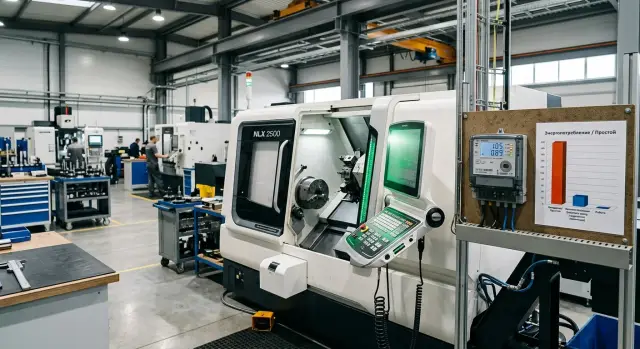
Why the bill keeps rising even when nothing is being cut
A machine uses electricity not only when it is actually removing metal. While the operator changes a tool, measures a part, or waits for the next blank, the CNC cabinet, servo drives in standby, lubrication pumps, hydraulic unit, cooling, and work area lighting keep drawing power. On a lathe, this background load can run for almost the entire shift.
Because of that, many people estimate consumption far too roughly. They look at the rated power and mentally multiply it by cutting time. But the meter counts every hour the machine is on. It does not care whether a heavy pass is underway or the machine is just standing by with its systems running.
Short pauses seem minor, but they are often what create the extra bill. A normal shift usually looks like this:
- the operator checks a dimension and enters a correction
- the crew waits for the crane, a pallet, or a new batch of blanks
- the operator changes a tool and runs a test after setup
- the machine stays on during lunch or a shift change
One such pause lasts 3-10 minutes. Individually, that is almost invisible. Over a shift, it easily adds up to an hour, and sometimes more. Over a month, that becomes dozens of hours without cutting, but with real electricity costs.
During cutting, consumption is usually at its highest because the spindle and feeds work under load. In waiting, the number drops, but not to zero. Auxiliary systems can still draw a noticeable share of power even when no part is being machined. That is why machine power consumption should be viewed not as one number in the spec sheet, but by operating mode across the whole shift.
In practice, the shop loses money exactly at this gap between "cutting" and "just switched on." If a machine cuts for 4 hours out of 8, that does not mean the other 4 hours are almost free. Often, those hours are what create the unpleasant tail in the monthly bill. When you calculate based on the real shift instead of the catalog, the picture becomes much more honest.
What is included in consumption outside cutting
Machine power consumption is not limited to the moment the tool is removing metal. The shop pays even when the machine is simply on, waiting for the operator, or keeping non-cutting systems running so the cycle can continue.
It helps to split this consumption into three parts. Then it becomes clear where the money is going all the time and where it appears only at certain moments.
- Idle running. The machine is on, the CNC system is active, sometimes the spindle rotates or the axes move, but there is no cutting.
- Waiting. The machine is ready to work, but no part is being machined: the operator changes the blank, checks the part, waits for a tool, or waits for a program.
- Auxiliary systems. They can run during machining and outside it: hydraulic unit, lubrication, cabinet cooling, coolant pump, chip conveyor, local compressor, and work area lighting.
The difference between a machine that is simply on and one under load is obvious right away. During cutting, power rises because of the spindle, feeds, and the cutting force itself. When the machine is only on, it still uses energy, but for different reasons: CNC power, servo drives in ready mode, fans, pumps, and electrical cabinet cooling. Over a long shift, this part of the bill often turns out to be frustratingly large.
On a CNC lathe, a typical example looks like this: in the morning the machine is switched on and warmed up, then it stops several times with the door open while the part is changed, after lunch the operator waits for the setter, and the pumps and cooling stay on all the while. There is no cutting in those pauses, but the consumption remains.
Which modes should be counted separately
If everything is lumped into one figure, the picture gets blurred. It is better to count at least four modes: startup and warm-up, ready state without machining, setup and waiting between parts, and auxiliary systems running separately from cutting.
Sometimes it is also worth putting long downtime into its own line. A 10-minute break and a one-hour stop mean different things for analysis. In the first case, you can look for quick operator habits; in the second, you need to check shutdown settings, shift schedule, and which systems stay on without a reason.
That is how machine power consumption becomes understandable not as a single monthly bill, but by the modes that the shop can reduce without harming the part or the cycle.
How to take measurements without a complex system
Start not with the whole shop, but with one machine and one ordinary shift. Do not choose a day with a breakdown, urgent order, or major changeover. You need a shift that is similar to most working days.
For this kind of measurement, you do not need an expensive month-long project. A portable meter or power analyzer installed on the machine supply, plus a simple observation log, is enough. For a CNC lathe, that is already enough to see where energy goes outside cutting.
If you want to estimate machine power consumption without a complex system, do not look only at total shift consumption. It is much more useful to break it down by operating mode. Then you can immediately see how much the machine draws in cutting, how much in waiting, and how much the auxiliary units consume.
What to record during the shift
The operator, setter, or supervisor notes the start and end time of each mode. Usually five observation lines are enough:
- cutting
- setup and tool approach
- waiting for a part or operator
- break without switching the machine off
- stop with auxiliary systems still on
Separately note the moments when the coolant pump, hydraulic unit, chiller, and local lighting turn on. This is where money is often lost, because these units run longer than necessary. For example, cutting took 18 minutes, but the coolant pump and hydraulic unit ran for the full 40-minute cycle.
It is convenient to keep the measurement in a simple table. Usually a few columns are enough: time, operating mode, power reading, systems switched on, and a short note. Do not make the form too complicated. If the table is hard to fill out on the fly, people will stop using it quickly.
A small example. In the first half of the shift, a lathe processes a batch of parts for 2 hours 20 minutes. Of that, actual cutting takes only 1 hour 5 minutes. The rest of the time goes to loading blanks, measurements, waiting for the crane, and short pauses. If the meter shows that the machine still draws noticeable power while waiting, you have already found a place to save.
After the shift, summarize the data by mode: how long each mode lasted and how many kWh it used. In the end, you get a simple picture: where the consumption is useful and where it is not. Very often that is how it turns out that the shop loses not in cutting, but in long idle running, pauses between parts, and constantly running auxiliary systems.
Which units draw extra kilowatts
On a machine, the bill grows not only during cutting. Extra kilowatts most often go to units that run in the background: they hold pressure, move fluid, cool the cabinet, or simply stay on between cycles.
If you look at machine power consumption across the shift, the biggest losses often do not come from the spindle, but from auxiliary systems. They may seem small individually, but together they add up to hours of extra operation.
The hydraulic unit and coolant pump are the first things to check. The hydraulic unit keeps pressure even when the machine is waiting for the operator or the next blank. The coolant pump also often runs longer than needed: the fluid is no longer required, but the motor is still on.
On CNC lathes, this happens all the time. One pump may draw only a little, but over a 10-12 hour shift even 0.5-1 kW turns into a noticeable amount.
The most common power users are:
- the hydraulic unit, if it does not enter pause during waiting
- the coolant pump, when it is not tied to the actual machining cycle
- the chiller, especially during long operation at partial load
- extraction and local ventilation, if they are left on "just in case"
- compressed air supply, when there are leaks or unnecessary blowing
The chiller, extraction, and air supply are often underestimated. The chiller can run almost without pauses if the shop is hot or if its settings are too strict. Extraction also tends to stay on for the whole shift, even when there is no cutting. Air is even worse: the machine itself may not draw much, but the shop compressor then adds the electricity bill for everyone at once.
Do not forget about cabinet heating, servo drives, and electronics. Control cabinet heating is needed in winter or in a cold shop, but sometimes it is left on longer than necessary. Servo amplifiers, CNC, power supplies, sensors, and fans create a constant base load. It does not stand out because each unit uses little, but this background runs all day.
A good example: the machine waits for the setter for 25 minutes. The spindle is stopped, there is no cutting, but the hydraulic unit holds pressure, the chiller keeps cooling, the cabinet is cooled, extraction is humming, and the compressor supports the pneumatics. By sound, it seems like "almost everything is off," but the meter says otherwise.
If a shop is buying equipment or reviewing operating modes, it is worth looking at more than spindle power. For machines supplied by EAST CNC, this kind of breakdown is useful already at the selection stage: it makes it easier to understand where the real losses will be during the shift, not just in the catalog.
One-shift example on a lathe
Let us take a hypothetical 8-hour shift on a CNC lathe. The machine is on for the whole shift, but it cuts metal for less time than people often think. The rest of the time goes to setup, loading, measurements, and short pauses between jobs.
| Mode | Time per shift | Average power | Consumption per shift |
|---|---|---|---|
| Cutting | 3 h | 11 kW | 33 kWh |
| Setup and warm-up | 1.5 h | 7 kW | 10.5 kWh |
| Loading, unloading, measurements | 2 h | 5 kW | 10 kWh |
| Waiting between batches | 1.5 h | 4 kW | 6 kWh |
| Total | 8 h | - | 59.5 kWh |
The picture is simple, but unpleasant. Cutting takes only 3 hours out of 8, yet it consumes 33 kWh. Another 26.5 kWh is spent outside cutting. That is almost 45% of the whole shift in electricity terms.
Why does this happen? Because the auxiliary systems run longer than the cutting itself. While the operator sets the tool or changes the blank, the machine does not fully sleep. The coolant pump, hydraulic unit, lubrication system, cabinet fans, and sometimes the chip conveyor continue to draw their share of power.
If we take a tariff of 55 tenge per kWh, one shift costs about 3,273 tenge. Of that, about 1,815 tenge goes to cutting itself, and around 1,458 tenge goes to everything happening around it.
Over 22 working shifts a month, the numbers become more noticeable:
- total consumption: about 1,309 kWh
- monthly cost: about 71,995 tenge
- consumption outside cutting: about 583 kWh
- cost outside cutting: about 32,065 tenge
On one machine, that is already not a small amount. If several identical lathes are installed in the shop, the extra costs rise very quickly. That is why you need to count not only the spindle during machining, but the whole shift, including waiting, setup, and auxiliary units.
How to turn kilowatts into money
To see the real amount of loss, you do not need complicated software. It is enough to know the machine’s average power in each mode, the time spent in that mode, and the electricity tariff for your shop.
The formula is simple: kW x hours = kWh, and then kWh x tariff = money. You need to count not only cutting, but also idle running, waiting, the operation of the hydraulic unit, coolant pump, lubrication system, cabinet ventilation, and other systems that stay on.
If the machine has several modes, count each one separately and then add them up:
- cutting
- idle running
- waiting for the operator or the program
- auxiliary systems running
Suppose a CNC lathe works like this over an 8-hour shift: it cuts for 3 hours at an average power of 11 kW, runs without cutting for 2 hours at 6 kW, waits for 2 hours at 3 kW, and then stands for 1 hour while auxiliary systems draw 2 kW. The shift consumption would be: 11 x 3 + 6 x 2 + 3 x 2 + 2 x 1 = 53 kWh.
If the shop tariff is 28 tenge per kWh, one shift costs 53 x 28 = 1,484 tenge. At first glance, that does not sound alarming. But if there are 22 such shifts in a month, that becomes 1,484 x 22 = 32,648 tenge for one machine. And if there are 10 similar machines on the line, the cost rises to 326,480 tenge per month.
That kind of calculation is very grounding. Often the shop looks for savings in cutting mode, while a noticeable share of the money goes into shop floor downtime and the constant operation of units that nobody counts.
Cost per part
If you need a calculation for an order, convert the consumption into the cost of one part. To do that, take the total consumption for the batch, divide it by the number of good parts, and multiply by the tariff.
For example, a batch of 200 parts used 180 kWh. At a tariff of 28 tenge, that is 180 x 28 = 5,040 tenge. One good part accounts for 5,040 / 200 = 25.2 tenge in electricity alone.
After that, it is useful to compare two numbers: how much one machine consumes and how much the whole line draws. On one machine, an extra 1.5 kW in waiting mode seems minor. On a group of machines, it becomes a constant cost item that shows up in the bill every month.
What can be reduced without risking the part
Money often goes not during cutting, but in the pauses that the shop already treats as "normal." If the operator is waiting for the next batch, looking for a tool, or doing a changeover, the machine often keeps drawing almost the same current through the pumps, hydraulic unit, lighting, cabinet ventilation, and coolant supply.
The first thing to look for is not the "hungriest" unit, but the longest empty wait. A 7-10 minute pause seems small, but over a shift those segments can easily add up to an hour or more. That is the part of electricity costs that can be removed without harming quality.
What to check first
A lot depends on the basic work order. If the operator switches everything on at once at the start of a changeover, some units run in vain. It is better to start them one by one when they are actually needed for the operation, not in advance.
It is usually worth checking the following:
- sleep timers and automatic shutdown for the screen, lighting, and some auxiliary units
- the order in which the hydraulic unit, coolant, chip conveyor, and cabinet ventilation are switched on
- what the operator does during pauses between batches longer than 10-15 minutes
- the condition of filters, pumps, and heat exchangers
A dirty filter or a tired pump also burns extra kilowatts. The pump starts working harder, gets louder, and no extra benefit is gained. Simple scheduled cleaning sometimes gives a noticeable effect faster than any adjustment.
During long pauses, it makes sense to switch off unnecessary systems according to procedure. But this should be done selectively. For example, the coolant supply or chip conveyor can often be stopped without consequences, while lubrication systems or units that need warm-up should not be touched without checking.
Where caution is needed
Any change should go through the technologist and service team. Otherwise, the shop may save a few kilowatts and then lose money on scrap, size drift, or extra wear. On a lathe, this is especially noticeable if you turn off too early something that affects the thermal stability of the spindle and repeatability.
A good process is this: measure machine power consumption during a pause, identify the units with the longest empty running time, change one item, take the measurement again, and compare the shift result. That makes it easier to see what really reduces idle consumption and what only gets in the way.
If the machine is supported by a supplier that provides commissioning and service, like EAST CNC, it is better to align such changes with their engineers. That reduces the risk of mistakes and helps cut consumption where it is truly unnecessary, not where it is needed for a stable part.
Where measurements go wrong most often
The most common mistake is simple: people look only at cutting time. But the electricity bill rises not only when the tool is removing metal. The machine uses energy for warm-up, tool changes, coolant delivery, hydraulic operation, and ordinary waiting between cycles. If you count only machining minutes, machine power consumption will almost always look lower than it really is.
The second source of confusion is downtime. Setup and waiting are not the same thing. Setup is needed to prepare the machine for work: set the tool, check the program, make a trial part. Waiting happens when there is no blank, the operator is busy at another station, or the part has gone to inspection and the machine is just standing on.
Another typical mistake is using rated power instead of actual power. The spec sheet shows the upper limit or a calculated operating mode. In real production, the machine almost never holds such a load continuously. That is why the measurement should be taken from actual data, with a network analyzer or meter on the line, not from a catalog figure.
A short measurement can also be misleading. If you collect data for 10-15 minutes of a good cycle, you may not see the morning warm-up, a long pause after lunch, or the pump or compressor switching on. It is better to look at at least several repeats of the same operation, or even better, a full shift or a typical part of it with cutting, pauses, and setup.
In a metalworking area, people also often forget about shared systems. A machine may consume a moderate amount, while the money goes into a shared compressor, chiller, extraction system, or pump group serving several machines at once. If those are not allocated to the shop floor, the conclusions will be too soft.
A good check looks like this:
- record cutting, setup, waiting, and idle running separately
- measure actual power, not rated power
- use data from a series of cycles, not just one short episode
- add the share of shared shop systems
- compare the numbers with the shift downtime log
On a CNC lathe, the error shows up quickly. If 12 minutes of machining makes the consumption seem normal, but during the shift the machine waited for a blank three times for 20 minutes with hydraulics and coolant on, the picture changes immediately. It is these small things that usually eat up a noticeable share of electricity costs.
A short shop-floor checklist
If nobody in the shop has measured consumption by mode, the discussion about losses is usually based on guesswork. That is convenient, but it almost always gives the wrong picture. Even one CNC lathe will show where the extra electricity is going.
For the first pass, you do not need a big project. You need one shift, a simple table, and discipline in recording.
- Choose one machine and take measurements in at least a few modes: cutting, idle running, and waiting. This shows how much the machine draws not only during work, but also between operations.
- Mark all pauses longer than 10-15 minutes separately. Short stops often disappear in the shift, while long pauses later add up to a meaningful monthly amount.
- Record the operating time of auxiliary units. People usually forget the coolant pump, hydraulic unit, chip conveyor, extraction, and local lighting. These are often the units that keep drawing power after the spindle has stopped cutting.
- Convert kilowatts into money right away. For a supervisor or manager, the amount in tenge is easier to understand than abstract kWh. When it becomes clear that waiting on one machine is costing, for example, the price of a consumable per month, decisions are made faster.
- Plan a repeat measurement after any changes. Otherwise, you cannot tell whether a new shutdown rule, pause adjustment, or different shift routine actually worked.
If the table feels too detailed, simplify it. Leave time, mode, active units, and consumption. That is already enough to find the first source of loss.
The most common mistake is simple: people measure once, get surprised by the numbers, and stop there. Only the measurement that leads the shop to change a habit and then verify the result again is useful.
Where to start next
Do not try to cover the whole shop at once. Take one machine, preferably one that runs almost every shift, and watch it for one full week. For that first check, a logbook and a simple meter are usually enough: when the machine cuts, when it waits for the operator, when it runs idle, and which auxiliary systems stay on.
After five to seven days, the picture usually becomes clear. You no longer see abstract machine power consumption, but understandable losses by mode. Often the shop is surprised not by cutting, but by long pauses between batches, warm-up without work, coolant pumps left on, the hydraulic unit, or a chip conveyor that nobody switches off for hours.
It is useful to summarize this in a very simple form:
- how many hours the machine actually cuts
- how many hours it sits waiting
- how much time it runs idle
- which units are on during downtime
- how much this adds up to in kWh and in money per shift
After that, compare two sums. The first is losses from downtime and waiting. The second is the cost of maintenance, setup, and small changes to the operating routine. In practice, the result is often uncomfortable but honest: the shop saves on service for a long time, and then pays more every month for extra kilowatts. For example, if a machine waits two hours per shift for the next operation with pumps and cooling on, the losses quickly add up to an amount that could have gone to proper setup or a planned inspection.
These data are useful not only for the current line. When you choose a new CNC lathe, look not only at spindle power, speed, and price. Ask right away how much the machine draws in waiting, idle running, and when the auxiliary units are operating. For a shop with long shifts, that difference can matter more than it seems at purchase.
If you need an analysis of operating modes or help selecting a machine for your production, EAST CNC can help in a practical way: from consultation and selection to delivery, commissioning, and service. To start, one machine, one week, and numbers without guesswork are enough. After that, it is already clear where the money is being lost and what to fix first.