
When a Machine Outgrows the Workcell: First Signs and an Action Plan
A machine has outgrown the workcell when extra walking, setup delays, service queues, and blank-supply problems start to grow. Here are the signs.
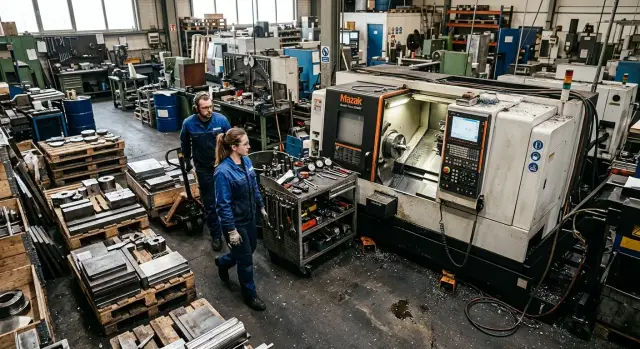
When a machine outgrows the workcell
It rarely starts with one big breakdown. Usually you can see it in small delays that repeat throughout the shift. The machine itself is fine, the program is set, the operator is there, and yet output still falls behind plan.
The first obvious sign is simple: the machine is ready to work longer than it is allowed to. Blanks arrive with pauses, finished parts are not cleared away in time, the tool cart gets stuck in the aisle, and the setup technician waits for free space near the cabinet or door. Each of these looks minor on its own. Over a day, those stops can easily take an hour or more.
A lot becomes clear from the way people move. If the operator, inspector, or crane operator increasingly has to walk around the machine the long way, the work area has become inconvenient. If two people cannot pass each other by a pallet, and loading one batch gets in the way of tool changeover, the issue is no longer discipline. The workcell simply does not have enough space for the current pace.
There is also a quieter sign: the shift passes without breakdowns, but the plan is still not met, even on good days. The report does not show one major two-hour stop. Instead, the whole shift is filled with 3–7 minute pauses: waiting for a blank, looking for an arbor, bringing coolant, clearing the aisle, cleaning chips at the wrong moment. That is how it becomes clear that the limitation is not in the machine, but around it.
This shows up especially quickly in a turning area. A more productive CNC lathe is installed, output grows, but the old way of working stays the same. Before, one pallet per shift did not bother anyone. Now there are two sitting nearby, the aisle has narrowed, the cart cannot turn, and the operator walks around obstacles twenty times a day. The machine became faster, but the workcell did not.
If this picture repeats week after week, there is no point waiting for the next missed plan. It is time to look at the shop floor layout.
What the logistics around the machine reveal
When blanks are brought to the machine by a long route, the workcell is already getting in the way. A direct path is almost always better: fewer wasted minutes, less risk of hitting containers, tooling, or finished parts, and less clutter in the aisles.
The problem quickly shows up in small things. Pallets and empty bins are not where they should be, but where half a meter happened to be free. The aisle narrows, the cart cannot turn easily, and the pallet jack bumps into a box placed there temporarily. People start to "just work around it," and soon that becomes normal.
Another common signal: the crane, pallet jack, or cart waits while someone clears space near the machine. The machine itself is ready to receive a blank or release a batch, but it is awkward to approach. This kind of stop is rarely counted separately, even though over a month it adds up to a noticeable loss.
The operator also shows very clearly when the layout is outdated. If he carries parts through temporary points, then there is no direct route. Today the part is placed on a nearby table, then on a pallet by the column, and then moved further. If a temporary point has existed for weeks, it is no longer temporary. It is part of poor logistics.
Finished parts piling up by the machine until the end of the shift point to the same issue. Stock grows around the machine, chip removal becomes harder, new blanks are harder to bring in, and the operator is distracted by the question of where to put the next box.
You can check this even without complex measurements. Over one shift, it is enough to look at a few things: how many times a blank changes location before it reaches the machine, whether pallets and tooling are left in the aisles, whether transport waits for a clear zone near the machine, whether the operator carries parts by hand where a cart should move, and whether the finished batch sits next to the machine for more than a couple of hours. If these signs appear every day, first remove the extra stop points, clear the aisles, and make clear places for blanks, bins, and finished parts. Sometimes moving one rack does more good than any talk about speeding up the shift.
What tooling and equipment tell you
The problem often does not show up in the machine’s operation, but in the way tooling is stored around it. If the chuck is in one place, the jaws are elsewhere, and the arbor is brought from a neighboring area, setup starts to spread out in time. The operator spends minutes not on work, but on walking and searching.
At first it looks like normal bustle. Then a tooling change that used to take 10–15 minutes stretches to half an hour. If that happens almost every day, the workcell is no longer matching the current pace.
Another easy-to-spot sign is when tools are brought one item at a time instead of as a complete set. First comes the holder, then the inserts, then the drill, then someone goes back for the adapter sleeve. Meanwhile the machine sits idle or runs with pauses between operations. The reason is not the machine, but the lack of a proper preparation area nearby.
Measuring tools tell the same story. When calipers, micrometers, and gauges are kept in different cabinets and on different tables, dimensional inspection turns into an unnecessary route. People grab the first tool they see just to avoid searching. Then the number of repeat measurements and small mistakes grows.
Usually the problem looks like this: tooling is assembled piece by piece instead of as a ready kit for the job, soft and hard jaws are stored far from the machine, the operator spends longer finding a gauge than doing the check itself, and there is no table or cart for pre-assembly nearby.
In a turning area, this is especially obvious during batch changeovers. If jaws, the arbor, and cutting tools are preassembled on one cart, the change goes smoothly. If there is no space nearby, tooling is spread out wherever it fits, items get mixed up, and some parts are brought in only during the process. In the end, it is not five minutes that are lost, but the rhythm of the whole shift.
If tooling and equipment are constantly spread all over the workcell, the problem is no longer with individual people. More often than not, it means the old layout can no longer handle the current workload, part variety, or changeover frequency.
What maintenance signals
If a service technician cannot quickly reach the needed unit, the problem is already in the workcell. The machine should have enough space for inspection, cleaning, and minor repairs. When access from the back, the side, or to the electrical cabinet is blocked by bins, pallets, or nearby equipment, maintenance starts to eat into production time.
A good indicator is when doors, covers, and cabinets do not open fully. Because of that, the technician has to work sideways, reach around a corner, or spend extra time on a simple task. Replacing a filter, sensor, or hose becomes awkward, even though the job itself is not difficult.
Another sign is when chip removal and coolant handling take too much time. If the tray is hard to roll out, the hose gets in the way, and the chip container is far away, cleaning is constantly postponed. Then chips build up, coolant gets dirty faster, and small issues become part of the background. For CNC machines, that is a bad scenario: dirt often leads to failures and extra wear.
Usually the workcell is already too tight for the machine when the same things keep repeating: consumables are changed too late because they are hard to reach, planned maintenance takes an hour instead of twenty minutes, small repairs are delayed until the weekend, and after service the carts, bins, and tooling have to be moved again.
It is also a bad sign when tightness changes the work schedule itself. If the team can only do a simple belt, hose, or limit switch replacement on a day off, the workcell is getting in the way of normal operation. That is not saving space — it is hidden time loss.
In practice, service is often the first thing that shows the layout is outdated. If the technician spends time not on the job itself, but trying to get to the machine, a rearrangement should be planned in advance, not after the first major stop.
What machine utilization shows
Utilization quickly answers the question of whether the machine has outgrown the workcell. At first it looks like a series of small glitches, but over shifts the same pattern appears: the machine could work more, but the workcell does not let it keep a steady rhythm.
The most obvious sign is that the machine is cutting for less time than planned. On the schedule it has a full shift, but in reality there are many pauses between cycles. If a CNC lathe is supposed to give six hours of actual cutting time per shift, but in reality it cuts for three and a half or four, the problem is often looked for in the wrong place. The machine itself is not at fault — it is everything happening around it.
A queue of parts before one operation says a lot too. When blanks pile up at one machine in particular, the workcell is already unbalanced. This often happens where one machine is faster than the others and pulls the whole flow toward itself. From the outside it may seem well utilized, but in fact it works in bursts: idle waiting for blanks, then receiving a batch at once, and creating a backlog again.
Changeovers also reveal the problem. If one tooling change pushes the neighboring orders off schedule, the time buffer is already gone. Formally, the machine is running, but the workcell is losing output. The more often the flow is interrupted for urgent batches, the more the real utilization drops.
There is also a simple sign you can see without reports: the operator walks too much. To the rack with blanks, to the tooling storage, to the inspection table, and back to the machine. Those trips steal minutes every hour. Over a shift, the loss becomes significant.
If the machine waits for blanks several times a day, a queue builds up only before one operation, changeovers disrupt the neighboring plan, and the operator spends a lot of time not at the control panel but between zones, the phrase "the machine has outgrown the workcell" no longer sounds like an exaggeration.
A typical shop floor example
A small workcell has one CNC lathe and a parts washer nearby. At first glance everything seems to be working: the machine cuts, people stay busy, and parts come out on time. But the shift spends the whole day working around small obstacles, and that is what eats the time.
In the morning, blanks are brought to the entrance and placed on a pallet there. Later it is moved closer to the machine because taking it from the door is inconvenient. Later still, the remaining batch is moved a third time when the aisle needs to be cleared for a cart or a new bin has to be delivered. Each movement looks harmless on its own. Add them up over a week and you get a noticeable chunk of the shift.
By lunchtime, things get tighter. The tool cart rolls closer to the machine and blocks access to the cabinet where gauges, chucks, or consumables are stored. The operator has to wait, move the cart, or take the long way around. Setup takes longer not because it is complicated, but because things are not where they should be.
By evening, another typical problem appears. The on-duty mechanic is about to do routine cleaning, check the chip area, top up fluids, and remove dirt around the machine. But a batch of finished parts is already sitting nearby, and the needed units cannot be reached. Cleaning is pushed to tomorrow, then to the next day, and routine care becomes a growing problem.
That is usually how it becomes clear that the machine has outgrown the workcell. The machine itself may be fully fine, but logistics, tooling, and maintenance start getting in each other’s way.
In such a situation, you do not always need to rearrange the whole shop. Sometimes a few simple steps are enough: place blank bins right at the loading point, move the setup table closer to the cabinet and out of the aisle, and separate the finished-parts area from the service zone. The result is often visible the same day: people walk less, aisles stay clear, and the machine waits less often because of small issues.
How to check the workcell in one shift
You do not need a complex audit for the first decision. One ordinary day, a notepad, and a person who watches not the spindle or the program, but everything happening around the machine, are enough.
It is best to start with the part route. Draw a simple hand sketch: where the metal is unloaded, where it waits, how it is brought to the machine, and where the part goes after machining. You do not need a polished diagram here. You need an honest picture.
After that, measure three times: how long it takes to deliver a blank to the machine, how long setup and tooling changeover take, and how long routine service takes, including cleaning the area, topping up coolant, and accessing consumables. Even at this stage, it is often clear where the workcell is losing pace.
Next, mark the waiting points. If the operator waits for the aisle to clear, for a cart to arrive, or for the crane to become free, that is not a minor detail. These pauses add up quickly. It is useful to walk the route yourself, on foot, not from memory. If a blank makes an extra trip through half the shop in one shift, there is already a problem. If tooling has to be searched for in two cabinets and in a neighboring area, that is also a clear signal.
Also look closely at what is standing near the machine. Very often, chucks, jaws, arbors, bins with parts, and even a stock of blanks are sitting there simply because there is no other convenient place in the shop. That is a direct sign that the layout has fallen behind real work.
A good test is to compare a normal day with a day when an urgent order arrives. In a calm shift, the workcell may look tolerable. Under load, it becomes obvious where the chaos starts: blocked aisles, queues for delivery, extra movement, and setup disruptions.
If you want to reduce the observations to a short checklist, five questions are enough:
- Does the blank go to the machine by one clear route, or does it change place several times?
- Are tooling and gauges nearby, or are they searched for all over the workcell each time?
- Can cabinets be opened and units be reached without moving bins and carts?
- Do finished parts leave the machine quickly, or do they pile up nearby until the end of the shift?
- Are the aisles still clear on a busy day?
If at least three points regularly get a bad answer, rearrangement is already worth considering as a practical solution, not a future idea.
Mistakes made when moving equipment
When it becomes clear that the workcell is slowing the machine down, the obvious temptation is to move the machine itself and expect improvement. In reality, the bottleneck often stays nearby. The bins are in the same place, tools are still being searched for across neighboring stations, and the operator keeps making extra trips.
A common mistake is to look only at free meters. On the plan everything looks neat: the machine fits, the rack fits, and the cart fits too. But floor space alone guarantees nothing. It is much more useful to measure the route of the part, the operator, the setup technician, and the forklift over a normal shift.
If, after rearrangement, the blank travels a short route but the person walks a long one, you have simply swapped one time loss for another. For a CNC lathe, that quickly turns into daily small delays: the operator goes for the chuck, then for the cutters, then clears the aisle for the bin.
Another mistake is forgetting about service access. A narrow aisle seems acceptable while the shop is calm. On a busy day it starts getting in everyone’s way at once. The operator waits for the cart, the warehouse worker cannot bring the blank in quickly, the service technician squeezes toward the unit that needs checking, and chip cleaning is postponed until the end of the shift.
Testing a new layout on a quiet day also does not work well. On such a day there is little waste, few moves, no rush in setup, and the workcell looks convenient. But the rearrangement must be assessed at peak load: when normal production is running, a new batch arrives, tools are changed, and transport is operating nearby.
If you are going to move equipment, move the whole working zone around it. For a machine, that means not only floor space, but also clear access for service, a place for bins, quick tool delivery, and proper cleaning. Otherwise, the old problems just move to another corner of the shop.
What to do next
After the first signs, do not rush to order a move. First, collect observations for at least one full week. One good day can easily be misleading: a convenient batch arrived, there were no urgent changeovers, and the operator worked calmly.
Look for repeats: where blanks pile up, how many times the cart goes around the machine, where tools are waiting, and how many minutes are lost to small stops. If the same delay appears every day, that is already a reason to change the workcell.
Then choose one solution that will give the biggest effect. Often the problem is not the machine itself, but what is around it. Sometimes moving equipment is enough. Sometimes it is better to move the blank storage area aside or create a separate setup station so the operator does not lose time between cycles.
Before any move, it helps to talk to the people who work with the machine every day. The operator sees unnecessary steps and awkward zones. The setup technician knows where time is lost on tooling and equipment. Service can tell you whether there will still be proper access to lubrication, electrics, guideways, and other units. These conversations often save more than the rearrangement itself.
If you are planning not only a move but also the purchase of new equipment, it is better to discuss installation and service access requirements in advance. This is where the experience of EAST CNC can be useful: the company supplies CNC lathes and machining centers, helps with selection, commissioning, and service support. It is better to have that conversation before buying, not after the first week of operation.
The working plan is simple: one week of observation, one chosen solution, a check of the new zone for logistics and maintenance, and then agreement with the people on the shop floor. That is how you change not the drawing on paper, but the real cause of lost time.
FAQ
How do you know the problem is no longer the machine, but the workcell?
Look for repeated short stoppages. The machine is fine, the program runs, the operator is there, but output still falls behind. If every shift includes waiting for blanks, clearing the aisle, searching for tooling, or moving finished parts away from the machine, the bottleneck is already around the machine. Another clear sign is that the machine could run longer than the workcell lets it. Then the problem is not the spindle, but the layout, material flow, and service access.
Which pauses are already a serious warning sign?
Watch the short pauses that happen all day. Waiting a few minutes for a blank, looking for an arbor, bringing coolant, clearing the aisle, moving a bin — each delay seems small on its own, but together they eat a noticeable part of the shift. If there is no single long stop in the report and the plan still is not met, count these small pauses. They show best that the workcell is already too tight for the current pace.
What should you check over one shift to assess the workcell?
One normal shift and a few simple notes are enough. Trace the part from unloading to the machine and then after machining. Note how many times the blank changes place, where bins pile up, whether a cart waits for a clear path, and whether the operator carries parts by hand where a cart should move. Then look at the time for blank delivery, setup, and routine service. These three points alone often show where the workcell is losing rhythm.
Should you move equipment right away, or try small changes first?
Start small. Often it helps to remove temporary storage points, clear the aisles, place bins closer to loading, and assign a proper spot for finished parts. Moving one rack or one setup table can bring a quick result. If the machine still waits and people keep walking around obstacles, then it makes sense to change the layout more broadly.
Which logistics problems most often show that there is not enough space?
Logistics usually breaks first. Blanks travel to the machine by a long route, empty bins are left wherever there is space, a pallet jack or cart cannot turn around, and finished parts pile up near the machine until the end of the shift. When people get used to working around obstacles and making extra moves, the workcell is already losing time every day.
What do tooling and measuring tools say about the workcell?
Tooling immediately reveals the weak spot. If the chuck, jaws, arbor, and cutting tools are stored in different places, setup drags on. People are not setting up the machine — they are walking around and looking for the right items. The same applies to measuring tools. When calipers, micrometers, and gauges are spread across different cabinets, dimensional checks take extra minutes and lead to more repeat checks.
How does maintenance show that the layout is already outdated?
Service needs proper access to the machine. If a technician cannot open a cabinet, reach a unit, or pull out the chip tray without moving bins or carts, the workcell is already interfering with the job. That makes simple tasks take longer: cleaning, filter replacement, coolant top-up, small repairs. Then maintenance gets postponed, and that quickly affects machine stability.
Why do extra operator routes have such a strong effect on output?
Too much walking almost always means poor arrangement. If the operator spends the day going to the rack, to the tooling cabinet, to the inspection table, and back again, the machine loses minutes every hour. One extra trip may seem minor. Over a shift, there are enough of them to reduce real utilization.
How can you tell that a new layout really worked?
Do not test the new layout on a quiet day. Evaluate it when normal production is running, a new batch arrives, tools are being changed, and transport is working nearby. If, in that mode, the aisles stay clear, tooling is at hand, service can reach the machine easily, and finished parts do not pile up, the layout is working. If not, the problems have simply moved to another corner.
When should you discuss the layout with the machine supplier?
Bring in the supplier and service team before buying or before moving the equipment, not after the first problems. That way you can discuss installation, cabinet access, blank delivery, bin placement, and the service zone in advance. If you are considering a new CNC lathe or machining center, a conversation with EAST CNC at this stage helps avoid extra rework after startup.