
Machine operator workstation without expensive automation
You can make a machine operator’s workstation more convenient without new automation: light, visibility, chip cleanup, air, noise, and a short checklist.
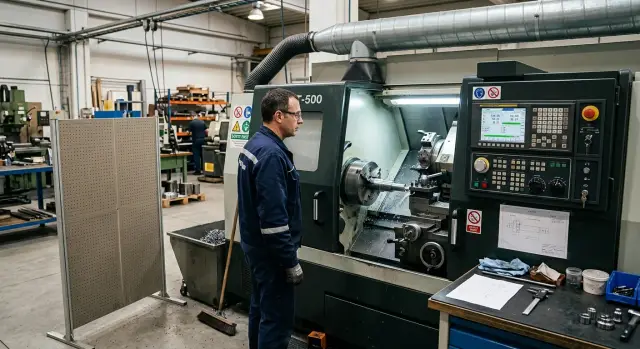
What gets in the way of the operator seeing the process
The machine operator’s workstation often looks acceptable until small issues start piling up. The operator spends longer looking through the window, walks up to the machine more often, and notices too late that something has gone wrong.
Loud noise does more than make conversation difficult. It hides the sounds that usually signal a problem: a new rattle, a dull knock, a tool whistle, a sudden change in feed. When the ears no longer catch the difference, the operator notices the issue later, only after a mark appears on the part or the chips start behaving differently.
Heat is quieter, but it hits just as hard. If the area around the CNC is stuffy, a person gets tired by mid-shift, loses focus, and starts checking the process only in short bursts. In that state, it’s easy to miss small things: a change in chip color, droplets on the glass, or a shaky workpiece.
Chips and splashes quickly block the view. Even a clean window can turn cloudy in half an hour, and if a sticky mix of coolant and fine chips builds up inside, the picture loses contrast. The operator no longer sees the cutting edge as clearly as at the start of the shift.
Poor lighting adds another problem. With weak light, it’s hard to notice a thin chamfer, a burr, the start of vibration, or edge wear. The eyes get tired faster, and the person starts squinting instead of calmly monitoring the process.
Because of this, the operator stands closer than necessary. They lean toward the window, look for a better angle, and sometimes open the door earlier than they should. It doesn’t always look like a mistake, but this habit often replaces a proper view of the process.
Usually, it’s not just one cause, but several at once. Noise mutes the auditory clues, heat drains attention, the light does not help the eyes, and chips block the picture. In the end, even a careful operator spends extra minutes on things they should be able to see right away.
How to inspect the workstation quickly
A quick inspection takes 10-15 minutes if you follow the operator’s normal route instead of walking the shop floor in general. Start at the control panel, then move to the machine door, the viewing area, the tool-change point, and the spot where chips are usually cleaned up. That way, you see the machine operator’s workstation through their eyes, not by the shop layout.
Look for simple signs. Where does the person squint to see the cutting zone? Where do they lean too low? In which spot do they have to raise their voice because of noise? Small things like these quickly reveal the real obstacles that steal energy and attention every day.
During the walk-through, don’t try to fix everything at once. First write down what exactly gets in the way, where it happens, and how often the operator runs into it. One short note like “glare on the window after 11:00” is more useful than a vague “poor visibility.”
Check five things with your hands and eyes:
- is the viewing window clean, and are there any reflections
- is there enough light inside the machining area
- does the mat slip or snag on shoes
- does the extraction pull where smoke or coolant mist appears
- is the tool stored where it can be reached without extra steps
Then ask the operator about the first hours of the shift. That’s when discomfort is felt most strongly: the eyes are not used to the light yet, noise is more irritating, and a poorly planned tool layout starts to bother people immediately. Often, the person will not name a “big problem,” but one small thing that repeats twenty times during a shift.
A good result from the inspection is not a long list, but three tasks for the week. For example: clean or replace the viewing window, move the light, and bring the chip scoop and hook closer to the machine. If a problem requires welding, purchasing, or a line stop, save it for the second stage. First remove what can be done quickly and without debate.
If, after those three changes, the operator squints less, leans less often, and no longer has to search for tools from memory, the inspection was worth it.
Lighting and visibility in the cutting zone
Poor visibility often starts not with the machine, but with small things around it. If the operator squints, leans toward the glass, or changes position every time they want to see the tool edge, the lighting and viewing setup is wrong. That tires people out faster than it seems, and later the mistakes look like “carelessness,” although the reason is simpler.
Task lighting helps only if it doesn’t shine into the glass. It’s better to place the lamp so the light falls on the cutting zone from above or slightly from the side, not directly into the eyes or into the enclosure window. Otherwise the operator sees a bright spot and their own reflection instead of the process. On a CNC lathe, this is especially noticeable when coolant creates fine splashes and the glass fogs up quickly.
A cloudy window also should not be tolerated for months. If the plastic is scratched, yellowed, or covered with a permanent network of marks, cleaning will no longer help. Worn seals near the window add dirt and leaks, and visibility drops even more. This kind of replacement usually costs much less than any automation, while the operator feels the effect the same day.
The control panel often has another simple problem: too many items in front of the screen. Jugs, a box of tools, a stack of gloves, old papers — all of these narrow the view and make it harder to stand in the normal working position. The machine operator’s workstation should leave a clear line of sight to the screen and the cutting zone, without constantly going around obstacles.
It helps to keep the simplest set nearby:
- clean lint-free wipes
- cleaner for glass or clear plastic
- a spare dry cloth
- a small container for dirty wipes
If everything is in one place, the glass gets wiped right away instead of “when there is time.” In practice, that saves several short stoppages during a shift.
There is a simple test. The operator stands where they normally work and looks at the cutting zone without leaning. If they can clearly see the tool edge, the contact point, and the coolant feed, the visibility is fine. If they need to stand very close, crouch, or move sideways, the lighting was placed badly, and the window and the space in front of the panel already need attention.
How to reduce noise without reworking the shop
Noise around a CNC machine rarely comes only from cutting. Often, what bothers the operator is not the machine itself, but the compressor behind them, a cart with blanks, a rattling cover, an empty tray, or a tool lying on metal and ringing with every vibration. If the machine operator’s workstation is noisy from all sides, the person hears the machine less clearly and notices sound changes later.
First, find the loudest source near the monitoring area. Don’t listen to the shop “as a whole.” Stand where the operator usually watches the cutting zone and walk a few meters around it. Very often, the noise source is not where people expect it.
What gives a quick result
Simple measures work better than you might think:
- move the compressor and noisy carts farther from where the operator monitors the process
- install a simple screen where the sound hits the head or ear from the side
- tighten covers, trays, housings, and anything that rattles with vibration
- do not store loose tools on metal surfaces near the machine
- keep the проход open so the operator can hear coworkers and warning signals
A screen does not have to be complex. Sometimes a dense panel between the noise source and the person is enough. The point is not total silence, but reducing the direct impact of the sound. After that, the operator can better tell apart unusual whistling, scraping, and changes in tone during cutting.
On a small area with two lathes, one common set of changes often works: the compressor is moved a few meters away, the cart with blanks is placed not next to the operator’s shoulder but to the side, and all the small rattles are fixed within an hour. The noise does not disappear, but it becomes more even. That already helps.
There is one common mistake: people block the work point too well and then can’t hear the machine warning. That should be avoided. The operator must still hear the alarm signal, a colleague calling out, and unusual sounds from the machining itself. If the area became quieter after the changes but the signals are harder to hear, the setup needs to be adjusted.
A good result looks simple: it is calmer by the machine, visibility has not changed, and hearing has not been shut off together with the noise.
Temperature and air around the machine
Heat around a CNC machine is more tiring than it seems. If warm air from the electrical cabinet or pump constantly blows toward the face, the operator notices small problems later and makes more mistakes in routine tasks.
Temperature is better measured more than once. Take three readings: in the morning, in the middle of the day, and near the end of the shift. Check not only the general air in the shop, but also the point by the control panel where the person stands for most of the shift. Even a difference of 3-5 degrees is noticeable.
Often the problem is not the machine itself, but how the air moves around it. The hot exhaust from the cabinet and pump should be redirected so it does not blow straight into the face. If there is incoming airflow nearby, direct it away from the chip and coolant mist area. Otherwise, the air will lift fine mist, droplets, and dust, and nothing will get cleaner.
What can be done quickly
Without expensive rework, these steps usually help:
- turn the hot airflow from the cabinet and pump toward the aisle or upward
- check where the supply air blows near the control panel
- install a screen where sunlight heats the control stand and buttons
- remove boxes and containers that block the air from moving properly
- leave a place nearby for a short break and drinking water
Sunlight is often underestimated. If the rays hit the control panel for several hours, the screen heats up, the buttons become unpleasantly warm, and the operator instinctively steps aside. A simple screen or moving the stand by half a meter sometimes helps more than adding another fan.
A small break near the work area is also important. Not a break room across the shop floor, but a place where a person can step away for a minute, take a few sips of water, and come back without extra walking. When the temperature near the CNC rises toward the end of the shift, these small things directly affect attention.
If these changes make the area by the panel even a couple of degrees cooler, it is noticeable right away. The operator gets less tired, keeps their eyes on the cutting zone longer, and follows the process more calmly.
Chips and splashes without constant rush
On the shop floor, the machine operator’s workstation is often ruined not by complex breakdowns, but by small everyday things. Wet chips underfoot, coolant drops on the floor, and a brush that has to be searched for every time quickly throw off the pace. The operator starts rushing, misses small deviations, and spends extra minutes cleaning up where things could have been simplified.
The simplest step is to keep the tools near the machine, not “somewhere on the shop floor.” A small tray for the scoop, brush, and scraper, plus a separate hook for gloves or a chip hook, usually solves half the daily confusion. When everything hangs in one place, the person cleans right away instead of putting it off until the end of the shift.
Cleanup works worst when it follows the “we’ll gather it all at once later” principle. It’s better to introduce short cleaning several times during the shift. It takes 2-3 minutes, but the chips do not have time to pile up underfoot, near the pedals, or in the walkway. That pace is calmer than one big cleanup in a rush, when it is already slippery and dirty.
It helps to look closely at where the chips fly in different modes. During roughing, they may go left and down, while during drilling or parting they may fall almost into the area where the operator turns around. After this kind of observation, it is easier to add a screen, adjust the tray position, or move the collection bin closer to the actual fall point instead of placing it where it simply does not get in the way.
Usually, four rules are enough:
- do not let wet chips pile up by the aisle;
- do not leave them near pedals and cabinets;
- wipe the floor where the operator turns most often;
- clear the edge of the machine from stray tools and rags.
A small example. On a lathe, after two hours of work, chips build up not by the front door, but to the side, where the operator takes the tool and looks at the part. If that area is cleaned halfway through the shift and the splashes are wiped right away, the walkway stays dry, and shoes do not spread coolant further around the shop.
If the shop has different types of CNC machines, it is useful to check each one separately. The direction of splashes and chips often differs more than it seems from the outside. Five minutes of this inspection usually brings more value than buying random accessories that later just sit unused.
A simple example from a small shop
In a small shop, two lathes are supervised by one operator. This setup is common: while one cycle runs smoothly, attention shifts to the second machine, the coolant feed, the cutting sound, and the door window. The problem does not start when something breaks, but when visibility gets a little worse every hour.
Before the simple upgrades, the operator had several small annoyances at once. The viewing window had to be wiped often because of splashes and an oil film. The overhead light cast shadows, so the cutting zone was sometimes clear and sometimes almost invisible. Another small thing was more annoying than it seems: the warning signals from the two machines blended together, and the operator would sometimes hesitate for a second about which one needed attention.
People often look at this kind of machine operator’s workstation too narrowly. It seems that new automation, sensors, and an expensive monitoring system are needed. In reality, the area first improved from simple things:
- a directional light was installed over the cutting zone;
- a noise screen was added on the aisle side;
- a convenient chip tray and small tools for quick cleanup were placed next to the machine.
After that, the picture became steadier. Through the window, the operator could see the coolant stream, chip shape, and the moment when the glass really needed wiping, not the usual “just in case” motion. The noise screen did not make the area silent, but the sounds stopped blending together so much. As a result, the operator mixed up signals less often and jumped less for no reason.
The chip tray had another noticeable effect. Small cleanup took less time because chips and dirty tools were no longer left wherever there was space. The walkway by the machines became cleaner, and that is not only more convenient, but also gives a clearer view underfoot when someone needs to step to the door quickly.
What stands out most in this example is simple: no automation was purchased. The money went into inexpensive workstation improvements that the operator feels every day. If one person is watching two machines at once, these small things often bring more value than another complex unit inside the control cabinet.
Common mistakes in low-cost improvements
Inexpensive improvements often help faster than buying new automation. But it is easy to spoil the machine operator’s workstation with small decisions made in a hurry. After such changes, the operator sees the process worse, takes longer to do routine tasks, and gets distracted more often.
The most common mistake is related to lighting. People choose a lamp based on the idea that “brighter is better,” and place it so the light hits the eyes or creates a strong reflection on the safety glass. From the outside, it seems that the cutting zone lighting improved, but the operator squints and notices tool wear, coolant flow, and chip color less clearly. Usually, what helps is not a more powerful lamp, but a different angle, lower brightness, and a simple diffuser.
People also often rush when reducing noise near the machine. They install a screen or shield, the noise drops a little, but access to the door, tray, or cleaning area becomes worse. A week later, people start going around the screen, leaving it open, or removing it altogether. If the protection makes it harder to clean the machine and reach the components, it will not last.
Another typical mistake is pointing a regular fan so it blows fine chips and dust straight into the aisle. The air feels fresher, but dirt builds up faster on the floor, and working near the neighboring machine becomes unpleasant. When dealing with temperature problems near the CNC, it is better to check the airflow direction and chip path first, and only then buy new equipment.
Small things also affect the shift a lot. When the hook, brush, scoop, gloves, or measuring tools are moved farther away “for order,” the operator loses 20-30 seconds almost every cycle. Over a shift, that adds up to a significant amount of time. Order matters, but the tools should be kept where they are actually used.
Worst of all is changing everything at once. New light, a noise screen, a fan, a moved cart, a different place for tools. After that, no one knows what made a difference and what only added inconvenience.
It is better to go one step at a time:
- change one light source and watch 2-3 shifts
- move the tools and measure how much time the cycle takes
- install a temporary screen and check access for cleaning
- redirect the air and see where the chips go
That is cheaper and more honest. If an improvement does not save time, make visibility better, or simplify chip cleanup in the shop, it is better to remove it right away instead of putting up with it for months.
A quick check before the shift
Five minutes before startup often bring more value than half an hour of small rushes later. If the operator can see the cutting zone right away, hear the machine clearly, and walk without avoiding puddles on the floor, the shift goes more smoothly and with fewer stoppages.
For the machine operator’s workstation, this habit is especially useful where noise, splashes, and chips build up every day. The check does not require new automation. It only needs order and a clear sequence.
Before the shift, it is worth going through the simplest points:
- Look at the viewing window. If there is haze, an oil film, or deep scratches on it, visibility drops right away, and the operator notices tool or chip problems later.
- Turn on the light and stand in the normal working spot. The lamp should not shine into the eyes, and the reflection on the glass and screen should not hide the cutting picture.
- Check the floor near the pedals and walkway. If it is wet, the foot slips, and the person starts moving more carefully and slowly than needed.
- Make sure the chip tray, brush, and other small items are in their place. When people search for them during work, cleanup takes extra time.
- Judge the noise in a simple way: if it is already hard to understand an ordinary sentence near the machine without shouting, the sound has become too dense and makes it harder to notice changes in the process.
This walk-through quickly shows where the problem is growing unnoticed. For example, one dirty window may seem minor on its own, but together with glare from the lamp, the operator is no longer looking at the cutting process, but at a cloudy spot.
On a shop floor with a CNC lathe, this is felt immediately. Clean glass, a dry floor, and proper light do not make the machine new, but they give the operator a calm view and fewer unnecessary movements throughout the shift.
What to do in the next month
In one month, you can noticeably improve the conditions by the machine without a major purchase. Start with three narrow tasks: one blocks the view of cutting, one adds noise, and one wastes time on chips. When there are only a few tasks, the crew does not scatter, and the result is easier to check.
Lighting usually gives the fastest effect. If the operator squints, catches glare on the glass, or leans toward the door, check the angle of the task light and the cleanliness of the safety window. Sometimes moving the lamp by 20-30 cm and removing a shadow from the housing is enough.
Noise does not always require reworking the shop. Often the rattling comes not from the machine itself, but from empty containers, a sheet-metal screen, a cart, a compressor hose, or a poorly fixed panel nearby. Find one source, remove it, and see whether the operator gets distracted less often by sound.
With chips, the question is better framed not as “how do we clean more,” but as “how do we clean without rushing.” Place the container where it is needed every hour, not at the end of the aisle. A holder for the hook, brush, and scoop in one place often saves more time than it seems.
After 10-14 days, compare simple things:
- how many times during a shift the operator leaves the panel because of light, noise, or cleanup;
- how many minutes it takes to clean the window and the floor around the machine;
- how many extra movements appear when changing a part or tool;
- whether it became easier to notice vibration, overheating marks, or unstable chips.
Then ask the operator directly, without vague wording. Better questions are: “What became easier in the usual shift?”, “Where are there fewer extra steps?”, “What still annoys you every day?” These answers are more useful than any report.
If you plan to upgrade the machine operator’s workstation or the whole shop, add these observations to the requirements for new equipment. Window size, lamp position, chip evacuation, access to service points, and the noise around the machine affect the daily work. EAST CNC can discuss the work area around a CNC lathe before the model is chosen and during commissioning, so small inconveniences do not stay with you for years.